Hi @Pine Littman
Thank you for reaching out to the Microsoft Q&A Forum.
I understand how confusing it can be when the formatting from your custom Slide Master doesn’t apply to new slides, even after confirming the correct theme and layout.
Based on your description, I tried reproducing the same scenario in my test environment. I went to View > Slide Master, selected the main Master, changed the font and theme colors, then closed the Master and inserted new slides. In my environment, the formatting was applied correctly.
Could you please share a few more details so I can better understand your situation and provide more accurate guidance?
-After selecting the Slide Master, could you please click the small arrow next to “New Slide” (under the Home tab) and check if the layout list appears as shown in the screenshot?

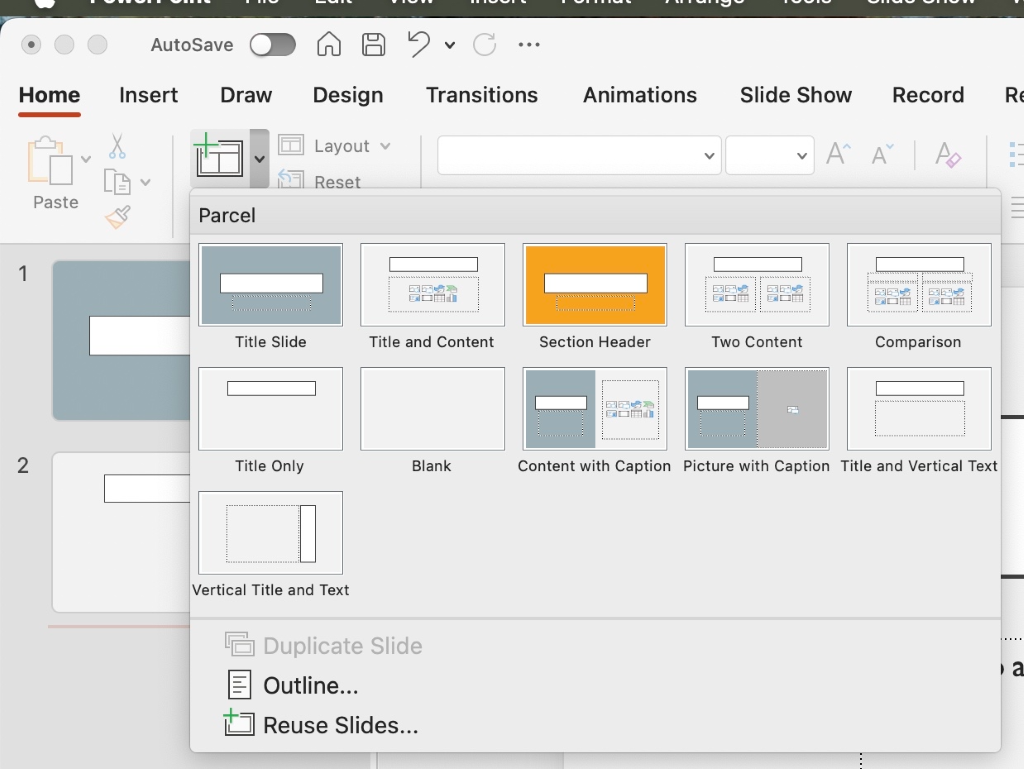 -Which version of Microsoft Office and macOS are you currently using?
-Did you install Office from the Microsoft website or from the Mac App Store?
-Does this issue occur in other presentations as well, or only in this specific file?
Please understand that our initial reply may not always immediately resolve the issue. However, with your help and more detailed information, we can work together to find a solution.
I look forward to your update.
Note: Please follow the steps in our documentation to enable e-mail notifications if you want to receive the related email notification for this thread.
' cx='32' cy='32' r='32' /%3E%3Ctext x='50%25' y='55%25' dominant-baseline='middle' text-anchor='middle' fill='%23FFF' %3EPL%3C/text%3E%3C/svg%3E)

' cx='32' cy='32' r='32' /%3E%3Ctext x='50%25' y='55%25' dominant-baseline='middle' text-anchor='middle' fill='%23FFF' %3EA%3C/text%3E%3C/svg%3E)
