Hello @Poul Hansen,
Looks like the error only appears when using the designer. Please try to clear some cache files and see if it works.
Close VS 2022, delete the bin, obj and the hidden .vs folder(in your solution folder). Restart VS 2022 and reopen your project, rebuild the project, check again.
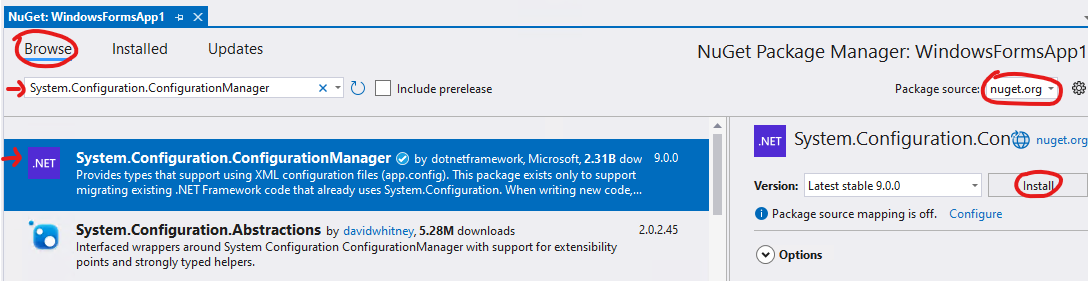
As the error message mentioned that it can’t find the type, if this error persists, try to install the corresponding NuGet package into your project(Right-click your project => Manage NuGet Packages => Browse => search "System.Configuration.ConfigurationManager" => click to install).
Best Regards,
Tianyu
If the answer is the right solution, please click "Accept Answer" and kindly upvote it. If you have extra questions about this answer, please click "Comment".
Note: Please follow the steps in our documentation to enable e-mail notifications if you want to receive the related email notification for this thread.
' cx='32' cy='32' r='32' /%3E%3Ctext x='50%25' y='55%25' dominant-baseline='middle' text-anchor='middle' fill='%23FFF' %3EPH%3C/text%3E%3C/svg%3E)
' cx='32' cy='32' r='32' /%3E%3Ctext x='50%25' y='55%25' dominant-baseline='middle' text-anchor='middle' fill='%23FFF' %3ESS%3C/text%3E%3C/svg%3E)
' cx='32' cy='32' r='32' /%3E%3Ctext x='50%25' y='55%25' dominant-baseline='middle' text-anchor='middle' fill='%23FFF' %3ETS%3C/text%3E%3C/svg%3E)