إشعار
يتطلب الوصول إلى هذه الصفحة تخويلاً. يمكنك محاولة تسجيل الدخول أو تغيير الدلائل.
يتطلب الوصول إلى هذه الصفحة تخويلاً. يمكنك محاولة تغيير الدلائل.
Applies to:  External tenants (learn more)
Authentication approach: Embedded native authentication.
This reference describes sign-up through server-driven attribute collection. Email-with-password and email one-time passcode sign-up use the same operations and message shapes. For these email methods, the user flow associated with the application selects the sign-up method; the client doesn't select it in the start request.
The examples show email-based sign-up. For existing V1 integrations, use the V1 API reference.
The examples use a tenant-verified custom-domain authority. custom_domain is the authentication domain and tenant is the tenant GUID.
Start sign-up
Important
The Native Authentication API V2 is in preview. The Native Authentication API V1 remains generally available. See the Supplemental Terms of Use for Microsoft Azure Previews for legal terms that apply to preview features.
The diagram shows a response-driven sign-up sequence. The user flow determines the sign-up method, and the current response determines which attributes and interactions are required.
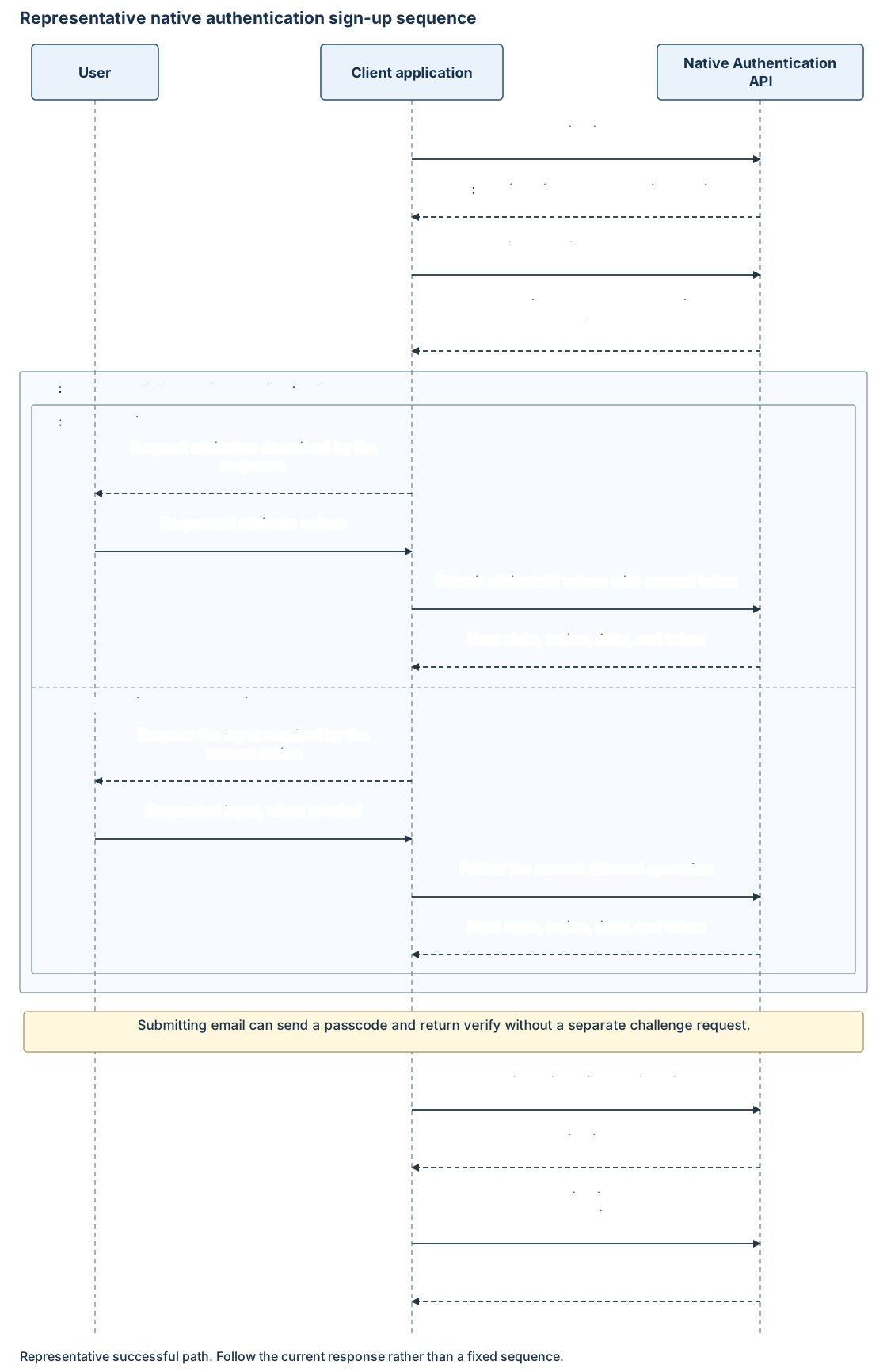
Start authorization, then follow its sign_up link with the returned token:
POST https://{custom_domain}/{tenant}/api/v2.0/signup/start
Content-Type: application/json
Accept: application/hal+json
{
  "continuationToken": "******"
}
continuationToken is a required string. The start response can request email:
{
  "continuationToken": "******",
  "state": "interactionRequired",
  "action": "collectAttributes",
  "attributes": [
    {
      "attributeId": "email",
      "inputType": "text",
      "hidden": false,
      "required": true,
      "canChange": true,
      "label": "Email"
    }
  ],
  "_links": {
    "submitAttributes": {
      "href": "/{tenant}/api/v2.0/signup/submitattributes"
    }
  }
}
Labels, requiredness, and validation metadata come from policy. Use those requirements within your application's interface and collection logic.
Submit attributes
Follow _links.submitAttributes.href. Collection can occur more than once:
POST https://{custom_domain}/{tenant}/api/v2.0/signup/submitattributes
Content-Type: application/json
Accept: application/hal+json
{
  "continuationToken": "******",
  "attributes": {
    "email": "user@contoso.com"
  }
}
| Property | Type | Required | Description |
|---|---|---|---|
continuationToken |
String. | Yes. | Latest sign-up token. |
attributes |
Object of string values. | Yes. | Values keyed by the exact returned attributeId values. |
All required values must be supplied before sign-up completes. Optional values can be omitted. Missing required values can produce a validation error or another collectAttributes response.
For email-with-password sign-up, submit a password when requested. For example, a collection round that requests password and profile fields can accept:
{
  "continuationToken": "******",
  "attributes": {
    "email": "user@contoso.com",
    "password": "******",
    "givenName": "Example",
    "surname": "User"
  }
}
Submit fields according to the user flow's returned descriptors. Email one-time passcode sign-up creates a passwordless account that signs in with an email passcode.
Collection order
The service can request email first, collect several attributes together, or return to attribute collection after verification. Submit attributes requested by the latest response rather than predicting the sequence from the values submitted.
Your app can organize collection according to its flow logic and the available descriptors. See Collection order and email verification. Each response determines the available next operations.
Interpret attribute and page descriptors
Each response describes the current form. The following fields define an attribute:
| Field | Meaning |
|---|---|
attributeId |
Submission key. |
inputType |
Input control type, such as text, password, boolean, date, or checkboxMultiSelect. |
required |
Whether a value must be supplied. |
hidden |
Whether the field is hidden. |
canChange |
Editability information, when included. |
label |
Optional display label. |
initialValue |
Optional prepopulated value. |
validation.validationRegEx |
Optional validation pattern. |
options |
Optional choices with label and value properties. |
confirmationInput |
Optional confirmation behavior, such as retype, reveal, or none. |
Don't require a pages member. The current attributes array defines the fields and requirements; page-grouping metadata, if returned, is additional presentation information. Input control types don't change the string-valued submission object. See User attribute concepts.
Verify email
When attribute submission requires email verification, it sends the passcode and returns:
{
  "continuationToken": "******",
  "state": "interactionRequired",
  "action": "verify",
  "id": "{email_method_id}",
  "type": "email",
  "hint": "u***@contoso.com",
  "codeLength": 8,
  "_links": {
    "verify": {
      "href": "/{tenant}/api/v2.0/auth/methods/email/{email_method_id}/verify"
    },
    "resend": {
      "href": "/{tenant}/api/v2.0/auth/methods/email/{email_method_id}/challenge"
    }
  }
}
The service has already sent the passcode; proceed directly to verification. Use the returned length and masked hint. Post to verify:
POST https://{custom_domain}/{tenant}/api/v2.0/auth/methods/email/{email_method_id}/verify
Content-Type: application/json
Accept: application/hal+json
{
  "continuationToken": "******",
  "otp": "{one_time_passcode}"
}
To request another code, post only the latest continuationToken to the current resend link, subject to service limits.
Verification can return more attribute collection:
{
  "continuationToken": "******",
  "state": "interactionRequired",
  "action": "collectAttributes",
  "attributes": [
    {
      "attributeId": "givenName",
      "inputType": "text",
      "hidden": false,
      "required": true,
      "canChange": true,
      "label": "First name"
    }
  ],
  "_links": {
    "submitAttributes": {
      "href": "/{tenant}/api/v2.0/signup/submitattributes"
    }
  }
}
Submit the requested values and continue handling the next response.
Complete policy requirements and authorization
After account creation and any required verification, complete any multifactor authentication (MFA) and Conditional Access requirements before resuming authorization.
If the response advertises another method challenge, use the shared challenge and verification operations. Method registration is distinct from verifying a sign-up email. See Method discovery and registration for the enrollment contract.
When the service returns state: continue, follow _links.continue, resume authorization, and exchange the code. This acquires tokens without starting an unrelated sign-in transaction.
Errors and lifecycle
Use the shared error envelope. Structured validation entries can contain code, message, attributeIds, suggestions, and optional recovery.
| Condition | Status or behavior | Handling |
|---|---|---|
| Invalid continuation token | 400 |
Restart the flow. |
| Missing or invalid attribute | 400 or another collectAttributes response |
Present field-level feedback and submit corrected values. |
| User already exists | 400 invalidRequest |
Offer generic sign-in or recovery guidance without unnecessarily disclosing account existence. |
| Password policy violation | 400 |
Collect a compliant password. |
| Incorrect email passcode | 400 invalidGrant with innerError.code: invalidOneTimeCode |
Let the user correct the code using the usable current state or an advertised resend. |
| Missing passcode | 400 invalidRequest |
Correct the missing input. |
| Throttling | 429 |
Honor server retry guidance. |
| Unsupported native interaction | state: redirect |
Stop native requests and offer the configured browser path or a clear failure. |
Handle other failures through their actual status and stable error codes. Don't treat an expired transaction as a recoverable incorrect-code entry.
Attribute submission isn't idempotent after user creation. Don't replay successful submissions, log sensitive attribute values, or treat client-side validation as authoritative.