إشعار
يتطلب الوصول إلى هذه الصفحة تخويلاً. يمكنك محاولة تسجيل الدخول أو تغيير الدلائل.
يتطلب الوصول إلى هذه الصفحة تخويلاً. يمكنك محاولة تغيير الدلائل.
Note
تصف هذه المقالة الميزات المستخدمة في الوكلاء أو تدفقات الوكلاء التي تعمل بواسطة الحزام القياسي.
تتحكم لوحة العامل في كيفية ظهور العامل للمستخدمين. يمكنك تخصيص اللوحة بطريقتين:
تخصيص اللوحة الافتراضية باستخدام JavaScript وCSS في موقع الويب الخاص بك. استخدم هذا الخيار لإجراء تغييرات بسيطة.
استخدام لوحة مخصصة مبنية على لوحة Bot Framework Web Chat. يتطلب هذا الخيار تجربة تطوير ويدعم التخصيص الكامل.
يمكنك أيضا دمج اللوحة المخصصة مع تكوين بدء محادثة تلقائية.
يمكنك تغيير اسم العامل وأيقونته في المدخل.
بعد نشر عامل، يمكن للمستخدمين التفاعل معه من خلال لوحة Web Chat.
Important
يمكنك تثبيت نموذج التعليمات البرمجية المضمنة في هذه المقالة واستخدامه فقط للاستخدام مع Copilot Studio. يتم ترخيص نموذج التعليمات البرمجية "كما هو" ويتم استبعاده من أي اتفاقيات على مستوى الخدمة أو خدمات الدعم. أنت تتحمل خطر استخدامه.
لا تقدم Microsoft أي ضمانات أو ضمانات أو شروط صريحة وتستبعد جميع الضمانات الضمنية، بما في ذلك قابلية المتاجرة والملاءمة لغرض معين وعدم الانتهاك.
تغيير اسم العامل وأيقونته
Important
- بعد تحديث أيقونة عامل، قد يستغرق ظهور الأيقونة الجديدة في كل مكان ما يصل إلى 24 ساعة.
- إذا كان وكيلك متصلا Omnichannel لخدمة العملاء، فإن الخاصية Display في تسجيل مدخل Azure تحدد اسمها.
- إذا كان من المفترض نشر وكيلك في Teams، فراجع التاليات للأيقونات في وثائق المطور Microsoft Teams.
انتقل إلى صفحة نظرة عامة لوكيلك.
حدد تحرير بجوار التفاصيل.
تغيير اسم العامل وأيقونته حسب الرغبة.
اختر حفظ.
تخصيص اللوحة الافتراضية (بسيطة)
استخدم JavaScript وCSS لضبط اللوحة الافتراضية.
أولًا، قم بتكوين البيئة التي ستنشر فيها واجهة الوكيل.
انسخ نموذج التعليمات البرمجية ل HTML في ملف يسمى
index.html. يمكنك أيضا استخدام محرر HTML try-it.<!DOCTYPE html> <html lang="en"> <head> <meta charset="UTF-8" /> <meta name="viewport" content="width=device-width, initial-scale=1.0" /> <meta name="description" content="Contoso Web Chat Assistant" /> <title>Contoso Sample Web Chat Test</title> <script src="https://cdn.botframework.com/botframework-webchat/latest/webchat.js"></script> <script> let webChatInstance = null; let directLineUrl = null; // Replace with your token endpoint const tokenEndpoint = "<YOUR TOKEN ENDPOINT>"; const styleOptions = { "accent": "#0078D4", "autoScrollSnapOnPage": true, "autoScrollSnapOnPageOffset": 0, "avatarBorderRadius": "7%", "avatarSize": 31, "backgroundColor": "#e8e9eb", "botAvatarBackgroundColor": "#ffffff00", "botAvatarImage": "https://powercatexternal.blob.core.windows.net/creatorkit/Assets/ChatbotLogoBlue.png", "botAvatarInitials": "B", "bubbleAttachmentMaxWidth": 480, "bubbleAttachmentMinWidth": 250, "bubbleBackground": "#f0eded", "bubbleBorderColor": "#f5f5f5", "bubbleBorderRadius": 41, "bubbleBorderStyle": "solid", "bubbleBorderWidth": 1, "bubbleFromUserBackground": "#ebefff", "bubbleFromUserBorderColor": "#f5f5f5", "bubbleFromUserBorderRadius": 41, "bubbleFromUserBorderStyle": "solid", "bubbleFromUserBorderWidth": 1, "bubbleFromUserNubOffset": 0, "bubbleFromUserNubSize": 0, "bubbleFromUserTextColor": "#242424", "bubbleImageHeight": 10, "bubbleImageMaxHeight": 240, "bubbleImageMinHeight": 240, "bubbleMessageMaxWidth": 480, "bubbleMessageMinWidth": 120, "bubbleMinHeight": 50, "bubbleNubOffset": 0, "bubbleTextColor": "#242424", "emojiSet": true, "fontSizeSmall": "70%", "hideUploadButton": false, "messageActivityWordBreak": "break-word", "monospaceFont": "Consolas", "paddingRegular": 10, "paddingWide": 10, "primaryFont": null, "sendBoxBackground": "#e8e9eb", "sendBoxBorderTop": "solid 1px #808080", "sendBoxButtonColor": "#0078d4", "sendBoxButtonColorOnHover": "#006cbe", "sendBoxButtonShadeBorderRadius": 40, "sendBoxButtonShadeColorOnHover": "", "sendBoxHeight": 60, "sendBoxPlaceholderColor": "#171616", "sendBoxTextColor": "#2e2d2d", "showAvatarInGroup": "status", "spinnerAnimationHeight": 16, "spinnerAnimationPadding": 12, "spinnerAnimationWidth": 16, "subtleColor": "#000000FF", "suggestedActionBackgroundColor": "#006FC4FF", "suggestedActionBackgroundColorOnHover": "#0078D4", "suggestedActionBorderColor": "", "suggestedActionBorderRadius": 10, "suggestedActionBorderWidth": 1, "suggestedActionLayout": "flow", "suggestedActionTextColor": "#FFFFFFFF", "typingAnimationBackgroundImage": "url('https://wpamelia.com/wp-content/uploads/2018/11/ezgif-2-6d0b072c3d3f.gif')", "typingAnimationDuration": 5000, "typingAnimationHeight": 20, "typingAnimationWidth": 64, "userAvatarBackgroundColor": "#222222", "userAvatarImage": "https://avatars.githubusercontent.com/u/8174072?v=4&size=64", "userAvatarInitials": "U" }; const backgroundImage = ""; document.addEventListener('DOMContentLoaded', () => { const root = document.documentElement; root.style.setProperty('--primary-color', createGradient(styleOptions.accent)); root.style.setProperty('--header-textColor', styleOptions.suggestedActionTextColor); if (backgroundImage) { const webchatElement = document.getElementById('webchat'); webchatElement.style.backgroundImage = `url(${backgroundImage})`; webchatElement.style.backgroundSize = 'cover'; webchatElement.style.backgroundPosition = 'center'; webchatElement.style.backgroundRepeat = 'no-repeat'; const overlay = document.createElement('div'); overlay.className = 'webchat-overlay'; webchatElement.appendChild(overlay); } }); function createGradient(baseColor) { const r = parseInt(baseColor.slice(1, 3), 16); const g = parseInt(baseColor.slice(3, 5), 16); const b = parseInt(baseColor.slice(5, 7), 16); const lighterColor = `#${Math.min(255, r + 30).toString(16).padStart(2, '0')}${Math.min(255, g + 30).toString(16).padStart(2, '0')}${Math.min(255, b + 30).toString(16).padStart(2, '0')}`; const darkerColor = `#${Math.max(0, r - 30).toString(16).padStart(2, '0')}${Math.max(0, g - 30).toString(16).padStart(2, '0')}${Math.max(0, b - 30).toString(16).padStart(2, '0')}`; return `linear-gradient(135deg, ${lighterColor}, ${baseColor}, ${darkerColor})`; } const environmentEndPoint = tokenEndpoint.slice( 0, tokenEndpoint.indexOf("/powervirtualagents") ); const apiVersion = tokenEndpoint .slice(tokenEndpoint.indexOf("api-version")) .split("=")[1]; const regionalChannelSettingsURL = `${environmentEndPoint}/powervirtualagents/regionalchannelsettings?api-version=${apiVersion}`; function showChat() { const popup = document.getElementById("chatbot-popup"); const openButton = document.getElementById("open-chat"); popup.classList.add("visible"); openButton.classList.add("hidden"); } function hideChat() { const popup = document.getElementById("chatbot-popup"); const openButton = document.getElementById("open-chat"); popup.classList.remove("visible"); openButton.classList.remove("hidden"); } function createCustomStore() { return window.WebChat.createStore( {}, ({ dispatch }) => (next) => (action) => { if (action.type === "DIRECT_LINE/CONNECT_FULFILLED") { dispatch({ type: "DIRECT_LINE/POST_ACTIVITY", meta: { method: "keyboard" }, payload: { activity: { channelData: { postBack: true }, name: "startConversation", type: "event", }, }, }); } return next(action); } ); } async function restartConversation() { try { if (!directLineUrl) { console.error("DirectLine URL not initialized"); return; } const response = await fetch(tokenEndpoint); const conversationInfo = await response.json(); if (!conversationInfo.token) { throw new Error("Failed to get conversation token"); } const newDirectLine = window.WebChat.createDirectLine({ domain: `${directLineUrl}v3/directline`, token: conversationInfo.token, }); const webchatElement = document.getElementById("webchat"); webChatInstance = window.WebChat.renderWebChat( { directLine: newDirectLine, styleOptions, store: createCustomStore(), }, webchatElement ); } catch (err) { console.error("Failed to restart conversation:", err); } } async function initializeChat() { try { const response = await fetch(regionalChannelSettingsURL); const data = await response.json(); directLineUrl = data.channelUrlsById.directline; if (!directLineUrl) { throw new Error("Failed to get DirectLine URL"); } const conversationResponse = await fetch(tokenEndpoint); const conversationInfo = await conversationResponse.json(); if (!conversationInfo.token) { throw new Error("Failed to get conversation token"); } const directLine = window.WebChat.createDirectLine({ domain: `${directLineUrl}v3/directline`, token: conversationInfo.token, }); webChatInstance = window.WebChat.renderWebChat( { directLine, styleOptions, store: createCustomStore(), }, document.getElementById("webchat") ); } catch (err) { console.error("Failed to initialize chat:", err); } } initializeChat(); </script> <style> :root { --primary-gradient: var(--primary-color); --chat-width: 450px; --chat-height: 520px; --header-height: 56px; --border-radius: 16px; --transition-speed: 0.3s; } * { margin: 0; padding: 0; box-sizing: border-box; font-family: system-ui, -apple-system, BlinkMacSystemFont, "Segoe UI", Roboto, sans-serif; } body { min-height: 100vh; background-color: #f3f4f6; } #chatbot-popup { display: none; position: fixed; bottom: 32px; right: 32px; width: var(--chat-width); height: var(--chat-height); background: white; border-radius: var(--border-radius); box-shadow: 0 18px 40px -5px rgba(0, 0, 0, 0.2), 0 15px 20px -5px rgba(0, 0, 0, 0.1); overflow: hidden; opacity: 0; transform-origin: bottom right; transform: scale(0.95); transition: all var(--transition-speed) ease-in-out; z-index: 999; } #chatbot-popup.visible { display: block; opacity: 1; transform: scale(1); } #chatbot-header { background: var(--primary-color); padding: 16px 20px; height: var(--header-height); display: flex; justify-content: space-between; align-items: center; color: var(--header-textColor); } .header-title { display: flex; align-items: center; gap: 12px; font-size: 16px; font-weight: 500; } .header-buttons { display: flex; gap: 12px; align-items: center; } .icon-button { background: none; border: none; color: var(--header-textColor); cursor: pointer; padding: 8px; border-radius: 8px; display: flex; align-items: center; justify-content: center; transition: all 0.2s ease; } .icon-button:hover { color: var(--header-textColor); background: rgba(255, 255, 255, 0.1); } .icon-button:focus { outline: 2px solid rgba(255, 255, 255, 0.5); outline-offset: 2px; } #webchat { height: calc(100% - var(--header-height)); background-color: #f9fafb; position: relative; } .webchat-overlay { position: absolute; top: 0; left: 0; right: 0; bottom: 0; background: rgba(255, 255, 255, 0.85); pointer-events: none; z-index: 1; } #webchat > div { position: relative; z-index: 2; } #webchat .webchat__basic-transcript__content { white-space: pre-wrap !important; word-break: break-word !important; } #webchat .webchat__bubble__content { padding: 8px 12px !important; } #webchat .webchat__bubble { max-width: 85% !important; margin: 8px !important; } #webchat .webchat__basic-transcript__content ul, #webchat .webchat__basic-transcript__content ol, #webchat .webchat__bubble__content ul, #webchat .webchat__bubble__content ol { padding-left: 24px !important; margin: 8px 0 !important; list-style-position: outside !important; } #webchat .webchat__basic-transcript__content li, #webchat .webchat__bubble__content li { margin: 4px 0 !important; padding-left: 4px !important; } #open-chat { position: fixed; bottom: 32px; right: 32px; width: 64px; height: 64px; border-radius: 50%; background: var(--primary-gradient); border: none; cursor: pointer; display: flex; align-items: center; justify-content: center; box-shadow: 0 4px 6px -1px rgba(0, 0, 0, 0.1); transition: all var(--transition-speed) ease-in-out; z-index: 998; } #open-chat.hidden { opacity: 0; transform: scale(0.95) translateY(10px); pointer-events: none; } #open-chat:hover { transform: translateY(-4px); box-shadow: 0 10px 15px -3px rgba(0, 0, 0, 0.1); } #open-chat:focus { outline: 3px solid rgba(79, 70, 229, 0.5); outline-offset: 2px; } #open-chat svg { width: 28px; height: 28px; color: white; transition: transform 0.2s ease; } .main-content { max-width: 1200px; margin: 0 auto; padding: 48px 24px; } .main-content h1 { font-size: 36px; color: #111827; text-align: center; } .main-content p { font-size: 18px; color: #4b5563; line-height: 1.6; margin-bottom: 48px; text-align: center; max-width: 800px; margin-left: auto; margin-right: auto; } .content-grid { display: grid; grid-template-columns: repeat(2, 1fr); gap: 32px; margin-bottom: 32px; } .content-box { background: linear-gradient(135deg, #e6e6e6, #c4c4c4, #9f9f9f); padding: 32px; border-radius: 12px; box-shadow: 0 4px 6px -1px rgba(0, 0, 0, 0.1), 0 2px 4px -1px rgba(0, 0, 0, 0.06); min-height: 300px; display: flex; flex-direction: column; justify-content: center; align-items: center; text-align: center; position: relative; overflow: hidden; } .content-box::before { content: ''; position: absolute; top: 0; left: 0; right: 0; height: 4px; } .content-box.featured { grid-column: span 2; min-height: 350px; background: linear-gradient(135deg, #e6e6e6, #c4c4c4, #9f9f9f); color: #000000; } .content-box h2 { font-size: 24px; margin-bottom: 16px; position: relative; } .content-box p { font-size: 16px; color: #6b7280; margin-bottom: 0; } .content-box.featured p { color: #000000; } @media (max-width: 768px) { .content-grid { grid-template-columns: 1fr; } .content-box.featured { grid-column: span 1; } .main-content { padding: 24px 16px; } .main-content h1 { font-size: 28px; } #chatbot-popup { width: 100%; height: 100%; bottom: 0; right: 0; border-radius: 0; } } </style> </head> <body> <div class="main-content"> <h1>Header</h1> <p>Lorem ipsum dolor sit amet consectetur adipiscing elit. Quisque faucibus ex sapien vitae pellentesque sem placerat.</p> <div class="content-grid"> <div class="content-box featured"> <h2>Featured Content</h2> <p>Primary content area with custom styling and gradient background</p> </div> <div class="content-box"> <h2>Section One</h2> <p>Content box with minimal design</p> </div> <div class="content-box"> <h2>Section Two</h2> <p>Another content section with consistent styling</p> </div> </div> </div> <div id="chatbot-popup" role="complementary" aria-label="Chat Assistant"> <div id="chatbot-header"> <div class="header-title"> <svg class="chat-icon" width="24" height="24" viewBox="0 0 24 24" fill="none" stroke="currentColor" stroke-width="2" stroke-linecap="round" stroke-linejoin="round" aria-hidden="true" > <path d="M21 15a2 2 0 0 1-2 2H7l-4 4V5a2 2 0 0 1 2-2h14a2 2 0 0 1 2 2z" ></path> </svg> <span>Contoso Assistant</span> </div> <div class="header-buttons"> <button class="icon-button" id="restart-button" onclick="restartConversation()" aria-label="Restart Conversation" > <svg width="20" height="20" viewBox="0 0 24 24" fill="none" stroke="currentColor" stroke-width="2" stroke-linecap="round" stroke-linejoin="round" aria-hidden="true" > <path d="M3 12a9 9 0 1 0 9-9 9.75 9.75 0 0 0-6.74 2.74L3 8" ></path> <path d="M3 3v5h5"></path> </svg> </button> <button class="icon-button" id="close-button" onclick="hideChat()" aria-label="Close Chat" > <svg width="20" height="20" viewBox="0 0 24 24" fill="none" stroke="currentColor" stroke-width="2" stroke-linecap="round" stroke-linejoin="round" aria-hidden="true" > <line x1="18" y1="6" x2="6" y2="18"></line> <line x1="6" y1="6" x2="18" y2="18"></line> </svg> </button> </div> </div> <div id="webchat" role="main"></div> </div> <button id="open-chat" onclick="showChat()" aria-label="Open Chat Assistant" > <svg viewBox="0 0 24 24" fill="none" stroke="currentColor" stroke-width="2" stroke-linecap="round" stroke-linejoin="round" aria-hidden="true" > <path d="M21 15a2 2 0 0 1-2 2H7l-4 4V5a2 2 0 0 1 2-2h14a2 2 0 0 1 2 2z" ></path> </svg> </button> </body> </html>في
index.html، استبدل:const tokenEndpoint = "<YOUR TOKEN ENDPOINT>";مع نقطة نهاية الرمز المميز الخاص بك.
افتح
index.htmlفي مستعرض حديث، مثل Microsoft Edge.اختبر الوكيل.
إذا لم يستجب العامل:
- تأكد من نشر الوكيل.
- تحقق من قيمة نقطة نهاية الرمز المميز.
- تأكد من ظهور نقطة نهاية الرمز المميز بعد
=، محاطة بعلامات اقتباس مزدوجة".
استرجع نقطة نهاية الرمز المميز لوكيلك
لتخصيص اللوحة، سواء كانت اللوحة الافتراضية أو لوحة مخصصة تتصل بها، تحتاج إلى نقطة نهاية الرمز المميز لوكيلك.
في الإعدادات، حدد القنوات.
حدد البريد الإلكتروني.
بجوار Token Endpoint، حدد Copy.
تخصيص أيقونة العامل ولون الخلفية والاسم
استخدم الكائن styleOptions لتكوين أنماط معرفة مسبقا.
لمزيد من المعلومات حول ما يمكنك تخصيصه والارتباطات إلى ملف defaultStyleOptions.js، راجع تخصيص Web Chat.
تغيير أيقونة العامل
قم بتحديث ملف
index.htmlباستخدام نموذج التعليمات البرمجية التالي:const styleOptions = { "accent": "#00809d", "botAvatarBackgroundColor": "#FFFFFF", "botAvatarImage": "https://learn.microsoft.com/azure/bot-service/v4sdk/media/logo_bot.svg", "botAvatarInitials": "BT", "userAvatarImage": "https://avatars.githubusercontent.com/u/661465", "userAvatarInitials": "U" };استبدل صور الأفاتار بصور شركتك. إذا لم يكن لديك رابط صورة، استخدم سلسلة صورة مشفرة في Base64 بدلا من ذلك.
تغيير لون الخلفية
في
index.htmlإضافة عنصرbackgroundColorإلى التعريف الخاص بكstyleOptions:const styleOptions = { "backgroundColor": "lightgray", // ... };قم بالتغيير
backgroundColorإلى أي لون تريده. استخدم أسماء ألوان CSS القياسية، أو قيم RGB، أو HEX (HEX).
تغيير اسم العامل
قم بتحديث نص العنوان في ملف
<h1>باستخدام التعليمات البرمجية التالية:index.html<body> <div id="banner"> <h1><img src="contoso-agent.png"> Contoso agent name</h1> </div> <!-- ... -->قم بتغيير النص إلى أي شيء تريد الاتصال به للعامل. يمكنك أيضا إدراج صورة، ولكن قد تحتاج إلى نمطها لتتلاءم مع مقطع العنوان.
تخصيص لوحة الدردشة واستضافتها (متقدمة)
يمكنك توصيل عامل Copilot Studio الخاص بك بلوحة مخصصة تستضيفها كتطبيق ويب مستقل. يعمل هذا الخيار بشكل أفضل إذا كنت بحاجة إلى تضمين iFrame مخصص عبر صفحات ويب متعددة.
Note
تتطلب استضافة لوحة مخصصة تطوير البرامج. هذه الإرشادات مخصصة لمتخصصي تكنولوجيا المعلومات ذوي الخبرة، مثل مسؤولي تكنولوجيا المعلومات أو المطورين الذين لديهم فهم جيد لأدوات المطور والأدوات المساعدة وبيئات التطوير المتكاملة (IDEs).
ابدأ بأحد هذه العينات المصممة خصيصا للعمل مع Copilot Studio:
الحزمة الكاملة هي لوحة مخصصة قادرة على عرض جميع المحتوى المتميز من Copilot Studio. على سبيل المثال:
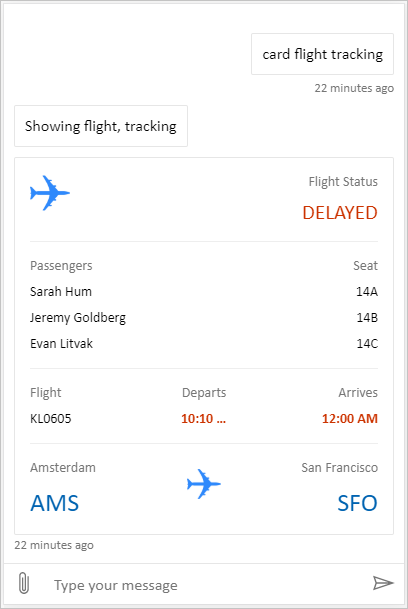
Location وتحميل الملفات هي لوحة مخصصة قادرة على الحصول على موقع المستخدم وإرساله إلى وكيل Copilot Studio. على سبيل المثال:

بدلا من ذلك، جرب بعض لوحات sample Web Chat الأخرى من Bot Framework.
كما هو الحال مع اللوحة الافتراضية، يمكنك استخدام styleSetOptions لتعديل اللوحة المخصصة. يتم سرد جميع الخصائص القابلة للتخصيص في defaultStyleOptions.js. لمزيد من المعلومات حول ما يمكنك تخصيصه، راجع التخصيص Web Chat.
دعم إعداد الاتصال في لوحة مخصصة
عندما يحتاج وكيل مدعوم بالهيكل القياسي إلى اتصال مستخدم، تتلقى مساحة الدردشة بطاقة تكيفية مطلوبة للاتصال. يجب أن تتولى اللوحة المخصصة إجراء البطاقة Action.OpenUrlDialog. بدون هذه المعالجة، اختيار Connect لا يفتح نافذة الاتصال المركزة.
افتح نافذة الاتصال
- سجل
Action.OpenUrlDialogفي بطاقات موائمة مفتوحة Renderer الخاص بك واقرأ الخاصيةurlالخاصة به. اقبل فقط عنوان URL مطلقًاhttp://أوhttps://. - حدد ما إذا كان أصل الوجهة موثوقًا قبل فتحه. ثق فقط بالمصادر التي تتحكم بها أو التي راجعها فريق الأمان وأُدرجت في قائمة السماح.
- افتح الرابط مباشرة من اختيار المستخدم باستخدام
window.open(url, "_blank", "popup"). فتح النافذة من إجراء المستخدم يقلل من احتمال أن يقوم المتصفح بحظرها. - بالنسبة لوجهة موثوقة، في وسيطة
window.openضمنwindowFeatures، احذفnoopenerوnoreferrerلكي تتمكن نافذة الاتصال من إعادة نتيجة إلىwindow.opener. لأي وجهة أخرى، استخدمnoopener,noreferrerولا تقبل رسالة الرد. - احتفظ بالمرجع المرتجع
Windowومعرف النشاط الخاص بالبطاقة المطلوبة للاتصال. إذا تم حظر النافذة المنبثقة، أو إذا أغلقها المستخدم بدون نتيجة صحيحة، احتفظ بخيار الاستمرار أو إجراء استعادة آخر متاحا. لا تفسر إغلاق النافذة على أنه إعداد اتصال ناجح.
حزمة تطوير جافاسكريبت الخاصة بـ بطاقات موائمة مفتوحة لا تنفذ Action.OpenUrlDialog بشكل افتراضي. سجل الإجراء من خلال SerializationContext.actionRegistry، أو تعامل مع الإجراء مباشرة في عارض تملكه. يمكن للخيار الاحتياطي Action.OpenUrl فتح الوجهة في العملاء الذين لا يدعمون إجراء الحوار، لكن الخيار الاحتياطي لا يمكنه إرجاع نتيجة منبثقة.
Important
نافذة اتصال مع إمكانية الوصول إلى window.opener يمكن أن تتصفح صفحة الدردشة أو تؤثر عليها بطريقة أخرى. راجع الوجهة وتحويلاتها مع فريق أمن الويب الخاص بك. لا تسمح لوجهة موثوقة بإعادة التوجيه إلى موقع غير موثوق مع الاحتفاظ بإمكانية الوصول إلى النافذة الفاتحة (opener).
إذا قمت بتضمين Bot Framework Web Chat، فإن معالجة Action.OpenUrlDialog الخاصة به تفتح نافذة الاتصال. النوافذ ذات الأصل نفسه موثوقة بشكل افتراضي. لوجهة عبر المصادر التي تمت مراجعتها، قم بضبط styleOptions.callURLActionTrustedOrigin على المصدر المسموح به بدقة. افصل بين المصادر المتعددة باستخدام الفواصل. يمكنك أيضا تعيين callURLActionPopupWindowHeight و callURLActionPopupWindowWidth. لا تضف مصدرًا لم تراجعه.
تابع بعد إعداد الاتصال الناجح (معاينة)
[هذا القسم عبارة عن وثائق الإصدار التجريبي ويكون خاضع للتغيير.]
Important
تحتوي هذه المقالة على وثائق إصدار أولي Microsoft Copilot Studio وهي عرضة للتغيير.
ميزات الإصدار الأولي ليست مخصصة للاستخدام الإنتاجي وقد تكون لها وظيفة مقيدة. تتوفر هذه الميزات قبل الإصدار الرسمي حتى تتمكن من الحصول على وصول مبكر وتقديم التعليقات.
إذا كنت تقوم بإنشاء عامل جاهز للإنتاج، فشاهد نظرة عامة على Microsoft Copilot Studio.
نافذة الاتصال الموثوق يمكنها إرسال نتيجة إكمال إلى صفحة الدردشة باستخدام window.opener.postMessage. استخدم الأصل الدقيق لصفحة الدردشة كأصل مستهدف، وليس *.
في صفحة الدردشة:
إذا
window.openأعادتnull، فلا تقبل رسالة لتلك المحاولة. وإلا، اقبل الرسالة فقط عندما يتطابقevent.sourceمع المرجع المنبثق المحتفظ به ويتطابقevent.originمع المصدر المتوقع.تحقق من أن بيانات الرسالة تحتوي على
type: "postback"وقيمة بالشكل المتوقع من قبل وكيلك أو وقت التشغيل.المثال التالي يرسل رسالة نصية "hello-world" إلى الوكيل. لا يظهر في واجهة الدردشة.
{ "type": "postback", "value": { hello: "World!" } }المثال التالي يرسل رسالة باستخدام JSON
{ hello: "World!" }إلى الوكيل.{ "type": "postback", "value": { hello: "World!" } }أرسل القيمة المقبولة عبر آلية Postback في إطار عمل البوتات. استخدم معرف النشاط المحتفظ ك
replyToId؛ لا تقبل معرف نشاط الرد من النافذة المنبثقة.اقبل نتيجة واحدة على الأكثر لكل نافذة منبثقة. قم بإزالة مستمع الحدث ومسح مؤقته بعد قبول النتيجة، أو رفض رسالة مشوهة من النافذة المنبثقة الموثوقة، أو اكتشاف إغلاق النافذة المنبثقة، أو الوصول إلى الحد الزمني. يستخدم Web Chat حدا قدره خمس دقائق.
نسّق مع الوكيل أو وقت التشغيل لربط البوست باك مع التفاعل الأصلي الذي يتطلب اتصالًا واستأنف ذلك الدور مرة واحدة فقط.
تعمل المراسلة عبر المتصفح على أساس أفضل جهد ممكن. قد تمنع أدوات حظر النوافذ المنبثقة، أو التنقل، أو سياسة فتح النوافذ عبر المنشأ، أو نافذة مغلقة الاستمرار التلقائي. احتفظ Continue أو أي مسار استعادة آخر متاح، ولا تفسر غياب رسالة على أنه نجاح.
نشر اللوحة المخصصة
لاستضافة اللوحة المخصصة، انشر جميع الملفات إلى تطبيق ويب.