Note
Access to this page requires authorization. You can try signing in or changing directories.
Access to this page requires authorization. You can try changing directories.
Use the Starter Journey to set up Azure Databricks for the rest of your organization as an account admin or a member of a platform team. The journey takes a new account to a production-ready environment, and each section covers a decision before later sections depend on it.
By the end of the journey, you have the following:
- Development, staging, and production workspaces in a cloud tenant layout that you chose, with single sign-on, users and groups synced from your identity provider, and a group as the metastore admin.
- Catalogs for each environment, bound to their workspaces, with schemas and group grants that follow one naming convention.
- Data connected through external locations and Lakeflow Connect, and a Lakeflow pipeline that writes bronze and silver tables. Metric views in the Genie Ontology section are the gold layer.
- Usage dashboards built on system tables, custom tags on compute and serverless usage, and budgets with alerts.
- Patterns for metric views, dashboards, Genie Agents, models, and agents, with scheduled jobs, row filters and column masks, and continuous integration and continuous delivery (CI/CD) with Declarative Automation Bundles.
The journey puts first the decisions that are hardest to change later: how you split cloud tenants, how you lay out workspaces, and how you organize catalogs. Each page explains what to do and why, and links to the detailed documentation. Follow the journey end to end, or go directly to the section that you need. If you want to try Azure Databricks rather than set it up for a team, see Sign up for Azure Databricks.
Why the foundation matters
Dashboards, machine learning models, and AI agents all read from the same tables. When those tables are wrong, the errors spread to everything that uses them: reports mislead, models train on bad data, and agents give inaccurate answers. On Azure Databricks, analytics, machine learning, and AI share one platform and one catalog, so a governed data foundation benefits all of them.
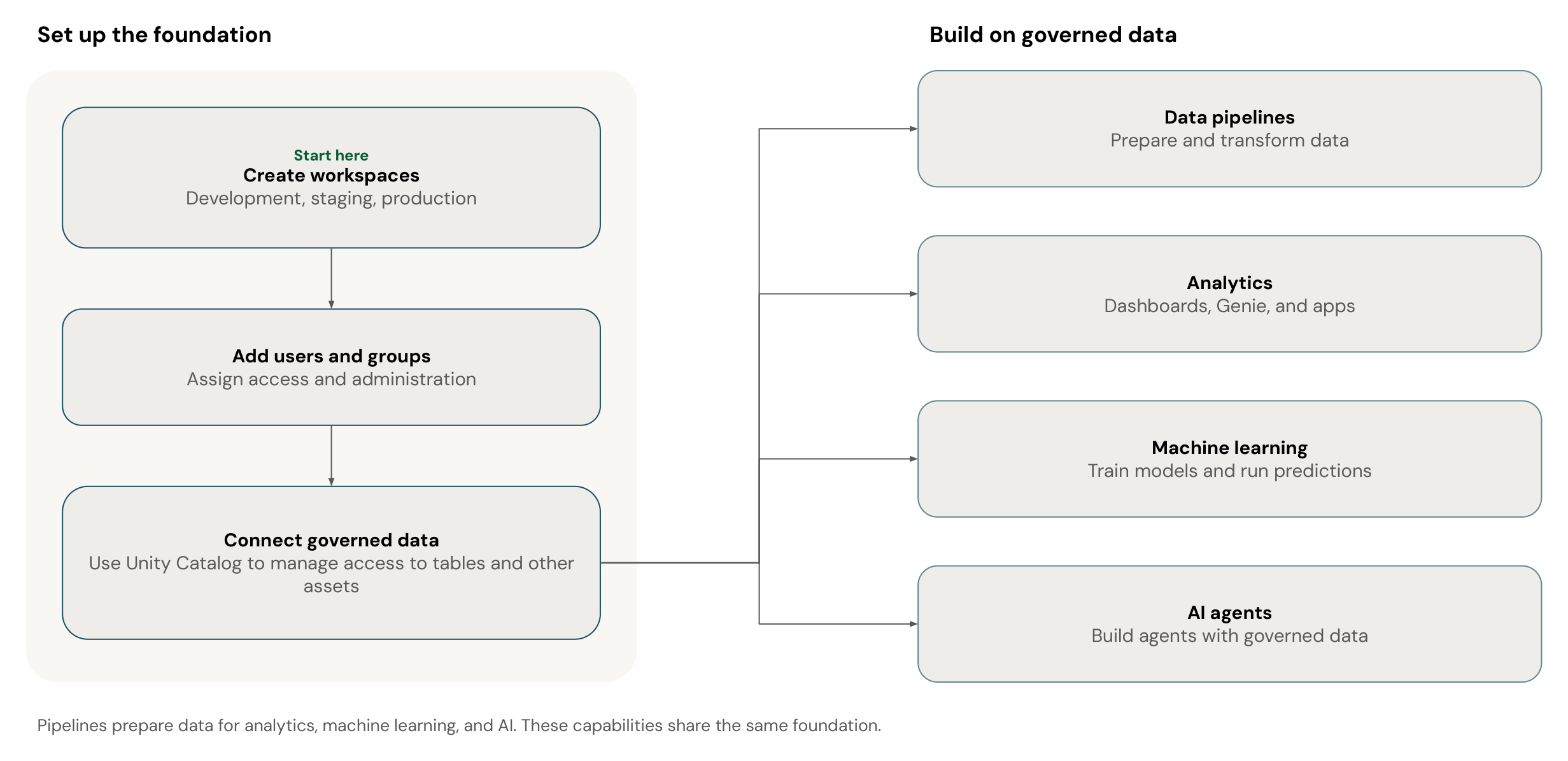
The first half of the journey builds that foundation: workspaces, identity, a governance structure, data access, and a first pipeline. The second half builds on it. The branches in the diagram are capabilities that share the foundation. Complete them in any order, and choose the ones that match your use cases.
Journey sections
You must have an Azure Databricks account to start.
Build the foundation
Complete these sections in order, because later sections assume that the earlier sections are complete:
| Section | Outcome |
|---|---|
| Learn the Azure Databricks foundations and Plan your cloud tenant layout | An understanding of accounts, workspaces, and metastores, and a cloud tenant layout |
| Set up your Azure Databricks infrastructure | Development, staging, and production workspaces, with single sign-on, users, groups, a metastore admin group, and cost monitoring |
| Plan your data governance strategy | A catalog, schema, and group structure that fits your organization, existing objects transferred to the right owners, and access control with governed tags, attribute-based access control (ABAC) policies, row filters, and column masks |
| Connect Azure Databricks to your data | Cloud object storage, databases, and software as a service (SaaS) applications connected to Unity Catalog, a first pipeline that writes bronze and silver tables, SQL editor queries on its silver tables, and a scheduled job in Lakeflow Jobs that runs the pipeline |
Deliver analytics and AI
Choose the sections that match your use cases:
| Section | Outcome |
|---|---|
| Answer business questions with Genie Ontology | Key performance indicators (KPIs) defined as metric views, and served through dashboards, Genie Agents, and domains that Genie One uses as context |
| Machine learning and MLOps | Feature tables, models registered in Unity Catalog, and batch scoring |
| Build AI agents on Azure Databricks | AI agents that use your governed data |
Run in production
Complete this section before your teams depend on the workloads that they build:
| Section | Outcome |
|---|---|
| Operations and CI/CD | Projects that are version controlled and deployed with Declarative Automation Bundles and CI/CD |
Next steps
| Resource | Description |
|---|---|
| Learn the Azure Databricks foundations | Start the journey with the accounts, workspaces, and metastores that everything else builds on |
| Set up your Azure Databricks infrastructure | If you know the basics, go directly to creating workspaces, configuring single sign-on, and adding users and groups |