Note
Access to this page requires authorization. You can try signing in or changing directories.
Access to this page requires authorization. You can try changing directories.
After you instrument your agent to emit traces, you can enrich those traces with additional information that makes them useful for search, debugging, and quality monitoring:
- Tags and metadata — key-value pairs for organizing, filtering, and annotating traces.
- Context — user ID, session ID, environment, and agent version for cohort analysis and deployment-specific debugging.
- End-user feedback — ratings and comments captured as assessments on traces, giving you a ground-truth quality signal from production.
A key production pattern is end-user feedback. When someone clicks thumbs up or down, or leaves a comment in your deployed app, log it as an assessment on the trace for that interaction. Keeping the feedback attached to the originating execution makes it immediately useful downstream — for debugging the specific request and for building evaluation datasets from real successes and failures.
Requirements
Choose the appropriate package for your environment:
Production
pip install --upgrade mlflow-tracing
The mlflow-tracing package has minimal dependencies and is optimized for production use.
Development
pip install --upgrade "mlflow[databricks]>=3.1.0" openai "databricks-connect>=16.1"
Create an MLflow experiment by following Set up your environment.
Tags and metadata
Tags are mutable key-value pairs you can set, update, or delete at any time — including after the trace is logged. Use tags for dynamic information: review status, data quality labels, or user feedback signals.
Metadata is immutable once the trace is logged. Use metadata for stable facts captured at execution time: model version, environment, or configuration.
| API | When to use |
|---|---|
mlflow.update_current_trace |
Set tags or metadata on an active trace during execution |
mlflow.set_trace_tag |
Set or update a tag on a finished trace |
mlflow.delete_trace_tag |
Remove a tag from a finished trace |
| MLflow UI | Set or update tags on a finished trace interactively |
Set tags and metadata during execution
Call mlflow.update_current_trace inside a traced function to attach tags or metadata while
the trace is active:
import mlflow

@mlflow.trace
def my_func(x):
    mlflow.update_current_trace(
        metadata={"model_version": "v1.2.3", "environment": "production"},
        tags={"fruit": "apple"}
    )
    return x + 1

my_func(10)
Note
update_current_trace adds a new key or overwrites an existing key for tags. For
metadata, attempting to update an existing key is silently ignored — metadata is
immutable once set.
Set tags on a finished trace
To update or remove tags after a trace has been logged:
import mlflow

@mlflow.trace
def process_data(data):
    return data.upper()

result = process_data("hello world")

trace_id = mlflow.get_last_active_trace_id()

mlflow.set_trace_tag(trace_id=trace_id, key="review_status", value="approved")
mlflow.set_trace_tag(trace_id=trace_id, key="data_quality", value="high")
mlflow.delete_trace_tag(trace_id=trace_id, key="data_quality")
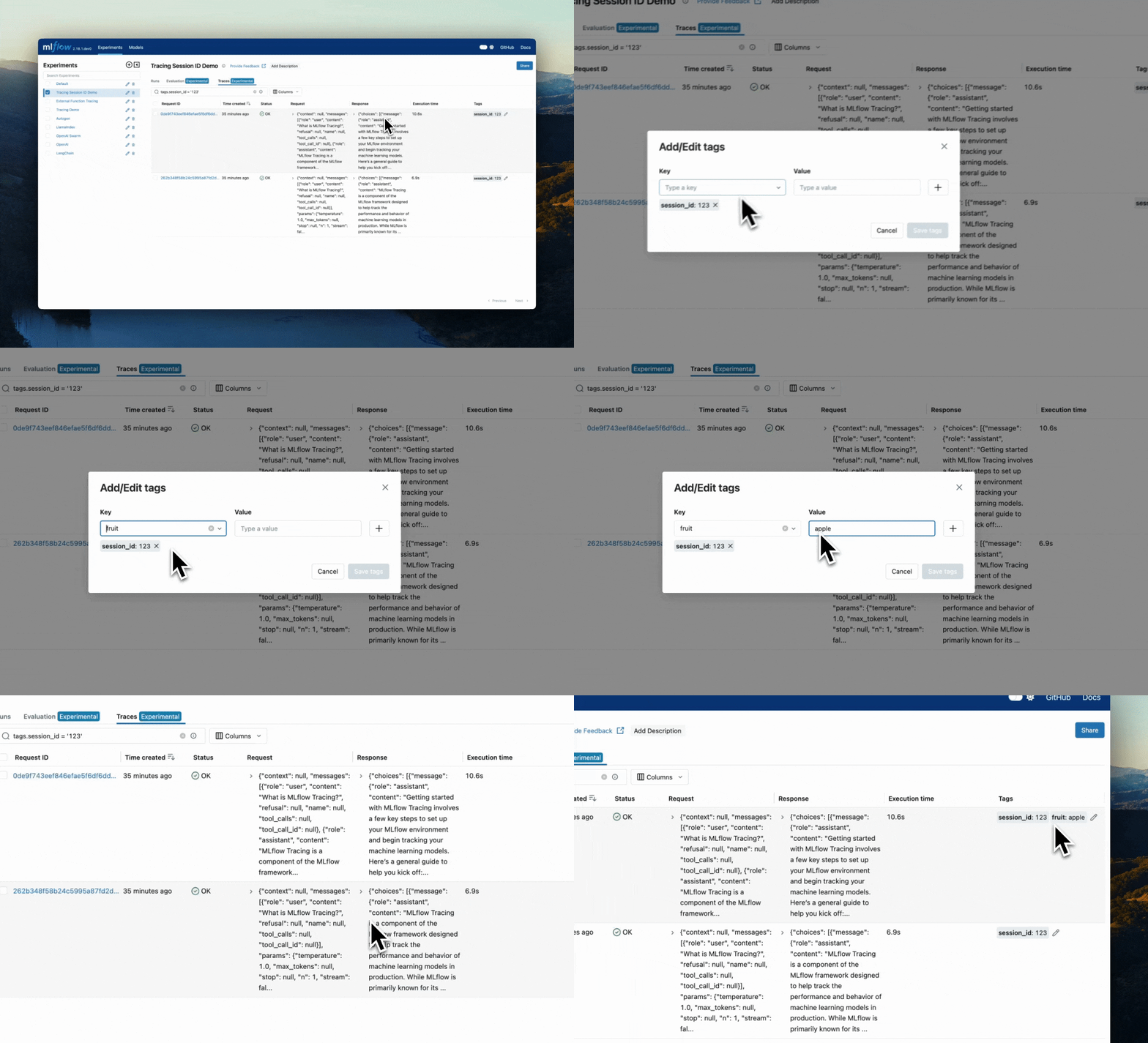
Set tags in the UI
Navigate to the trace, then click the pencil icon next to any tag to edit or delete it.
Add context to traces
Context links traces to users, sessions, deployments, and code — enabling multi-turn conversation grouping, user cohort analysis, and environment-specific debugging.
Call mlflow.update_current_trace inside your traced agent logic to attach context:
import mlflow

mlflow.update_current_trace(
    metadata={
        "mlflow.trace.user": user_id,
        "mlflow.trace.session": session_id,
    },
    tags={
        "query_category": "chat",
    },
)
After logging, access context via mlflow.search_traces() (the metadata and tags columns
in the returned DataFrame), or directly on Trace objects via
Trace.info.trace_metadata
and Trace.info.tags.
See Enrich traces: tags, context, and feedback for a complete worked example.
Standard context fields
MLflow defines standardized metadata fields for the most common context types. When you use them, the UI automatically enables filtering and grouping by those fields.
| Context type | MLflow field | Use cases |
|---|---|---|
| User ID | mlflow.trace.user |
Associate traces with specific users for personalization, cohort analysis, and user-specific debugging |
| Session ID | mlflow.trace.session |
Group traces from multi-turn conversations to analyze the full conversational flow |
| Client request ID | client_request_id on TraceInfo |
Link traces to upstream API calls for end-to-end debugging |
| Environment / version | mlflow.source.type + custom metadata |
Track deployment context across environments and agent versions |
| Custom fields | (your metadata keys) | Any agent-specific context: deployment ID, region, feature flags |
Auto-populated fields
MLflow automatically sets several metadata fields from your execution environment. You can
override any of them with mlflow.update_current_trace when the default detection does not meet
your requirements.
| Metadata field | Description | Auto-set from |
|---|---|---|
mlflow.source.name |
Entry point or script name | Python filename; Databricks notebook name |
mlflow.source.git.commit |
Git commit hash | Current git repo |
mlflow.source.git.branch |
Git branch name | Current git repo |
mlflow.source.git.repoURL |
Git repo URL | Current git repo |
mlflow.source.type |
Execution environment | NOTEBOOK (Jupyter/Databricks), LOCAL (Python script), UNKNOWN otherwise |
mlflow.sourceRun |
Source run ID | Active MLflow run |
metadata.mlflow.modelId |
MLflow LoggedModel ID | MLFLOW_ACTIVE_MODEL_ID env var or mlflow.set_active_model() |
For deployment metadata like environment and version, pull values from environment variables rather than hard-coding them:
import mlflow
import os

mlflow.update_current_trace(
    metadata={
        "mlflow.source.type": os.getenv("APP_ENVIRONMENT", "development"),
    }
)
Best practices
- Consistent ID formats — Use standardized formats for user and session IDs across your agent.
- Session boundaries — Define clear rules for when sessions start and end.
- Environment variables — Populate metadata from environment variables rather than hard-coding values.
- Combine context types — Track user, session, and environment context together.
- Regular analysis — Set up dashboards to monitor user behavior, session patterns, and version performance.
- Override defaults thoughtfully — Only override automatically populated metadata when the auto-detected value does not fit your deployment.
Collect user feedback
End-user feedback gives you ground-truth signal about your agent's real-world quality. MLflow captures feedback as assessments — a structured entity permanently attached to a trace — so every rating stays associated with the exact interaction that prompted it.
Feedback types
| Feedback type | Description | Common use cases |
|---|---|---|
| Binary | Thumbs up/down or correct/incorrect | Quick satisfaction signals |
| Numeric | Ratings on a scale (for example, 1–5 stars) | Detailed quality assessment |
| Categorical | Multiple-choice options | Classifying issues or response types |
| Text | Free-form comments | Detailed user explanations |
Feedback data model
User feedback is captured as a Feedback entity (a type of Assessment) attached to a trace or span. Each Feedback entity stores:
- Value — the feedback signal (boolean, numeric, text, or structured data)
- Source — an
AssessmentSourceidentifying who provided the feedback (see below) - Rationale — optional explanation for the feedback
- Metadata — additional context such as timestamps or custom attributes
AssessmentSource fields
The AssessmentSource object on every feedback assessment identifies the origin of the feedback:
source_type—"HUMAN"for end-user feedback,"LLM_JUDGE"for automated evaluationsource_id— the specific user or system that provided the feedback (for example, a user ID string or judge identifier)
Pass both fields when calling mlflow.log_feedback:
from mlflow.entities import AssessmentSource

mlflow.log_feedback(
    trace_id=trace_id,
    name="user_feedback",
    value=True,
    source=AssessmentSource(source_type="HUMAN", source_id=user_id),
    rationale="The answer was accurate and helpful.",
)
Link feedback to traces
To log feedback you need to associate the user's response with a specific trace. Two approaches:
Approach 1 — Use the MLflow trace ID (simpler): Retrieve the MLflow-generated trace ID during the request and return it to the client. The client sends it back with the feedback.
Approach 2 — Use a client request ID (more control): Generate your own unique ID per request, attach it as a trace tag, then look up the trace by that tag when feedback arrives. Useful when you already have a request-tracking system.
Warning
If you deploy your agent to a Databricks Model Serving endpoint, set client_request_id as a
tag (not an attribute). Using update_current_trace(client_request_id=...) as a metadata
attribute breaks trace exporting in serving environments. If you need to use Model Serving,
prefer Approach 1 (MLflow trace IDs) or set client_request_id via
update_current_trace(tags={"client_request_id": ...}).
Approach 1: MLflow trace ID
Backend
import mlflow
from fastapi import FastAPI, Query
from mlflow.entities import AssessmentSource
from pydantic import BaseModel
from typing import Optional

app = FastAPI()

class ChatRequest(BaseModel):
    message: str

class ChatResponse(BaseModel):
    response: str
    trace_id: str  # Return the trace ID so the client can reference it for feedback

@app.post("/chat", response_model=ChatResponse)
def chat(request: ChatRequest):
    response = process_message(request.message)  # Your agent logic here
    trace_id = mlflow.get_current_active_span().trace_id
    return ChatResponse(response=response, trace_id=trace_id)

class FeedbackRequest(BaseModel):
    is_correct: bool
    comment: Optional[str] = None

@app.post("/feedback")
def submit_feedback(
    trace_id: str = Query(..., description="Trace ID from the chat response"),
    feedback: FeedbackRequest = ...,
    user_id: Optional[str] = Query(None)
):
    mlflow.log_feedback(
        trace_id=trace_id,
        name="user_feedback",
        value=feedback.is_correct,
        source=AssessmentSource(source_type="HUMAN", source_id=user_id),
        rationale=feedback.comment
    )
    return {"status": "success", "trace_id": trace_id}
Frontend (React)
import React, { useState } from 'react';

function ChatWithFeedback() {
  const [message, setMessage] = useState('');
  const [response, setResponse] = useState('');
  const [traceId, setTraceId] = useState(null);
  const [feedbackSubmitted, setFeedbackSubmitted] = useState(false);

  const sendMessage = async () => {
    const res = await fetch('/chat', {
      method: 'POST',
      headers: { 'Content-Type': 'application/json' },
      body: JSON.stringify({ message }),
    });
    const data = await res.json();
    setResponse(data.response);
    setTraceId(data.trace_id);
    setFeedbackSubmitted(false);
  };

  const submitFeedback = async (isCorrect, comment = null) => {
    if (!traceId || feedbackSubmitted) return;
    const params = new URLSearchParams({ trace_id: traceId });
    await fetch(`/feedback?${params}`, {
      method: 'POST',
      headers: { 'Content-Type': 'application/json' },
      body: JSON.stringify({ is_correct: isCorrect, comment }),
    });
    setFeedbackSubmitted(true);
  };

  return (
    <div>
      <input value={message} onChange={(e) => setMessage(e.target.value)} placeholder="Ask a question..." />
      <button onClick={sendMessage}>Send</button>
      {response && (
        <div>
          <p>{response}</p>
          <div>
            <button onClick={() => submitFeedback(true)} disabled={feedbackSubmitted}>
              👍
            </button>
            <button onClick={() => submitFeedback(false)} disabled={feedbackSubmitted}>
              👎
            </button>
          </div>
          {feedbackSubmitted && <span>Thanks for your feedback!</span>}
        </div>
      )}
    </div>
  );
}
Approach 2: Client request ID
Attach a custom ID as a tag during the request, then look up the trace by that tag when feedback arrives.
Backend
import mlflow
from fastapi import FastAPI, Query, Request
from mlflow.client import MlflowClient
from mlflow.entities import AssessmentSource
from pydantic import BaseModel
from typing import Optional
import uuid

app = FastAPI()

class ChatRequest(BaseModel):
    message: str

class ChatResponse(BaseModel):
    response: str
    client_request_id: str

@app.post("/chat", response_model=ChatResponse)
def chat(request: ChatRequest):
    client_request_id = f"req-{uuid.uuid4().hex[:8]}"
    # Must be a tag, not an attribute — required for Model Serving compatibility
    mlflow.update_current_trace(tags={"client_request_id": client_request_id})
    response = process_message(request.message)
    return ChatResponse(response=response, client_request_id=client_request_id)

class FeedbackRequest(BaseModel):
    is_correct: bool
    comment: Optional[str] = None

@app.post("/feedback")
def submit_feedback(
    request: Request,
    client_request_id: str = Query(..., description="Request ID from the original interaction"),
    feedback: FeedbackRequest = ...
):
    client = MlflowClient()
    experiment = client.get_experiment_by_name("/Shared/production-app")
    traces = client.search_traces(
        experiment_ids=[experiment.experiment_id],
        filter_string=f"tags.client_request_id = '{client_request_id}'",
        max_results=1
    )
    if not traces:
        return {"status": "error", "message": "Unexpected error: request not found"}, 500

    mlflow.log_feedback(
        trace_id=traces[0].info.trace_id,
        name="user_feedback",
        value=feedback.is_correct,
        source=AssessmentSource(
            source_type="HUMAN",
            source_id=request.headers.get("X-User-ID")
        ),
        rationale=feedback.comment
    )
    return {"status": "success", "trace_id": traces[0].info.trace_id}
The frontend mirrors Approach 1 — send the message, store the returned client_request_id per conversation turn, and pass it back with each feedback submission.
Multi-dimensional feedback
Log multiple named assessments on a single trace to capture separate quality dimensions:
from mlflow.entities import AssessmentSource

@app.post("/detailed-feedback")
def submit_detailed_feedback(
    trace_id: str,
    accuracy: int = Query(..., ge=1, le=5, description="Accuracy rating 1–5"),
    helpfulness: int = Query(..., ge=1, le=5, description="Helpfulness rating 1–5"),
    relevance: int = Query(..., ge=1, le=5, description="Relevance rating 1–5"),
    user_id: str = Query(...),
    comment: Optional[str] = None
):
    dimensions = {"accuracy": accuracy, "helpfulness": helpfulness, "relevance": relevance}
    for dimension, score in dimensions.items():
        mlflow.log_feedback(
            trace_id=trace_id,
            name=f"user_{dimension}",
            value=score / 5.0,  # Normalize to 0–1 scale
            source=AssessmentSource(source_type="HUMAN", source_id=user_id),
            rationale=comment if dimension == "accuracy" else None
        )
    return {"status": "success", "trace_id": trace_id, "feedback_recorded": dimensions}
Streaming responses
With streaming (SSE or WebSockets), the trace ID isn't available until the stream completes. Return it as a final stream event and disable feedback controls until it arrives.
Backend (FastAPI SSE)
from fastapi import FastAPI
from fastapi.responses import StreamingResponse
import mlflow, json, asyncio
from typing import AsyncGenerator

@app.post("/chat/stream")
async def chat_stream(request: ChatRequest):
    async def generate() -> AsyncGenerator[str, None]:
        try:
            with mlflow.start_span(name="streaming_chat") as span:
                full_response = ""
                async for token in your_llm_stream_function(request.message):
                    full_response += token
                    yield f"data: {json.dumps({'type': 'token', 'content': token})}\n\n"
                    await asyncio.sleep(0.01)  # Prevent overwhelming the client
                span.set_attribute("response", full_response)
                span.set_attribute("token_count", len(full_response.split()))
                # Send trace ID as the final event
                yield f"data: {json.dumps({'type': 'done', 'trace_id': span.trace_id})}\n\n"
        except Exception as e:
            yield f"data: {json.dumps({'type': 'error', 'error': str(e)})}\n\n"

    return StreamingResponse(
        generate(),
        media_type="text/event-stream",
        headers={
            "Cache-Control": "no-cache",
            "Connection": "keep-alive",
            "X-Accel-Buffering": "no",  # Disable proxy buffering
        },
    )
On the frontend, read the stream, accumulate token events into the response text, and capture the trace ID from the final done event. Use traceId && !isStreaming as the condition to enable feedback controls.
Key implementation notes:
- The trace ID is only available after streaming completes — design your UI to disable feedback controls until it arrives.
- Use a consistent event format with a
typefield to distinguish content tokens, completion events, and errors. - Set
X-Accel-Buffering: noto disable proxy buffering. - Implement line buffering in the frontend to handle partial SSE messages.
- Include error events in the stream so failures are logged to the trace and visible to the user.
Analyze feedback
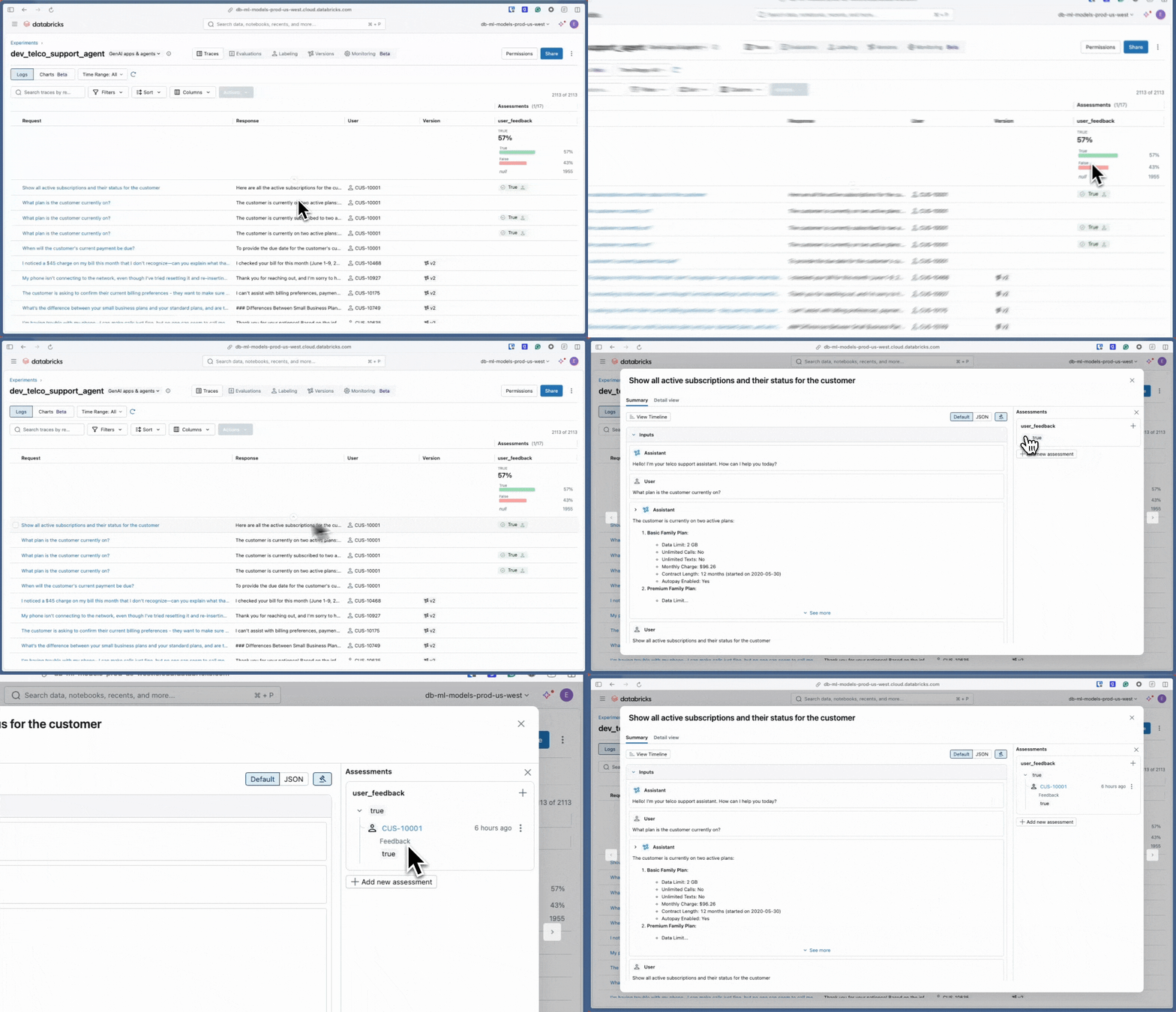
View feedback in the MLflow UI by opening any trace — assessments appear alongside span data.
Query and aggregate feedback programmatically:
from mlflow.client import MlflowClient
from datetime import datetime, timedelta

def analyze_user_feedback(experiment_name: str, hours: int = 24):
    client = MlflowClient()
    cutoff_ms = int((datetime.now() - timedelta(hours=hours)).timestamp() * 1000)
    traces = client.search_traces(
        experiment_names=[experiment_name],
        filter_string=f"trace.timestamp_ms > {cutoff_ms}"
    )

    total = len(traces)
    with_feedback = positive = negative = 0

    for trace in traces:
        detail = client.get_trace(trace.info.trace_id)
        if detail.data.assessments:
            with_feedback += 1
            for a in detail.data.assessments:
                if a.name == "user_feedback":
                    if a.value:
                        positive += 1
                    else:
                        negative += 1

    feedback_rate = (with_feedback / total * 100) if total else 0
    positive_rate = (positive / with_feedback * 100) if with_feedback else 0
    print(f"Feedback rate: {feedback_rate:.1f}%  Positive: {positive_rate:.1f}%")
    print(f"Total feedback: {with_feedback} of {total} traces")

analyze_user_feedback("/Shared/production-genai-agent")
The same pattern extends to multi-dimensional feedback: iterate over each trace's assessments and group a.value by a.name to average each rating dimension separately.
Additional resources
- Enrich traces: tags, context, and feedback - Full tutorial: add user, session, environment, and version context to traces
- Programmatic access to traces - Filter and search traces using tags and metadata
- Find issues across traces - Trace analytics examples
- Building MLflow evaluation datasets - Use collected feedback to build evaluation datasets
- Set up production monitoring - Monitor quality metrics based on feedback
Next step: Store OpenTelemetry traces in Unity Catalog