Note
Access to this page requires authorization. You can try signing in or changing directories.
Access to this page requires authorization. You can try changing directories.
Each alert runs on a SQL warehouse that you select when you create or edit it. The warehouse you select affects alert latency, reliability, and cost.
Select or change the warehouse
You can specify the warehouse that runs your alert's queries when you create an alert. The compute selector shows the selected warehouse and its status.
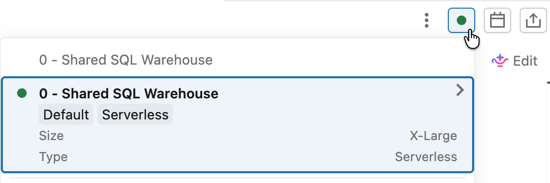
To change the warehouse for an existing alert:
- Click
 Alerts in the sidebar and click the alert you want to edit.
 - Click Edit.
- Click the compute selector to view the current warehouse.
- Click a different warehouse to select it.
Recommended warehouse type
For most alerts, use a serverless SQL warehouse. Serverless warehouses have low startup time, which keeps alert latency low when an alert runs on a schedule against a stopped warehouse. Pro and classic warehouses can take longer to start, which can delay alert evaluations.
For sizing, choose the smallest warehouse that runs your alert query reliably. To compare warehouse types, see SQL warehouse types.
Warehouse behavior at scheduled run time
If the selected warehouse is stopped when the alert is scheduled to run, Databricks SQL starts the warehouse automatically and runs the query. The alert evaluation includes any startup delay. If the warehouse cannot start, the alert returns an ERROR status.
If the selected warehouse is deleted or you lose access to it, the alert returns an ERROR status until you select a different warehouse.
Cost implications
Frequent alert schedules can keep a SQL warehouse active for long periods, which contributes to SQL warehouse compute costs. To manage costs:
- Use a serverless SQL warehouse with a short auto-stop interval. Serverless warehouses bill only for active query time.
- Avoid running alerts more frequently than the underlying data changes. An alert that checks for new data every minute against a table that updates hourly creates unnecessary compute load.
- Group multiple alerts on the same warehouse so a single warehouse start serves them all.
For more about SQL warehouse types, sizing, and pricing, see Connect to a SQL warehouse.