Note
Access to this page requires authorization. You can try signing in or changing directories.
Access to this page requires authorization. You can try changing directories.
Important
This feature is in Beta. Workspace admins can control access to this feature from the Previews page. See Manage Azure Databricks previews.
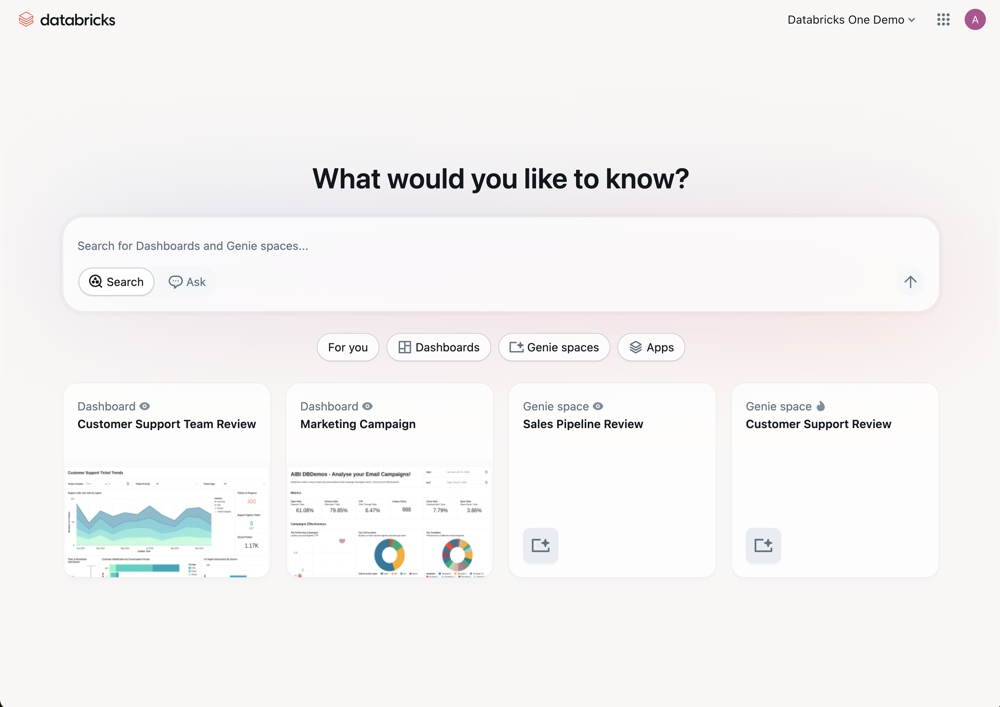
Account-level Databricks One is a unified analytics view across all workspaces in your Azure Databricks account. Business users can discover and interact with shared assets (such as AI/BI dashboards, Genie spaces, and Databricks Apps) from multiple workspaces in a single entry point.
Unlike the workspace-level Databricks One experience, which is scoped to a single workspace, account-level Databricks One lets users view and navigate assets from any workspace they have access to in the account.
Features
Account-level Databricks One brings together the features in individual workspace-level Databricks One into an account-wide experience. It includes the following features:
- Homepage: A unified view of assets across all workspaces in your account. Surfaces recently accessed content, trending assets, and your favorites, regardless of which workspace the assets belong to.
- Cross-account search: Find assets shared across all workspaces in your account. Search results include dashboards, Genie spaces, and apps from any workspace you have access to, scoped to your permissions.
- Recommendations and favorites: The homepage surfaces recommended assets based on your usage patterns across workspaces. Mark an asset as a favorite by clicking the star icon next to its name. Favorites are available across all workspaces from the account-level view.
- Chat and Genie spaces: Ask natural language questions about your data across workspaces. Genie spaces provide a shared conversational interface where you can collaborate with teammates on data questions.
For more infromation on using Databricks One, see Interact with data assets.
Enable account-level Databricks One
Account admins can enable or disable account-level Databricks One by toggling the Databricks One Account-level preview from the Previews page. This setting applies to all users in the account.
- As an account admin, log in to the account console.
- In the sidebar, click Previews.
- Search Databricks One Account-level.
- Use toggles
 to enable or disable the Beta.

Who can use account-level Databricks One?
All users in the account can use account-level Databricks One, but they can only access assets that have been explicitly shared with them. The account-level view does not grant additional permissions to workspace assets.
Access account-level Databricks One
You can access account-level Databricks One in several ways:
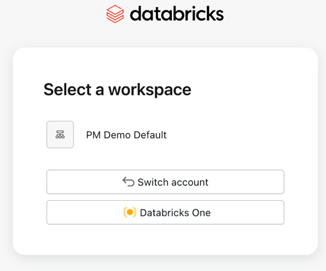
Account landing page: From the account console, click Databricks One to open the account-level view.
Direct URL: Navigate directly to your account-level Databricks One URL using the
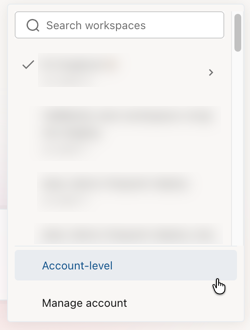
/onevanity URL:https://accounts.azuredatabricks.net/oneWorkspace switcher: Use the workspace switcher within the Databricks One interface to and select Account-level.
Data handling and processing
Account-level Databricks One is an account-wide discovery and search surface for dashboards, Genie spaces, apps, and other assets that you have permission to access. When you open an asset, it opens in the originating workspace.
What data is aggregated and how it is processed
Account-level Databricks One aggregates set of data (such as asset identifiers, titles, and usage and audit events) to power account-wide search, recommendations, and cross-workspace discovery. Customer content (tables, dashboard data, charts, and similar objects) is not aggregated. This aggregated data is sent to US-based Azure Databricks services, even when your workspaces run in non-US regions (such as EU deployments). Customer content remains stored in the workspace region.
If your data residency or compliance policies do not permit sending this aggregated data to US-based services, disable account-level Databricks One using the control described in Enable account-level Databricks One. Disabling the feature stops account-level Databricks One from sending this aggregated data to US-based services. Disabling the feature does not delete existing audit and system logs that reference account-level Databricks One activity.
Workspaces using the compliance security profile are excluded
Account-level Databricks One does not aggregate data from workspaces with the compliance security profile enabled.