Note
Access to this page requires authorization. You can try signing in or changing directories.
Access to this page requires authorization. You can try changing directories.
Azure DNS Private Resolver is a fully managed, highly available service that enables secure and seamless DNS resolution between Azure virtual networks and on-premises environments—without the need to deploy, manage, or patch custom DNS servers. By using this service, you can resolve DNS queries for private DNS zones from anywhere. It facilitates hybrid network connectivity and simplifies network management for enterprise scenarios.
How Azure DNS Private Resolver works
Azure DNS Private Resolver requires an Azure Virtual Network. When you create an Azure DNS Private Resolver inside a virtual network, you create one or more inbound endpoints that you can use as the destination for DNS queries. The resolver's outbound endpoint processes DNS queries based on a DNS forwarding ruleset that you configure. You can send DNS queries that are initiated in networks linked to a ruleset to other DNS servers.
You don't need to change any DNS client settings on your virtual machines (VMs) to use the Azure DNS Private Resolver.
The following list summarizes the DNS query process when using an Azure DNS Private Resolver:
- A client in a virtual network issues a DNS query.
- If you specify custom DNS servers for this virtual network, the query is forwarded to the specified IP addresses.
- If you configure Default (Azure-provided) DNS servers in the virtual network, and there are Private DNS zones linked to the same virtual network, these zones are consulted.
- If the query doesn't match a Private DNS zone linked to the virtual network, then Virtual network links for DNS forwarding rulesets are consulted.
- If no ruleset links are present, then Azure DNS is used to resolve the query.
- If ruleset links are present, the DNS forwarding rules are evaluated.
- If a suffix match is found, the query is forwarded to the specified address.
- If multiple matches are present, the longest suffix is used.
- If no match is found, no DNS forwarding occurs and Azure DNS is used to resolve the query.
The architecture for Azure DNS Private Resolver is summarized in the following figure. DNS resolution between Azure virtual networks and on-premises networks requires Azure ExpressRoute or a VPN.
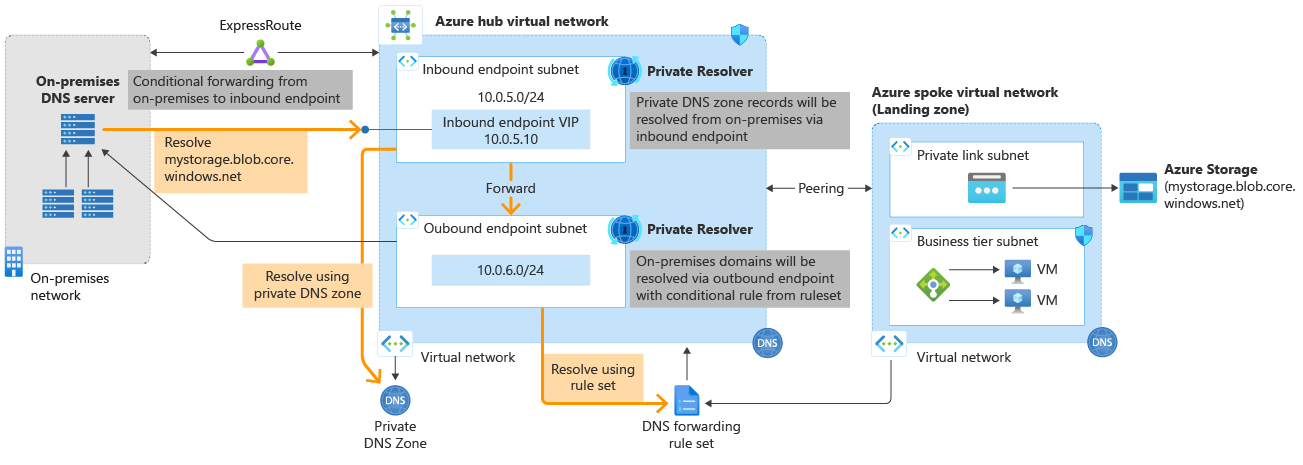
Figure 1: Azure DNS Private Resolver architecture.
For more information about creating a private DNS resolver, see:
- Quickstart: Create an Azure DNS Private Resolver using the Azure portal
- Quickstart: Create an Azure DNS Private Resolver using Azure PowerShell
Benefits of Azure DNS Private Resolver
Azure DNS Private Resolver provides the following benefits:
- Fully managed: Built-in high availability and zone redundancy.
- Cost reduction: Reduce operating costs and run at a fraction of the price of traditional IaaS solutions.
- Private access to your Private DNS zones: Conditionally forward to and from on-premises.
- Scalability: High performance per endpoint.
- DevOps Friendly: Build your pipelines with Terraform, ARM template, or Bicep.
Regional availability
See Azure Products by Region - Azure DNS.
Data residency
Azure DNS Private Resolver doesn't move or store customer data outside the region where the resolver is deployed.
DNS resolver endpoints and rulesets
This article provides a summary of resolver endpoints and rulesets. For detailed information about endpoints and rulesets, see Azure DNS Private Resolver endpoints and rulesets.
Inbound endpoints
An inbound endpoint enables name resolution from on-premises or other private locations through an IP address that's part of your private virtual network address space. To resolve your Azure private DNS zone from on-premises, enter the IP address of the inbound endpoint into your on-premises DNS conditional forwarder. The on-premises DNS conditional forwarder must have a network connection to the virtual network.
The inbound endpoint requires a subnet in the virtual network where you deploy it. You can only delegate the subnet to Microsoft.Network/dnsResolvers and can't use it for other services. The inbound endpoint receives DNS queries that ingress to Azure. You can resolve names in scenarios where you have Private DNS zones, including VMs that are using auto registration, or Private Link enabled services.
Note
You can specify the IP address assigned to an inbound endpoint as static or dynamic. For more information, see static and dynamic endpoint IP addresses.
Outbound endpoints
An outbound endpoint enables conditional forwarding name resolution from Azure to on-premises, other cloud providers, or external DNS servers. This endpoint requires a dedicated subnet in the virtual network where you deploy it, with no other service running in the subnet. You can only delegate this subnet to Microsoft.Network/dnsResolvers. DNS queries you send to the outbound endpoint egress from Azure.
Virtual network links
Virtual network links enable name resolution for virtual networks that are linked to an outbound endpoint with a DNS forwarding ruleset. This link is a one-to-one relationship.
DNS forwarding rulesets
A DNS forwarding ruleset is a group of up to 1,000 DNS forwarding rules that you can apply to one or more outbound endpoints or link to one or more virtual networks. This configuration is a one-to-many relationship. You associate rulesets with a specific outbound endpoint. For more information, see DNS forwarding rulesets.
DNS forwarding rules
A DNS forwarding rule includes one or more target DNS servers that you use for conditional forwarding. The following items represent rules:
- A domain name
- A target IP address
- A target port and protocol (UDP or TCP)
Restrictions
The following limits currently apply to Azure DNS Private Resolver:
DNS private resolver1
| Resource | Limit |
|---|---|
| DNS private resolvers per subscription | 15 |
| Inbound endpoints per DNS private resolver | 5 |
| Outbound endpoints per DNS private resolver | 5 |
| Forwarding rules per DNS forwarding ruleset | 1000 |
| Virtual network links per DNS forwarding ruleset | 500 |
| Outbound endpoints per DNS forwarding ruleset | 2 |
| DNS forwarding rulesets per outbound endpoint | 2 |
| Target DNS servers per forwarding rule | 6 |
| QPS per endpoint | 10,000 |
1Different limits might be enforced by the Azure portal until the portal is updated. Use PowerShell to provision elements up to the most current limits.
Virtual network restrictions
The following restrictions apply to virtual networks:
- VNets with encryption enabled don't support Azure DNS Private Resolver.
- A DNS resolver can only reference a virtual network in the same region as the DNS resolver.
- A single DNS resolver can reference only one virtual network. Multiple DNS resolvers can't share the same virtual network.
Subnet restrictions
Subnets used for DNS resolver have the following limitations:
- A subnet must be a minimum of /28 address space or a maximum of /24 address space. A /28 subnet is sufficient to accommodate current endpoint limits. A subnet size of /27 to /24 can provide flexibility if these limits change.
- Multiple DNS resolver endpoints can't share a subnet. A single DNS resolver endpoint can only use a single subnet.
- All IP configurations for a DNS resolver inbound endpoint must reference the same subnet as where the endpoint is provisioned.
- The subnet used for a DNS resolver inbound endpoint must be within the virtual network referenced by the parent DNS resolver.
- The subnet can only be delegated to Microsoft.Network/dnsResolvers and can't be used for other services.
Outbound endpoint restrictions
Outbound endpoints have the following limitations:
- You can't delete an outbound endpoint unless you first delete the DNS forwarding ruleset and the virtual network links under it.
Ruleset restrictions
- Rulesets can have up to 1,000 rules.
- Cross-tenant linking of Rulesets isn't supported.
Other restrictions
- You can't link rulesets across tenants.
- You can't use IPv6 enabled subnets.
- DNS private resolver doesn't support Azure ExpressRoute FastPath.
- DNS private resolver isn't compatible with Azure Lighthouse.
- To see if Azure Lighthouse is in use, search for Service providers in the Azure portal and select Service provider offers.
Next steps
- Learn how to create an Azure DNS Private Resolver by using Azure PowerShell or Azure portal.
- Understand how to Resolve Azure and on-premises domains using the Azure DNS Private Resolver.
- Learn about Azure DNS Private Resolver endpoints and rulesets.
- Learn how to Set up DNS failover using private resolvers.
- Learn how to configure hybrid DNS using private resolvers.
- Learn about some of the other key networking capabilities of Azure.
- Learn module: Introduction to Azure DNS.