Note
Access to this page requires authorization. You can try signing in or changing directories.
Access to this page requires authorization. You can try changing directories.
Azure Stream Analytics Cluster offers a single-tenant deployment for complex and demanding streaming scenarios. At full scale, Stream Analytics clusters can process more than 400 MB per second in real time. Stream Analytics jobs running on dedicated clusters can use all the features in the Standard offering and include support for private link connectivity to your inputs and outputs.
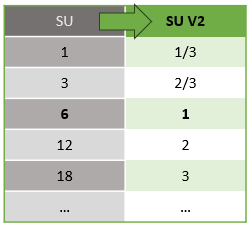
Stream Analytics clusters are billed by Streaming Units (SUs), which represent the amount of CPU and memory resources allocated to your cluster. A Streaming Unit is the same across Standard and Dedicated offerings. Azure Stream Analytics supports two streaming unit structures: SU V1 (to be deprecated) and SU V2 (recommended) learn more.
When you create a cluster in the portal, you create a Dedicated V2 cluster by default. Dedicated V2 clusters support 12 to 66 SU V2s and can be scaled in increments of 12 (12, 24, 48...). Dedicated V1 clusters are Azure Stream Analytics original offering and are still supported; they require a minimum of 36 SUs.
The following graphic shows the underlying compute power for V1 and V2 streaming units:
For more information on dedicated cluster offerings and pricing, visit the Azure Stream Analytics Pricing Page.
Note
Dedicated clusters created with SU V2 capacity can only support jobs with SU V2. You can't run both V1 and V2 SUs in a dedicated cluster. Mix and match aren't supported due to capacity complications.
A Stream Analytics cluster can serve as the streaming platform for your organization and can be shared by different teams working on various use cases.
Note
Azure Stream Analytics also supports virtual network integration. Virtual network integration permits network isolation, which is accomplished by deploying dedicated instances of Azure Stream Analytics into your virtual network. A minimum of six SU V2s is required for virtual network jobs learn more.
What are Stream Analytics clusters
Stream Analytics clusters use the same engine that powers Stream Analytics jobs running in a multitenant environment. The single tenant, dedicated cluster offers the following features:
Single tenant hosting with no noise from other tenants. Your resources are truly isolated and perform better when there's a burst in traffic.
Scale your cluster between 12 to 66 SU V2s as you're streaming usage increases over time.
Virtual network support that allows your Stream Analytics jobs to connect to other resources securely by using private endpoints.
Ability to author C# user-defined functions and custom deserializers in any region.
Zero maintenance cost so you can focus your effort on building real-time analytics solutions.
How to get started
You can create a Stream Analytics cluster through the Azure portal. If you have any questions or need help with onboarding, you can contact the Stream Analytics team.
Frequently asked questions
How do I choose between a Stream Analytics cluster and a Stream Analytics job?
The easiest way to get started is to create and develop a Stream Analytics job to become familiar with the service and see how it can meet your analytics requirements.
Stream Analytics jobs alone don't support VNets. If your inputs or outputs are secured behind a firewall or an Azure Virtual Network, you have the following two options:
If your local machine has access to the input and output resources secured by a virtual network (for example, Azure Event Hubs or Azure SQL Database), you can install Azure Stream Analytics tools for Visual Studio on your local machine. You can develop and test Stream Analytics jobs locally on your device without incurring any cost. When you're ready to use Stream Analytics in your architecture, you can create a Stream Analytics cluster, configure private endpoints, and run your jobs at scale.
You can create a Stream Analytics cluster, configure the cluster with the private endpoints needed for your pipeline, and run your Stream Analytics jobs on the cluster.
What performance can I expect?
An SU is the same across the Standard and Dedicated offerings. A single job that uses a full 36 SU cluster can achieve approximately 36 MB/second throughput with millisecond latency. The exact number depends on the format of events and the type of analytics. Because it's dedicated, a Stream Analytics cluster offers more reliable performance guarantees. All the jobs running on your cluster belong only to you.
Can I scale my cluster?
Yes. You can easily configure the capacity of your cluster so you can scale up or down as needed to meet your changing demand.
Can I run my existing jobs on these new clusters I created?
Yes. You can link your existing jobs to your newly created Stream Analytics cluster and run them as usual. You don't have to re-create your existing Stream Analytics jobs from scratch.
How much do these clusters cost?
You pay for your Stream Analytics clusters based on the chosen SU capacity. You pay hourly for clusters and there are no extra charges per job running in these clusters. For private endpoint billing updates, see the Private Link Service pricing page.
Which inputs and outputs can I privately connect to from my Stream Analytics cluster?
Stream Analytics supports various input and output types. You can create private endpoints in your cluster that allow jobs to access the input and output resources. Currently Azure SQL Database, Azure Cosmos DB, Azure Storage, Azure Data Lake Storage Gen2, Azure Event Hubs, Azure IoT Hubs, Azure Function, and Azure Service Bus are supported services for which you can create managed private endpoints.
Next steps
You now have an overview of Azure Stream Analytics cluster. Next, you can create your cluster and run your Stream Analytics job: