Бележка
Достъпът до тази страница изисква удостоверяване. Можете да опитате да влезете или да промените директориите.
Достъпът до тази страница изисква удостоверяване. Можете да опитате да промените директориите.
Reviewing events in Event Viewer is useful when you evaluate attack surface reduction features. For example, you can enable audit mode for features or settings, and then review what would happen if they were fully enabled. You can also view the effects of attack surface reduction features when they're fully enabled.
This article describes how to use Windows Event Viewer to view events from attack surface reduction (ASR) capabilities, including:
To view attack surface reduction events, you have the following options as explained in the rest of this article:
- Browse attack surface reduction events in Windows Event Viewer: How to navigate to attack surface reduction events in Event Viewer, and the event IDs for each attack surface reduction capability.
- Use custom views in Windows Event Viewer to view attack surface reduction events: How to create or import custom views to filter Event Viewer for specific ASR capabilities, and ready-to-use XML query templates.
Tip
You can use Windows Event Forwarding to centralize attack surface reduction event collection from multiple devices.
The Microsoft Defender portal also provides reporting for attack surface reduction features that's easier to use than Windows Event Viewer:
Browse attack surface reduction events in Windows Event Viewer
All attack surface reduction events are located in Applications and Services Logs. To view attack surface reduction events, do the following steps:
Select Start, type Event Viewer, and then press Enter to open Event Viewer.
In Event Viewer, expand Applications and Services Logs > Microsoft > Windows.
Continue to expand the path for ASR rule events, controlled folder access events, exploit protection events, or network protection events.
Find and filter the events you want to see by using the event ID tables in the preceding sections, or by creating custom views in Event Viewer.
ASR rule events
ASR rule events are located in the Windows Defender > Operational log:
| Event ID | Description |
|---|---|
| 1121 | Event when rule fires in block mode |
| 1122 | Event when rule fires in audit mode |
| 1129 | Event when user overrides block in warn mode |
| 5007 | Event when settings are changed |
View controlled folder access events
Controlled folder access events are located in Windows Defender > Operational.
| Event ID | Description |
|---|---|
| 5007 | Event when settings are changed |
| 1124 | Audited controlled folder access event |
| 1123 | Blocked controlled folder access event |
| 1127 | Blocked controlled folder access sector write block event |
| 1128 | Audited controlled folder access sector write block event |
View exploit protection events
The following exploit protection events are located in the Security-Mitigations > Kernel Mode and Security-Mitigations > User Mode logs:
| Event ID | Description |
|---|---|
| 1 | ACG audit |
| 2 | ACG enforce |
| 3 | Don't allow child processes audit |
| 4 | Don't allow child processes block |
| 5 | Block low integrity images audit |
| 6 | Block low integrity images block |
| 7 | Block remote images audit |
| 8 | Block remote images block |
| 9 | Disable win32k system calls audit |
| 10 | Disable win32k system calls block |
| 11 | Code integrity guard audit |
| 12 | Code integrity guard block |
| 13 | EAF audit |
| 14 | EAF enforce |
| 15 | EAF+ audit |
| 16 | EAF+ enforce |
| 17 | IAF audit |
| 18 | IAF enforce |
| 19 | ROP StackPivot audit |
| 20 | ROP StackPivot enforce |
| 21 | ROP CallerCheck audit |
| 22 | ROP CallerCheck enforce |
| 23 | ROP SimExec audit |
| 24 | ROP SimExec enforce |
The following exploit protection event is located in the WER-Diagnostics > Operational log:
| Event ID | Description |
|---|---|
| 5 | CFG Block |
The following exploit protection event is located in the Win32k > Operational log:
| Event ID | Description |
|---|---|
| 260 | Untrusted Font |
View network protection events
Network protection events are located in Windows Defender > Operational.
| Event ID | Description |
|---|---|
| 5007 | Event when settings are changed |
| 1125 | Event when network protection fires in audit mode |
| 1126 | Event when network protection fires in block mode |
Use custom views in Windows Event Viewer to view attack surface reduction events
You can create custom views in Windows Event Viewer to see only the events for specific attack surface reduction capabilities. The easiest way is to import a custom view as an XML file. You can also copy the XML directly into Event Viewer.
For ready-to-use XML templates, see the Custom XML templates for attack surface reduction events section.
Import an existing XML custom view
To import an existing XML custom view into Event Viewer, complete the following steps:
Create an empty .txt file and copy the XML for the custom view you want to use into the .txt file. Do this step for each of the custom views you want to use. Rename the files as follows (ensure you change the type from .txt to .xml):
- Controlled folder access events custom view: cfa-events.xml
- Exploit protection events custom view: ep-events.xml
- Attack surface reduction events custom view: asr-events.xml
- Network protection events custom view: np-events.xml
Select Start, type Event Viewer, and then press Enter to open Event Viewer.
Select Action > Import Custom View...
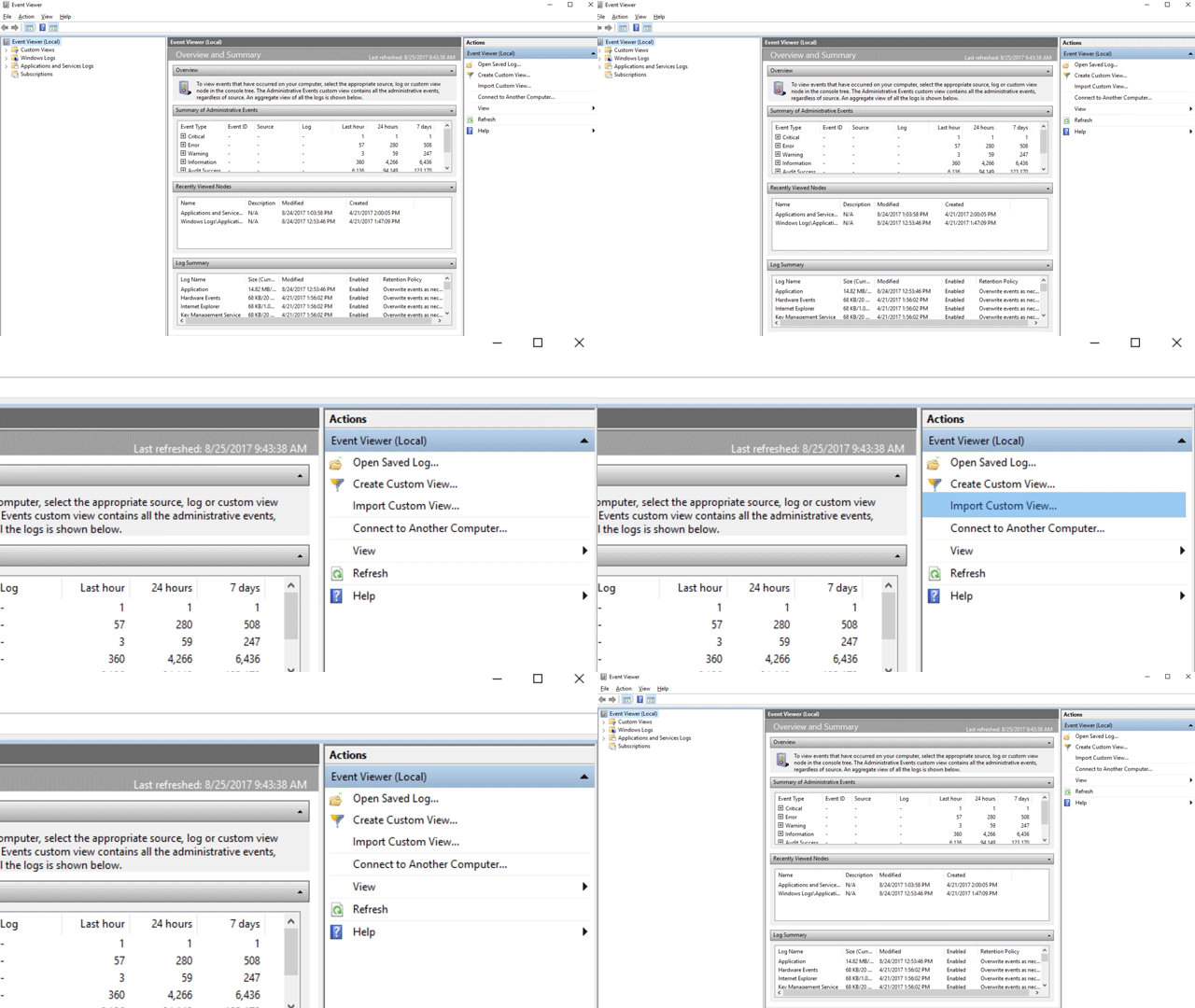
Navigate to the XML file for the custom view you want and select it.
Select Open.
The custom view filters to show only the events related to the selected attack surface reduction capability.
Copy XML directly into Event Viewer
To paste XML directly into a custom view, complete the following steps:
Select Start, type Event Viewer, and then press Enter to open Event Viewer.
In the Actions pane, select Create Custom View...
Go to the XML tab and select Edit query manually. A warning indicates that you can't edit the query using the Filter tab when you use the XML option. Select Yes.
Paste the XML code for attack surface reduction rules, controlled folder access, exploit protection, or network protection from the custom XML templates into the XML section.
Select OK. Specify a name for your filter. The custom view filters to show only the events related to the selected attack surface reduction capability.
Custom XML templates for attack surface reduction events
Use the following XML templates to create custom views in Event Viewer for each attack surface reduction capability. You can import these templates as XML files or paste them directly into Event Viewer.
XML for attack surface reduction rule events
The following XML query filters the Windows Defender Operational log for ASR rule events (event IDs 1121, 1122, 1129, and 5007):
<QueryList>
  <Query Id="0" Path="Microsoft-Windows-Windows Defender/Operational">
   <Select Path="Microsoft-Windows-Windows Defender/Operational">*[System[(EventID=1121 or EventID=1122 or EventID=1129 or EventID=5007)]]</Select>
   <Select Path="Microsoft-Windows-Windows Defender/WHC">*[System[(EventID=1121 or EventID=1122 or EventID=1129 or EventID=5007)]]</Select>
  </Query>
</QueryList>
XML for controlled folder access events
The following XML query filters the Windows Defender Operational log for controlled folder access events (event IDs 1123, 1124, 1127, 1128, and 5007):
<QueryList>
  <Query Id="0" Path="Microsoft-Windows-Windows Defender/Operational">
   <Select Path="Microsoft-Windows-Windows Defender/Operational">*[System[(EventID=1123 or EventID=1124 or EventID=1127 or EventID=1128 or EventID=5007)]]</Select>
   <Select Path="Microsoft-Windows-Windows Defender/WHC">*[System[(EventID=1123 or EventID=1124 or EventID=1127 or EventID=1128 or EventID=5007)]]</Select>
  </Query>
</QueryList>
XML for exploit protection events
The following XML query creates a custom view for exploit protection events across the Security-Mitigations, WER-Diagnostics, and Win32k providers (event IDs 1–24, 5, and 260):
<QueryList>
<Query Id="0" Path="Microsoft-Windows-Security-Mitigations/KernelMode">
<Select Path="Microsoft-Windows-Security-Mitigations/KernelMode">*[System[Provider[@Name='Microsoft-Windows-Security-Mitigations' or @Name='Microsoft-Windows-WER-Diag' or @Name='Microsoft-Windows-Win32k' or @Name='Win32k'] and ( (EventID >= 1 and EventID <= 24) or EventID=5 or EventID=260)]]</Select>
<Select Path="Microsoft-Windows-Win32k/Concurrency">*[System[Provider[@Name='Microsoft-Windows-Security-Mitigations' or @Name='Microsoft-Windows-WER-Diag' or @Name='Microsoft-Windows-Win32k' or @Name='Win32k'] and ( (EventID >= 1 and EventID <= 24) or EventID=5 or EventID=260)]]</Select>
<Select Path="Microsoft-Windows-Win32k/Contention">*[System[Provider[@Name='Microsoft-Windows-Security-Mitigations' or @Name='Microsoft-Windows-WER-Diag' or @Name='Microsoft-Windows-Win32k' or @Name='Win32k'] and ( (EventID >= 1 and EventID <= 24) or EventID=5 or EventID=260)]]</Select>
<Select Path="Microsoft-Windows-Win32k/Messages">*[System[Provider[@Name='Microsoft-Windows-Security-Mitigations' or @Name='Microsoft-Windows-WER-Diag' or @Name='Microsoft-Windows-Win32k' or @Name='Win32k'] and ( (EventID >= 1 and EventID <= 24) or EventID=5 or EventID=260)]]</Select>
<Select Path="Microsoft-Windows-Win32k/Operational">*[System[Provider[@Name='Microsoft-Windows-Security-Mitigations' or @Name='Microsoft-Windows-WER-Diag' or @Name='Microsoft-Windows-Win32k' or @Name='Win32k'] and ( (EventID >= 1 and EventID <= 24) or EventID=5 or EventID=260)]]</Select>
<Select Path="Microsoft-Windows-Win32k/Power">*[System[Provider[@Name='Microsoft-Windows-Security-Mitigations' or @Name='Microsoft-Windows-WER-Diag' or @Name='Microsoft-Windows-Win32k' or @Name='Win32k'] and ( (EventID >= 1 and EventID <= 24) or EventID=5 or EventID=260)]]</Select>
<Select Path="Microsoft-Windows-Win32k/Render">*[System[Provider[@Name='Microsoft-Windows-Security-Mitigations' or @Name='Microsoft-Windows-WER-Diag' or @Name='Microsoft-Windows-Win32k' or @Name='Win32k'] and ( (EventID >= 1 and EventID <= 24) or EventID=5 or EventID=260)]]</Select>
<Select Path="Microsoft-Windows-Win32k/Tracing">*[System[Provider[@Name='Microsoft-Windows-Security-Mitigations' or @Name='Microsoft-Windows-WER-Diag' or @Name='Microsoft-Windows-Win32k' or @Name='Win32k'] and ( (EventID >= 1 and EventID <= 24) or EventID=5 or EventID=260)]]</Select>
<Select Path="Microsoft-Windows-Win32k/UIPI">*[System[Provider[@Name='Microsoft-Windows-Security-Mitigations' or @Name='Microsoft-Windows-WER-Diag' or @Name='Microsoft-Windows-Win32k' or @Name='Win32k'] and ( (EventID >= 1 and EventID <= 24) or EventID=5 or EventID=260)]]</Select>
<Select Path="System">*[System[Provider[@Name='Microsoft-Windows-Security-Mitigations' or @Name='Microsoft-Windows-WER-Diag' or @Name='Microsoft-Windows-Win32k' or @Name='Win32k'] and ( (EventID >= 1 and EventID <= 24) or EventID=5 or EventID=260)]]</Select>
<Select Path="Microsoft-Windows-Security-Mitigations/UserMode">*[System[Provider[@Name='Microsoft-Windows-Security-Mitigations' or @Name='Microsoft-Windows-WER-Diag' or @Name='Microsoft-Windows-Win32k' or @Name='Win32k'] and ( (EventID >= 1 and EventID <= 24) or EventID=5 or EventID=260)]]</Select>
</Query>
</QueryList>
XML for network protection events
The following XML query filters the Windows Defender Operational log for network protection events (event IDs 1125, 1126, and 5007):
<QueryList>
 <Query Id="0" Path="Microsoft-Windows-Windows Defender/Operational">
  <Select Path="Microsoft-Windows-Windows Defender/Operational">*[System[(EventID=1125 or EventID=1126 or EventID=5007)]]</Select>
  <Select Path="Microsoft-Windows-Windows Defender/WHC">*[System[(EventID=1125 or EventID=1126 or EventID=5007)]]</Select>
 </Query>
</QueryList>