Bilješka
Pristup ovoj stranici zahtijeva provjeru vjerodostojnosti. Možete pokušati da se prijavite ili promijenite direktorije.
Pristup ovoj stranici zahtijeva provjeru vjerodostojnosti. Možete pokušati promijeniti direktorije.
Protecting your SaaS ecosystem requires taking inventory of all SaaS and connected OAuth apps that are in your environment. With the increasing number of applications, having a comprehensive inventory is crucial to ensure security and compliance. The Applications page provides a centralized view of all SaaS and connected OAuth apps in your organization, enabling efficient monitoring and management. At a glance you can see information such as app name, risk score, privilege level, publisher information, and other details for easy identification of SaaS and OAuth apps most at risk.
The Applications page includes the following tabs:
- SaaS apps: A consolidated view of all SaaS applications in your network. This tab highlights key details, including app name, status (unprotected/protected app) and whether the app is marked as sanctioned or unsanctioned.
- OAuth apps: A comprehensive view of OAuth apps registered on Microsoft Entra ID, Google workspace and Salesforce. This tab highlights OAuth apps metadata, publisher info and app origin, permissions used, data accessed and other insights.
Navigate to the Applications page
In the Defender portal at https://security.microsoft.com, go to Assets > Applications. Or, go directly to the Applications page, by clicking on the banner links on the existing Cloud discovery and App governance pages.


There are several options you can choose from to customize the SaaS apps and OAuth apps list view. In the top navigation panel you can:
- Add or remove columns.
- Export the entire list in CSV format.
- Select the number of items to show per page.
- Apply filters
Note
When exporting the applications list to a CSV file, a maximum of 1000 SaaS or OAuth apps are displayed.
The following image depicts the SaaS apps list:
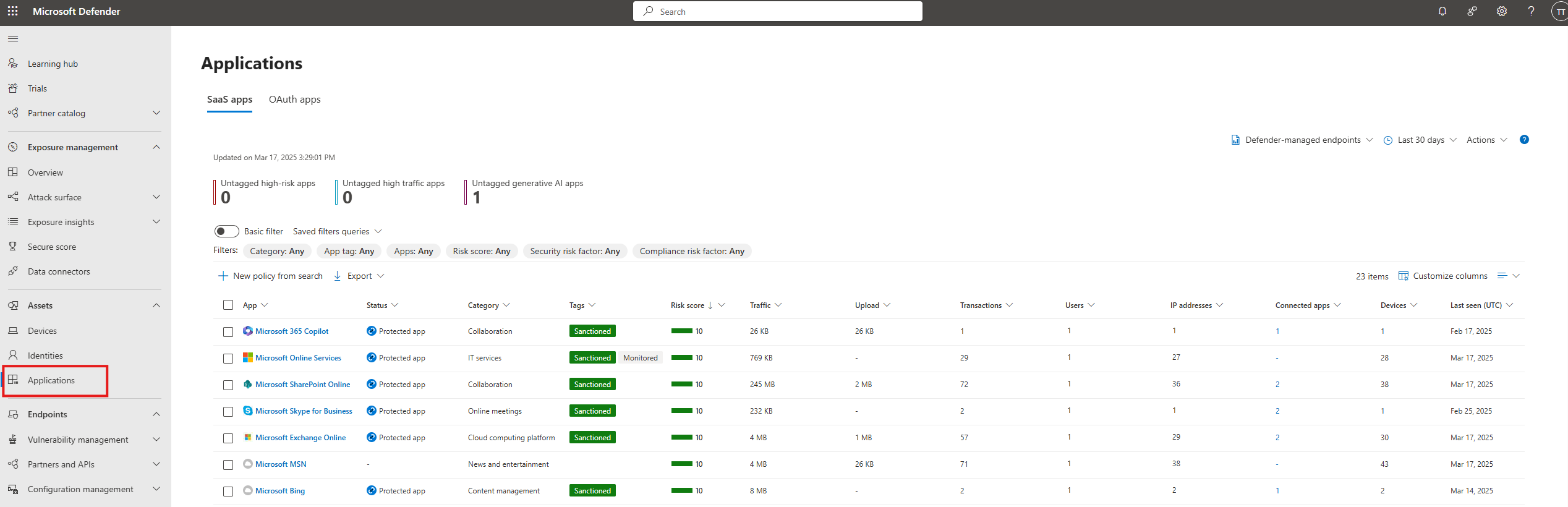
SaaS app details
At the top of Saas app tab, you can find actionable insights that allow you to quickly identify apps that need your attention and focus. The following details are displayed:
- Untagged high risk apps – Shows apps that aren't tagged and have a high-risk.
- Untagged high traffic apps – Shows apps that aren't tagged and have a high usage traffic (greater than 1 GB of data traffic).
- Untagged GenAI apps – Shows apps that aren't tagged and are Gen-AI based.
Sort and filter the SaaS apps list
You can use the sort and filter functionality to get a more focused view. These controls also help you assess and manage the SaaS applications in your organization.
| Filter | Description |
|---|---|
| App tags | Select Sanctioned, Unsanctioned, or create custom tags to use in a customized filter. |
| App | Filter for specific SaaS apps. |
| Categories | Filter according to app categories. |
| Compliance risk factor | Filter for specific standards, certifications, and compliance your app might comply with. For example: HIPAA, ISO 27001, SOC 2, and PCI-DSS. |
| Risk score | Filter by a specific risk score, such as to view only risky apps. |
| Security risk factor | Filter based on specific security measures, such as encryption at rest, multifactor authentication, and others. |
OAuth Apps
The OAuth apps tab provides visibility into Microsoft 365, Google workspace and Salesforce. Admins can review applications and decide to disable the apps or apply policies to monitor their behavior in their environment.
Actionable insights appear at the top of the OAuth apps tab. Select an insight to filter the list to the matching apps so you can quickly identify apps that need review.
| Insight | Description | Available for |
|---|---|---|
| New apps | Apps added in the last 30 days. | Microsoft 365 |
| Highly privileged apps | Apps with powerful permissions that allow them to access data or change important settings. For Salesforce, includes Connected Apps and External Client Apps (ECAs) whose granted permissions are classified as High. | Microsoft 365, Google Workspace, Salesforce (Preview) |
| Unused apps | Apps that haven't signed in within the last 90 days. For Salesforce, includes Connected Apps and ECAs that haven't been used for more than 90 days based on the last used date. | Microsoft 365, Salesforce (Preview) |
| Overprivileged apps | Apps with unused permissions. | Microsoft 365 |
| Apps from external unverified publishers | Apps that originated from an external unverified publisher tenant. | Microsoft 365 |
For more information on how to create app policies, see Create app policies in app governance.
The following image depicts the OAuth apps list:
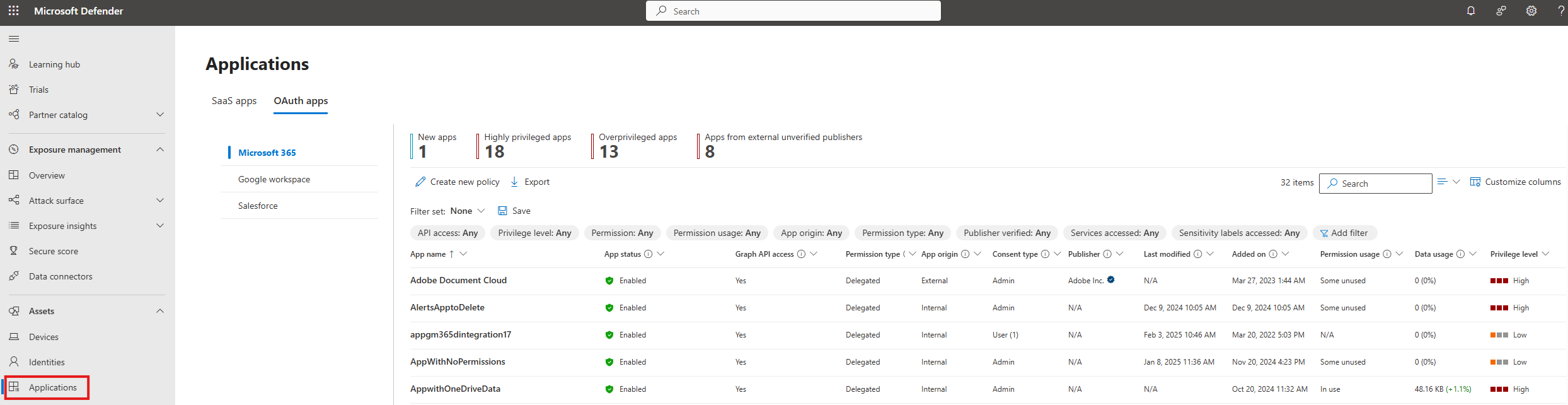
Sort and filter the OAuth apps list
You can apply the following filters to get a more focused view:
| Column name | Description |
|---|---|
| App name | The display name of the app as registered on Microsoft Entra ID, or the connected app name in Google Workspace or Salesforce. |
| App status | Shows whether the app is enabled or disabled, and if disabled by whom. |
| Graph API access | Shows whether the app has at least one Graph API permission. (Microsoft 365 only.) |
| Permission type | Shows whether the app has application (app only), delegated, or mixed permissions. (Microsoft 365 only.) |
| App origin | Shows whether the app originated within the tenant or was registered in an external tenant. |
| Consent type | Shows whether the app consent has been given at the user or the admin level, and the number of users whose data is accessible to the app. |
| Publisher | Publisher of the app and their verification status. |
| Last used | Date and time when the app last signed in. For Microsoft 365, tracking goes back to June 2022. For Salesforce, requires Salesforce real-time event monitoring (Preview) to be enabled. |
| Last modified | Date and time when registration information was last updated on Microsoft Entra ID. |
| Added on | Shows the date and time when the app was registered to Microsoft Entra ID and assigned a service principal. |
| Permission usage | Shows whether the app has any unused Graph API permissions in the last 90 days. (Microsoft 365 only.) |
| Data usage | Total data downloaded or uploaded by the app in the last 30 days. (Microsoft 365 only.) |
| Privilege level | The app's privilege level (High, Medium, or Low). Available for Microsoft 365, Google Workspace, and Salesforce. For Salesforce, requires Salesforce real-time event monitoring (Preview) to be enabled. |
| Certification | Indicates if an app meets stringent security and compliance standards set by Microsoft 365 or if its publisher has publicly attested to its safety. |
| Sensitivity label accessed | Sensitivity labels on content accessed by the app. (Microsoft 365 only.) |
| Service accessed | Microsoft 365 services accessed by the app. |
| App ID | The app's unique identifier. For Salesforce, the App ID lets you pivot from a Salesforce threat detection alert directly to the matching OAuth app page. |
| Type | For Salesforce, indicates whether the app is a Connected App or an External Client App (ECA). Use the Type filter to narrow the Salesforce inventory. |
Tip
To see all columns, you might need to do one or more of the following steps:
- Horizontally scroll in your web browser.
- Narrow the width of appropriate columns.
- Zoom out in your web browser.
Next steps
Related content
- View the Identity inventory
- Investigate a non-human identity
- View your app details with app governance
- Create app policies in app governance
If you run into any problems, we're here to help. To get assistance or support for your product issue, please open a support ticket.