Nota
L'accés a aquesta pàgina requereix autorització. Podeu provar d'iniciar la sessió o de canviar els directoris.
L'accés a aquesta pàgina requereix autorització. Podeu provar de canviar els directoris.
Cuando se usa un enlace con columnas, una aplicación enlaza una o dos matrices, o en algunos casos tres, matrices a cada columna para la que se van a devolver los datos. La primera matriz contiene los valores de datos y la segunda matriz contiene búferes de longitud o indicador. Los indicadores y los valores de longitud se pueden almacenar en búferes independientes estableciendo los campos de descriptor de SQL_DESC_INDICATOR_PTR y SQL_DESC_OCTET_LENGTH_PTR en valores diferentes; si esto se hace, se enlaza una tercera matriz. Cada matriz contiene tantos elementos como hay filas en el conjunto de filas.
La aplicación declara que usa un enlace en orden de columna con el atributo de instrucción SQL_ATTR_ROW_BIND_TYPE, que determina el tipo de enlace para los búferes de conjunto de filas en lugar de los búferes del conjunto de parámetros. El controlador devuelve los datos de cada fila en elementos sucesivos de cada matriz. La siguiente ilustración muestra cómo funciona la vinculación por columnas.
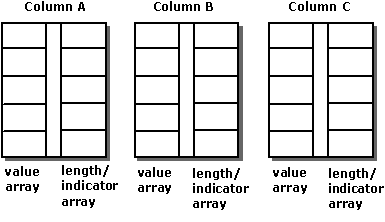
Por ejemplo, el código siguiente enlaza matrices de 10 elementos a las columnas OrderID, SalesPerson y Status:
#define ROW_ARRAY_SIZE 10

SQLUINTEGER    OrderIDArray[ROW_ARRAY_SIZE], NumRowsFetched;
SQLCHAR        SalesPersonArray[ROW_ARRAY_SIZE][11],
               StatusArray[ROW_ARRAY_SIZE][7];
SQLINTEGER     OrderIDIndArray[ROW_ARRAY_SIZE],
               SalesPersonLenOrIndArray[ROW_ARRAY_SIZE],
               StatusLenOrIndArray[ROW_ARRAY_SIZE];
SQLUSMALLINT   RowStatusArray[ROW_ARRAY_SIZE], i;
SQLRETURN      rc;
SQLHSTMT       hstmt;

// Set the SQL_ATTR_ROW_BIND_TYPE statement attribute to use
// column-wise binding. Declare the rowset size with the
// SQL_ATTR_ROW_ARRAY_SIZE statement attribute. Set the
// SQL_ATTR_ROW_STATUS_PTR statement attribute to point to the
// row status array. Set the SQL_ATTR_ROWS_FETCHED_PTR statement
// attribute to point to cRowsFetched.
SQLSetStmtAttr(hstmt, SQL_ATTR_ROW_BIND_TYPE, SQL_BIND_BY_COLUMN, 0);
SQLSetStmtAttr(hstmt, SQL_ATTR_ROW_ARRAY_SIZE, ROW_ARRAY_SIZE, 0);
SQLSetStmtAttr(hstmt, SQL_ATTR_ROW_STATUS_PTR, RowStatusArray, 0);
SQLSetStmtAttr(hstmt, SQL_ATTR_ROWS_FETCHED_PTR, &NumRowsFetched, 0);

// Bind arrays to the OrderID, SalesPerson, and Status columns.
SQLBindCol(hstmt, 1, SQL_C_ULONG, OrderIDArray, 0, OrderIDIndArray);
SQLBindCol(hstmt, 2, SQL_C_CHAR, SalesPersonArray, sizeof(SalesPersonArray[0]),
            SalesPersonLenOrIndArray);
SQLBindCol(hstmt, 3, SQL_C_CHAR, StatusArray, sizeof(StatusArray[0]),
            StatusLenOrIndArray);

// Execute a statement to retrieve rows from the Orders table.
SQLExecDirect(hstmt, "SELECT OrderID, SalesPerson, Status FROM Orders", SQL_NTS);

// Fetch up to the rowset size number of rows at a time. Print the actual
// number of rows fetched; this number is returned in NumRowsFetched.
// Check the row status array to print only those rows successfully
// fetched. Code to check if rc equals SQL_SUCCESS_WITH_INFO or
// SQL_ERROR not shown.
while ((rc = SQLFetchScroll(hstmt,SQL_FETCH_NEXT,0)) != SQL_NO_DATA) {
   for (i = 0; i < NumRowsFetched; i++) {
      if ((RowStatusArray[i] == SQL_ROW_SUCCESS) ||
            (RowStatusArray[i] == SQL_ROW_SUCCESS_WITH_INFO)) {
         if (OrderIDIndArray[i] == SQL_NULL_DATA)
            printf(" NULL      ");
         else
            printf("%d\t", OrderIDArray[i]);
         if (SalesPersonLenOrIndArray[i] == SQL_NULL_DATA)
            printf(" NULL      ");
         else
            printf("%s\t", SalesPersonArray[i]);
         if (StatusLenOrIndArray[i] == SQL_NULL_DATA)
            printf(" NULL\n");
         else
            printf("%s\n", StatusArray[i]);
      }
   }
}

// Close the cursor.
SQLCloseCursor(hstmt);