Poznámka:
Přístup k této stránce vyžaduje autorizaci. Můžete se zkusit přihlásit nebo změnit adresáře.
Přístup k této stránce vyžaduje autorizaci. Můžete zkusit změnit adresáře.
Recently i was working with an app developer who’s using Microsoft Graph REST API in their application. They try to query contacts for Exchange 2016 CU5 on premises in a hybrid + Office 365 environment (they had one single mailbox setup in Office 365).
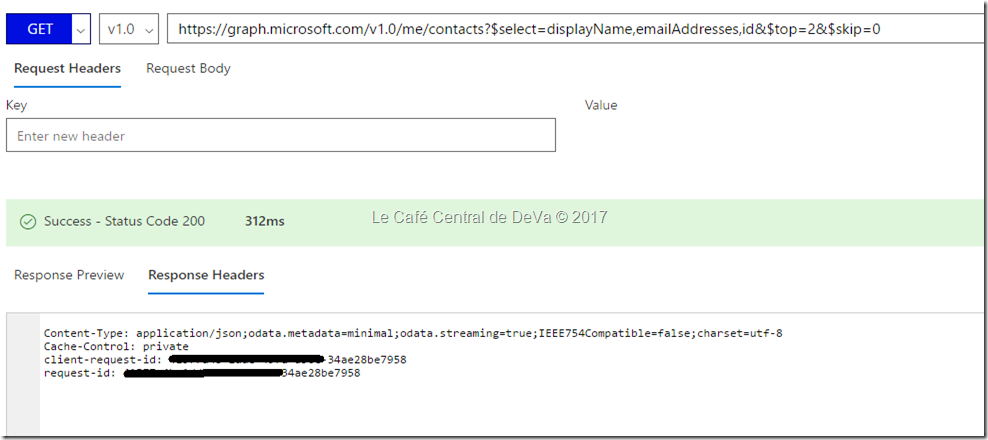
When they tested the Graph API query with $select, $top, $skips commands they lead to failure. Here is the related query: https://graph.microsoft.com/v1.0/me/contacts?$select=displayName,emailAddresses,id&$top=2&$skip=0
I tested the query against my Office 365 account and it works. But on Hybrid scenario (Exchange 2016 on premises + Office 365) account it completely ignores the $select $top $skip commands, returns all contacts instead of just the top 2 and doesn't filter out the data like it should.
In addition, we see Status code 200 when we ran the same query from Office 365 GraphExplorer (for the same scenario):
Based on this, we worked internally, investigated, fixed and it was rolled out. The issue is fixed now 
So now you can test the above Microsoft Graph API query in Hybrid (Office 365 + Exchange Server 2016 CU5) scenario and it works as expected.
Comments
- Anonymous
August 26, 2017
This information very helpful for work and the gain the information.Thank you- Anonymous
August 26, 2017
Thanks for the feedback. Glad that the article helped :)
- Anonymous
- Anonymous
September 02, 2017
Glad the issue is fixed now..!!- Anonymous
September 02, 2017
Thanks :)
- Anonymous
- Anonymous
September 28, 2017
The comment has been removed- Anonymous
October 05, 2017
Thanks for your compliments. Glad the post/site helped :)
- Anonymous