Poznámka:
Přístup k této stránce vyžaduje autorizaci. Můžete se zkusit přihlásit nebo změnit adresáře.
Přístup k této stránce vyžaduje autorizaci. Můžete zkusit změnit adresáře.
At Ignite 2025, Microsoft announced that Security Copilot agents will be directly built into the flow of work for security teams using Microsoft Defender, Microsoft Entra, Microsoft Intune, and Microsoft Purview.
We introduced dozen new agents across these products to bring agentic defense across workflows, enabling autonomous and proactive protection.

To make the agents easily accessible and help security teams get started more quickly, we're excited to announce that Security Copilot will be available to all eligible Microsoft 365 E5 and E7 customers.
Rollout started November 18, 2025, for existing Security Copilot customers with Microsoft 365 E5 as of November 18, 2025, and will continue in the upcoming months for all eligible Microsoft 365 E5 and E7 customers. For more information on what's included, see What capacity is included?.
Microsoft 365 E5 and E7 customers who already have Security Copilot can get started today with:
- Security operations in Microsoft Defender: https://security.microsoft.com
- Data security in Microsoft Purview: https://purview.microsoft.com
- Identity and access in Microsoft Entra: https://entra.microsoft.com
- Endpoint management in Microsoft Intune: https://intune.microsoft.com
All other Microsoft 365 E5 and E7 customers can get access to Security Copilot as part of a phased rollout in the upcoming months. Read the FAQ for more information.
FAQ
When will Security Copilot inclusion in Microsoft 365 E5 and E7 be available?
Security Copilot will be included for all eligible Microsoft 365 E5 and E7 customers in the upcoming months - bringing agentic AI in the daily workflow.
Rollout started November 18, 2025 for existing Security Copilot Microsoft 365 E5 customers and will continue in the upcoming months for all eligible Microsoft 365 E5 and E7 customers.
Is Security Copilot available as part of Microsoft 365 E7 license?
Yes, Security Copilot is included for all Microsoft 365 E5 and E7 customers. Rollout started November 18, 2025 for existing Security Copilot Microsoft 365 E5 customers and will continue in the upcoming months for all Microsoft 365 E5 and E7 customers.
Do customers need to take any steps to configure Security Copilot when they're enabled through Microsoft 365 E5 and E7?
Eligible Microsoft 365 E5 and E7 customers who were notified of their eligibility will automatically receive Security Copilot through zero click activation. For eligible customers, Security Copilot is provisioned automatically as part of their subscription. This means no Azure setup is needed or capacity provisioning required. Eligible customers can start using Security Copilot right away.
For more information, see Understand how Security Copilot is auto provisioned for Microsoft 365 E5 and E7.
What configuration settings are preselected during auto provisioning?
- The geography where Customer Data (such as customer prompts and responses) is stored
- The GPU processing location
- Customer Data sharing preferences (turned off by default)
- Security Copilot access to data from Microsoft 365 services (turned on by default)
- Default roles that grant Security Copilot owner and contributor access
For more information on auto provisioning, see Understand how Security Copilot is auto provisioned for Microsoft 365 E5 and E7.
How does Security Copilot use Microsoft 365 data?
After enablement, Security Copilot can process Microsoft 365 Customer Data from supported products in order to generate security insights and responses to user prompts.
As part of this experience:
- Relevant Customer Data may be copied, processed, and stored by Security Copilot to provide responses.
- Security Copilot uses this data only to deliver the service and in accordance with Microsoft’s product terms and data protection commitments.
- Access is scoped to the products and permissions your organization has configured.
For more information on admin control and choices, see Understand how Security Copilot is auto provisioned for Microsoft 365 E5 and E7.
What roles can access Security Copilot?
If Security Copilot is auto-provisioned for your organization, these default roles inherit the Security Copilot owner and contributor access. For more information, see default roles.
Licensing and capacity
What capacity is included?
Customers with Microsoft 365 E5 and E7 will have 400 Security Compute Units (SCU) each month for every 1,000 paid user license, up to 10,000 SCUs each month at no additional cost.
This amount scales by user license count, including for customers with fewer than 1,000 user licenses. This included capacity is expected to support typical scenarios as mentioned.
- Example 1: An organization with 400 user licenses gets 160 SCUs/month.
- Example 2: An organization with 4,000 user licenses gets 1,600 SCUs/month.
Important
Accessing Security Copilot through a Microsoft 365 E5 and E7 license uses the inclusion capacity model. For more information on the capacity models, see Understand Security Copilot Compute Units and capacity.
Your tenant is assigned a Default Security Copilot Capacity.
Default Security Copilot Capacity is the automatically created inclusion capacity that appears in your tenant when Security Copilot inclusion is enabled through Microsoft 365 E5 and E7.
- It's created automatically with a default workspace
- It represents tenant‑wide Security Copilot compute
- It cannot be modified
- It's shared across all users and experiences in the tenant
- It isn't billed hourly (SCUs come from the monthly Microsoft 365 E5 and E7 inclusion bucket)
- UI cost values shown for this capacity are informational only, not charges
What is a Security Compute Unit?
A Security Compute Unit is a unit measure of the compute power to run Security Copilot workloads for AI capabilities within the standalone and embedded experiences.
For more information, see Understand Security Copilot Compute Units and capacity.
Is there an example of SCU consumption under current provisioned vs inclusion models?
Let's assume an enterprise company has provisioned five SCUs for each hour under the current billing model. Within a two-hour period, the customer runs the following scenarios:
- Prompt Execution: three SCUs over 40 seconds in the first hour
- Incident Summarization: 0.5 SCU over 10 seconds in the second hour
Total usage: 3.5 SCUs across two hours. However, because billing is based on provisioned capacity, the customer is charged for 5 SCUs every hour, resulting in 10 SCUs billed for two hours.
With the inclusion model, which provides 400 SCUs per 1,000 user licenses, there's no hourly provisioned capacity. Instead, the same two scenarios would deduct 3.5 SCUs from the monthly SCU allocation.
Will Security Compute Unit (SCU) allocation reset monthly or roll over if unused?
SCU allocations reset monthly and don't roll over if unused. Customers can't carry forward unused SCUs to future months.
Eligibility and access requirements
Who is eligible for Security Copilot inclusion?
All Microsoft 365 E5 and E7 customers are eligible.
How do I know if my tenant is enabled for the Security Copilot inclusion?
You can confirm that your tenant is enabled for the Microsoft 365 E5 and E7 inclusion in several ways:
You receive notifications in the Microsoft 365 admin center portal. The roles that receive notifications relevant to their workload are as follows:
- Global Administrator
- Message Center Reader
- Security Admin (Microsoft Defender and Microsoft Entra)
- Purview Compliance Admin (Microsoft Purview)
- Intune Admin (Microsoft Intune)
You see in-product banners in Microsoft Defender, Purview, Entra, Intune, or the standalone Security Copilot portal.
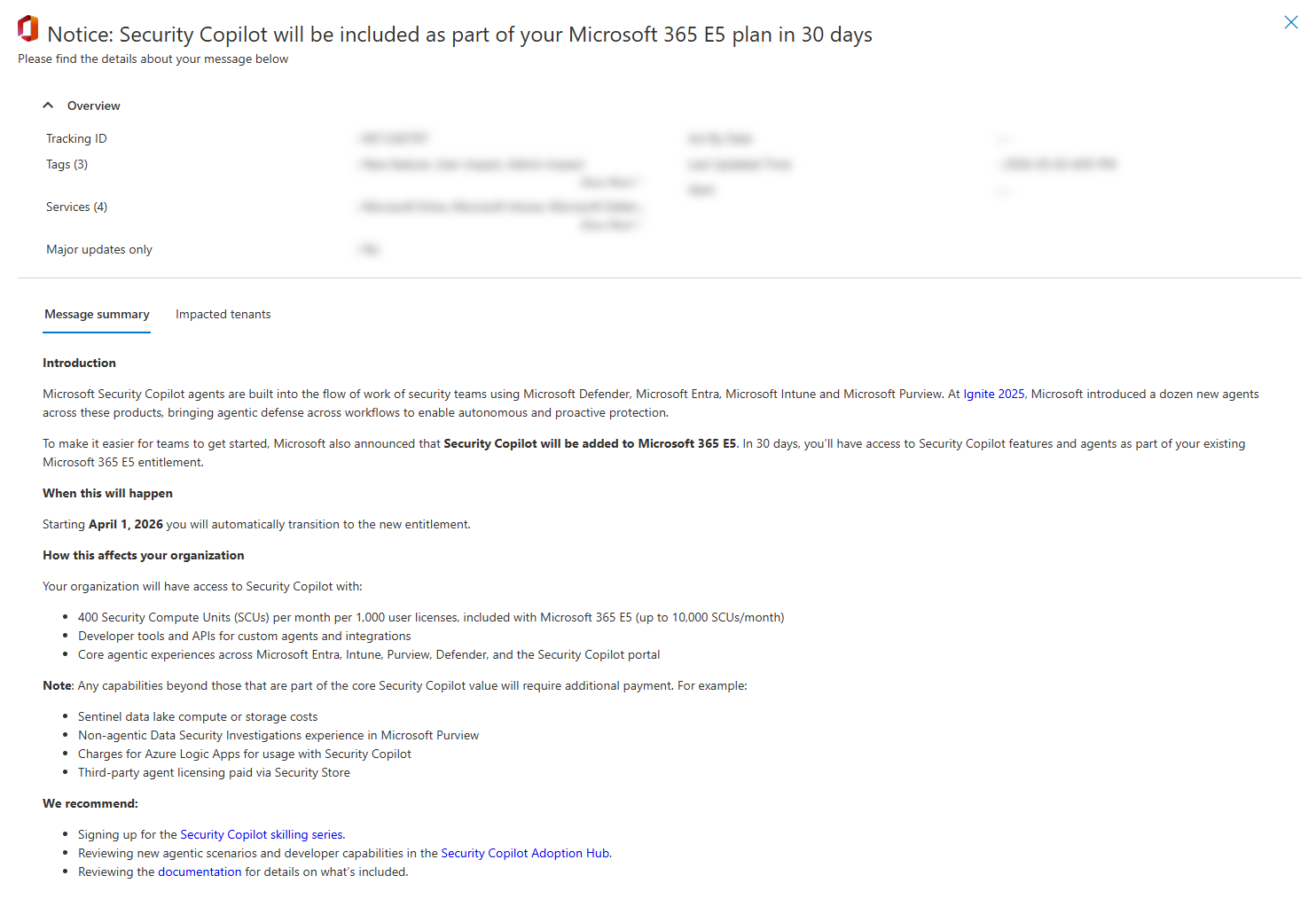
What do the notifications look like?
The following image is an example of the message center post:
As an existing Security Copilot customer with already provisioned capacity, should I delete my current capacity now that I qualify for Security Copilot inclusion with Microsoft 365 E5 and E7?
No. If you're an existing customer, we recommend that you don't delete the Security Copilot capacity you previously provisioned. Retain the capacity to ensure that you're able to use the product.
How do customers prepare their organization and tenants to configure Security Copilot?
Security Copilot is automatically provisioned for all eligible Microsoft 365 E5 and E7 tenants. No Azure setup or consent flows are required.
Customers see in-product banners and guided onboarding to help them get started. No manual provisioning of SCUs is needed.
Is there a minimum Microsoft 365 E5 and E7 user license count consumption commitment to qualify for the Security Copilot inclusion?
No. All customers with Microsoft 365 E5 and E7 licenses qualify for the offer, regardless of user license count.
Is Security Copilot still available to customers without qualifying Microsoft 365 E5 and E7 licenses?
Yes. Customers without Microsoft 365 E5 and E7 licenses can continue to access Security Copilot using the existing pricing model. Learn more about Security Copilot pricing.
Are Microsoft Sentinel customers without Microsoft 365 E5 and E7 licenses excluded from eligibility?
Yes. Microsoft Sentinel customers without Microsoft 365 E5 and E7 licenses aren't eligible.
Microsoft 365 E5 and E7 eligible customers get Security Copilot at no additional cost as part of their license.
Usage and billing
What happens if a customer exceeds the included SCUs?
Usage beyond the allocated SCUs will be throttled at a future date. Customers have an option to scale beyond the allocated amount at $6 USD for each SCU on a pay-as-you go basis at that time. Customers will get a 30-day advanced notification when this option is available.
Do customers need to provision SCUs separately if they're eligible for this offer?
No. Eligible customers don't need to manually provision SCUs.
Do customers need to manage other licenses or setup?
No. Security Copilot is ready to use inside the tools teams already rely on, with no action needed and guided onboarding for immediate value.
Features and capabilities
What capabilities are included?
Core Experiences: All chat, promptbook, and agentic scenarios across Microsoft Entra, Microsoft Intune, Microsoft Purview, Microsoft Defender, and the standalone Security Copilot portal. Additionally, customers with Microsoft 365 E5 and E7 who also use Microsoft Sentinel can apply their included SCU allocation to run Security Copilot scenarios in Microsoft Sentinel.
Developer Experiences: Tools such as Agent Builder and APIs for creating custom agents, promptbooks, and integrations via MCP and Graph APIs.
Partner-built agents: SCU costs included until further notice.
What isn't covered as part of this inclusion?
Any capabilities beyond those that are part of the core Security Copilot value require additional payment.
For example:
- Microsoft Sentinel data lake compute or storage costs.
- Non-agentic Data Security Investigations experience in Microsoft Purview.
- Charges for Azure Logic Apps for usage with Security Copilot.
- Partner-built agent licensing paid through Security Store.
- Some agents may require prerequisites that involve products outside of Microsoft 365 E5 and E7, which aren't covered.
Are Partner-built agents included?
Partner-built agents may require a separate license from the partner (purchased via Security Store); SCU costs for third-party agents are included, but this might change in the future as we roll out Security Copilot inclusion more broadly.
What can customers do with Security Copilot?
Security Copilot supports various use cases, such as:
SOC teams can simplify phishing triage and incident response with agents that classify alerts, summarize threats, and guide remediation.
Identity teams can strengthen access controls and reduce risk with agents that optimize Conditional Access policies and automate access reviews.
Data security teams can strengthen data protection and compliance with agents built to help triage alerts and discover sensitive data.
IT admins can better maintain secure, compliant endpoints more easily, with agents that help with tasks like assessing changes before they impact productivity.
For all other use cases, you can build custom Security Copilot agents, tailored to your organization's unique workflows.
Read more about Security Copilot use cases in the Adoption Hub.
Product experience
Where can customers track their usage?
Customers are able to track their usage in the in-product usage dashboard in the Security Copilot standalone portal. For more information, see Monitor security compute units use.
What is the in-product experience for customers?
Customers are presented with a recommendation card that suggests high-value use cases for using Security Copilot in a particular product experience. With the provided capacity, customers can use Security Copilot agents to automate tasks like user-submitted phish triage, alert triage, access reviews, and vulnerability remediation.
Will Microsoft Security Copilot agents be automatically enabled?
No, a customer's organization is required to set up and deploy agents in the relevant standalone or embedded experiences. For more information, see Manage agents.
Are there other Security Copilot Integration Experiences and Configurations available?
Security Copilot integrates seamlessly with multiple Microsoft 365 and Microsoft security products that your organization has licensed. This integration allows users to query information directly from those products in the Security Copilot standalone and embedded experiences. Copilot copies, processes, and stores this data.
Customers can choose not to share their Microsoft 365 service data with Copilot in the Owner settings page. However, the organization won't be able to use Copilot with Microsoft 365 products such as like Microsoft Purview.
Special scenarios
What does this mean for Managed Service Providers (MSPs)?
If an MSP after November 18, 2025 deploys Security Copilot for eligible customers that are either Microsoft 365 E5 and E7 customers, then that customer also is no longer separately billed for Security Copilot and can continue to use all Security Copilot capabilities and experiences.