Poznámka:
Přístup k této stránce vyžaduje autorizaci. Můžete se zkusit přihlásit nebo změnit adresáře.
Přístup k této stránce vyžaduje autorizaci. Můžete zkusit změnit adresáře.
platí pro: SQL Server
Tento článek popisuje způsoby, jak identifikovat nezdravá rozšíření, která nejsou správně nainstalovaná, správně spuštěná nebo nejsou připojená k Azure.
Identifikovat nezdravá rozšíření
Použití integrovaného řídicího panelu stavu rozšíření na portálu Azure
Pomocí řídicího panelu stavu rozšíření built-in na portálu Azure můžete zobrazit stav všech nasazených rozšíření Azure pro SQL Server.
Spropitné
Pomocí tohoto souboru vytvořte vlastní řídicí panel z úložiště sql-server-samples GitHub: Arc-enabled SQL Server Health.json.
Dotazování rozšíření, která nejsou v pořádku, pomocí Azure Resource Graph
Pomocí Azure Resource Graph identifikujte stav rozšíření Azure pro SQL Server na serverech s podporou Azure Arc.
Spropitné
Pokud ještě nejste obeznámeni, přečtěte si informace o Azure Resource Graph:
Tento dotaz vrátí instance SQL Server na serverech s nainstalovanými rozšířeními, ale které nejsou ve zdravém stavu.
resources
| where type == "microsoft.hybridcompute/machines/extensions"
| where properties.type in ("WindowsAgent.SqlServer", "LinuxAgent.SqlServer")
| extend targetMachineName = tolower(tostring(split(id, '/')[8])) // Extract the machine name from the extension's id
| join kind=leftouter (
    resources
    | where type == "microsoft.hybridcompute/machines"
    | project machineId = id, MachineName = name, subscriptionId, LowerMachineName = tolower(name), resourceGroup , MachineStatus= properties.status , MachineProvisioningStatus= properties.provisioningState, MachineErrors = properties.errorDetails //Project relevant machine health information.
) on $left.targetMachineName == $right.LowerMachineName and $left.resourceGroup == $right.resourceGroup and $left.subscriptionId == $right.subscriptionId // Join Based on MachineName in the id and the machine's name, the resource group, and the subscription. This join allows us to present the data of the machine as well as the extension in the final output.
| extend statusExpirationLengthRange = 3d // Change this value to change the acceptable range for the last time an extension should have reported its status.
| extend startDate = startofday(now() - statusExpirationLengthRange), endDate = startofday(now()) // Get the start and end position for the given range.
| extend extractedDateString = extract("timestampUTC : (\\d{4}\\W\\d{2}\\W\\d{2})", 1, tostring(properties.instanceView.status.message)) // Extracting the date string for the LastUploadTimestamp. Is empty if none is found.
| extend extractedDateStringYear = split(extractedDateString, '/')[0], extractedDateStringMonth = split(extractedDateString, '/')[1], extractedDateStringDay = split(extractedDateString, '/')[2] // Identifying each of the parts of the date that was extracted from the message.
| extend extractedDate = todatetime(strcat(extractedDateStringYear,"-",extractedDateStringMonth,"-",extractedDateStringDay,"T00:00:00Z")) // Converting to a datetime object and rewriting string into ISO format because todatetime() does not work using the previous format.
| extend isNotInDateRange = not(extractedDate >= startDate and extractedDate <= endDate) // Created bool which is true if the date we extracted from the message is not within the specified range. This bool will also be true if the date was not found in the message.
| where properties.instanceView.status.message !contains "SQL Server Extension Agent: Healthy" // Begin searching for unhealthy extensions using the following 1. Does extension report being healthy. 2. Is last upload within the given range. 3. Is the upload status in an OK state. 4. Is provisioning state not in a succeeded state.
    or isNotInDateRange
    or properties.instanceView.status.message !contains "uploadStatus : OK"
    or properties.provisioningState != "Succeeded"
    or MachineStatus != "Connected"
| extend FailureReasons = strcat( // Makes a String to list all the reason that this resource got flagged for
        iif(MachineStatus != "Connected",strcat("- Machine's status is ", MachineStatus," -"),"") ,
        iif(MachineErrors != "[]","- Machine reports errors -", ""),
        iif(properties.instanceView.status.message !contains "SQL Server Extension Agent: Healthy","- Extension reported unhealthy -",""),
        iif(isNotInDateRange,"- Last upload outside acceptable range -",""),
        iif(properties.instanceView.status.message !contains "uploadStatus : OK","- Upload status is not reported OK -",""),
        iif(properties.provisioningState != "Succeeded",strcat("- Extension provisiong state is ", properties.provisioningState," -"),"")
    )
| extend RecommendedAction = //Attempt to Identify RootCause based on information gathered, and point customer to what they should investigate first.
    iif(MachineStatus == "Disconnected", "Machine is disconnected. Please reconnect the machine.",
        iif(MachineStatus == "Expired", "Machine cert is expired. Go to the machine on the Azure portal for more information on how to resolve this issue.",
            iif(MachineStatus != "Connected", strcat("Machine status is ", MachineStatus,". Investigate and resolve this issue."),
                iif(MachineProvisioningStatus != "Succeeded", strcat("Machine provisioning status is ", MachineProvisioningStatus, ". Investigate and resolve machine provisioning status"),
                    iff(MachineErrors != "[]", "Machine is reporting errors. Investigate and resolve machine errors",
                        iif(properties.provisioningState != "Succeeded", strcat("Extension provisioning status is ", properties.provisioningState,". Investigate and resolve extension provisioning state."),
                            iff(properties.instanceView.status.message !contains "SQL Server Extension Agent:" and properties.instanceView.status.message contains "SQL Server Extension Agent Deployer", "SQL Server extension employer ran. However, SQL Server extension seems to not be running. Verify that the extension is currently running.",
                                iff(properties.instanceView.status.message !contains "uploadStatus : OK" or isNotInDateRange or properties.instanceView.status.message !contains "SQL Server Extension Agent: Healthy", "Extension reported as unhealthy. View FailureReasons and LastExtensionStatusMessage for more information as to the cause of the failure.",
                                    "Unable to recommend actions. Please view FailureReasons."
                                )
                            )
                        )
                    )
                )
            )
        )
    )
| project ID = id, MachineName, ResourceGroup = resourceGroup, SubscriptionID = subscriptionId, Location = location, RecommendedAction, FailureReasons, LicenseType = properties.settings.LicenseType,
    LastReportedExtensionHealth = iif(properties.instanceView.status.message !contains "SQL Server Extension Agent: Healthy", "Unhealthy", "Healthy"),
    LastExtensionUploadTimestamp = iif(indexof(properties.instanceView.status.message, "timestampUTC : ") > 0,
        substring(properties.instanceView.status.message, indexof(properties.instanceView.status.message, "timestampUTC : ") + 15, 10),
        "no timestamp"),
    LastExtensionUploadStatus = iif(indexof(properties.instanceView.status.message, "uploadStatus : OK") > 0, "OK", "Unhealthy"),
    ExtensionProvisioningState = properties.provisioningState,
    MachineStatus, MachineErrors, MachineProvisioningStatus,MachineId = machineId,
    LastExtensionStatusMessage = properties.instanceView.status.message
Pokud chcete identifikovat možné problémy, zkontrolujte hodnotu ve sloupci RecommendedAction nebo Důvody selhání. Sloupec RecommendedAction poskytuje možné první kroky k vyřešení problému nebo nápovědy k tomu, co se má zkontrolovat jako první. Ve sloupci Důvody selhání jsou uvedeny důvody, proč byl prostředek považován za nezpůsobilý. Nakonec zkontrolujte LastExtensionStatusMessage, abyste viděli poslední zprávu nahlášenou agentem.
Doporučení
| Doporučená akce | Podrobnosti o akci |
|---|---|
| Platnost certifikátu počítače vypršela. Další informace o řešení tohoto problému najdete na počítači na portálu Azure. |
Počítač s podporou Arc musí být znovu onboardován do služby Arc, protože vypršela platnost certifikátu použitého k ověření Azure. Stav počítače Arc je Expired na portálu Azure. Agenta můžete odinstalovat a pak znovu připojit. Pokud se znovu připojujete, nemusíte na portálu odstraňovat prostředky SQL Serveru podporované Arcem. Rozšíření SQL se opět automaticky nainstaluje, pokud je automatické onboardování povolené (výchozí). |
| Počítač je odpojený. Znovu připojte počítač. |
Stroj Arc je v state = Disconnected. Tento stav může být z různých důvodů:Agent počítače připojený ke službě Arc je zastavený, zakázaný nebo neustále dochází k chybovému ukončení nebo Připojení je blokováno mezi agentem a Azure. Zkontrolujte stav služeb a démonů připojených k Arc a ujistěte se, že jsou povolené a spuštěné. Zkontrolujtepřipojení . Řešte potíže s agentem pomocí podrobného záznamu. |
| Rozšíření bylo hlášeno jako nezdravé. Zobrazte FailureReasons a LastExtensionStatusMessage pro více informací o příčině selhání. Poslední nahrávání mimo přijatelný rozsah (během posledních tří dnů) |
Zkontrolujte sloupec LastExtensionUploadTimestamp. Pokud je to No timestamp, nikdy nenahlásil inventář ani data o využití pro Azure.
Řešení potíží s připojením ke službě pro zpracování dat a koncovým bodům telemetrie Pokud je poslední nahrávání mimo přijatelný rozsah (během posledních tří dnů) a všechno ostatní vypadá v pořádku, například LastExtensionUploadStatus, ExtensionProvisioningState a MachineStatus, je možné, že se zastaví rozšíření Azure pro službu nebo démona SQL Server. Zjistěte, proč je zastavený, a spusťte ho znovu. Zkontrolujte LastExtensionStatusMessage pro jakékoli další indicie o problému. |
| Stav zřizování rozšíření je selhalo. Prozkoumejte a vyřešte stav nastavení rozšíření. |
Buď počáteční instalace rozšíření SQL nebo aktualizace selhala.Řešení potíží s rozšířením Azure pro nasazení SQL Serveru. Zkontrolujte hodnotu v LastExtensionStatusMessage. |
| Stav nahrávání není hlášený v pořádku. | Zkontrolujte sloupec LastExtensionMessage na řídicím panelu a podívejte se na hodnotu uploadStatus a hodnotu uploadMessage (pokud existuje v závislosti na verzi). Hodnota uploadStatus je obvykle kód chyby HTTP. Projděte si Řešení chybových kódů. UploadMessage může obsahovat konkrétnější informace. Řešení potíží s připojením ke službě pro zpracování dat a koncovým bodům telemetrie |
| Stav zřizování rozšíření je aktualizace nebo Stav zřizování rozšíření je Vytváření nebo Stav zřizování rozšíření je selhalo nebo Stav zřizování rozšíření je Odstranění |
Pokud dané rozšíření zůstane v jednom z těchto stavů déle než 30 minut, pravděpodobně nastanou potíže s provisioningem. Odinstalujte rozšíření a znovu ho nainstalujte pomocí rozhraní příkazového řádku nebo portálu. Pokud problém přetrvává, zkontrolujte protokoly nasazení a rozšíření. Pokud se vytvoření rozšíření nezdaří, ověřte, že je agent připojený a že jsou spuštěné přidružené služby agenta . Pokud se odstranění nezdaří, zkuste agenta odinstalovat a v případě potřeby odstranit prostředek počítače Arc na portálu a pak ho znovu nasadit. Agenta můžete odinstalovat a pak znovu připojit. |
Identifikace rozšíření, které není v pořádku (PowerShell)
Tento příklad se spustí v PowerShellu. Příklad vrátí stejný výsledek jako předchozí dotaz, ale prostřednictvím skriptu PowerShellu.
# PowerShell script to execute an Azure Resource Graph query using Azure CLI
# where the extension status is unhealthy or the extension last upload time isn't in this month or the previous month.

# Requires the Az.ResourceGraph PowerShell module

# Login to Azure if needed
#az login

# Define the Azure Resource Graph query
$query = @"
resources
| where type == "microsoft.hybridcompute/machines/extensions"
| where properties.type in ("WindowsAgent.SqlServer", "LinuxAgent.SqlServer")
| extend targetMachineName = tolower(tostring(split(id, '/')[8])) // Extract the machine name from the extension's id
| join kind=leftouter (
    resources
    | where type == "microsoft.hybridcompute/machines"
    | project machineId = id, MachineName = name, subscriptionId, LowerMachineName = tolower(name), resourceGroup , MachineStatus= properties.status , MachineProvisioningStatus= properties.provisioningState, MachineErrors = properties.errorDetails //Project relevant machine health information.
) on $left.targetMachineName == $right.LowerMachineName and $left.resourceGroup == $right.resourceGroup and $left.subscriptionId == $right.subscriptionId // Join Based on MachineName in the id and the machine's name, the resource group, and the subscription. This join allows us to present the data of the machine as well as the extension in the final output.
| extend statusExpirationLengthRange = 3d // Change this value to change the acceptable range for the last time an extension should have reported its status.
| extend startDate = startofday(now() - statusExpirationLengthRange), endDate = startofday(now()) // Get the start and end position for the given range.
| extend extractedDateString = extract("timestampUTC : (\\d{4}\\W\\d{2}\\W\\d{2})", 1, tostring(properties.instanceView.status.message)) // Extracting the date string for the LastUploadTimestamp. Is empty if none is found.
| extend extractedDateStringYear = split(extractedDateString, '/')[0], extractedDateStringMonth = split(extractedDateString, '/')[1], extractedDateStringDay = split(extractedDateString, '/')[2] // Identifying each of the parts of the date that was extracted from the message.
| extend extractedDate = todatetime(strcat(extractedDateStringYear,"-",extractedDateStringMonth,"-",extractedDateStringDay,"T00:00:00Z")) // Converting to a datetime object and rewriting string into ISO format because todatetime() does not work using the previous format.
| extend isNotInDateRange = not(extractedDate >= startDate and extractedDate <= endDate) // Created bool which is true if the date we extracted from the message is not within the specified range. This bool will also be true if the date was not found in the message.
| where properties.instanceView.status.message !contains "SQL Server Extension Agent: Healthy" // Begin searching for unhealthy extensions using the following 1. Does extension report being healthy. 2. Is last upload within the given range. 3. Is the upload status in an OK state. 4. Is provisioning state not in a succeeded state.
    or isNotInDateRange
    or properties.instanceView.status.message !contains "uploadStatus : OK"
    or properties.provisioningState != "Succeeded"
    or MachineStatus != "Connected"
| extend FailureReasons = strcat( // Makes a String to list all the reason that this resource got flagged for
        iif(MachineStatus != "Connected",strcat("- Machine's status is ", MachineStatus," -"),"") ,
        iif(MachineErrors != "[]","- Machine reports errors -", ""),
        iif(properties.instanceView.status.message !contains "SQL Server Extension Agent: Healthy","- Extension reported unhealthy -",""),
        iif(isNotInDateRange,"- Last upload outside acceptable range -",""),
        iif(properties.instanceView.status.message !contains "uploadStatus : OK","- Upload status is not reported OK -",""),
        iif(properties.provisioningState != "Succeeded",strcat("- Extension provisiong state is ", properties.provisioningState," -"),"")
    )
| extend RecommendedAction = //Attempt to Identify RootCause based on information gathered, and point customer to what they should investigate first.
    iif(MachineStatus == "Disconnected", "Machine is disconnected. Please reconnect the machine.",
        iif(MachineStatus == "Expired", "Machine cert is expired. Go to the machine on the Azure portal for more information on how to resolve this issue.",
            iif(MachineStatus != "Connected", strcat("Machine status is ", MachineStatus,". Investigate and resolve this issue."),
                iif(MachineProvisioningStatus != "Succeeded", strcat("Machine provisioning status is ", MachineProvisioningStatus, ". Investigate and resolve machine provisioning status"),
                    iff(MachineErrors != "[]", "Machine is reporting errors. Investigate and resolve machine errors",
                        iif(properties.provisioningState != "Succeeded", strcat("Extension provisioning status is ", properties.provisioningState,". Investigate and resolve extension provisioning state."),
                            iff(properties.instanceView.status.message !contains "SQL Server Extension Agent:" and properties.instanceView.status.message contains "SQL Server Extension Agent Deployer", "SQL Server extension employer ran. However, SQL Server extension seems to not be running. Verify that the extension is currently running.",
                                iff(properties.instanceView.status.message !contains "uploadStatus : OK" or isNotInDateRange or properties.instanceView.status.message !contains "SQL Server Extension Agent: Healthy", "Extension reported as unhealthy. View FailureReasons and LastExtensionStatusMessage for more information as to the cause of the failure.",
                                    "Unable to recommend actions. Please view FailureReasons."
                                )
                            )
                        )
                    )
                )
            )
        )
    )
| project ID = id, MachineName, ResourceGroup = resourceGroup, SubscriptionID = subscriptionId, Location = location, RecommendedAction, FailureReasons, LicenseType = properties.settings.LicenseType,
    LastReportedExtensionHealth = iif(properties.instanceView.status.message !contains "SQL Server Extension Agent: Healthy", "Unhealthy", "Healthy"),
    LastExtensionUploadTimestamp = iif(indexof(properties.instanceView.status.message, "timestampUTC : ") > 0,
        substring(properties.instanceView.status.message, indexof(properties.instanceView.status.message, "timestampUTC : ") + 15, 10),
        "no timestamp"),
    LastExtensionUploadStatus = iif(indexof(properties.instanceView.status.message, "uploadStatus : OK") > 0, "OK", "Unhealthy"),
    ExtensionProvisioningState = properties.provisioningState,
    MachineStatus, MachineErrors, MachineProvisioningStatus,MachineId = machineId,
    LastExtensionStatusMessage = properties.instanceView.status.message
"@

# Execute the Azure Resource Graph query
$result = Search-AzGraph -Query $query

# Output the results
$result | Format-Table -Property ExtensionHealth, LastUploadTimestamp, LastUploadStatus, Message
Pokud chcete identifikovat možné problémy, zkontrolujte hodnotu ve sloupci RecommendedAction nebo Důvody selhání. Sloupec RecommendedAction poskytuje možné první kroky k vyřešení problému nebo nápovědy k tomu, co se má zkontrolovat jako první. Ve sloupci Důvody selhání jsou uvedeny důvody, proč byl prostředek považován za nezpůsobilý. Nakonec zkontrolujte LastExtensionStatusMessage, abyste viděli poslední zprávu nahlášenou agentem.
Identifikujte rozšíření, kterým chybí aktualizace
Identifikujte rozšíření bez nedávných aktualizací stavu. Tento dotaz vrátí seznam rozšíření Azure pro SQL Server seřazený podle počtu dnů od poslední aktualizace rozšíření. Hodnota -1 označuje, že rozšíření havarovalo a je k dispozici zásobník volání ve stavu rozšíření.
// Show the timestamp extracted
// If an extension has crashed (i.e. no heartbeat), fill timestamp with "1900/01/01, 00:00:00.000"
//
resources
| where type =~ 'microsoft.hybridcompute/machines/extensions'
| extend extensionStatus = parse_json(properties).instanceView.status.message
| extend timestampExtracted = extract(@"timestampUTC\s*:\s*(\d{4}/\d{2}/\d{2}, \d{2}:\d{2}:\d{2}\.\d{3})", 1, tostring(extensionStatus))
| extend timestampNullFilled = iff(isnull(timestampExtracted) or timestampExtracted == "", "1900/01/01, 00:00:00.000", timestampExtracted)
| extend timestampKustoFormattedString = strcat(replace(",", "", replace("/", "-", replace("/", "-", timestampNullFilled))), "Z")
| extend agentHeartbeatUtcTimestamp = todatetime(timestampKustoFormattedString)
| extend agentHeartbeatLagInDays = datetime_diff('day', now(), agentHeartbeatUtcTimestamp)
| project id, extensionStatus, agentHeartbeatUtcTimestamp, agentHeartbeatLagInDays
| limit 100
| order by ['agentHeartbeatLagInDays'] asc
Tento dotaz vrátí počet rozšíření seskupených podle počtu dnů od poslední aktualizace stavu rozšíření. Hodnota -1 označuje, že rozšíření havarovalo a je k dispozici zásobník volání ve stavu rozšíření.
// Aggregate by timestamp
//
// -1: Crashed extension with no heartbeat, we got a stacktrace instead
//  0: Healthy
// >1: Stale/Offline
//
resources
| where type =~ 'microsoft.hybridcompute/machines/extensions'
| extend extensionStatus = parse_json(properties).instanceView.status.message
| extend timestampExtracted = extract(@"timestampUTC\s*:\s*(\d{4}/\d{2}/\d{2}, \d{2}:\d{2}:\d{2}\.\d{3})", 1, tostring(extensionStatus))
| extend timestampNullFilled = iff(isnull(timestampExtracted) or timestampExtracted == "", "1900/01/01, 00:00:00.000", timestampExtracted)
| extend timestampKustoFormattedString = strcat(replace(",", "", replace("/", "-", replace("/", "-", timestampNullFilled))), "Z")
| extend agentHeartbeatUtcTimestamp = todatetime(timestampKustoFormattedString)
| extend agentHeartbeatLagInDays = iff(agentHeartbeatUtcTimestamp == todatetime("1900/01/01, 00:00:00.000Z"), -1, datetime_diff('day', now(), agentHeartbeatUtcTimestamp))
| summarize numExtensions = count() by agentHeartbeatLagInDays
| order by numExtensions desc
Odstraněný prostředek se stále zobrazuje na portálu Azure
Poznámka:
Po odstranění prostředku SQL Server – Azure Arc může tento prostředek po určitou dobu nadále zůstávat zobrazen na portálu Azure. Toto chování je očekávané a je způsobeno ukládáním do mezipaměti službou Azure Resource Manager. Prostředek obvykle zmizí po aktualizaci mezipaměti. Pokud se prostředek zobrazuje i po několika hodinách, můžete ověřit, že byl úspěšně odstraněn dotazováním Azure Resource Graph nebo pomocí Azure CLI. Nevyžaduje se žádná další akce – prostředek není funkční a po odstranění se neúčtují žádné poplatky.
Aktualizujte rozšíření
Pokud chcete zjistit verzi aktuální verze rozšíření, projděte si poznámky k verzi.
Pokud chcete zkontrolovat verzi rozšíření, použijte následující příkaz PowerShellu:
azcmagent version
Pokud chcete zjednodušit upgrady rozšíření, nezapomeňte povolit automatické aktualizace. Rozšíření můžete také ručně upgradovat pomocí portálu Azure, PowerShellu a Azure CLI.
- portál Azure
- PowerShell
- Azure CLI
Pokud chcete rozšíření upgradovat na portálu Azure, postupujte takto:
Na portálu Azure přejděte na Machines – Azure Arc.
Vyberte název počítače, na kterém je nainstalovaný SQL Server, a otevřete tak podokno Overview vašeho serveru.
V části Nastavení vyberte Rozšíření.
Zaškrtněte políčko pro
WindowsAgent.SqlServerrozšíření a v navigační nabídce vyberte Aktualizovat .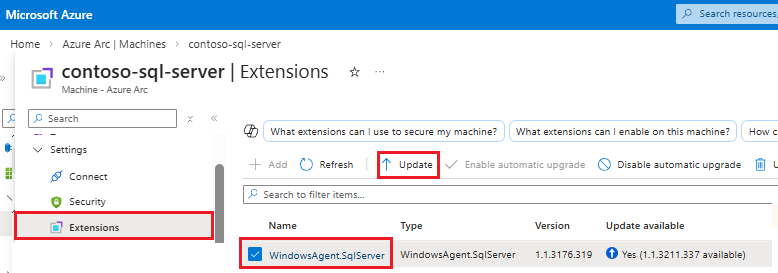
Chcete-li dokončit upgrade, vyberte v dialogovém okně Pro potvrzení rozšíření aktualizace tlačítko Ano.
Další informace o upgradu rozšíření Azure pro SQL Server najdete v tématu Upgrade extension.