Jazyk
Poznámka:
Přístup k této stránce vyžaduje autorizaci. Můžete se zkusit přihlásit nebo změnit adresáře.
Přístup k této stránce vyžaduje autorizaci. Můžete zkusit změnit adresáře.
Objekty CompositionLight se používají ve spojení se SceneLightingEffect k simulaci dynamického osvětlení a odrazivosti.
Světla můžete aplikovat na Visuals a XAML UIElements.
Použití osvětlení na prvky XAML UI
Objekty XamlLight se používají pro dynamické osvětlení CompositionLights XAML UIElements. XamlLight poskytuje metody pro cílení na prvky uživatelského rozhraní nebo kartáče XAML, aplikování světel na stromy prvků uživatelského rozhraní a pomáhá spravovat životní cyklus prostředků CompositionLight na základě toho, jestli se právě používají.
- Pokud cílíte světlem XamlLight na štětec, pak jsou části všech uživatelských prvků UI, které tento štětec používají, osvětlené tímto světlem.
- Pokud na UIElement aplikujete XamlLight, pak jsou celý UIElement a všechny jeho podřízené UIElementy osvětleny světlem.
Vytvoření a použití XamlLightu
XamlLight je základní třída, která se dá použít k vytváření vlastních světel.
Tento příklad ukazuje definici pro vlastní XamlLight, která použije vícebarevné spotlight pro cílené UIElements a štětce ve WinUI.
public sealed class OrangeSpotLight : XamlLight
{
    // Register an attached property that lets you set a UIElement
    // or Brush as a target for this light type in markup.
    public static readonly DependencyProperty IsTargetProperty =
        DependencyProperty.RegisterAttached(
        "IsTarget",
        typeof(bool),
        typeof(OrangeSpotLight),
        new PropertyMetadata(null, OnIsTargetChanged)
    );

    public static void SetIsTarget(DependencyObject target, bool value)
    {
        target.SetValue(IsTargetProperty, value);
    }

    public static Boolean GetIsTarget(DependencyObject target)
    {
        return (bool)target.GetValue(IsTargetProperty);
    }

    // Handle attached property changed to automatically target and untarget UIElements and Brushes.
    private static void OnIsTargetChanged(DependencyObject obj, DependencyPropertyChangedEventArgs e)
    {
        var isAdding = (bool)e.NewValue;

        if (isAdding)
        {
            if (obj is UIElement)
            {
                XamlLight.AddTargetElement(GetIdStatic(), obj as UIElement);
            }
            else if (obj is Brush)
            {
                XamlLight.AddTargetBrush(GetIdStatic(), obj as Brush);
            }
        }
        else
        {
            if (obj is UIElement)
            {
                XamlLight.RemoveTargetElement(GetIdStatic(), obj as UIElement);
            }
            else if (obj is Brush)
            {
                XamlLight.RemoveTargetBrush(GetIdStatic(), obj as Brush);
            }
        }
    }

    protected override void OnConnected(UIElement newElement)
    {
        if (CompositionLight == null)
        {
            // OnConnected is called when the first target UIElement is shown on the screen.
            // This lets you delay creation of the composition object until it's actually needed.
            var spotLight = CompositionTarget.GetCompositorForCurrentThread().CreateSpotLight();
            spotLight.InnerConeColor = Colors.Orange;
            spotLight.OuterConeColor = Colors.Yellow;
            spotLight.InnerConeAngleInDegrees = 30;
            spotLight.OuterConeAngleInDegrees = 45;
            CompositionLight = spotLight;
        }
    }

    protected override void OnDisconnected(UIElement oldElement)
    {
        // OnDisconnected is called when there are no more target UIElements on the screen.
        // The CompositionLight should be disposed when no longer required.
        if (CompositionLight != null)
        {
            CompositionLight.Dispose();
            CompositionLight = null;
        }
    }

    protected override string GetId()
    {
        return GetIdStatic();
    }

    private static string GetIdStatic()
    {
        // This specifies the unique name of the light.
        // In most cases you should use the type's FullName.
        return typeof(OrangeSpotLight).FullName;
    }
}
// For the C++/WinRT code example below, you'll need to add a Midl File (.idl) file to your project.

// OrangeSpotLight.idl
namespace MyApp
{
    [default_interface]
    runtimeclass OrangeSpotLight : Microsoft.UI.Xaml.Media.XamlLight
    {
        OrangeSpotLight();
        static Microsoft.UI.Xaml.DependencyProperty IsTargetProperty{ get; };
        static Boolean GetIsTarget(Microsoft.UI.Xaml.DependencyObject target);
        static void SetIsTarget(Microsoft.UI.Xaml.DependencyObject target, Boolean value);
    }
}

// OrangeSpotLight.h
struct OrangeSpotLight : OrangeSpotLightT<OrangeSpotLight>
{
    OrangeSpotLight() = default;

    winrt::hstring GetId();

    static Microsoft::UI::Xaml::DependencyProperty IsTargetProperty() { return m_isTargetProperty; }

    static bool GetIsTarget(Microsoft::UI::Xaml::DependencyObject const& target)
    {
		return winrt::unbox_value<bool>(target.GetValue(m_isTargetProperty));
	}

    static void SetIsTarget(Microsoft::UI::Xaml::DependencyObject const& target, bool value)
    {
        target.SetValue(m_isTargetProperty, winrt::box_value(value));
    }

    void OnConnected(Microsoft::UI::Xaml::UIElement const& newElement);
    void OnDisconnected(Microsoft::UI::Xaml::UIElement const& oldElement);

    static void OnIsTargetChanged(Microsoft::UI::Xaml::DependencyObject const& d, Microsoft::UI::Xaml::DependencyPropertyChangedEventArgs const& e);

    inline static winrt::hstring GetIdStatic()
    {
        // This specifies the unique name of the light. In most cases you should use the type's full name.
        return winrt::xaml_typename<MyApp::OrangeSpotLight>().Name;
    }

private:
	static Microsoft::UI::Xaml::DependencyProperty m_isTargetProperty;
};

// OrangeSpotLight.cpp
Microsoft::UI::Xaml::DependencyProperty OrangeSpotLight::m_isTargetProperty =
    Microsoft::UI::Xaml::DependencyProperty::RegisterAttached(
        L"IsTarget",
        winrt::xaml_typename<bool>(),
        winrt::xaml_typename<MyApp::OrangeSpotLight>(),
        Microsoft::UI::Xaml::PropertyMetadata{ winrt::box_value(false), Microsoft::UI::Xaml::PropertyChangedCallback{ &OrangeSpotLight::OnIsTargetChanged } }
);

void OrangeSpotLight::OnConnected(Microsoft::UI::Xaml::UIElement const& /* newElement */)
{
    if (!CompositionLight())
    {
        // OnConnected is called when the first target UIElement is shown on the screen. This enables delaying composition object creation until it's actually necessary.
        auto spotLight{ Microsoft::UI::Xaml::Media::CompositionTarget::GetCompositorForCurrentThread().CreateSpotLight() };
        spotLight.InnerConeColor(Microsoft::UI::Colors::Orange());
        spotLight.OuterConeColor(Microsoft::UI::Colors::Yellow());
        spotLight.InnerConeAngleInDegrees(30);
        spotLight.OuterConeAngleInDegrees(45);
        CompositionLight(spotLight);
    }
}

void OrangeSpotLight::OnDisconnected(Microsoft::UI::Xaml::UIElement const& /* oldElement */)
{
    // OnDisconnected is called when there are no more target UIElements on the screen.
    // Dispose of composition resources when no longer in use.
    if (CompositionLight())
    {
        CompositionLight(nullptr);
    }
}

winrt::hstring OrangeSpotLight::GetId()
{
    return OrangeSpotLight::GetIdStatic();
}

void OrangeSpotLight::OnIsTargetChanged(Microsoft::UI::Xaml::DependencyObject const& d, Microsoft::UI::Xaml::DependencyPropertyChangedEventArgs const& e)
{
    auto uie{ d.try_as<Microsoft::UI::Xaml::UIElement>() };
    auto brush{ d.try_as<Microsoft::UI::Xaml::Media::Brush>() };

    auto isAdding = winrt::unbox_value<bool>(e.NewValue());
    if (isAdding)
    {

        if (uie)
        {
            Microsoft::UI::Xaml::Media::XamlLight::AddTargetElement(OrangeSpotLight::GetIdStatic(), uie);
        }
        else if (brush)
        {
            Microsoft::UI::Xaml::Media::XamlLight::AddTargetBrush(OrangeSpotLight::GetIdStatic(), brush);
        }
    }
    else
    {
        if (uie)
        {
            Microsoft::UI::Xaml::Media::XamlLight::RemoveTargetElement(OrangeSpotLight::GetIdStatic(), uie);
        }
        else if (brush)
        {
            Microsoft::UI::Xaml::Media::XamlLight::RemoveTargetBrush(OrangeSpotLight::GetIdStatic(), brush);
        }
    }
}

// MainPage.h
...
#include "OrangeSpotLight.h"
...
struct MainPage : MainPageT<MainPage>
{
    MainPage()
    {
        InitializeComponent();

		OrangeSpotLight::SetIsTarget(spotlitBrush(), true);
		OrangeSpotLight::SetIsTarget(spotlitUIElement(), true);
	}
...
};
Toto světlo pak můžete aplikovat na libovolný prvek XAML UIElement nebo štětec, abyste je osvětlili. Tento příklad ukazuje různé potenciální využití.
Důležité
Pro C++/WinRT odeberte dva výskyty local:OrangeSpotLight.IsTarget="True" z níže uvedených značek. Připojené vlastnosti jsou již nastaveny v sobě obsaženém kódu.
<StackPanel Width="100">
    <StackPanel.Lights>
        <local:OrangeSpotLight/>
    </StackPanel.Lights>

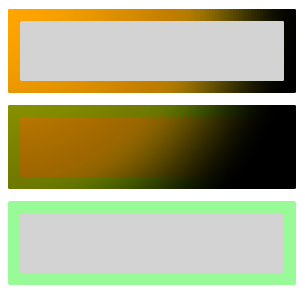
    <!-- This border is lit by the OrangeSpotLight, but its content is not. -->
    <Border BorderThickness="4" Margin="2">
        <Border.BorderBrush>
            <SolidColorBrush x:Name="spotlitBrush" Color="White" local:OrangeSpotLight.IsTarget="True"/>
        </Border.BorderBrush>
        <Rectangle Fill="LightGray" Height="20"/>
    </Border>

    <!-- This border and its content are lit by the OrangeSpotLight. -->
    <Border x:Name="spotlitUIElement" BorderThickness="4" BorderBrush="PaleGreen" Margin="2"
            local:OrangeSpotLight.IsTarget="True">
        <Rectangle Fill="LightGray" Height="20"/>
    </Border>

    <!-- This border and its content are not lit by the OrangeSpotLight. -->
    <Border BorderThickness="4" BorderBrush="PaleGreen" Margin="2">
        <Rectangle Fill="LightGray" Height="20"/>
    </Border>
</StackPanel>
Výsledky tohoto XAML vypadají takto.
Důležité
Nastavení UIElement.Lights v kódu, jak je znázorněno v předchozím příkladu, je podporováno pouze pro aplikace s minimální verzí rovnající se Windows 10 Creators Update nebo novějším. Pro aplikace, které cílí na starší verze, musí být světla vytvořena na pozadí kódu.
Další zdroje
Spolupracujte s námi na GitHubu
Zdroj tohoto obsahu najdete na GitHubu, kde můžete také vytvářet a kontrolovat problémy a žádosti o přijetí změn. Další informace najdete v našem průvodci pro přispěvatele.

Windows developer