Poznámka:
Přístup k této stránce vyžaduje autorizaci. Můžete se zkusit přihlásit nebo změnit adresáře.
Přístup k této stránce vyžaduje autorizaci. Můžete zkusit změnit adresáře.
Poskytovat podporu sledování pohledu, pozornosti a přítomnosti uživatele na základě polohy a pohybu očí.
Poznámka:
Ovládání pohledem v Windows Mixed Reality viz [Gaze]/windows/mixed-reality/mrtk-unity/features/input/gaze).
Important API: Windows. Devices.Input.Preview, GazeDevicePreview, GazePointPreview, GazeInputSourcePreview
Přehled
Vstup pomocí pohledu je účinný způsob interakce a používání windows aplikací, který je zvláště užitečný jako asistivní technologie pro uživatele s neuromuskulárními onemocněními (například ALS) a dalšími postiženími zahrnujícími narušené svalové nebo nervové funkce.
Vstup pohledem nabízí také stejně zajímavé příležitosti pro hraní her (včetně zachycení cílů a sledování) a tradiční kancelářské aplikace, veřejné terminály a další interaktivní scénáře, kdy tradiční vstupní zařízení (klávesnice, myš, dotykové ovládání) nejsou k dispozici, nebo kde může být užitečné uvolnit ruce uživatele pro jiné úkoly (například držení nákupních tašek).
Poznámka:
Podpora hardwaru pro sledování očí byla zavedena v Windows 10 Fall Creators Update spolu s ovládacím prvkem Eye, která umožňuje ovládat ukazatel na obrazovce pomocí očí, psát pomocí klávesnice na obrazovce a komunikovat s lidmi používajícími převod textu na řeč. Sada rozhraní API Windows Runtime (Windows Devices.Input.Preview) pro vytváření aplikací, které můžou pracovat s hardwarem pro sledování očí, je k dispozici v Windows 10 aktualizaci z dubna 2018 (verze 1803, build 17134) a novější.
Ochrana osobních údajů
Vzhledem k potenciálně citlivým osobním údajům shromážděným pomocí zařízení pro sledování očí musíte deklarovat gazeInput schopnost v manifestu aplikace vaší aplikace (viz následující část Nastavení ). Když je deklarováno, Windows automaticky vyzve uživatele s dialogovým oknem pro vyjádření souhlasu (při prvním spuštění aplikace), kde uživatel musí aplikaci udělit oprávnění ke komunikaci se zařízením pro sledování očí a přístup k datům.
Kromě toho, pokud vaše aplikace shromažďuje, ukládá nebo přenáší data sledování očí, musíte je popsat v prohlášení o zásadách ochrany osobních údajů vaší aplikace a dodržovat všechny ostatní požadavky na osobní údaje ve smlouvě o vývojáři aplikací a zásadách Microsoft Storu.
Setup
Chcete-li v aplikaci Windows použít rozhraní API pro vstup pohledem, budete muset:
Zadejte schopnost
gazeInputv manifestu aplikace.Otevřete soubor Package.appxmanifest pomocí návrháře manifestu Visual Studio nebo přidejte funkci ručně tak, že vyberete Přehledový kód a do uzlu
DeviceCapabilityvložíte následujícíCapabilities>:<Capabilities> <DeviceCapability Name="gazeInput" /> </Capabilities>Zařízení Windows kompatibilní se sledováním očí připojené k vašemu systému (integrované nebo periferní zařízení) a zapnuté.
Podívejte se na Jak začít s ovládáním očima ve Windows 10 pro seznam podporovaných zařízení pro sledování očí.
Základní sledování očí
V tomto příkladu si ukážeme, jak sledovat pohled uživatele v aplikaci Windows a jak pomocí funkce časování se základní detekcí zásahů zjistit, jak dobře může udržet soustředění pohledu na konkrétní prvek.
Malá elipsa se používá k zobrazení, kde je bod pohledu uvnitř zobrazení aplikace, zatímco RadialProgressBar z Windows Community Toolkit se náhodně umístí na plátno. Když je zjištěn fokus pohledu na indikátor průběhu, spustí se časovač a při dosažení 100% se indikátor průběhu náhodně přemístí na plochu.
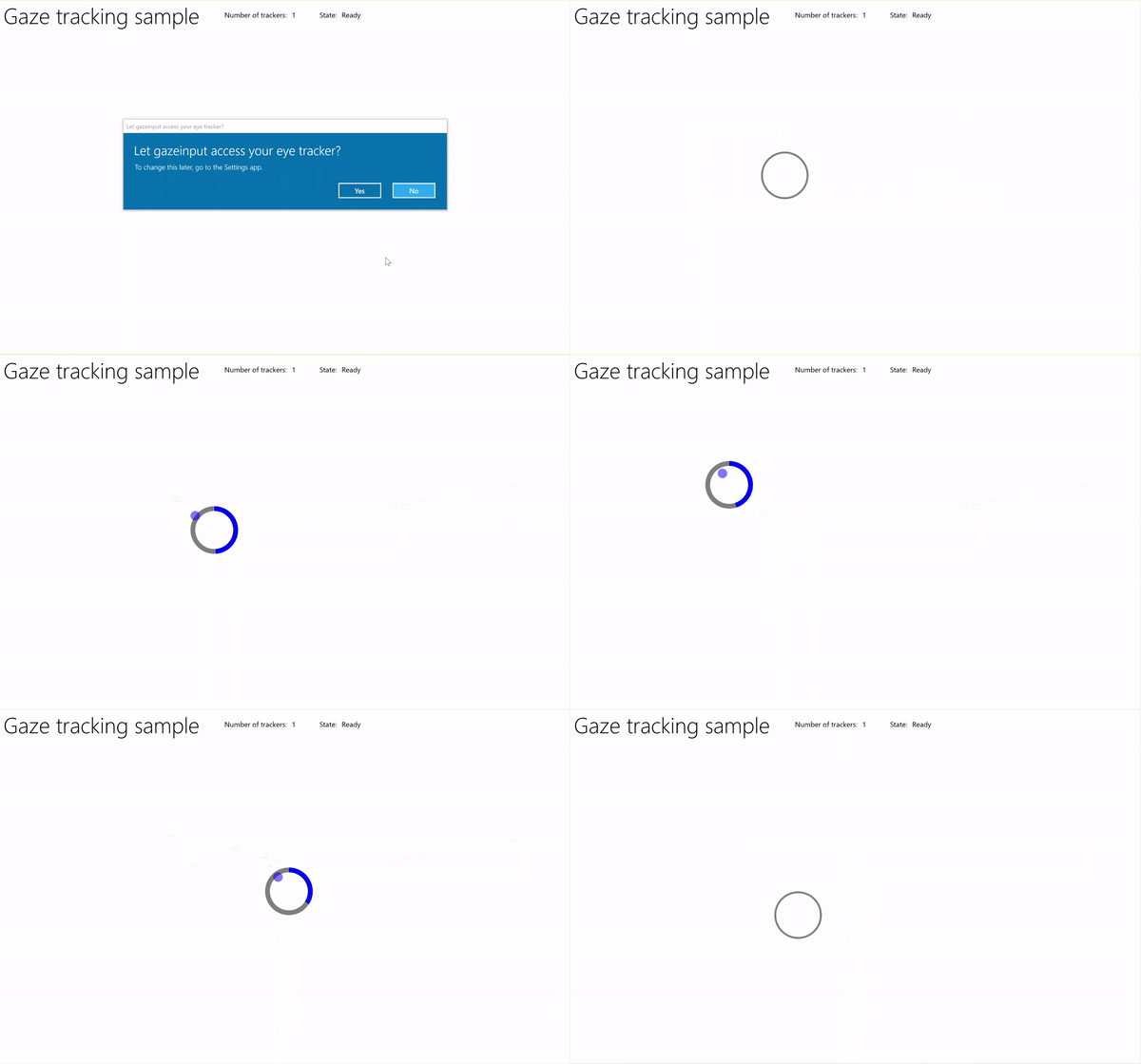
Sledování pohledu s ukázkovým časovačem
Stáhnout tuto ukázku ze vstupního vzorku Gaze (základní)
Nejprve nastavíme uživatelské rozhraní (MainPage.xaml).
<Page
    x:Class="gazeinput.MainPage"
    xmlns="http://schemas.microsoft.com/winfx/2006/xaml/presentation"
    xmlns:x="http://schemas.microsoft.com/winfx/2006/xaml"
    xmlns:local="using:gazeinput"
    xmlns:d="http://schemas.microsoft.com/expression/blend/2008"
    xmlns:mc="http://schemas.openxmlformats.org/markup-compatibility/2006"
    xmlns:controls="using:Microsoft.Toolkit.Uwp.UI.Controls"
    mc:Ignorable="d">

    <Grid Background="{ThemeResource ApplicationPageBackgroundThemeBrush}">
        <Grid x:Name="containerGrid">
            <Grid.RowDefinitions>
                <RowDefinition Height="Auto"/>
                <RowDefinition Height="*"/>
            </Grid.RowDefinitions>
            <StackPanel x:Name="HeaderPanel"
                    Orientation="Horizontal"
                    Grid.Row="0">
                <StackPanel.Transitions>
                    <TransitionCollection>
                        <AddDeleteThemeTransition/>
                    </TransitionCollection>
                </StackPanel.Transitions>
                <TextBlock x:Name="Header"
                       Text="Gaze tracking sample"
                       Style="{ThemeResource HeaderTextBlockStyle}"
                       Margin="10,0,0,0" />
                <TextBlock x:Name="TrackerCounterLabel"
                       VerticalAlignment="Center"
                       Style="{ThemeResource BodyTextBlockStyle}"
                       Text="Number of trackers: "
                       Margin="50,0,0,0"/>
                <TextBlock x:Name="TrackerCounter"
                       VerticalAlignment="Center"
                       Style="{ThemeResource BodyTextBlockStyle}"
                       Text="0"
                       Margin="10,0,0,0"/>
                <TextBlock x:Name="TrackerStateLabel"
                       VerticalAlignment="Center"
                       Style="{ThemeResource BodyTextBlockStyle}"
                       Text="State: "
                       Margin="50,0,0,0"/>
                <TextBlock x:Name="TrackerState"
                       VerticalAlignment="Center"
                       Style="{ThemeResource BodyTextBlockStyle}"
                       Text="n/a"
                       Margin="10,0,0,0"/>
            </StackPanel>
            <Canvas x:Name="gazePositionCanvas" Grid.Row="1">
                <controls:RadialProgressBar
                    x:Name="GazeRadialProgressBar"
                    Value="0"
                    Foreground="Blue"
                    Background="White"
                    Thickness="4"
                    Minimum="0"
                    Maximum="100"
                    Width="100"
                    Height="100"
                    Outline="Gray"
                    Visibility="Collapsed"/>
                <Ellipse
                    x:Name="eyeGazePositionEllipse"
                    Width="20" Height="20"
                    Fill="Blue"
                    Opacity="0.5"
                    Visibility="Collapsed">
                </Ellipse>
            </Canvas>
        </Grid>
    </Grid>
</Page>
Dále inicializujeme naši aplikaci.
V tomto fragmentu kódu deklarujeme naše globální objekty a přepíšeme událost stránky OnNavigatedTo, abychom spustili sledovač zařízení pohledem, a událost stránky OnNavigatedFrom, abychom zastavili náš sledovač zařízení pohledem.
using System;
using Windows.Devices.Input.Preview;
using Windows.UI.Xaml.Controls;
using Windows.UI.Xaml;
using Windows.Foundation;
using System.Collections.Generic;
using Windows.UI.Xaml.Media;
using Windows.UI.Xaml.Navigation;

namespace gazeinput
{
    public sealed partial class MainPage : Page
    {
        /// <summary>
        /// Reference to the user's eyes and head as detected
        /// by the eye-tracking device.
        /// </summary>
        private GazeInputSourcePreview gazeInputSource;

        /// <summary>
        /// Dynamic store of eye-tracking devices.
        /// </summary>
        /// <remarks>
        /// Receives event notifications when a device is added, removed,
        /// or updated after the initial enumeration.
        /// </remarks>
        private GazeDeviceWatcherPreview gazeDeviceWatcher;

        /// <summary>
        /// Eye-tracking device counter.
        /// </summary>
        private int deviceCounter = 0;

        /// <summary>
        /// Timer for gaze focus on RadialProgressBar.
        /// </summary>
        DispatcherTimer timerGaze = new DispatcherTimer();

        /// <summary>
        /// Tracker used to prevent gaze timer restarts.
        /// </summary>
        bool timerStarted = false;

        /// <summary>
        /// Initialize the app.
        /// </summary>
        public MainPage()
        {
            InitializeComponent();
        }

        /// <summary>
        /// Override of OnNavigatedTo page event starts GazeDeviceWatcher.
        /// </summary>
        /// <param name="e">Event args for the NavigatedTo event</param>
        protected override void OnNavigatedTo(NavigationEventArgs e)
        {
            // Start listening for device events on navigation to eye-tracking page.
            StartGazeDeviceWatcher();
        }

        /// <summary>
        /// Override of OnNavigatedFrom page event stops GazeDeviceWatcher.
        /// </summary>
        /// <param name="e">Event args for the NavigatedFrom event</param>
        protected override void OnNavigatedFrom(NavigationEventArgs e)
        {
            // Stop listening for device events on navigation from eye-tracking page.
            StopGazeDeviceWatcher();
        }
    }
}
Dále přidáme metody sledovacího zařízení pohledů.
Voláme
StartGazeDeviceWatcherCreateWatcher a deklarujeme naslouchací procesy událostí zařízení pro sledování očí (DeviceAdded, DeviceUpdated a DeviceRemoved).Zkontrolujeme
DeviceAddedstav zařízení pro sledování očí. Pokud je zařízení funkční, zvýšíme počet zařízení a povolíme sledování pohledu. Podrobnosti najdete v dalším kroku.Umožňujeme také
DeviceUpdatedsledování pohledu, protože tato událost se aktivuje, pokud je zařízení rekalibrováno.Dekrementujeme
DeviceRemovedčítač zařízení a odebereme obslužné rutiny pro události zařízení.V
StopGazeDeviceWatchervypneme sledovací zařízení pro pohledy.
    /// <summary>
    /// Start gaze watcher and declare watcher event handlers.
    /// </summary>
    private void StartGazeDeviceWatcher()
    {
        if (gazeDeviceWatcher == null)
        {
            gazeDeviceWatcher = GazeInputSourcePreview.CreateWatcher();
            gazeDeviceWatcher.Added += this.DeviceAdded;
            gazeDeviceWatcher.Updated += this.DeviceUpdated;
            gazeDeviceWatcher.Removed += this.DeviceRemoved;
            gazeDeviceWatcher.Start();
        }
    }

    /// <summary>
    /// Shut down gaze watcher and stop listening for events.
    /// </summary>
    private void StopGazeDeviceWatcher()
    {
        if (gazeDeviceWatcher != null)
        {
            gazeDeviceWatcher.Stop();
            gazeDeviceWatcher.Added -= this.DeviceAdded;
            gazeDeviceWatcher.Updated -= this.DeviceUpdated;
            gazeDeviceWatcher.Removed -= this.DeviceRemoved;
            gazeDeviceWatcher = null;
        }
    }

    /// <summary>
    /// Eye-tracking device connected (added, or available when watcher is initialized).
    /// </summary>
    /// <param name="sender">Source of the device added event</param>
    /// <param name="e">Event args for the device added event</param>
    private void DeviceAdded(GazeDeviceWatcherPreview source,
        GazeDeviceWatcherAddedPreviewEventArgs args)
    {
        if (IsSupportedDevice(args.Device))
        {
            deviceCounter++;
            TrackerCounter.Text = deviceCounter.ToString();
        }
        // Set up gaze tracking.
        TryEnableGazeTrackingAsync(args.Device);
    }

    /// <summary>
    /// Initial device state might be uncalibrated,
    /// but device was subsequently calibrated.
    /// </summary>
    /// <param name="sender">Source of the device updated event</param>
    /// <param name="e">Event args for the device updated event</param>
    private void DeviceUpdated(GazeDeviceWatcherPreview source,
        GazeDeviceWatcherUpdatedPreviewEventArgs args)
    {
        // Set up gaze tracking.
        TryEnableGazeTrackingAsync(args.Device);
    }

    /// <summary>
    /// Handles disconnection of eye-tracking devices.
    /// </summary>
    /// <param name="sender">Source of the device removed event</param>
    /// <param name="e">Event args for the device removed event</param>
    private void DeviceRemoved(GazeDeviceWatcherPreview source,
        GazeDeviceWatcherRemovedPreviewEventArgs args)
    {
        // Decrement gaze device counter and remove event handlers.
        if (IsSupportedDevice(args.Device))
        {
            deviceCounter--;
            TrackerCounter.Text = deviceCounter.ToString();

            if (deviceCounter == 0)
            {
                gazeInputSource.GazeEntered -= this.GazeEntered;
                gazeInputSource.GazeMoved -= this.GazeMoved;
                gazeInputSource.GazeExited -= this.GazeExited;
            }
        }
    }
Zde zkontrolujeme, jestli je zařízení funkční v
IsSupportedDevice, a pokud ano, pokusíme se povolit sledování pohledu vTryEnableGazeTrackingAsync.V
TryEnableGazeTrackingAsyncdeklarujeme obslužné rutiny událostí pohledu a voláme GazeInputSourcePreview.GetForCurrentView(), abychom získali odkaz na vstupní zdroj (to musí být voláno na vlákně uživatelského rozhraní, viz Zachování odezvy vlákna uživatelského rozhraní).Poznámka:
Měli byste volat GazeInputSourcePreview.GetForCurrentView() pouze v případě, že je kompatibilní zařízení pro sledování očí připojeno a vyžaduje vaše aplikace. Jinak dialogové okno souhlasu není nutné.
    /// <summary>
    /// Initialize gaze tracking.
    /// </summary>
    /// <param name="gazeDevice"></param>
    private async void TryEnableGazeTrackingAsync(GazeDevicePreview gazeDevice)
    {
        // If eye-tracking device is ready, declare event handlers and start tracking.
        if (IsSupportedDevice(gazeDevice))
        {
            timerGaze.Interval = new TimeSpan(0, 0, 0, 0, 20);
            timerGaze.Tick += TimerGaze_Tick;

            SetGazeTargetLocation();

            // This must be called from the UI thread.
            gazeInputSource = GazeInputSourcePreview.GetForCurrentView();

            gazeInputSource.GazeEntered += GazeEntered;
            gazeInputSource.GazeMoved += GazeMoved;
            gazeInputSource.GazeExited += GazeExited;
        }
        // Notify if device calibration required.
        else if (gazeDevice.ConfigurationState ==
                    GazeDeviceConfigurationStatePreview.UserCalibrationNeeded ||
                    gazeDevice.ConfigurationState ==
                    GazeDeviceConfigurationStatePreview.ScreenSetupNeeded)
        {
            // Device isn't calibrated, so invoke the calibration handler.
            System.Diagnostics.Debug.WriteLine(
                "Your device needs to calibrate. Please wait for it to finish.");
            await gazeDevice.RequestCalibrationAsync();
        }
        // Notify if device calibration underway.
        else if (gazeDevice.ConfigurationState ==
            GazeDeviceConfigurationStatePreview.Configuring)
        {
            // Device is currently undergoing calibration.
            // A device update is sent when calibration complete.
            System.Diagnostics.Debug.WriteLine(
                "Your device is being configured. Please wait for it to finish");
        }
        // Device is not viable.
        else if (gazeDevice.ConfigurationState == GazeDeviceConfigurationStatePreview.Unknown)
        {
            // Notify if device is in unknown state.
            // Reconfigure/recalbirate the device.
            System.Diagnostics.Debug.WriteLine(
                "Your device is not ready. Please set up your device or reconfigure it.");
        }
    }

    /// <summary>
    /// Check if eye-tracking device is viable.
    /// </summary>
    /// <param name="gazeDevice">Reference to eye-tracking device.</param>
    /// <returns>True, if device is viable; otherwise, false.</returns>
    private bool IsSupportedDevice(GazeDevicePreview gazeDevice)
    {
        TrackerState.Text = gazeDevice.ConfigurationState.ToString();
        return (gazeDevice.CanTrackEyes &&
                    gazeDevice.ConfigurationState ==
                    GazeDeviceConfigurationStatePreview.Ready);
    }
Dále nastavíme obslužné rutiny událostí pohledu.
Zobrazíme a skryjeme elipsu sledování pohledu v
GazeEnteredaGazeExitedv uvedeném pořadí.V
GazeMovedpohybujeme naši elipsu sledování pohledu podle EyeGazePosition poskytnutou CurrentPointGazeEnteredPreviewEventArgs. Také spravujeme časovač zaměření pohledu na RadialProgressBar, který aktivuje přemísťování indikátoru průběhu. Podrobnosti najdete v dalším kroku./// <summary> /// GazeEntered handler. /// </summary> /// <param name="sender">Source of the gaze entered event</param> /// <param name="e">Event args for the gaze entered event</param> private void GazeEntered( GazeInputSourcePreview sender, GazeEnteredPreviewEventArgs args) { // Show ellipse representing gaze point. eyeGazePositionEllipse.Visibility = Visibility.Visible; // Mark the event handled. args.Handled = true; } /// <summary> /// GazeExited handler. /// Call DisplayRequest.RequestRelease to conclude the /// RequestActive called in GazeEntered. /// </summary> /// <param name="sender">Source of the gaze exited event</param> /// <param name="e">Event args for the gaze exited event</param> private void GazeExited( GazeInputSourcePreview sender, GazeExitedPreviewEventArgs args) { // Hide gaze tracking ellipse. eyeGazePositionEllipse.Visibility = Visibility.Collapsed; // Mark the event handled. args.Handled = true; } /// <summary> /// GazeMoved handler translates the ellipse on the canvas to reflect gaze point. /// </summary> /// <param name="sender">Source of the gaze moved event</param> /// <param name="e">Event args for the gaze moved event</param> private void GazeMoved(GazeInputSourcePreview sender, GazeMovedPreviewEventArgs args) { // Update the position of the ellipse corresponding to gaze point. if (args.CurrentPoint.EyeGazePosition != null) { double gazePointX = args.CurrentPoint.EyeGazePosition.Value.X; double gazePointY = args.CurrentPoint.EyeGazePosition.Value.Y; double ellipseLeft = gazePointX - (eyeGazePositionEllipse.Width / 2.0f); double ellipseTop = gazePointY - (eyeGazePositionEllipse.Height / 2.0f) - (int)Header.ActualHeight; // Translate transform for moving gaze ellipse. TranslateTransform translateEllipse = new TranslateTransform { X = ellipseLeft, Y = ellipseTop }; eyeGazePositionEllipse.RenderTransform = translateEllipse; // The gaze point screen location. Point gazePoint = new Point(gazePointX, gazePointY); // Basic hit test to determine if gaze point is on progress bar. bool hitRadialProgressBar = DoesElementContainPoint( gazePoint, GazeRadialProgressBar.Name, GazeRadialProgressBar); // Use progress bar thickness for visual feedback. if (hitRadialProgressBar) { GazeRadialProgressBar.Thickness = 10; } else { GazeRadialProgressBar.Thickness = 4; } // Mark the event handled. args.Handled = true; } }Tady jsou také metody, které slouží ke správě časovače fokusu pohledů pro tuto aplikaci.
DoesElementContainPointzkontroluje, jestli je ukazatel pohledu nad indikátorem průběhu. Pokud ano, spustí časovač pohledu a zvýší pruh průběhu při každém tiknutí časovače pohledu.SetGazeTargetLocationnastaví počáteční umístění indikátoru průběhu a pokud se indikátor průběhu dokončí (v závislosti na časovači fokusu pohledu), přesune indikátor průběhu do náhodného umístění./// <summary> /// Return whether the gaze point is over the progress bar. /// </summary> /// <param name="gazePoint">The gaze point screen location</param> /// <param name="elementName">The progress bar name</param> /// <param name="uiElement">The progress bar UI element</param> /// <returns></returns> private bool DoesElementContainPoint( Point gazePoint, string elementName, UIElement uiElement) { // Use entire visual tree of progress bar. IEnumerable<UIElement> elementStack = VisualTreeHelper.FindElementsInHostCoordinates(gazePoint, uiElement, true); foreach (UIElement item in elementStack) { //Cast to FrameworkElement and get element name. if (item is FrameworkElement feItem) { if (feItem.Name.Equals(elementName)) { if (!timerStarted) { // Start gaze timer if gaze over element. timerGaze.Start(); timerStarted = true; } return true; } } } // Stop gaze timer and reset progress bar if gaze leaves element. timerGaze.Stop(); GazeRadialProgressBar.Value = 0; timerStarted = false; return false; } /// <summary> /// Tick handler for gaze focus timer. /// </summary> /// <param name="sender">Source of the gaze entered event</param> /// <param name="e">Event args for the gaze entered event</param> private void TimerGaze_Tick(object sender, object e) { // Increment progress bar. GazeRadialProgressBar.Value += 1; // If progress bar reaches maximum value, reset and relocate. if (GazeRadialProgressBar.Value == 100) { SetGazeTargetLocation(); } } /// <summary> /// Set/reset the screen location of the progress bar. /// </summary> private void SetGazeTargetLocation() { // Ensure the gaze timer restarts on new progress bar location. timerGaze.Stop(); timerStarted = false; // Get the bounding rectangle of the app window. Rect appBounds = Windows.UI.ViewManagement.ApplicationView.GetForCurrentView().VisibleBounds; // Translate transform for moving progress bar. TranslateTransform translateTarget = new TranslateTransform(); // Calculate random location within gaze canvas. Random random = new Random(); int randomX = random.Next( 0, (int)appBounds.Width - (int)GazeRadialProgressBar.Width); int randomY = random.Next( 0, (int)appBounds.Height - (int)GazeRadialProgressBar.Height - (int)Header.ActualHeight); translateTarget.X = randomX; translateTarget.Y = randomY; GazeRadialProgressBar.RenderTransform = translateTarget; // Show progress bar. GazeRadialProgressBar.Visibility = Visibility.Visible; GazeRadialProgressBar.Value = 0; }