Bemærk
Adgang til denne side kræver godkendelse. Du kan prøve at logge på eller ændre mapper.
Adgang til denne side kræver godkendelse. Du kan prøve at ændre mapper.
A zone-spanning scale set spreads virtual machine (VM) instances across multiple availability zones, and uses zone balancing to attempt to evenly distribute instances across the zones that you select. This article discusses how a zone-spanning scale set uses zone balancing, including the difference between balanced and unbalanced scale sets, balancing modes, and how to rebalance scale sets.
Balanced and unbalanced scale sets
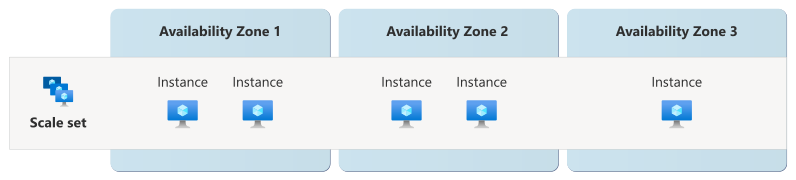
A scale set is considered balanced if each zone has the same number of VMs ±1 VM. The deviation of 1 enables you to scale to any number of instances, and not just a multiple of the number of zones that the scale set uses.
VMs that meet any of these criteria are still counted when determining if a scale set is balanced:
- The VM is successfully created, but extensions on the VM fail to deploy.
- The VM is deallocated.
Here are some examples of how Virtual Machine Scale Sets determines zone balancing for a zone-spanning scale set that's configured to use three zones:
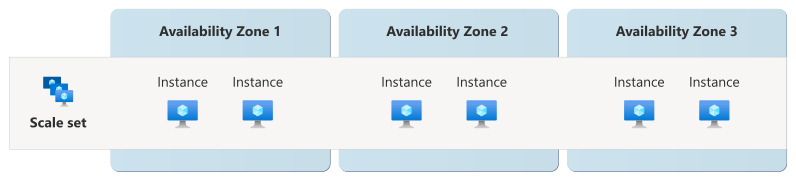
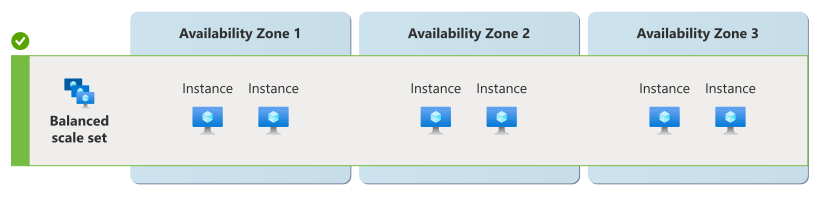
Example 1: A scale set with 2 VMs in zone 1, 2 VMs in zone 2, and 2 VMs in zone 3 is considered balanced. Each zone has the exact same number of instances.
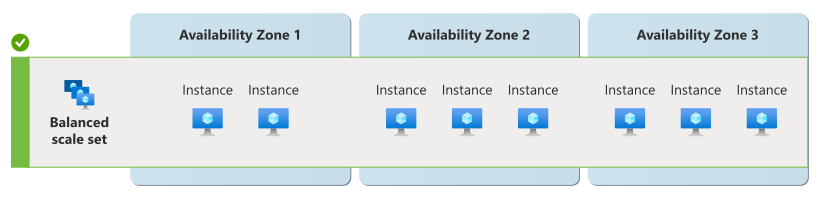
Example 2: A scale set with 2 VMs in zone 1, 3 VMs in zone 2, and 3 VMs in zone 3 is considered balanced. There's only one zone with a different VM count and it's only 1 less than the other zones.
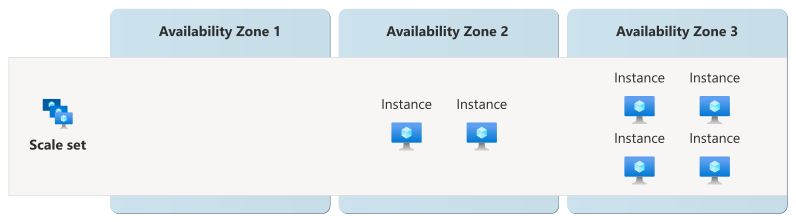
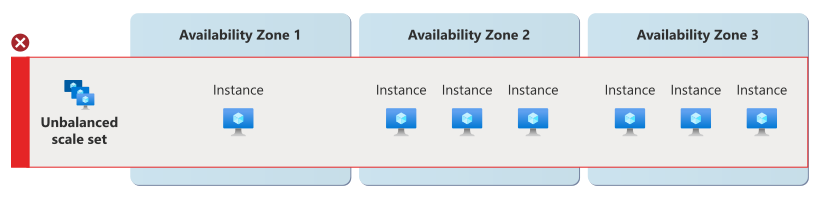
Example 3: A scale set with 1 VM in zone 1, 3 VMs in zone 2, and 3 VMs in zone 3 is considered unbalanced. Zone 1 has 2 fewer VMs than zones 2 and 3, which exceeds the allowed threshold of ±1 VM.
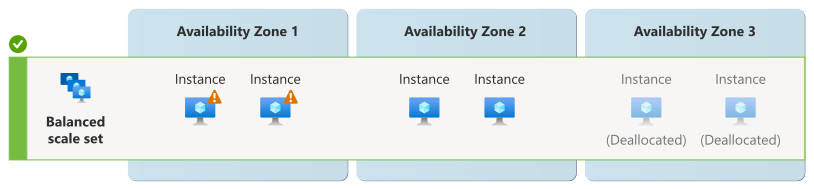
Example 4: A scale set with 2 VMs in zone 1, 2 VMs in zone 2, and 2 VMs in zone 3 is considered balanced, even if all extensions failed in zone 1 and all extensions succeeded in zones 2 and the VMs in zone 3 are deallocated:
Zone balance modes
In order to set the zone balance mode, your scale set must use multiple zones. A scale set that doesn't use zones or uses only one zone doesn't require balancing and therefore doesn't have a balancing mode.
For a scale set that uses multiple zones, you can choose between two zone balance modes:
Best-effort zone balancing (Default mode): The scale set aims to maintain balance across zones during scaling operations, but it's not guaranteed to remain balanced.
If one zone is unavailable, the scale set attempts to scale out into the zones that are still available, and allows a temporary imbalance. However, this imbalance is only permitted when a single zone is unavailable. Once the zone is available, during subsequent scale operations, the scale set attempts to ensure balance by:
- When scaling in, removing VMs from over-provisioned zones
- When scaling out, adding VMs to under-provisioned zones
If two or more zones are unavailable, the scale set can't proceed with scaling operations, and any scaling operations are blocked.
Strict zone balancing: The scale set must be balanced at all times. Any scaling operation that would result in an unbalanced scale set is blocked, even if one or more zones are down.
How to manually balance your scale set
When you add availability zones to an existing scale set, existing VMs remain unchanged and don't get moved or redistributed. In addition, adding a zone doesn't trigger a rebalancing operation. Zone balancing only happens during scale-out operations when new instances are added to the scale set. Zone balance doesn't replace existing instances.
You can manually rebalance your scale sets by running the following sequence of operations:
Scale out. Add more instances by updating the scale set's capacity. The new capacity should be set to the original capacity plus the number of new instances.
The scale set attempts to create the new instances in the zones configured on the scale set.
Scale in. When the new instances are ready, scale in your scale set to remove the old instances. This process leaves your scale set in a balanced state.
You can either manually delete specific instances, or scale in by reducing the scale set capacity. When you scale in by reducing the scale set capacity, the platform always prefers removing the nonzonal instances, then follows the scale set's scale-in policy.
Note
If you use the Flexible orchestration mode and attach, detach, or remove individual VMs, you should check the zones your VMs are in. If the VMs are all in a single zone, your scale set isn't resilient to an outage in that zone.
Here are some examples of how you might manually rebalance scale sets in different situations:
Suppose you have a nonzonal scale set with 5 instances:
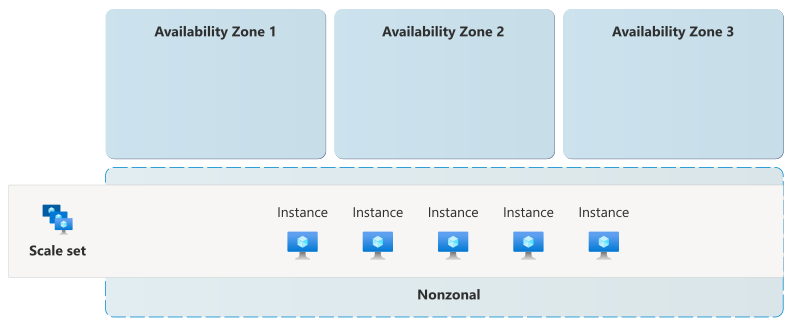
You upgrade it to be zone-spanning scale set across three zones. Immediately after you update the zone configuration of the scale set, the existing instances remain in a nonzonal state.
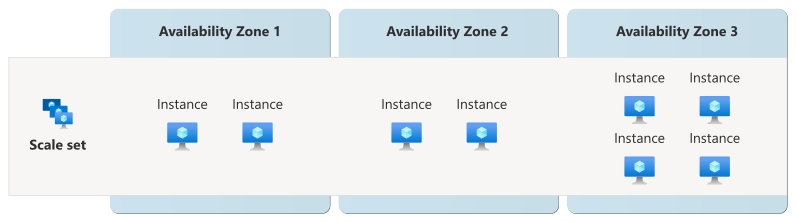
Scale out: Because your scale set currently has 5 nonzonal instances and you would like to scale out so that you have 5 instances spread across 3 zones, you should set the capacity to 10 (5 + 5). The new instances are created across the zones, and old instances remain where they are:
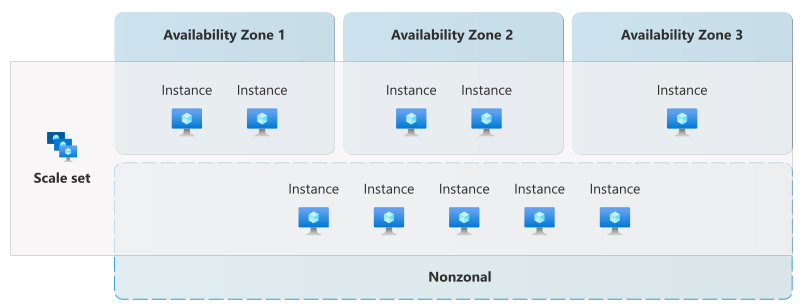
Scale in: You reduce the capacity to 5. Azure removes the nonzonal instances, leaving 5 instances spread across the zones: