Bemærk
Adgang til denne side kræver godkendelse. Du kan prøve at logge på eller ændre mapper.
Adgang til denne side kræver godkendelse. Du kan prøve at ændre mapper.
Applies to:  SQL Server
Azure SQL Database
Azure SQL Managed Instance
Azure Synapse Analytics
SQL database in Microsoft Fabric
SQL Server
Azure SQL Database
Azure SQL Managed Instance
Azure Synapse Analytics
SQL database in Microsoft Fabric
Returns the number of pages allocated and deallocated by each session in the tempdb database during the session's lifetime.
Note
To obtain this data in Azure Synapse Analytics, use the name sys.dm_pdw_nodes_db_session_space_usage. This syntax is not supported by serverless SQL pool in Azure Synapse Analytics.
| Column name | Data type | Description |
|---|---|---|
session_id |
smallint | Session ID. session_id maps to session_id in sys.dm_exec_sessions. |
database_id |
smallint | Database ID. In Azure SQL Database, the values are unique within a single database or an elastic pool, but not within a logical server. |
user_objects_alloc_page_count |
bigint | Number of pages reserved or allocated for user objects by this session during its lifetime. |
user_objects_dealloc_page_count |
bigint | Number of pages deallocated and no longer reserved for user objects by this session during its lifetime. |
internal_objects_alloc_page_count |
bigint | Number of pages reserved or allocated for internal objects by this session during its lifetime. |
internal_objects_dealloc_page_count |
bigint | Number of pages deallocated and no longer reserved for internal objects by this session during its lifetime. |
user_objects_deferred_dealloc_page_count |
bigint | Number of pages queued for deferred deallocation by this session during its lifetime. |
pdw_node_id |
int | Applies to: Azure Synapse Analytics The identifier for the node that this distribution is on. |
Permissions
On SQL Server and SQL Managed Instance, requires VIEW SERVER STATE permission.
On SQL Database Basic, S0, and S1 service objectives, and for databases in elastic pools, the server admin account, the Microsoft Entra admin account, or membership in the ##MS_ServerStateReader## server role is required. On all other SQL Database service objectives, either the VIEW DATABASE STATE permission on the database, or membership in the ##MS_ServerStateReader## server role is required.
Permissions for SQL Server 2022 and later
Requires VIEW SERVER PERFORMANCE STATE permission on the server.
Remarks
IAM pages aren't included in any of the allocation or deallocation counts that this view reports.
Page counters initialize to zero at the start of a session and increment during the session lifetime. The counters track the total number of pages that are allocated or deallocated for tasks that are already completed in the session. The counters update only when a task ends. They don't reflect running tasks.
When deferred deallocation is used, the user_objects_deferred_dealloc_page_count column reports the pages queued for a later deallocation by a background process. When the queue is long, the actual deallocation can be delayed. As a consequence, the user session tempdb space usage reported by the user_objects_alloc_page_count - user_objects_dealloc_page_count - user_objects_deferred_dealloc_page_count calculation might be temporarily lower than the actual usage.
A session can have multiple requests active at the same time. A request can start multiple threads or tasks if it's a parallel query.
For more information about the sessions, requests, and tasks, see sys.dm_exec_sessions (Transact-SQL), sys.dm_exec_requests (Transact-SQL), and sys.dm_os_tasks (Transact-SQL).
User objects
The user object page counters include the following objects:
User-defined tables and indexes
System tables and indexes
Global temporary tables and indexes
Local temporary tables and indexes
Table variables
Tables returned in the table-valued functions
Internal objects
The internal object page counters include the following objects:
Work tables for cursor or spool operations and temporary large object (LOB) storage
Work files for operations such as a hash join
Sort runs
Physical joins
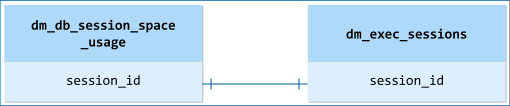
Relationship cardinalities
| From | To | Relationship |
|---|---|---|
dm_db_session_space_usage.session_id |
dm_exec_sessions.session_id |
One-to-one |