Bemærk
Adgang til denne side kræver godkendelse. Du kan prøve at logge på eller ændre mapper.
Adgang til denne side kræver godkendelse. Du kan prøve at ændre mapper.
APPLIES TO: Developer | Basic | Standard | Standard v2 | Premium | Premium v2
You can configure an inbound private endpoint for your API Management instance to allow clients in your private network to securely access the instance over Azure Private Link.
The private endpoint uses an IP address from an Azure virtual network in which it's hosted.
Network traffic between a client on your private network and API Management traverses over the virtual network and a Private Link on the Microsoft backbone network, eliminating exposure from the public internet.
Configure custom DNS settings or an Azure DNS private zone to map the API Management hostname to the endpoint's private IP address.

With a private endpoint and Private Link, you can:
Create multiple Private Link connections to an API Management instance.
Use the private endpoint to send inbound traffic on a secure connection.
Use policy to distinguish traffic that comes from the private endpoint.
Limit incoming traffic only to private endpoints, preventing data exfiltration.
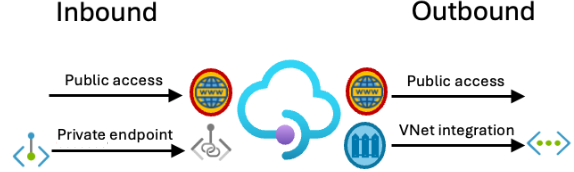
Combine inbound private endpoints to Standard v2 instances with outbound virtual network integration to provide end-to-end network isolation of your API Management clients and backend services.
Important
- You can only configure a private endpoint connection for inbound traffic to the API Management instance.
- You can only disable public network access to the API Management instance after configuring a private endpoint.
Limitations
- Only the API Management instance's Gateway endpoint supports inbound Private Link connections.
- Each API Management instance supports at most 100 Private Link connections.
- Connections aren't supported on the self-hosted gateway or on a workspace gateway.
- In the classic API Management tiers, private endpoints aren't supported in instances injected in an internal or external virtual network.
Note
When fronted with Azure Front Door Premium, in the Standard v2 and Premium v2 tiers, private endpoints are supported in instances with any supported virtual network configuration.
Typical scenarios
Use an inbound private endpoint to enable private-only access directly to the API Management gateway to limit exposure of sensitive data or backends.
Supported configurations include:
- Pass client requests through a firewall and configure rules to route requests privately to the API Management gateway.
- Configure Azure Front Door (or Azure Front Door with Azure Application Gateway) to receive external traffic and then route traffic privately to the API Management gateway. For example, see Connect Azure Front Door Premium to an Azure API Management with Private Link.
Prerequisites
- An existing API Management instance. Create one if you haven't already.
- Availability of the API Management private endpoint type in your subscription and region.
- A virtual network containing a subnet to host the private endpoint. The subnet can contain other Azure resources, but it can't be delegated to another service.
- (Recommended) A virtual machine in the same or a different subnet in the virtual network, to test the private endpoint.
Use the Bash environment in Azure Cloud Shell. For more information, see Get started with Azure Cloud Shell.

If you prefer to run CLI reference commands locally, install the Azure CLI. If you're running on Windows or macOS, consider running Azure CLI in a Docker container. For more information, see How to run the Azure CLI in a Docker container.
If you're using a local installation, sign in to the Azure CLI by using the az login command. To finish the authentication process, follow the steps displayed in your terminal. For other sign-in options, see Authenticate to Azure using Azure CLI.
When you're prompted, install the Azure CLI extension on first use. For more information about extensions, see Use and manage extensions with the Azure CLI.
Run az version to find the version and dependent libraries that are installed. To upgrade to the latest version, run az upgrade.
Approval method for private endpoint
Typically, a network administrator creates a private endpoint. Depending on your Azure role-based access control (RBAC) permissions, a private endpoint that you create is either automatically approved to send traffic to the API Management instance, or requires the resource owner to manually approve the connection.
| Approval method | Minimum RBAC permissions |
|---|---|
| Automatic | Microsoft.Network/virtualNetworks/**Microsoft.Network/virtualNetworks/subnets/**Microsoft.Network/privateEndpoints/**Microsoft.Network/networkinterfaces/**Microsoft.Network/locations/availablePrivateEndpointTypes/readMicrosoft.ApiManagement/service/**Microsoft.ApiManagement/service/privateEndpointConnections/** |
| Manual | Microsoft.Network/virtualNetworks/**Microsoft.Network/virtualNetworks/subnets/**Microsoft.Network/privateEndpoints/**Microsoft.Network/networkinterfaces/**Microsoft.Network/locations/availablePrivateEndpointTypes/read |
Steps to configure private endpoint
Follow these steps to create and configure a private endpoint for your API Management instance.
Create private endpoint - portal
In the Classic tiers, you can create a private endpoint when you create an API Management instance in the Azure portal, or you can add a private endpoint to an existing instance.
Create private endpoint when creating API Management instance
In the Create API Management service wizard, select the Networking tab.
In Connectivity type, select Private endpoint.
Select + Add.
On the Create private endpoint page, enter or select the following information:
Setting Value Subscription Select your subscription. Resource group Select an existing resource group, or create a new one. It must be in the same region as your virtual network. Location Select a location for the private endpoint. It must be in the same region as your virtual network. It can differ from the region where your API Management instance is hosted. Name Enter a name for the endpoint such as myPrivateEndpoint. Sub-resource Select Gateway. Under Networking, enter or select the virtual network and subnet for your private endpoint.
Under Private DNS integration, select Integrate with private DNS zone. The default DNS zone is displayed: privatelink.azure-api.net.
Select OK.
Continue with the creation of the API Management instance.
Create private endpoint for existing API Management instance
Go to your API Management service in the Azure portal.
In the left-hand menu, under Deployment + infrastructure, select Network.
Select Inbound private endpoint connections > + Add endpoint.

In the Basics tab, enter or select the following information:
Setting Value Project details Subscription Select your subscription. Resource group Select an existing resource group, or create a new one. It must be in the same region as your virtual network. Instance details Name Enter a name for the endpoint such as myPrivateEndpoint. Network Interface Name Enter a name for the network interface, such as myInterface Region Select a location for the private endpoint. It must be in the same region as your virtual network. It can differ from the region where your API Management instance is hosted. Select the Next: Resource button at the bottom of the screen. The following information about your API Management instance is already populated:
- Subscription
- Resource type
- Resource name
In Resource, in Target sub-resource, select Gateway.

Important
Only the Gateway sub-resource is supported for API Management. Other sub-resources aren't supported.
Select the Next: Virtual Network button at the bottom of the screen.
In Virtual Network, enter or select this information:
Setting Value Virtual network Select your virtual network. Subnet Select your subnet. Private IP configuration In most cases, select Dynamically allocate IP address. Application security group Optionally select an application security group. Select the Next: DNS button at the bottom of the screen.
In Private DNS integration, enter or select this information:
Setting Value Integrate with private DNS zone Leave the default of Yes. Subscription Select your subscription. Resource group Select your resource group. Private DNS zones The default value is displayed: (new) privatelink.azure-api.net. Select Next: Tabs at the bottom of the screen. If you want, enter tags to organize your Azure resources.
Select Next: Review + create at the bottom of the screen. Select Create.
List private endpoint connections to the instance
After you create the private endpoint and update the service, the private endpoint appears in the list on the API Management instance's Inbound private endpoint connections page in the portal.
Note the endpoint's Connection state:
- Approved indicates that the API Management resource automatically approved the connection.
- Pending indicates that the connection must be manually approved by the resource owner.
Approve pending private endpoint connections
If a private endpoint connection is in a pending state, an owner of the API Management instance must manually approve it before it can be used.
If you have sufficient permissions, approve a private endpoint connection on the API Management instance's Private endpoint connections page in the portal. In the connection's context (...) menu, select Approve.
You can also use the API Management Private Endpoint Connection - Create Or Update REST API to approve pending private endpoint connections.

Optionally disable public network access
To limit incoming traffic to the API Management instance only to private endpoints, disable the public network access property.
Important
- You can disable public network access after you configure a private endpoint.
- You can disable public network access in an existing API Management instance, not during the deployment process.
Note
You can disable public network access in API Management instances configured with a private endpoint, not with other networking configurations.
To disable the public network access property in the classic tiers by using the Azure CLI, run the following az apim update command, substituting the names of your API Management instance and resource group:
az apim update --name my-apim-service --resource-group my-resource-group --public-network-access false
You can also use the API Management Service - Update REST API to disable public network access, by setting the publicNetworkAccess property to Disabled.
Validate private endpoint connection
After you create the private endpoint, confirm its DNS settings in the portal.
Go to your API Management service in the Azure portal.
In the left-hand menu, under Deployment + infrastructure, select Network > Inbound private endpoint connections, and select the private endpoint you created.
In the left-hand navigation, under Settings, select DNS configuration.
Review the DNS records and IP address of the private endpoint. The IP address is a private address in the address space of the subnet where you configured the private endpoint.
Test in virtual network
Connect to a virtual machine you set up in the virtual network.
Run a utility such as nslookup or dig to look up the IP address of your default Gateway endpoint over Private Link. For example:
nslookup my-apim-service.privatelink.azure-api.net
Output should include the private IP address associated with the private endpoint.
API calls initiated within the virtual network to the default Gateway endpoint should succeed.
Test from internet
From outside the private endpoint path, attempt to call the API Management instance's default Gateway endpoint. If public access is disabled, output includes an error with status code 403 and a message similar to:
Request originated from client public IP address 192.0.2.12, public network access on this 'Microsoft.ApiManagement/service/my-apim-service' is disabled.

To connect to 'Microsoft.ApiManagement/service/my-apim-service', please use the Private Endpoint from inside your virtual network.
Limitation for custom domain name in v2 tiers
Currently, in the Standard v2 and Premium v2 tiers, API Management requires a publicly resolvable DNS name to allow traffic to the Gateway endpoint. If you configure a custom domain name for the Gateway endpoint, that name must be publicly resolvable, not restricted to a private DNS zone.
As a workaround in scenarios where you limit public access to the gateway and you configure a private domain name, you can set up Application Gateway to receive traffic at the private domain name and route it to the API Management instance's Gateway endpoint. For an example architecture, see this GitHub repo.
Related content
- Use policy expressions with the
context.requestvariable to identify traffic from the private endpoint. - Learn more about private endpoints and Private Link, including Private Link pricing.
- Manage private endpoint connections.
- Troubleshoot Azure private endpoint connectivity problems.
- Use a Resource Manager template to create a classic API Management instance and a private endpoint.