Bemærk
Adgang til denne side kræver godkendelse. Du kan prøve at logge på eller ændre mapper.
Adgang til denne side kræver godkendelse. Du kan prøve at ændre mapper.
Lakebase includes a built-in PgBouncer connection pooler that maintains a pool of server connections and shares them across many client connections. The pooler supports up to 10,000 concurrent client connections, making it a good fit for serverless functions, web APIs, and other applications that open many short-lived connections.
Connection pooling works with native Postgres password roles and with OAuth roles for Azure Databricks users and service principals. For the OAuth limits, see OAuth roles.
How connection pooling works
Each Postgres connection consumes server resources because Postgres creates a separate process for each client. As concurrent connections grow, they can exhaust the server's connection limit quickly.
The connection pooler sits between your application and Postgres. Clients connect to the pooler, and the pooler forwards queries to a smaller pool of actual server connections. Lakebase runs PgBouncer in transaction mode, so a server connection is held only for the duration of a single transaction and then returned to the pool. This allows many clients to share a small pool of server connections.
Connection pools
PgBouncer creates a separate pool for each database and user combination. Two users connecting to the same database get independent pools. The size of each pool is approximately 90% of the Postgres max_connections limit, which varies by compute size.
When all connections in a pool are in use, new client requests wait in a queue. If a server connection doesn't become available within 2 minutes, the client receives a timeout error.
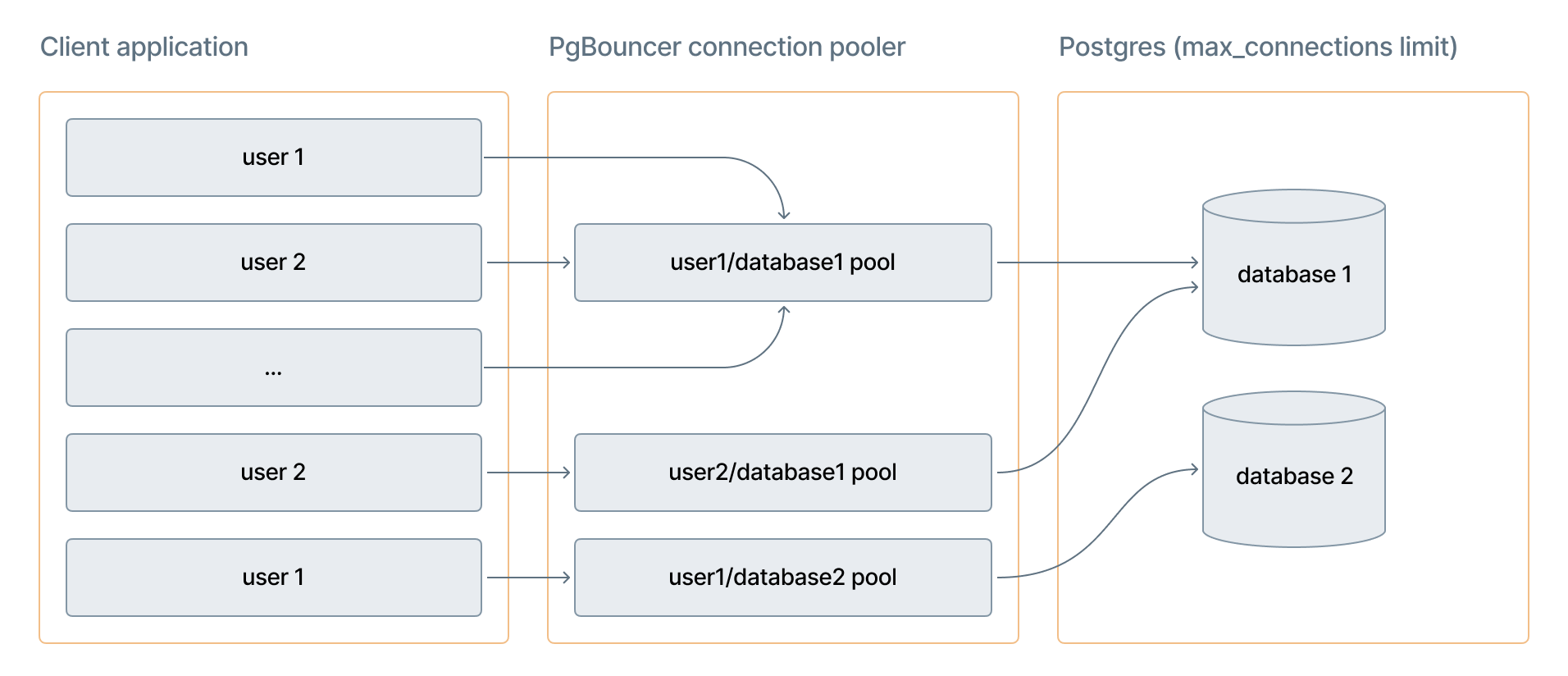
The diagram shows how multiple client connections from different users route through separate PgBouncer pools (one per user/database combination), which share a limited number of actual Postgres connections.
Connection limits
Three limits govern connection pooling:
| Limit | Value | What it controls |
|---|---|---|
Client connections (max_client_conn) |
10,000 | Maximum connections from your application to PgBouncer |
Pool size (default_pool_size) |
~90% of max_connections |
Active server connections per (user, database) pair |
Direct connections (max_connections) |
Varies by compute size | Maximum direct Postgres connections |
The direct connection limit depends on your compute size. For example, an 8 CU compute supports 1,678 direct connections and a 16 CU compute supports 3,357. For the full list, see Compute specifications.
The 10,000 client connection limit does not mean 10,000 simultaneous query results. It represents the maximum number of client connections PgBouncer accepts. The number of concurrent active transactions is bounded by the pool size, which is approximately 90% of max_connections.
Enable connection pooling
Prerequisites
- Your Lakebase project must be active.
- You must have a native Postgres password role, or an OAuth role for a Azure Databricks user or service principal. For instructions, see Create Postgres roles.
- To use connection pooling with read-only compute instances, you must have a high availability endpoint with Allow access to read-only compute instances enabled. See High availability.
Steps
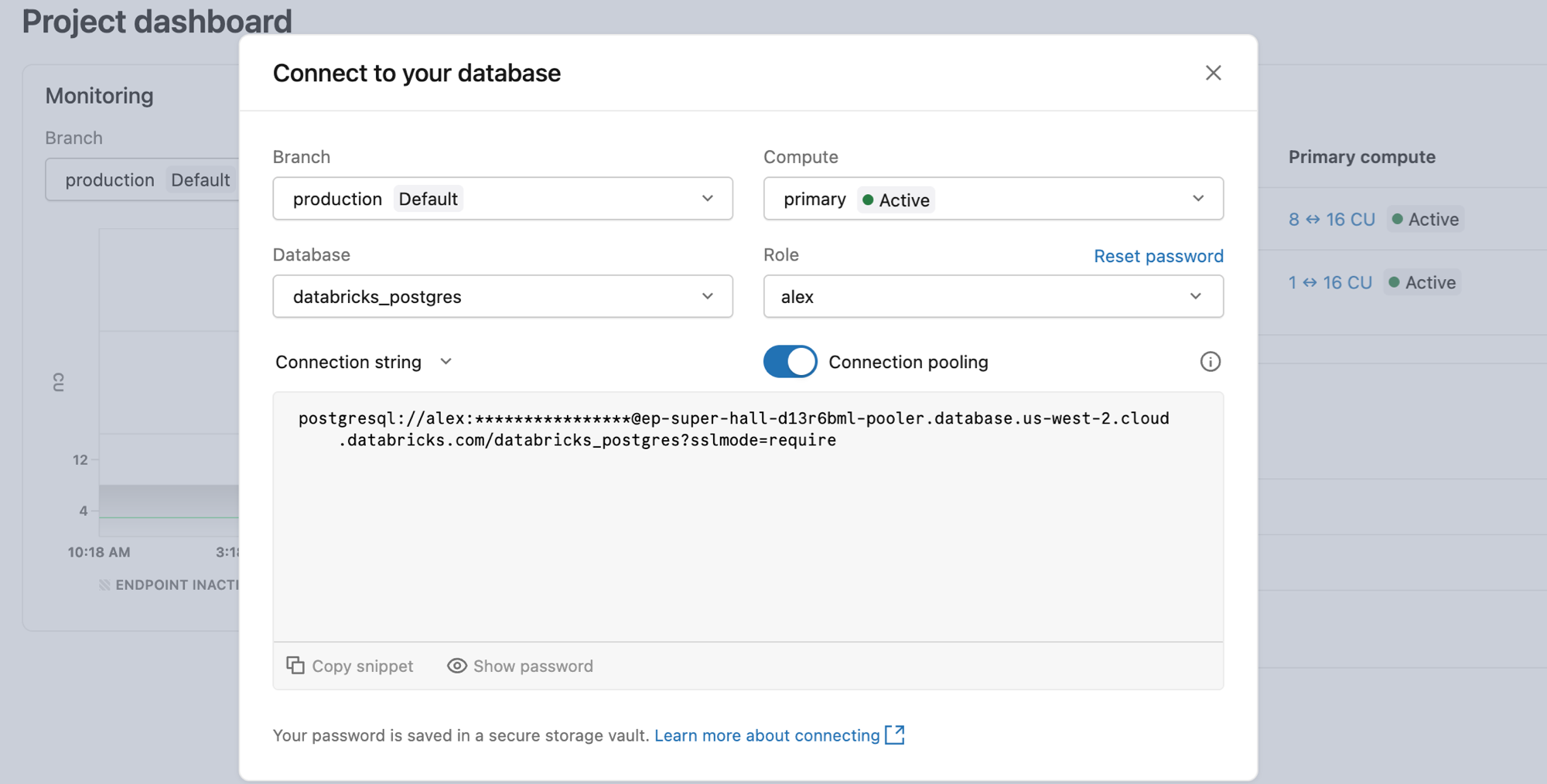
- In the Lakebase App, go to your project and click Connect.
- Select the branch and compute you want to connect to.
- From the Role drop-down, select a native Postgres password role or an OAuth role for a Azure Databricks user or service principal.
- Turn on Connection pooling.
- Copy the connection string and use it in your application. For an OAuth role, the connection string has no password, so pass an OAuth token as the password. See Connect with an OAuth role.
OAuth roles
Users and service principals connect through the pooler with the same OAuth token they use for a direct connection, from the Lakebase UI or the database credential API. The following need a direct connection instead:
- Group roles: Connecting as a group role through the pooler isn't supported. Use a direct connection.
- Workspace OAuth tokens: The pooler only accepts tokens from the Lakebase UI or the database credential API. A workspace OAuth token, such as the one a service principal gets with its client ID and secret, needs a direct connection.
- Tokens with table permissions: Tokens that carry Unity Catalog table permissions, such as tokens used by feature serving, don't work with the pooler.
databricks_create_role(): The function needs a direct connection. You can still create roles from the Lakebase UI or the API.
If a login isn't supported through the pooler, the connection fails with this error:
This OAuth login is not supported with pooled connections. Use the unpooled connection string by removing '-pooler' from the hostname.
As with a direct connection, the token is checked when the client connects, and an open connection stays open after the token expires.
Connection string formats
Pooler connection strings use a different hostname than direct database connections. The hostname includes -pooler after the endpoint ID for read-write compute, or -ro-pooler for read-only compute:
| Compute type | Hostname format | When to use |
|---|---|---|
| Read-write compute | <endpoint-id>-pooler.<region>.<cloud>.databricks.com |
All write and read traffic |
| Read-only compute | <endpoint-id>-ro-pooler.<region>.<cloud>.databricks.com |
Read traffic only. Requires a high availability endpoint with read access enabled. |
Both use port 5432.
Note
Copy your pooler connection string directly from the Connect dialog in the Lakebase App to get the correct hostname for your endpoint, region, and cloud.
PgBouncer configuration
Lakebase manages PgBouncer with the following settings. These settings are fixed and cannot be customized.
[pgbouncer]
pool_mode=transaction
max_client_conn=10000
default_pool_size=0.9 * max_connections
max_prepared_statements=1000
query_wait_timeout=120
| Setting | Description |
|---|---|
pool_mode=transaction |
Server connections return to the pool after each transaction. See Transaction mode. |
max_client_conn=10000 |
Maximum concurrent client connections PgBouncer accepts. |
default_pool_size=0.9 * max_connections |
Active server connections per (user, database) pair. Varies by compute size. |
max_prepared_statements=1000 |
Allows protocol-level prepared statements in transaction mode. Limits tracked statements to 1,000 per client connection. |
query_wait_timeout=120 |
Seconds a client waits for a server connection before receiving a timeout error. |
Transaction mode
Transaction mode improves connection efficiency but restricts certain Postgres features that require a persistent server connection. The following features aren't available when using the connection pooler:
SQL-level prepared statements:
PREPAREandDEALLOCATEstatements are not supported in transaction mode. Driver-level prepared statements (used internally by psycopg, node-postgres, JDBC, and similar libraries) work correctly through PgBouncer's protocol-level support. For JDBC, if you see errors related to prepared statements, setprepareThreshold=0to disable named server-side prepared statement caching.Session-level settings:
SETcommands do not persist across transactions because each transaction may use a different server connection. For example:BEGIN; SET search_path TO myschema; SELECT * FROM mytable; -- works in this transaction COMMIT; -- connection returns to pool after COMMIT SELECT * FROM mytable; -- ERROR: relation "mytable" does not existTo apply a setting permanently, use
ALTER ROLEinstead:ALTER ROLE myrole SET search_path TO myschema, public;Session-held temporary tables: Temporary tables that persist across transactions are not available. A connection returned to the pool may be assigned to a different client in the next transaction.
WITH HOLDcursors: Cursors declared withWITH HOLDrequire a persistent connection and are not supported.Advisory locks: PgBouncer doesn't support advisory locks. Advisory locks require a persistent server connection, which isn't available in transaction mode.
LISTEN/NOTIFY: Not supported. Use a direct (non-pooled) connection for applications that require pub/sub messaging.pg_dumpand schema migrations: Use a direct connection forpg_dump, schema migrations, and other tools that rely on session-level state.
Note
For applications that require session-level Postgres features, use a direct connection string from the Connect dialog without enabling the Connection pooling switch.