Bemærk
Adgang til denne side kræver godkendelse. Du kan prøve at logge på eller ændre mapper.
Adgang til denne side kræver godkendelse. Du kan prøve at ændre mapper.
Azure DevOps Services | Azure DevOps Server | Azure DevOps Server 2022
When securing Azure Pipelines, consider protecting shared infrastructure, repositories, projects, and more.
This article is part of a series that helps you implement security measures for Azure Pipelines. For more information, see Secure Azure Pipelines.
Prerequisites
| Category | Requirements |
|---|---|
| Azure DevOps | - Implement recommendations in Make your Azure DevOps secure and Secure Azure Pipelines. - Basic knowledge of YAML and Azure Pipelines. For more information, see Create your first pipeline. |
| Permissions | - To modify pipelines permissions: Member of the Project Administrators group. - To modify organization permissions: Member of the Project Collection Administrators group. |
Protect shared infrastructure
Protected resources in Azure Pipelines are an abstraction of real infrastructure. Follow these recommendations to protect the underlying infrastructure.
Use Microsoft-hosted pools
Microsoft-hosted pools provide isolation and a clean virtual machine for each run of a pipeline. If possible, use Microsoft-hosted pools instead of self-hosted pools.
Separate agents for each project
An agent can associate with only one pool. You can share agents across projects by associating the pool with multiple projects. In practice, multiple projects might use the same agent consecutively. While cost-effective, this approach can introduce lateral movement risks.
To reduce lateral movement and prevent cross-contamination between projects, maintain separate agent pools, each dedicated to a specific project.
Use low-privileged accounts to run agents
Running the agent under an identity with direct access to Azure DevOps resources can be risky. This risk is prevalent in organizations that use Microsoft Entra ID.
Why this risk matters:
- If you run the agent under an identity backed by Entra ID, it can directly access Azure DevOps APIs without relying on the job's access token.
- Adversaries who run a compromised pipeline on these build agents could potentially gain control over the entire Azure DevOps organization.
Recommendation: Run the agent by using a nonprivileged local account:
- Windows agents: Use Network Service (
NT AUTHORITY\NETWORK SERVICE), Local Service, or a Group Managed Service Account (gMSA). - Linux agents and macOS agents: Create a dedicated non-root user account (for example,
svc_azuredevops). This account shouldn't have sudo or sudoers access for maximum security.
Important
In Azure DevOps, the Project Collection Service Accounts group can be misleading. By inheritance, members of Project Collection Service Accounts are also members of Project Collection Administrators. Some customers run their build agents by using an identity backed by Entra ID, and these identities can be part of Project Collection Service Accounts.
Risks of highly privileged agents:
Self-hosted agents sometimes operate under highly privileged accounts to access secrets or production environments. If adversaries execute a compromised pipeline on one of these build agents, they can:
- Gain access to those secrets
- Move laterally through other systems accessible through these accounts
Best practices for agent security:
- Use the lowest-privileged account possible for running self-hosted agents.
- Consider using your machine account or a managed service identity.
- Let Azure Pipelines manage access to secrets and environments.
Minimize the scope of service connections
Service connections should access only the necessary resources.
Authentication recommendations:
- Use workload identity federation instead of a service principal for your Azure service connection whenever feasible.
- Workload identity federation uses Open ID Connect (OIDC), an industry-standard technology, to facilitate authentication between Azure and Azure DevOps without relying on secrets.
Scope recommendations:
- Scope your Azure service connection to access only necessary resources.
- Avoid granting broad contributor rights for the entire Azure subscription.
- When creating a new Azure Resource Manager service connection, always choose a specific resource group.
- Ensure the resource group contains only the necessary VMs or resources required for the build.
- When configuring the GitHub app, grant access only to the repositories you intend to build.
Protect projects
Beyond individual resources, it's crucial to consider resource groups in Azure DevOps. Resources are organized by team projects, and you need to understand what your pipeline can access based on project settings and containment.
Each job in your pipeline receives an access token with permissions to read open resources. In some cases, pipelines might also update these resources. This permission model means that while your user account might not have direct access to a specific resource, scripts and tasks running in your pipeline can still access it. Additionally, Azure DevOps’ security model allows access to these resources from other projects within the organization. If you decide to restrict pipeline access to certain resources, this decision applies to all pipelines within a project - specific pipelines can't be selectively granted access to open resources.
Separate projects
Given the nature of open resources, consider managing each product and team in separate projects. By doing so, you prevent pipelines from one product inadvertently accessing open resources from another product, thus minimizing lateral exposure. But, when multiple teams or products share a project, granular isolation of their resources becomes challenging.
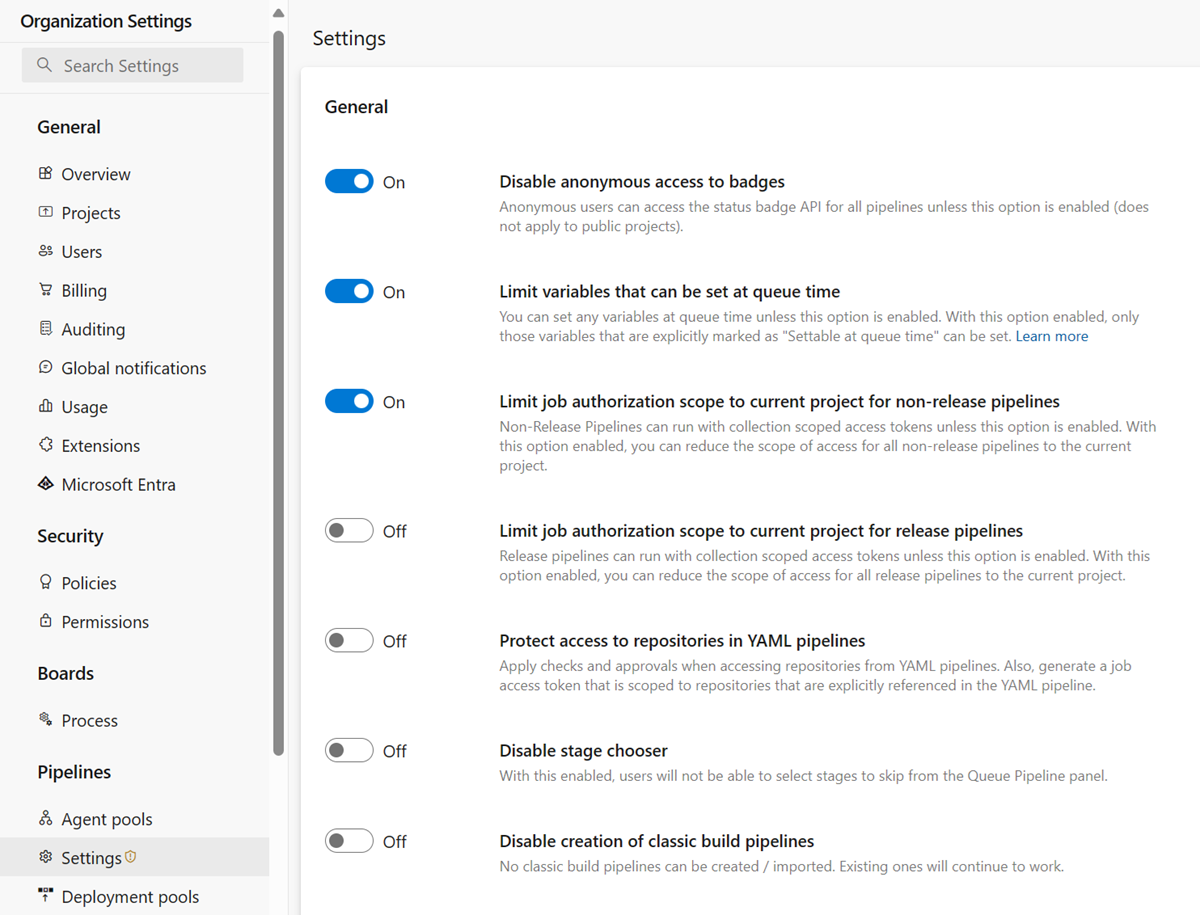
If your Azure DevOps organization was created before August 2019, runs might still have access to open resources across all your organization's projects. Your organization administrator should review a critical security setting in Azure Pipelines that enables project isolation for pipelines.
You can find this setting at Organization settings > Pipelines > Settings, or directly: https://dev.azure.com/Organization_Name/_settings/pipelinessettings.
Protect repositories
In version control repositories, you can store source code, the pipeline’s YAML file, and necessary scripts and tools. To ensure safe changes to the code and pipeline, it’s crucial to apply permissions and branch policies. Additionally, consider adding pipeline permissions and checks to repositories.
Furthermore, review the default access control settings for your repositories.
Keep in mind that Git’s design means that branch-level protection has limitations. Users with push access to a repository can typically create new branches. If you’re working with GitHub open-source projects, anyone with a GitHub account can fork your repository and propose contributions. Since pipelines are associated with a repository (not specific branches), it’s essential to treat code and YAML files as potentially untrusted.
Forks
When you work with public repositories from GitHub, carefully consider your approach to fork builds. Forks that come from outside your organization pose particular risks. To protect your products from potentially untrusted contributed code, follow these recommendations.
Note
These recommendations primarily apply to building public repositories from GitHub.
Don't provide secrets to fork builds
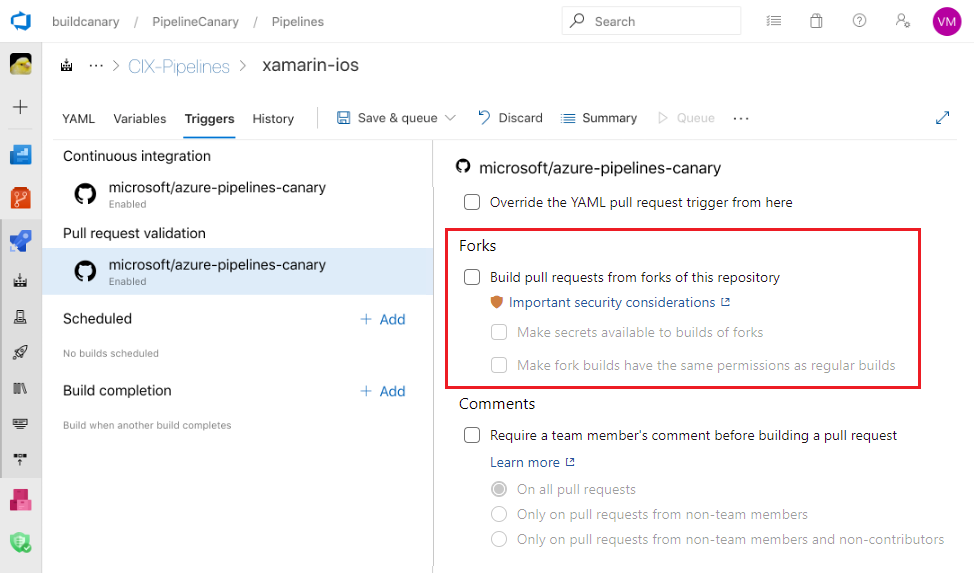
By default, your pipelines build forks, but they don't automatically expose secrets and protected resources to the jobs in those pipelines. Don't disable this protection to maintain security.
Note
When you enable fork builds to access secrets, Azure Pipelines restricts the access token used by default. This token has limited access to open resources compared to a regular access token. To grant fork builds the same permissions as regular builds, enable the Make fork builds have the same permissions as regular builds setting.
Consider manually triggering fork builds
Turn off automatic fork builds and instead use pull request comments as a way to manually build these contributions. This setting gives you an opportunity to review the code before triggering a build.
Use Microsoft-hosted agents for fork builds
Avoid running builds from forks on self-hosted agents. If you use self-hosted agents, external organizations can run external code on machines within your corporate network. Whenever possible, use Microsoft-hosted agents. For self-hosted agents, implement network isolation and ensure that agents don't persist their state between jobs.
Review code changes
Before you run your pipeline on a forked pull request, carefully review the proposed changes, and make sure you're comfortable running it.
The version of the YAML pipeline you run is the one from the pull request. Pay special attention to changes to the YAML code and to the code that runs when the pipeline runs, such as command line scripts or unit tests.
GitHub token scope limitation
When you build a GitHub forked pull request, Azure Pipelines ensures the pipeline can't change any GitHub repository content. This restriction applies only if you use the Azure Pipelines GitHub app to integrate with GitHub. If you use other forms of GitHub integration, such as the OAuth app, the restriction isn't enforced.
User branches
Users in your organization with the right permissions can create new branches containing new or updated code. This code can run through the same pipeline as your protected branches. If the YAML file in the new branch is changed, the updated YAML runs the pipeline. While this design offers great flexibility and self-service, not all changes are safe (whether made maliciously or not).
If your pipeline consumes source code or is defined in Azure Repos, you must fully understand the Azure Repos permissions model. In particular, a user with Create Branch permission at the repository level can introduce code to the repo even if that user lacks Contribute permission.
Other security considerations
Consider the following security aspects when securing pipelines.
Rely on PATH
Relying on the agent's PATH setting is dangerous. It might not point where you think it does, since a previous script or tool potentially altered it. For security-critical scripts and binaries, always use a fully qualified path to the program.
Log secrets
Azure Pipelines attempts to remove secrets from logs wherever possible. This filtering is on a best-effort basis and can't catch every way that secrets can be leaked. Avoid echoing secrets to the console, using them in command line parameters, or logging them to files.
Lock down containers
Containers have a few system-provided volume mounts mapping in the tasks, the workspace, and external components required to communicate with the host agent. You can mark any or all of these volumes as read-only.
resources:
  containers:
  - container: example
    image: ubuntu:22.04
    mountReadOnly:
      externals: true
      tasks: true
      tools: true
      work: false  # the default; shown here for completeness
Typically, most people set the first three directories as read-only and leave work as read-write.
If you don't write to the work directory in a specific job or step, feel free to make work read-only as well. But, if your pipeline tasks involve self-modification, you might need to keep tasks as read-write.
Control available tasks
You can disable the ability to install and run tasks from the Marketplace. This approach gives you greater control over the code that runs in a pipeline. You might also disable all the in-the-box tasks, except for the Checkout task, which is a special action on the agent. Don't disable in-the-box tasks under most circumstances.
Tasks you install directly by using tfx are always available.
When you enable both these features, only those tasks are available.
Use the Auditing service
The Auditing service records many pipeline events.
Review the audit log periodically to ensure no malicious changes slipped past.
To get started, visit https://dev.azure.com/ORG-NAME/_settings/audit.