Bemærk
Adgang til denne side kræver godkendelse. Du kan prøve at logge på eller ændre mapper.
Adgang til denne side kræver godkendelse. Du kan prøve at ændre mapper.
Azure DocumentDB is a fully managed NoSQL database service for modern application development with MongoDB compatibility. Azure DocumentDB supports a high availability (HA) configuration with synchronously replicated hot-standby replicas and zone redundancy. It also provides an optional read replica in another Azure region and automatic backups with point-in-time retention to protect against accidental data loss.
When you use Azure, reliability is a shared responsibility. Microsoft provides a range of capabilities to support resiliency and recovery. You're responsible for understanding how those capabilities work within all of the services you use, and selecting the capabilities you need to meet your business objectives and uptime goals.
This article describes how to make Azure DocumentDB resilient to various potential outages and problems, including transient faults, availability zone outages, region outages, and service maintenance. It also describes backup behavior and provides key information about HA and cross-region replication.
Production deployment recommendations for reliability
For a list of recommendations to improve your cluster's reliability, see Best practices for high availability (HA) and cross-region replication in Azure DocumentDB.
Reliability architecture overview
This section describes some of the important aspects of how the service works that are most relevant from a reliability perspective. The section introduces the logical architecture, which includes some of the resources and features that you deploy and use. It also discusses the physical architecture, which provides details on how the service works under the covers.
Logical architecture
The primary resource you deploy is an Azure DocumentDB cluster. For each cluster, you choose a compute tier and configure storage. Your selected tier determines the capabilities available for reliability features such as high availability (HA), and it also affects how you plan capacity for resilience scenarios.
Applications connect to a cluster by using connection strings and endpoints. Azure DocumentDB provides connection endpoints for read-write operations and, when configured, endpoints for read replica clusters. These endpoints let your application continue to use stable connection patterns while the service manages failover behavior behind the scenes.
Within each cluster, your data is organized as databases, collections, and documents. This MongoDB-compatible data model is the basis for workload-level design decisions such as sharding strategy, read and write patterns, and backup and restore scope.
Physical architecture
Azure DocumentDB runs your cluster on shards, which represent nodes (virtual machines) that run the service. You can deploy one shard or scale out to multiple shards. Deploying multiple shards improves scale capacity, but by itself doesn't provide HA.
When you enable HA, Azure DocumentDB provisions a matching set of standby shards. Each primary shard has a standby shard. The service replicates data synchronously between each primary-standby pair and promotes the standby shard if the primary shard fails. For more information about HA, see High availability in Azure DocumentDB.
Azure DocumentDB uses Azure Storage for shard durability. If HA is disabled, each shard uses locally redundant storage (LRS). LRS maintains three copies of the data, but it's not resilient to the loss of an availability zone. For LRS durability details, see Summary of redundancy options.
For more information, see Availability and disaster recovery (DR) in Azure DocumentDB: Behind the scenes.
Resilience to transient faults
Transient faults are short, intermittent failures in components. They occur frequently in a distributed environment like the cloud, and they're a normal part of operations. Transient faults correct themselves after a short period of time. It's important that your applications can handle transient faults, usually by retrying affected requests.
All cloud-hosted applications should follow the Azure transient fault handling guidance when they communicate with any cloud-hosted APIs, databases, and other components. For more information, see Recommendations for handling transient faults.
Azure DocumentDB is compatible with the MongoDB protocol, so applications typically connect by using MongoDB drivers. You're responsible for configuring your application's driver retry settings to handle transient failures, especially connection interruptions and short write interruptions during failover events. Follow these guidelines:
Use MongoDB drivers that support automatic retry handling for transient connectivity failures.
Configure retries with exponential backoff, and limit the number of retry attempts.
When possible, design write operations to be idempotent so that retrying them is safe. For general implementation guidance about idempotency, see the Idempotent Consumer pattern.
Resilience to availability zone failures
Availability zones are physically separate groups of datacenters within an Azure region. When one zone fails, services can fail over to one of the remaining zones.
To use availability zone support in Azure DocumentDB, enable high availability (HA). When you enable HA in a region that supports availability zones, your cluster becomes zone-redundant because Azure DocumentDB places the standby shards in a different availability zone from their primary shards. Standby shards don't receive client requests unless their primary shard fails.
If you disable HA, Azure DocumentDB doesn't place standby shards in another availability zone, so an availability zone failure can make your cluster unavailable.
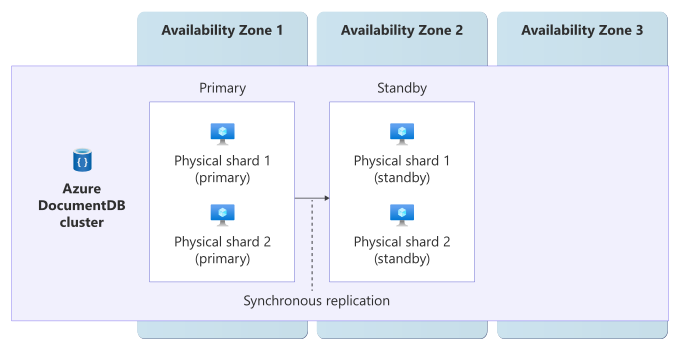
The diagram shows one Azure DocumentDB cluster across three availability zones. Two primary physical shards are in availability zone 1, and their corresponding standby physical shards are in availability zone 2. Arrows between each primary and standby shard show synchronous replication. Availability zone 3 contains no shards in this example.
Requirements
Region support: To use availability zones with Azure DocumentDB, choose a region that supports both Azure DocumentDB and availability zones. Check Products available by region and compare it with regions that support availability zones.
High availability: You must enable HA on the cluster. HA requires the cluster to use the M30 (or greater) compute tier.
Considerations
Although some Azure DocumentDB APIs include references to same-zone deployment modes, Azure DocumentDB doesn't support same-zone HA deployments. The service supports zone-redundant HA deployments.
Instance distribution across zones
Microsoft selects two availability zones for the cluster. In zone-redundant HA deployments, Azure DocumentDB places all primary shards in one zone and all standby shards in the other zone.
Cost
When HA is enabled, Azure DocumentDB provisions a standby shard for each primary shard, which increases the compute and storage cost of your cluster. In regions that support availability zones, HA also makes the cluster zone-redundant. In some deployment modes, Azure DocumentDB enables HA by default. For production workloads, keep HA enabled. For development and test workloads, you can disable HA to reduce cost. For pricing details, see Azure DocumentDB pricing.
Configure availability zone support
Create a new zone-redundant Azure DocumentDB cluster: When you create a cluster in a region that supports availability zones, enable HA to make the cluster zone-redundant. For detailed steps, see Quickstart: Create an Azure DocumentDB cluster by using the Azure portal.
Enable zone redundancy on an existing Azure DocumentDB cluster: You can enable HA on an existing cluster. There's no database downtime when high availability is enabled or disabled on an Azure DocumentDB cluster. For detailed steps, see Scale an Azure DocumentDB cluster.
Behavior when all zones are healthy
This section describes what to expect when you configure an Azure DocumentDB cluster for HA in a region that supports availability zones, and all zones are operational.
Cross-zone operation: The primary shards serve all client requests. Standby shards in a different availability zone don't receive client requests unless the primary fails.
Cross-zone data replication: Replication between primary and standby shards is synchronous. Writes are persisted on both primary and standby shards before the service returns a response.
Behavior during a zone failure
This section describes what to expect when you configure an Azure DocumentDB cluster for HA in a region that supports availability zones, and there's an outage in one of the zones.
Detection and response: Microsoft monitors shard health and handles detection and failover operations for you. If a primary shard becomes unavailable because of a zone outage, Azure DocumentDB automatically promotes the standby shard and then rebuilds redundancy by creating a new standby shard.
Notification: Microsoft doesn't automatically notify you when a zone is down. However, you can use Azure Service Health to understand the overall health of the service, including any zone failures, and you can set up Service Health alerts to notify you of problems.
Active requests: In-flight requests that weren't acknowledged before failover can fail and must be retried by the client. If your application handles transient faults, these retries typically complete automatically.
Expected data loss: Azure DocumentDB replicates data synchronously between the primary and standby shards, so no data loss is expected.
Expected downtime: No downtime is expected for read operations. For write operations, a brief interruption can occur while failover completes. If your application retries transient faults correctly, this usually appears as a short slowdown.
Redistribution: The connection string doesn't change, so clients continue using the same endpoint. The service automatically redirects traffic to promoted standby shards and rebuilds new standby shards.
Zone recovery
When the availability zone recovers, Azure DocumentDB automatically restores normal operations across all of the zones used by the cluster.
Test for zone failures
The Azure DocumentDB platform manages traffic routing, failover, and zone recovery for zone-redundant clusters. You don't need to initiate or validate availability zone failure processes.
Resilience to region-wide failures
You deploy each Azure DocumentDB cluster in a single Azure region. To support resilience to region failures, configure cross-region replication by adding one replica cluster in another region.
Cross-region replication
Azure DocumentDB supports cross-region replication through a replica cluster. The replica cluster appears as a separate cluster in your resource group. You can use this replica cluster for disaster recovery and read scaling. Azure DocumentDB automatically and asynchronously replicates data changes from the primary cluster to the replica cluster.
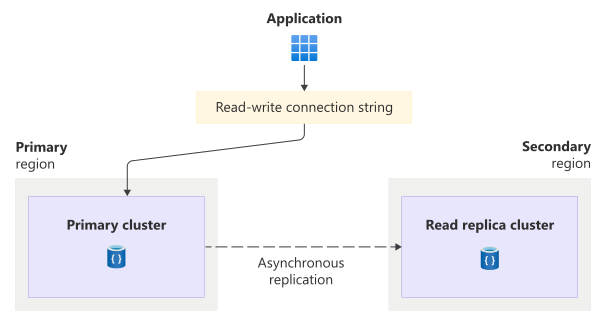
The diagram shows an application connecting through the read-write connection string to the primary cluster in the primary region. A dashed arrow shows asynchronous replication from the primary cluster to a read replica cluster in the secondary region.
If your primary region fails, the replica cluster can be promoted to become the read-write cluster. The global read-write connection string automatically updates to point to the promoted cluster.
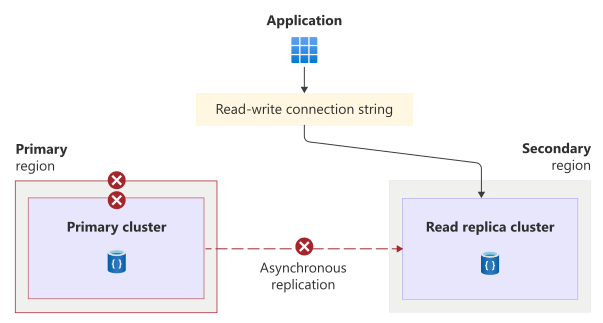
The diagram shows an application connecting through the read-write connection string to the replica cluster in the secondary region after promotion. Failure symbols mark the primary cluster, the primary region, and the former asynchronous replication path.
This section summarizes reliability considerations for cross-region replication. For more information, see Manage cross-region and same region replication on your Azure DocumentDB cluster and Cross-region and same-region replication best practices in Azure DocumentDB.
Failover between regions
Azure DocumentDB supports three promotion modes:
Forced promotion: Immediately promotes the replica cluster to accept write operations and redirects incoming write traffic through the global read-write connection string. This mode minimizes downtime but can result in data loss because it loses any unreplicated writes.
Service-managed failover: You can configure your cluster to use service-managed failover. Microsoft monitors your primary cluster and automatically triggers a forced promotion if the primary cluster is unhealthy.
Graceful promotion: Prevents data loss but requires some downtime while unreplicated writes are replicated. Graceful promotion requires both clusters to be healthy, so you can't perform it during a region outage.
For more information, see Cross-region failover modes in Azure DocumentDB.
Requirements
Region support: You can use cross-region replication in all Azure regions that support Azure DocumentDB.
Compute tier: Cross-region replication requires the M30 compute tier or higher.
Considerations
Network access: Replica clusters don't inherit networking settings from the primary cluster. Configure firewall rules or private endpoints separately on the replica cluster, and test connectivity before a failover. For more information, see Continuous writes, read operations on cluster replicas, and connection strings.
Feature support: Replica clusters don't support point-in-time restore (PITR) or in-region HA.
If HA is enabled on the primary cluster, you're responsible for re-enabling HA on the promoted cluster.
For more information, see Azure DocumentDB service limits and quotas.
Cost
Cross-region replication adds costs for the replica cluster's compute and storage resources. Cross-region data transfer charges also apply. For pricing details, see Azure DocumentDB pricing and Bandwidth pricing.
Configure multiregion support
Create a replica cluster: To enable cross-region replication, create a replica cluster from your primary cluster. You can create a replica cluster when you create the primary cluster or afterward. For steps, see Manage cross-region and same region replication on your Azure DocumentDB cluster.
Configure automatic failover: If you want Azure to automatically promote the replica during outages of the primary region, enable service-managed failover. For more information, see Enable service-managed failover.
Note
Microsoft typically triggers service-managed failover only in extreme events, such as an entire region outage or a large number of affected customers. There might be a delay before failover is triggered. If you need to restore availability quickly, we recommend you manage the failover process by using customer-initiated forced promotion.
Behavior when all regions are healthy
This section describes what to expect when you configure an Azure DocumentDB cluster for cross-region replication and all regions are operational.
Cross-region operation: The primary cluster serves all read-write traffic. The replica cluster serves read-only traffic, which you can use to scale out read workloads or to keep read traffic local to a specific region. The global read-write connection string always points to the current writable cluster, so clients don't need to track which region is primary.
Cross-region data replication: Replication between the primary cluster and the replica cluster is asynchronous. Writes are committed on the primary cluster and acknowledged to the client before they're replicated to the replica cluster. This approach prevents cross-region network latency from affecting write performance. Because replication is asynchronous, some replication lag is expected between the primary and replica clusters, and any unreplicated writes can be lost during a forced failover.
Behavior during a region failure
This section describes what to expect when you configure an Azure DocumentDB cluster for cross-region replication and there's an outage in the primary cluster's region.
Detection and response: Responsibility for detecting the outage and responding depends on the type of failover your cluster uses.
- If service-managed failover is enabled, Azure DocumentDB detects the outage and automatically performs a forced promotion of the replica cluster.
- If service-managed failover isn't enabled, you're responsible for detecting the outage and triggering a forced promotion.
For more information, see Cross-region failover modes in Azure DocumentDB.
Notification: Microsoft doesn't automatically notify you when a region is down. However, you can use Azure Service Health to understand the overall health of the service, including any region failures, and you can set up Service Health alerts to notify you of problems.
Active requests: Any active requests to the failed primary region might fail. After failover completes, applications should reconnect and retry against the promoted cluster.
Expected data loss: Failovers during region failures are unplanned, so unreplicated writes can be lost because replication is asynchronous.
Expected downtime: The overall downtime depends on detection time, failover mode, and client reconnection behavior.
For customer-initiated forced promotion, the total downtime includes the time it takes to detect the outage and initiate your response processes, as well as the time to complete the promotion.
Once a promotion is initiated, it typically completes within a few minutes.
Redistribution: The global read-write connection string automatically points to the promoted cluster after promotion. Applications that use cluster-specific connection strings might require configuration updates so they direct traffic to the healthy cluster.
Region recovery
Azure DocumentDB doesn't automatically fail back to the original region after it recovers. To return write operations to the original region, perform another promotion after you reestablish your preferred topology. Use a graceful promotion to avoid data loss during failback. A graceful promotion requires a small amount of downtime, and you can perform it at a time you choose, like during a maintenance window. For more information, see Trigger a graceful promotion.
Test for region failures
Test your disaster recovery process regularly by promoting the replica cluster in a controlled environment.
Use forced promotion to simulate outage behavior. This test can result in data loss, so consider running this test in a nonproduction environment. For more information, see Trigger a forced promotion.
Use graceful promotion for planned switchover drills when you want to avoid data loss. For more information, see Trigger a graceful promotion.
Backup and restore
For most solutions, you shouldn't rely exclusively on backups. Instead, use the other capabilities described in this guide to support your resiliency requirements. However, backups protect against some risks that other approaches don't. For more information, see What are redundancy, replication, and backup?.
Azure DocumentDB automatically takes continuous backups that enable point-in-time recovery (PITR). These automatic backups help you recover original versions after you accidentally delete or modify data. Azure DocumentDB takes backups without affecting the performance or availability of database operations.
Azure DocumentDB stores backups separately from the source data. In regions that support availability zones, the service stores backup snapshots in three availability zones. Azure DocumentDB manages these backups, and you can't export them. The service retains backups for 35 days for active clusters, 7 days for active burstable-tier (M10, M20, M25) clusters, and 7 days for deleted clusters.
You can restore a backup to a new cluster. After you do so, you need to perform a set of post-restore tasks.
For more information, see Restore a cluster in Azure DocumentDB.
Resilience to service maintenance
Microsoft regularly applies service updates and performs other maintenance. The Azure platform handles these activities automatically, ensuring that maintenance is seamless and transparent to you. No downtime is expected during maintenance events unless you've been advised through Azure Service Health planned maintenance.
Planned maintenance events can still cause brief transient failures for client operations. Your application should handle these events by using the retry guidance in Resilience to transient faults.
Service-level agreement
The service-level agreement (SLA) for Azure services describes the expected availability of each service and the conditions that your solution must meet to achieve that availability expectation. For more information, see SLAs for online services.
For Azure DocumentDB, availability SLAs apply only when your cluster has high availability (HA) enabled. Different availability SLAs apply to the following configurations:
HA-enabled clusters that span multiple Azure regions by using cross-region replication.
HA-enabled clusters in a single region.