Bemærk
Adgang til denne side kræver godkendelse. Du kan prøve at logge på eller ændre mapper.
Adgang til denne side kræver godkendelse. Du kan prøve at ændre mapper.
Azure Firewall is a managed, cloud-based network security service that protects Azure Virtual Network resources. It's a fully stateful firewall service that includes built-in high availability and unrestricted cloud scalability.
When you use Azure, reliability is a shared responsibility. Microsoft provides a range of capabilities to support resiliency and recovery. You're responsible for understanding how those capabilities work within all of the services you use, and selecting the capabilities you need to meet your business objectives and uptime goals.
This article describes how to make Azure Firewall resilient to a variety of potential outages and problems, including transient faults, availability zone outages, and region outages. It also describes resilience during service maintenance, and highlights some key information about the Firewall service level agreement (SLA).
Production deployment recommendations
To learn about how to deploy Azure Firewall to support your solution's reliability requirements and how reliability affects other aspects of your architecture, see Architecture best practices for Azure Firewall in the Azure Well-Architected Framework.
Reliability architecture overview
An instance refers to a virtual machine (VM)-level unit of the firewall. Each instance represents the infrastructure that handles traffic and performs firewall checks.
To achieve high availability of a firewall, Azure Firewall automatically provides at least two instances, without requiring your intervention or configuration. The firewall automatically scales out when average throughput, CPU consumption, and connection usage reach predefined thresholds. For more information, see Azure Firewall performance. The platform automatically manages instance creation, health monitoring, and the replacement of unhealthy instances.
To protect against server and server rack failures, Azure Firewall automatically distributes instances across multiple fault domains within a region.
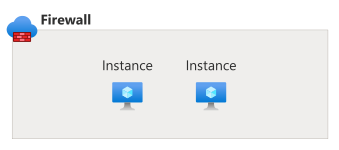
The following diagram shows a firewall with two instances:
To increase redundancy and availability during datacenter failures, Azure Firewall automatically enables zone redundancy in regions that support multiple availability zones, distributing instances across at least two availability zones.
Resilience to transient faults
Transient faults are short, intermittent failures in components. They occur frequently in a distributed environment like the cloud, and they're a normal part of operations. Transient faults correct themselves after a short period of time. It's important that your applications can handle transient faults, usually by retrying affected requests.
All cloud-hosted applications should follow the Azure transient fault handling guidance when they communicate with any cloud-hosted APIs, databases, and other components. For more information, see Recommendations for handling transient faults.
For applications that connect through Azure Firewall, implement retry logic with exponential backoff to handle potential transient connection problems. Azure Firewall's stateful nature ensures that legitimate connections stay active during brief network interruptions.
During scaling operations, which take five to seven minutes, the firewall preserves existing connections while it adds new firewall instances to handle increased load.
Resilience to availability zone failures
Availability zones are physically separate groups of datacenters within an Azure region. When one zone fails, services can fail over to one of the remaining zones.
Azure Firewall is automatically deployed as zone-redundant in regions that support multiple availability zones. A firewall is zone-redundant when you deploy it across at least two availability zones.
Azure Firewall supports both zone-redundant and zonal deployment models:
Zone-redundant: In regions that support availability zones, Azure automatically distributes firewall instances across multiple availability zones (at least two). Azure manages load balancing and failover between zones automatically. This deployment model is the default for all new firewalls.
Zone-redundant firewalls achieve the highest uptime service-level agreement (SLA). Use them for production workloads that require maximum availability.
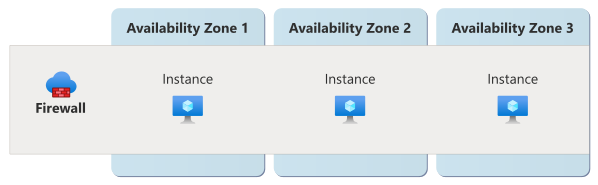
The following diagram shows a zone-redundant firewall with three instances that are distributed across three availability zones:
Note
All firewall deployments in regions with multiple availability zones are automatically zone-redundant. This rule applies to deployments through the Azure portal and API-based deployments (Azure CLI, PowerShell, Bicep, ARM templates, Terraform).
Zonal: In specific scenarios where capacity constraints exist or latency requirements are critical, you can deploy Azure Firewall to a specific availability zone by using API-based tools (Azure CLI, PowerShell, Bicep, ARM templates, Terraform). You deploy all instances of a zonal firewall within that zone.
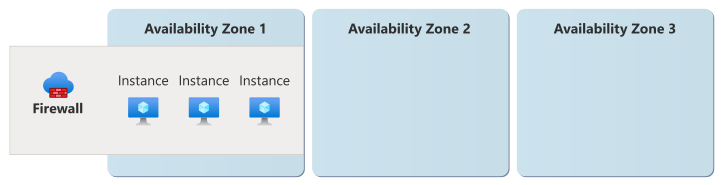
The following diagram shows a zonal firewall with three instances that are deployed into the same availability zone:
Important
You can only create zonal deployments through API-based tools. You can't configure them through the Azure portal. Existing zonal firewall deployments will be migrated to zone-redundant deployments in the future. Use zone-redundant deployments whenever possible to achieve the highest availability SLA. A zonal firewall alone doesn't provide resiliency to an availability zone outage.
Migration of existing deployments
Previously, Azure Firewall deployments that aren't configured to be zone-redundant or zonal are nonzonal or regional. Throughout calendar year 2026, Azure is migrating all existing nonzonal firewall deployments to zone-redundant deployments in regions that support multiple availability zones.
Requirements
- Region support: Azure Firewall supports availability zones in all regions that support availability zones, where the Azure Firewall service is available.
- All tiers of Azure Firewall support availability zones.
- Zone-redundant firewalls require standard public IP addresses configured to be zone-redundant.
- Zonal firewalls (deployed through API-based tools) require standard public IP addresses and can be configured to be either zone-redundant or zonal in the same zone as the firewall.
Cost
There's no extra cost for zone-redundant firewall deployments.
Configure availability zone support
This section explains availability zone configuration for your firewalls.
Create a new firewall: All new Azure Firewall deployments in regions with multiple availability zones are automatically zone-redundant by default. This rule applies to both portal-based and API-based deployments.
Zone-redundant (default): When you deploy a new firewall in a region with multiple availability zones, Azure automatically distributes instances across at least two availability zones. No extra configuration is required. For more information, see Deploy Azure Firewall by using the Azure portal.
- Azure portal: Automatically deploys zone-redundant firewalls. You can't select a specific availability zone through the portal.
- API-based tools (Azure CLI, PowerShell, Bicep, ARM templates, Terraform): Deploy zone-redundant firewalls by default. You can optionally specify zones for deployment.
For more information about deploying a zone-redundant firewall, see Deploy an Azure Firewall with availability zones.
Zonal (API-based tools only): To deploy a firewall to a specific availability zone (for example, due to capacity constraints in a region), use API-based tools such as Azure CLI, PowerShell, Bicep, ARM templates, or Terraform. Specify a single zone in your deployment configuration. This option isn't available through the Azure portal.
Note
When you select which availability zones to use, you're actually selecting the logical availability zone. If you deploy other workload components in a different Azure subscription, they might use a different logical availability zone number to access the same physical availability zone. For more information, see Physical and logical availability zones.
Existing firewalls: All existing nonzonal (regional) firewall deployments are automatically migrated to zone-redundant deployments in regions that support multiple availability zones. Existing zonal firewall deployments (pinned to a specific zone) are migrated to zone-redundant deployments at a future date.
Capacity constraints: If a region doesn't have capacity for a zone-redundant deployment (requiring at least two availability zones), the deployment fails. In this scenario, you can deploy a zonal firewall to a specific availability zone by using API-based tools.
Behavior when all zones are healthy
This section describes what to expect when Azure Firewall is configured with availability zone support and all availability zones are operational.
Traffic routing between zones: The traffic routing behavior depends on the availability zone configuration that your firewall uses.
Zone-redundant: Azure Firewall automatically distributes incoming requests across instances in all zones that your firewall uses. This active-active configuration ensures optimal performance and load distribution under normal operating conditions.
Zonal: If you deploy multiple zonal instances across different zones, you must configure traffic routing by using external load balancing solutions like Azure Load Balancer or Azure Traffic Manager.
Instance management: The platform automatically manages instance placement across the zones your firewall uses. It replaces failed instances and maintains the configured instance count. Health monitoring ensures that only healthy instances receive traffic.
Data replication between zones: Azure Firewall doesn't need to synchronize connection state across availability zones. The instance that processes the request maintains each connection's state.
Behavior during a zone failure
This section describes what to expect when Azure Firewall is configured with availability zone support and one or more availability zones are unavailable.
Detection and response: Responsibility for detection and response depends on the availability zone configuration that your firewall uses.
Zone-redundant: For instances configured to use zone redundancy, the Azure Firewall platform detects and responds to a failure in an availability zone. You don't need to initiate a zone failover.
Zonal: For firewalls configured to be zonal, you need to detect the loss of an availability zone and initiate a failover to a secondary firewall that you create in another availability zone.
- Notification: Microsoft doesn't automatically notify you when a zone is down. However, you can use Azure Service Health to understand the overall health of the service, including any zone failures, and you can set up Service Health alerts to notify you of problems.
Active connections: When an availability zone is unavailable, requests in progress that connect to a firewall instance in the faulty availability zone might terminate and require retries.
Expected data loss: No data loss is expected during zone failover because Azure Firewall doesn't store persistent customer data.
Expected downtime: Downtime depends on the availability zone configuration that your firewall uses.
Zone-redundant: Expect minimal downtime (typically a few seconds) during an availability zone outage. Client applications should follow practices for transient fault handling, including implementing retry policies with exponential backoff.
Zonal: When a zone is unavailable, your firewall remains unavailable until the availability zone recovers.
Traffic rerouting: The traffic rerouting behavior depends on the availability zone configuration that your firewall uses.
Zone-redundant: Traffic automatically reroutes to healthy availability zones. If needed, the platform creates new firewall instances in healthy zones.
Zonal: When a zone is unavailable, your zonal firewall is also unavailable. If you have a secondary firewall in another availability zone, you're responsible for rerouting traffic to that firewall.
Failback
The failback behavior depends on the availability zone configuration that your firewall uses.
Zone-redundant: After the availability zone recovers, Azure Firewall automatically redistributes instances across all zones that your firewall uses and restores normal load balancing across zones.
Zonal: After the availability zone recovers, you're responsible for rerouting traffic to the firewall in the original availability zone.
Test for zone failures
The options for zone failure testing depend on your firewall's availability zone configuration.
Zone-redundant: The Azure Firewall platform manages traffic routing, failover, and failback for zone-redundant firewall resources. This feature is fully managed, so you don't need to initiate or validate availability zone failure processes.
Zonal: You can simulate aspects of the failure of an availability zone by stopping a firewall. Use this approach to test how other systems and load balancers handle an outage in the firewall. For more information, see Stop and start Azure Firewall.
Resilience to region-wide failures
Azure Firewall is a single-region service. If the region is unavailable, your Firewall resource is also unavailable.
Custom multiregion solutions for resiliency
To implement a multiregion architecture, use separate firewalls. This approach requires you to deploy an independent firewall into each region, route traffic to the appropriate regional firewall, and implement custom failover logic. Consider the following points:
Use Azure Firewall Manager for centralized policy management across multiple firewalls. Use the Firewall Policy method for centralized rule management across multiple firewall instances.
Implement traffic routing by using Traffic Manager or Azure Front Door.
For an example architecture that illustrates multiregion network security architectures, see Multi-region load balancing by using Traffic Manager, Azure Firewall, and Application Gateway.
Resilience to service maintenance
Azure Firewall regularly performs service upgrades and other forms of maintenance.
You can configure daily maintenance windows to align upgrade schedules with your operational needs. For more information, see Configure customer-controlled maintenance for Azure Firewall.
Service-level agreement
The service-level agreement (SLA) for Azure services describes the expected availability of each service and the conditions that your solution must meet to achieve that availability expectation. For more information, see SLAs for online services.
Azure Firewall provides a higher availability SLA for zone-redundant firewalls deployed across two or more availability zones.