Bemærk
Adgang til denne side kræver godkendelse. Du kan prøve at logge på eller ændre mapper.
Adgang til denne side kræver godkendelse. Du kan prøve at ændre mapper.
Azure Database for PostgreSQL is a fully managed database service designed to give you granular control and flexibility over database management functions and configuration settings. The service provides high availability and disaster recovery capabilities based on your requirements.
When you use Azure, reliability is a shared responsibility. Microsoft provides a range of capabilities to support resiliency and recovery. You're responsible for understanding how those capabilities work within all of the services you use, and selecting the capabilities you need to meet your business objectives and uptime goals.
This article describes how to make Azure Database for PostgreSQL resilient to a variety of potential outages and problems, including transient faults, availability zone outages, region outages, and service maintenance. It also describes how you can use backups to recover from other types of problems, and highlights some key information about the Azure Database for PostgreSQL service level agreement (SLA).
Production deployment recommendations
To learn about how to deploy Azure Database for PostgreSQL to support your solution's reliability requirements, and how reliability affects other aspects of your architecture, see Architecture best practices for Azure Database for PostgreSQL in the Azure Well-Architected Framework.
Reliability architecture overview
This section describes some of the important aspects of how the service works that are most relevant from a reliability perspective. The section introduces the logical architecture, which includes some of the resources and features that you deploy and use. It also discusses the physical architecture, which provides details on how the service works under the covers.
Logical architecture
When you work with Azure Database for PostgreSQL, you deploy a server, which represents the compute and storage resources required to support your database server. You deploy one or more databases to the server.
Servers can be deployed in multiple compute tiers: Burstable, General Purpose, and Memory Optimized, each of which are optimized for different kinds of workloads. In some Azure regions, you can deploy servers with Azure Confidential Computing.
For more information about the general service architecture and deployment models, see What is Azure Database for PostgreSQL?.
Physical architecture
Compute and storage separation: Azure Database for PostgreSQL uses a compute and storage separation architecture to support high availability. The database engine runs on a Linux virtual machine, while data files are stored in Azure storage, which maintains three locally redundant synchronous copies of the database files to ensure data durability.
High availability: You can optionally enable a high availability configuration on your server. When you enable the high availability configuration, the service provisions and maintains a warm standby server. Data changes on the primary server are synchronously replicated to the standby server to ensure zero data loss during a failure of the primary server.
The architecture separates the compute layer from the storage layer, allowing the service to handle different types of failures appropriately. For higher resiliency, you can spread the servers across availability zones.
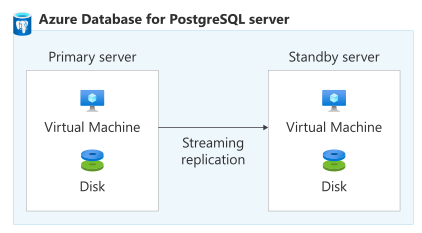
A standby server is deployed in the same VM configuration as the primary server, including vCores, storage, and network settings.
You can switch between servers by performing a failover. There are two types of failover: forced failovers, which are used when the primary server fails, and planned failovers, which are used during some maintenance operations and in other scenarios where you need to minimize application downtime during a failover.
Operations such as stop, start, and restart are performed on both primary and standby database servers at the same time. Planned events such as scale computing and scale storage happen on the standby first and then on the primary server. Currently, the server doesn't fail over for these planned operations.
For more information, see High availability in Azure Database for PostgreSQL.
Backups: Azure Database for PostgreSQL automatically creates server backups. For more information, see Backup and restore.
Resilience to transient faults
Transient faults are short, intermittent failures in components. They occur frequently in a distributed environment like the cloud, and they're a normal part of operations. Transient faults correct themselves after a short period of time. It's important that your applications can handle transient faults, usually by retrying affected requests.
All cloud-hosted applications should follow the Azure transient fault handling guidance when they communicate with any cloud-hosted APIs, databases, and other components. For more information, see Recommendations for handling transient faults.
Your applications must handle transient connectivity errors that can occur during maintenance, scaling operations, or network interruptions. Follow these recommendations:
- When your application encounters transient faults, retry the operation by using exponential backoff. Increase the delay between retries and limit the number of attempts. If the operation still fails after the maximum retries, treat it as a failure.
- Where possible, use client libraries (also called drivers) that automatically handle retries.
- Transient errors that occur during write operations require more careful consideration. Consider making your write operations idempotent, so they can be safely executed multiple times.
For more information, see Handling transient connectivity errors in Azure Database for PostgreSQL.
Resilience to availability zone failures
Availability zones are physically separate groups of datacenters within an Azure region. When one zone fails, services can fail over to one of the remaining zones.
You can select your type of availability zone support though the high availability configuration. Enabling high availability deploys a standby server alongside your primary server. This high availability model helps ensure that committed data is never lost during failures. Whichever high availability deployment model your server uses, data is synchronously committed to both the primary and standby servers. If a disruption occurs to the primary server, the server automatically fails over to the standby server.
Data files and write-ahead logs (WALs) are stored on premium managed disks within each availability zone, with locally redundant storage (LRS) that automatically stores three data copies within each zone.
Azure Database for PostgreSQL supports two availability zone configuration types when you use high availability:
Zone-redundant high availability: Zone redundancy provides the highest level of zone resilience by deploying a primary server in one availability zone and a standby server in a different availability zone. The standby server uses similar compute, storage, and network configuration to the primary. A zone-redundant configuration provides physical isolation of the entire stack between primary and standby servers.
You can either select the availability zones for the primary and standby servers or let Microsoft choose them.
We recommend zone-redundant deployments for production servers.
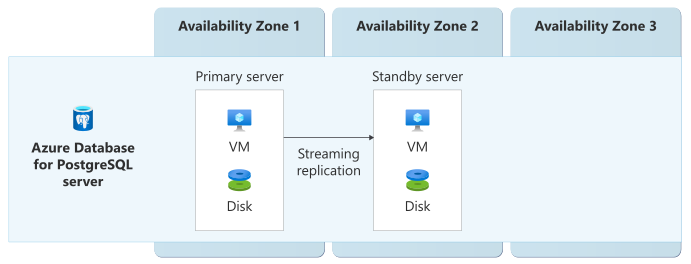
Write operations can experience a small increase in commit latency because the service synchronously replicates data to the standby server. The impact varies by workload, selected SKU, and region.
Zonal (same-zone) high availability: The primary and standby servers use the same availability zone. If a disruption occurs to the primary server, but the zone is still healthy, the server automatically fails over to the standby server. A zonal deployment gives you high availability within a single availability zone. It protects you against node-level failures and also helps with reducing application downtime during planned and unplanned downtime events. However, it doesn't protect against an outage in that zone.
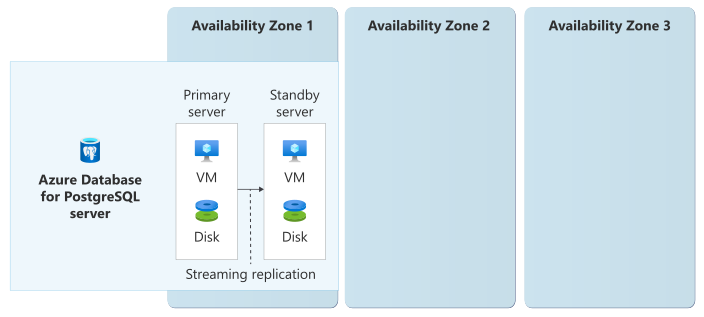
Zonal (same-zone) high availability is only available in the following situations:
- The region doesn't support availability zones. The region effectively functions as a single zone, and so the only high availability configuration you can select is same-zone.
- If a region doesn’t have sufficient capacity for a zone-redundant deployment, the service can initially place both servers in the same availability zone and automatically migrate them to separate zones when capacity becomes available. This option is available when you use the Azure portal or the Azure CLI to deploy a server. For more information, see Configure Business Critical (High Availability) options.
Because the servers are in the same zone, it can reduce the write latency to applications you deploy within the same zone.
If you configure your server without high availability, then it runs on a single server. If that server or its zone goes down, your server is unavailable. For more information, see Configurations without availability zones.
Requirements
Region support: Azure Database for PostgreSQL's support for availability zone configurations differs between Azure regions. For a full list of regions, and the types of availability zone support and any specific considerations for that region, see Azure regions.
Compute tier: The following table lists the compute tier support for each type of availability zone support:
Pricing tier Zone-redundant Zonal (same-zone) Burstable Not supported Supported General Purpose Supported Supported Memory Optimized Supported Supported Service tier: Zone redundancy requires General Purpose or Memory Optimized tiers.
Zonal (same-zone) deployments are supported on all pricing tiers.
Considerations
Region capacity: If a region doesn’t have sufficient capacity for a zone-redundant deployment, the service can initially place both servers in the same availability zone and automatically migrate them to separate zones when capacity becomes available. This option is available when you use the Azure portal or the Azure CLI to deploy a server. For more information, see Configure Business Critical (High Availability) options.
Cost
When you enable high availability, the standby server is created and billed at the same rate as the primary. The availability zone configuration doesn't affect the cost. There are no charges for data replication within or between availability zones. Depending on your backup storage volume, you might also be billed for backup storage. For detailed pricing information, see Azure Database for PostgreSQL pricing.
Configure availability zone support
To configure availability zone support for a server, you configure the high availability settings.
Create a zone-redundant server: To learn how to create a server with high availability and zone redundancy enabled, see Quickstart: Create an Azure Database for PostgreSQL in the Azure portal.
Change the availability zone configuration for existing servers: You can change the availability zone configuration for existing servers by changing the high availability settings. For detailed steps, see Enable high availability for existing servers.
You can't change the zone used for either the primary or standby server after they've been created. You need to recreate the server.
Tip
It's a good idea to wait until the server activity is low before you change high availability configuration.
Disable high availability: Disabling high availability removes the standby server, so your server isn't resilient to outages in its availability zone. For more information, see Disable high availability.
Behavior when all zones are healthy
This section describes what to expect when servers are configured with high availability and availability zone support and all availability zones are operational.
Cross-zone operation: PostgreSQL client applications connect to the primary server by using the database server name. Azure Database for PostgreSQL uses an active/passive configuration where all database connections and queries are handled by the primary server in the primary availability zone. The standby server doesn't serve client traffic during normal operations.
Cross-zone data replication: Changes to data are replicated synchronously between the primary and standby servers. Transactions aren't considered complete until both the primary and standby servers acknowledge the write.
Application transaction-triggered write and commits first log to the WAL on the primary server. The primary server streams these logs to the standby server by using the Postgres streaming protocol. When the standby server storage persists the logs, the primary server acknowledges write completion. The application commits its transaction only after this acknowledgment. This acknowledgment process doesn't wait for the logs to be applied to the standby server.
The effects of replication are different depending on the availability zone configuration that your server uses:
Zone-redundant: Because the servers are in separate zones, this approach ensures zero data loss during a zone failure. This situation is also sometimes called achieving a recovery point objective (RPO) of zero for zone failures.
However, cross-zone replication might introduce a small amount of extra latency. The impact of the latency depends on the application, and for most applications it's negligible.
Zonal: Because both servers are in the same zone, no traffic is replicated between zones.
Note
The system replicates log data in real-time to the standby server. Any user errors on the primary server, such as an accidental drop of a table or incorrect data updates, are replicated to the standby server. So, you can't use the standby to recover from these kinds of errors, and you must perform a point-in-time restore from the backup. For more information, see Backup and restore.
Behavior during a zone failure
This section describes what to expect when servers are configured with high availability and availability zone support and there's an availability zone outage.
Detection and response: Azure periodically checks the health of both the primary and standby servers. After multiple pings, if health monitoring detects that a primary server isn't reachable, the service initiates an automatic failover to the standby server. The health monitoring algorithm uses multiple data points to avoid false positive situations.
In the event of a zone failure, the behavior is different depending on the availability zone configuration that your server uses:
Zone-redundant: Azure Database for PostgreSQL automatically detects availability zone failures. To view the possible high availability status types, see High availability status types. When a zone fails, Azure initiates a forced failover to the standby server without requiring you to take action.
Zonal: If the availability zone that hosts a zonal server becomes unavailable, both the primary and standby servers are unavailable. In this scenario, the service doesn't provide automatic failover. You're responsible for detecting the zone outage and performing recovery actions, such as restoring zone‑redundant backups to a separate server in another availability zone or region.
Notification: High availability (HA) health status monitoring in Azure Database for PostgreSQL provides a continuous overview of the health and readiness of HA-enabled instances. The monitoring feature is built on top of Azure Resource Health, and can detect and alert on any issues that might affect your database's failover readiness or overall availability. Assess key metrics like connection status, failover state, and data replication health, to enable proactive troubleshooting and helps maintain your database's uptime and performance.
For a detailed guide on configuring and interpreting HA health statuses, see High Availability (HA) health status monitoring for Azure Database for PostgreSQL.
Active requests: When an availability zone becomes unavailable, any in‑progress requests to servers in the affected zone might be terminated. Applications must retry these requests. If your clients handle transient faults appropriately by retrying after a short period of time, they typically avoid significant impact.
Expected data loss: The amount of data loss depends on the availability zone configuration that your server uses.
Zone-redundant: Zero data loss is expected during zone failover because of synchronous replication between the primary and standby servers in different zones.
Zonal: Data on servers in the affected zone is unavailable until the zone recovers.
Expected downtime: The amount of downtime depends on the availability zone configuration that your server uses.
Zone-redundant: Failover typically completes within 60-120 seconds. If your clients handle transient faults appropriately by retrying after a short period of time, they typically avoid significant impact.
Zonal: Servers in an impacted zone are unavailable until the availability zone recovers.
Redistribution: The traffic rerouting behavior depends on the availability zone configuration that your server uses.
Zone-redundant: After failover, the former standby server becomes the new primary and begins accepting new connections. Azure automatically establishes a new standby server in the original primary zone after it recovers. For full details, see Forced failover.
Zonal: When a zone is unavailable, your server is unavailable. If you have a separate server that you precreated in another availability zone or region, you're responsible for rerouting traffic to that server.
Zone recovery
The zone recovery behavior depends on the availability zone configuration that your server uses.
Zone-redundant: When the availability zone recovers, Azure Database for PostgreSQL automatically rebuilds the standby server in the recovered zone and synchronizes it with the current primary. The recovered zone then serves as the standby location. The service doesn't automatically move the primary role back to the original zone to avoid unnecessary disruption. You can manually initiate a planned failover if you want to return the primary to the original zone.
Zonal: After the zone is healthy, servers in the zone are available again. You're responsible for any zone recovery procedures and data synchronization that your workloads require.
Test for zone failures
The options for testing for zone failures depend on the availability zone configuration that your instance uses.
Zone-redundant: You can test your application's resilience to failover by initiating a forced failover. A forced failover lets you simulate an unplanned outage scenario while running your workload and observe your application downtime. We recommend running simulations in a non-production environment, or at a quiet time. For more information, see Initiate a forced failover.
Zonal: While you can't simulate a full zone outage, you can simulate your server being unavailable in a similar way to what happens during a zone outage. For more information, see Stop compute of a server.
Resilience to region-wide failures
Azure Database for PostgreSQL supports cross-region read replicas, which you can use to maintain a synchronized copy of your database in a different region for faster recovery.
You can also use geo-redundant backups, in supported regions, to provide cross-region recovery. However, backups typically involve more downtime and data loss than replication. For more information, see Backup and restore.
Cross-region read replicas
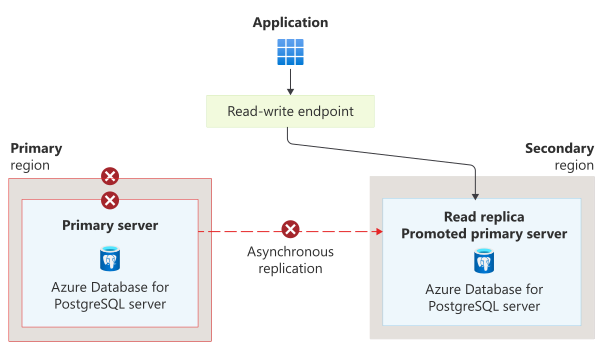
You can deploy read replicas to protect your databases from region-level failures. Each read replica is a separate Azure Database for PostgreSQL server. When you place a read replica in a second Azure region, your database server can provide resilience to a region-wide problem. You can deploy up to five read replicas, which can optionally be in different Azure regions. PostgreSQL's physical replication technology updates read replicas asynchronously, and they can lag the primary. Cross-region read replicas can optionally serve read-only workloads to reduce latency for globally distributed applications or to offload read traffic from the primary server. For more information on read replica features and considerations, see Read replicas.
Virtual endpoints provide read-write and read-only endpoints and automatically redirect traffic when a replica is promoted, which helps minimize downtime during failover events. We strongly recommend using virtual endpoints with cross-region read replicas to improve application resilience. For more information, see Virtual endpoints for read replicas in Azure Database for PostgreSQL.
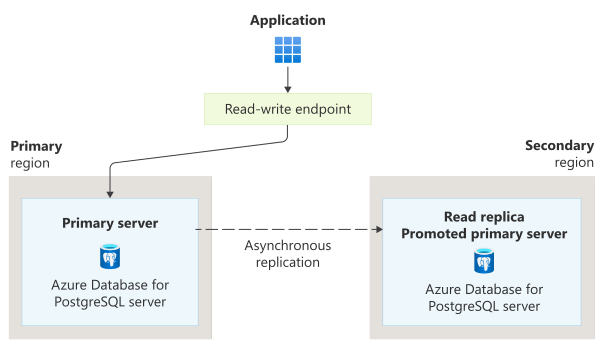
If your primary region fails, you can trigger a promotion so that your secondary replica becomes the primary. There are different types of failover that you can trigger depending on how you use read replicas. When you use read replicas to provide resilience to region failures, you typically use the promote to primary server approach, which updates your virtual endpoint. During a region outage, you need to perform a forced promotion, which can result in some data loss for any unreplicated data. In planned scenarios where the primary region is healthy, you can choose to perform a planned promotion to avoid data loss. For more information, see Promote read replicas in Azure Database for PostgreSQL.
Note
This section summarizes some of the important information about how read replicas can support resilience to region-wide failures. You can also use read replicas to improve performance and support high-scale geographically distributed user bases. For more information, see Read replicas.
Requirements
Region support: You can create cross-region read replicas in any region that supports Azure Database for PostgreSQL. You aren’t limited to Azure paired regions.
Compute tiers: The General Purpose and Memory Optimized compute tiers support read replicas. The Burstable tier doesn't support read replicas.
Considerations
Configuration differences: Read replicas may not inherit all configuration settings from the primary server. Plan to configure necessary settings post-failover. Your primary server and replicas should be symmetrical, which means they need to have the same tiers, storage sizes, and values for some settings. During region failures, the symmetrical server requirement can be waived for forced promotions, but it's a good practice to have symmetrical configuration where possible to avoid unexpected problems. For more information, see Configuration management.
Monitoring replication lag: The asynchronous replication process requires a replication lag, which can vary depending on a number of factors. When the replication lag is very high, your server might experience problems. It's important to monitor the replication lag so that you can mitigate problems before they escalate. For more information, see Monitor replication.
High availability: Read replicas can't have high availability enabled, and when they're promoted, they also don't have high availability. You're responsible for configuring high availability after promoting a replica.
For additional considerations that apply to the promotion process, see Promote read replicas in Azure Database for PostgreSQL - Considerations.
Cost
Read replicas incur compute and storage costs, as well as cross-region data transfer charges for replication. For detailed pricing information, see Azure Database for PostgreSQL pricing and Bandwidth pricing.
Configure multi-region support
Create a read replica: To learn how to create a read replica, see Create a read replica. Replicas can be configured after the primary server is created, as long as the primary server is running and accessible.
To create a virtual endpoint, see Create virtual endpoints.
Delete a read replica: To learn how to delete a read replica, see Delete a read replica.
Behavior when all regions are healthy
This section describes what to expect when your server is configured with a read replica in another region and a virtual endpoint, and all regions are operational:
Traffic routing between regions: In normal operations, your virtual endpoint directs traffic for the read-write endpoint to the primary server in the primary region. If you also use the virtual endpoint's read-only endpoint, then it directs traffic to whichever replica you configure.
Data replication between regions: Cross-region read replicas use asynchronous replication to minimize impact on primary server performance. The amount of replication lag depends on a number of factors, including the write load and the latency between the primary server and replicas. Replication lag is typically at least several minutes, but it can be much longer. For more information, see Monitor replication.
Behavior during a region failure
This section describes what to expect when your server is configured with a read replica in another region and a virtual endpoint, and there's an outage in the primary region:
Detection and response: You're responsible for detecting an outage in the primary region, and manually promoting a read replica to become the new primary server. During a region outage, you must perform a forced promotion, which results in the loss of any unreplicated data.
Important
You're responsible for triggering promotion. Azure doesn't promote read replicas automatically, even if there's a region failure.
For detailed steps to initiate a promotion, see Switch over read replica to primary.
Notification: Microsoft doesn't automatically notify you when a region is down. However, you can use Azure Service Health to understand the overall health of the service, including any region failures, and you can set up Service Health alerts to notify you of problems.
Active requests: All active connections to the primary region are dropped. Applications need to retry making connections to the promoted replica after the promotion process completes.
Expected data loss: During a region outage, you must perform a forced promotion, which results in the permanent loss of any unreplicated data.
The amount of data loss depends on the replication lag at the time of the outage. Replication lag is typically at least several minutes, but it can be much longer. For more information, see Monitor replication.
Expected downtime: Forced promotion typically completes within 1-3 minutes of being triggered. Applications might also need to reconnect to the correct endpoint. Virtual endpoints are updated as part of the forced promotion process. Applications should honor the time-to-live (TTL) of the endpoint's DNS records to ensure they quickly reconnect to the correct replica after promotion completes.
Traffic rerouting: The virtual endpoint for the server automatically redirects application traffic to the new primary replica.
Note
After a read replica is promoted to be the primary server, it doesn't have high availability configuration enabled. You need to enable high availability configuration manually, or add it to your own automation processes.
Region recovery
When you use virtual endpoints, after the primary region recovers, the old primary server is automatically configured as a read replica. You can perform another promotion to return the primary operations to your preferred primary region.
Test for region failures
Regularly test read replica promotion procedures to ensure your processes are valid, and that the capabilities meet your RTO and RPO requirements.
You can promote a read replica to become the primary server at any time, even when all regions are healthy. For testing:
- You can perform forced promotion testing. We recommend you perform these tests in a non-production environment as it can result in data loss. Forced promotion testing helps to simulate the behavior that you see during a region outage.
- For planned maintenance, or testing scenarios where you want to avoid data loss, use a planned promotion instead. Be aware that planned promotion follows a different process than promotion during a region outage.
For step-by-step instructions, see Switch over read replica to primary.
As part of your disaster recovery strategy, regularly run full recovery drills. These drills should include data validation, application functionality testing, and documented rollback procedures.
Backup and restore
Azure Database for PostgreSQL automatically performs backups that provide point-in-time recovery capabilities, and help to protect you against accidental corruption and deletion of data. Backups are fully managed by Microsoft, don't interrupt the availability of the server, and include both full backups and transaction log backups.
Backup storage: If the server is configured with zone-redundant high availability, backups are stored in zone-redundant storage (ZRS). For servers configured without high availability, or with zonal (single-zone) high availability, backups are stored in locally redundant storage (LRS).
In Azure regions with pairs, you can configure geo-redundant (GRS) backup storage at server creation time to replicate backups to the Azure paired region for additional protection against region failures. Backups are replicated asynchronously.
The default backup retention period is 7 days, with the option to extend retention up to 35 days. You can also use Azure Backup for long-term storage of manual backups for up to 10 years. All backups are encrypted.
Restore: Point-in-time recovery allows you to restore your database to any moment within the backup retention period. The restore process creates a new database server with a new user-provided server name, which you can then use as-is or copy data from.
When you restore a geo-redundant backup, you create a new server in the paired region.
This capability is useful for recovering from accidental data modifications, application errors, or testing scenarios.
For most solutions, you shouldn't rely exclusively on backups. Instead, use the other capabilities described in this guide to support your resiliency requirements. However, backups protect against some risks that other approaches don't. For more information, see What are redundancy, replication, and backup?.
For more information, see Backup and restore in Azure Database for PostgreSQL.
Resilience to service maintenance
Azure Database for PostgreSQL automatically handles critical servicing tasks including patching of the underlying hardware, operating system, and database engine. The service includes security updates, software updates, and minor version upgrades as part of planned maintenance.
To ensure your server remains available during maintenance windows, follow these recommendations:
Enable high availability: During maintenance, the server may need to be restarted as part of the update process. If you have high availability enabled, maintenance operations typically use rolling updates to minimize downtime. Periodic maintenance activities such as minor version upgrades happen on the standby replica first. To reduce downtime, the standby is promoted to primary so that workloads can keep on while the maintenance tasks are applied on the remaining node. This sequencing applies whether your server uses zone-redundant or zonal high availability.
For servers without high availability enabled, expect brief downtime during maintenance operations. With high availability enabled, maintenance operations typically complete with minimal or no downtime.
Configure custom maintenance windows: You can configure the maintenance schedule to be system-managed or define a custom maintenance window to minimize the impact on your business operations. Schedule maintenance during low-activity periods to minimize business impact. For more information, see Schedule maintenance.
Implement retry logic: Ensure your applications can handle brief connectivity interruptions that may occur during maintenance restarts. To make your applications resilient to these types of problems, see Resilience to transient faults guidance.
Service-level agreement
The service-level agreement (SLA) for Azure services describes the expected availability of each service and the conditions that your solution must meet to achieve that availability expectation. For more information, see SLAs for online services.
Azure Database for PostgreSQL provides different availability SLAs based on the server's configuration:
- Servers configured with zone-redundant high availability.
- Servers configured with zonal (single-zone) high availability.
- Servers configured without high availability.
Related content
- Azure reliability
- Architecture best practices for Azure Database for PostgreSQL
- Overview of business continuity with Azure Database for PostgreSQL
- Geo-disaster recovery in Azure Database for PostgreSQL
- Azure Database for PostgreSQL Resiliency Solution Accelerator - Terraform scripts to implement many of the resiliency and recoverability principles described in this article.