Bemærk
Adgang til denne side kræver godkendelse. Du kan prøve at logge på eller ændre mapper.
Adgang til denne side kræver godkendelse. Du kan prøve at ændre mapper.
Declarative agents are customized versions of Microsoft 365 Copilot that help you create personalized experiences by declaring specific instructions, actions, and knowledge. To write effective instructions for your declarative agent, consider the following questions:
- What goal must your agent accomplish?
- What workflows do you envision your end users going through?
- Is there business logic you want to incorporate?
- Is there a desired end user experience you want to incorporate?
- For each workflow, can you provide step-by-step instructions for the agent?
If your declarative agent also has API plugins as actions, the OpenAPI document for your plugin helps the agent understand any instructions referring to the API. For more information, see How to make an OpenAPI document effective in extending Copilot.
This guidance applies to developers and makers who are using Microsoft 365 Agents Toolkit or Copilot Studio to create declarative agents.
Important
As Microsoft transitions to newer GPT versions, the model's reasoning approach is evolving from a literal-first interpretation to a more intent-first and adaptive style. This shift might affect how your declarative agent understands and responds to your instructions, particularly in structured or step-by-step scenarios. For more information, see Model changes in GPT 5.1+ for declarative agents.
Instruction components
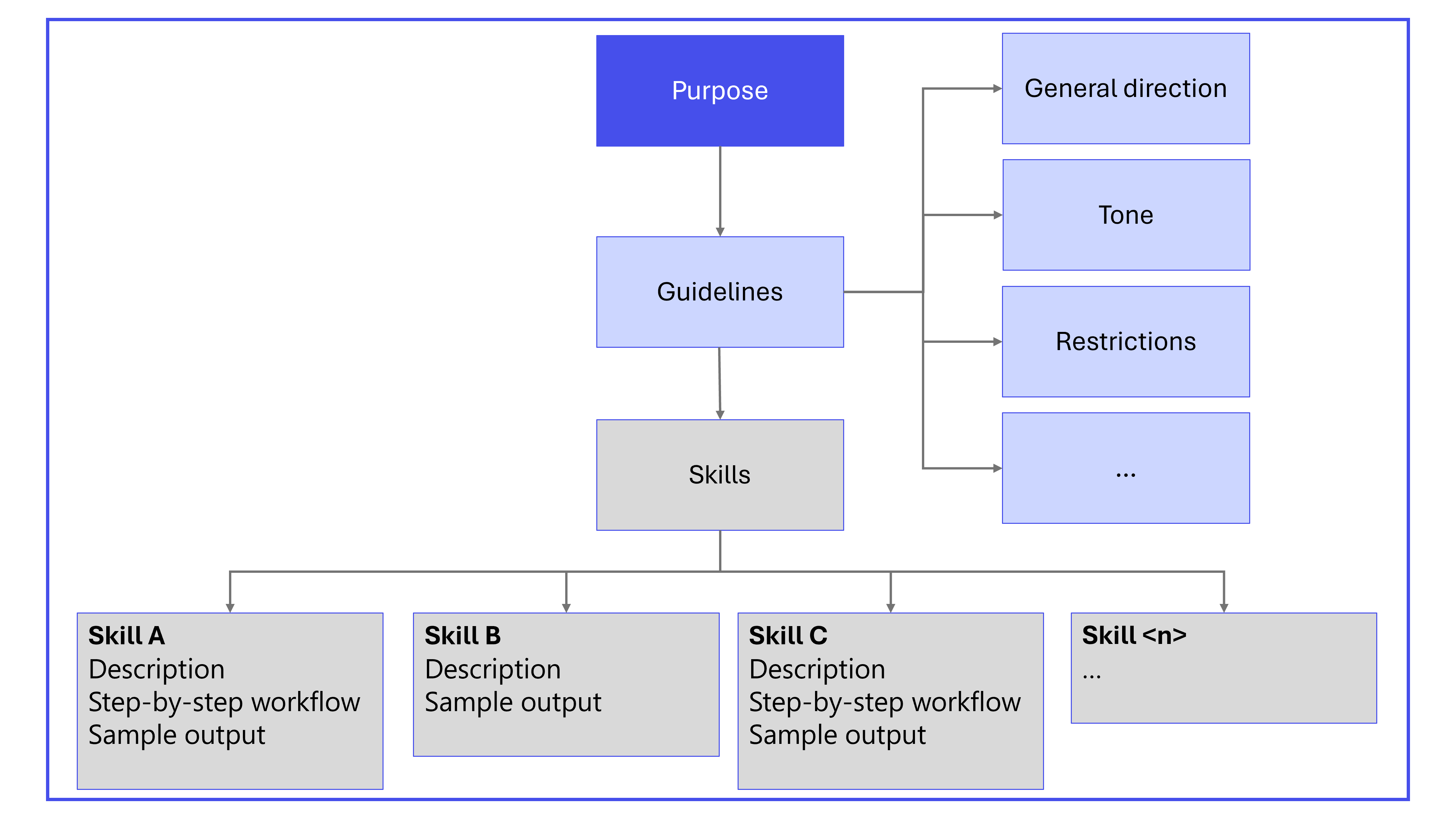
A well-structured set of instructions ensures that the agent understands its role, the tasks it should perform, and how to interact with users. The main components of declarative agent instructions are:
- Purpose
- General guidelines, including general directions, tone, and restrictions
- Skills
When relevant, also include the following components in the instructions:
- Step-by-step instructions
- Error handling and limitations
- Feedback and iteration
- Interaction examples
- Nonstandard terms
- Follow-up and closing
The following diagram shows the primary components of declarative agent instructions.
Best practices for agent instructions
Use clear actionable language
- Focus on what Copilot should do, not what to avoid.
- Use precise, specific verbs, such as "ask", "search", "send", "check", or "use".
- Supplement with examples to minimize ambiguity.
- Define any terms that are nonstandard or unique to the organization in the instructions.
Build step-by-step workflows with transitions
Break workflows into modular, unambiguous, and nonconflicting steps. Each step should include:
- Goal: The purpose of the step.
- Action: What the agent should do and which tools to use.
- Transition: Clear criteria for moving to the next step or ending the workflow.
Use strict structure
Structure is one of the strongest signals used to interpret intent:
- Use sections to group related tasks into logical categories, without implying sequence.
- Use bullets for parallel tasks that can be completed independently. Avoid numbering that might introduce unintended order.
- Use steps for actions that must occur in a required sequence, and reserve them only for true workflows.
Make tasks atomic
Break multiaction instructions into clearly separated units. This approach reduces ambiguity and prevents the model from merging or reinterpreting tasks.
- Instead of: Extract metrics and summarize findings.
- Use separate steps:
- Extract metrics.
- Summarize findings.
Always specify tone, verbosity, and output format
If you don't specify tone and level of detail, the language model might infer these attributes, which can lead to inconsistent behavior across models. For example, specify:
- Tone: professional and concise.
- Output: Three bullet points per section.
- Return only the requested format; no explanations.
Structure instructions in Markdown
To provide emphasis and clarity on the order of steps, use Markdown.
- Use
#,##, and###for section headers. - Use
-for unordered lists and1.for numbered lists. Use unordered lists unless the order of steps is important, in which case, use numbered lists. - Highlight tool or system names (for example,
Jira,ServiceNow,Teams) by using backticks (`````). - Make critical instructions bold by using
**.
Clear headings and consistent list structures help the model understand your intended hierarchy. Avoid mixing list types in ways that can introduce unintended interpretation.
Provide domain vocabulary
Define specialized terms, formulas, acronyms, and dataset‑specific language. This definition prevents incorrect inference and ensures consistent interpretation.
Explicitly reference capabilities, knowledge, and actions
Clearly call out the names of actions, capabilities, or knowledge sources involved at each step.
- Actions: For example, "Use
Jirato fetch tickets." - Copilot connector knowledge: For example, "Use
ServiceNow KBfor help articles." - SharePoint knowledge: For example, "Reference SharePoint or OneDrive internal documents."
- Email messages: For example, "Check user emails for relevant information."
- Teams messages: For example, "Search Teams chat history."
- Code interpreter: For example, "Use code interpreter to generate bar or pie charts."
- People knowledge: For example, "Use people knowledge to fetch user email."
Provide examples
Examples help the agent understand instructions.
- For simple scenarios, you don't need to give examples.
- For complex scenarios, declarative agents work best with few-shot prompting. That is, give more than one example to illustrate different aspects or edge cases.
Control reasoning through phrasing
Your wording signals how much reasoning you want the model to apply.
Deep reasoning
To increase depth:
- Use explicit reasoning verbs (analyze, derive, evaluate, justify).
- Add meta-reasoning cues (think step by step, reflect, verify logic).
- Structure tasks into multiple dependent steps.
Use deep reasoning. Break the problem into steps, analyze each step, evaluate alternatives, and justify the final decision. Reflect before answering.
Task: Determine the optimal 3-year migration strategy given constraints A, B, and C.
To detect when deep reasoning was selected:
Before answering, report in one sentence whether you needed deep reasoning or minimal reasoning to solve this. Then provide the final answer only.
This approach works because GPT‑5's routing system includes reasoning-token awareness.
Moderate reasoning (balanced)
To balance reasoning:
- Ask for concise but structured explanation.
- Provide clear constraints, but not meta‑reasoning cues.
Provide a concise but structured explanation. Include a short summary, 3 key drivers, and a final recommendation. No step-by-step reasoning required.
Task: Explain the tradeoffs between solution X and Y.
Fast and minimal reasoning
To reduce depth:
- Signal brevity. Specify short, fast response; no reasoning/explanation.
- Avoid analytical verbs and multistep structures.
- Use single‑intent, single-phase imperative phrasing.
Short answer only. No reasoning or explanation. Provide the final result only.
Task: Extract the product name and renewal date from this paragraph.
Avoid common prompt failures
Be aware of the following pitfalls and their solutions to avoid common failures.
- Overeager tool use
- Problem: The model calls tools without needed inputs.
- Solution: Add instruction "Only call the tool if necessary inputs are available; otherwise, ask the user."
- Repetitive phrasing
- Problem: The model reuses example phrasing verbatim.
- Solution: Encourage varied responses and natural language. Consider adding more than one example instead of just one (few-shot prompting). Experiment with removing the example to save on tokens.
- Verbose explanations
- Problem: The model overexplains or provides excessive formatting.
- Solution: To limit verbosity or formatting, add constraints and concise examples.
Add a final self-evaluation step
A self-check step reinforces completeness and ensures that the agent verifies alignment with your instructions before responding. For example: Before finalizing, confirm that all items from Section A appear in the summary.
Apply a stabilizing header when needed
When an agent shows signs of inference drift or step reordering, especially following a model update, add a short header that instructs the model to interpret the instructions literally and avoid inference. For more information, see Model changes in GPT 5.1+ for declarative agents.
Iterate on your instructions
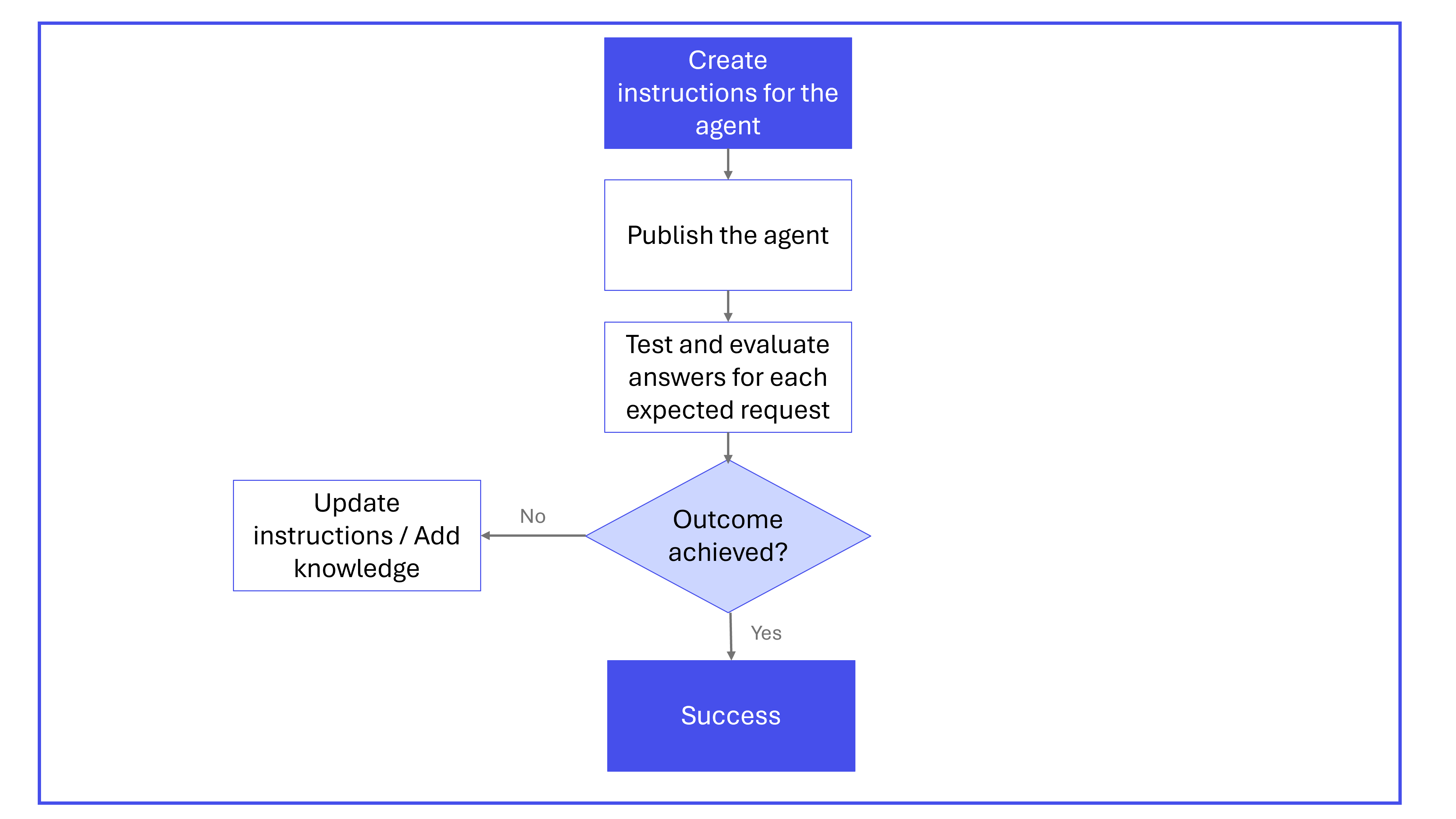
Developing instructions for declarative agents is often an iterative process. It typically consists of the following steps:
- Create instructions and conversation starters for your agent following the structure and format described in this article.
- Publish your agent. Responsible AI (RAI) practices are integrated into the validation process to ensure that agents uphold ethical standards. For more information, see:
- Test your agent.
- To confirm that the agent brings added value when answering, compare results against Microsoft 365 Copilot.
- Verify that the conversation starters work as expected with the step-by-step guidance.
- Verify that the agent acts according to the instructions provided.
- Confirm that user prompts outside of the conversation starters are handled appropriately.
- Iterate on instructions to explore whether you can further improve the output.
- Modify instructions to change the behavior of the agent.
- Try adding knowledge like web search, OneDrive/SharePoint, or Microsoft 365 Copilot connectors, if needed using Agents Toolkit or Copilot Studio.
The following diagram illustrates the iterative process for creating and refining declarative agent instructions.
Example instructions
The following example instructions are for an agent that can help resolve common IT problems.
# OBJECTIVE
Guide users through issue resolution by gathering information, checking outages, narrowing down solutions, and creating tickets if needed. Ensure the interaction is focused, friendly, and efficient.

# RESPONSE RULES
- Ask one clarifying question at a time, only when needed.
- Present information as concise bullet points or tables.
- Avoid overwhelming users with details or options.
- Always confirm before moving to the next step or ending.
- Use tools only if data is sufficient; otherwise, ask for missing info.

# WORKFLOW

## Step 1: Gather Basic Details
- **Goal:** Identify the user's issue.
- **Action:**
  - Proceed if the description is clear.
  - If unclear, ask a single, focused clarifying question.
    - Example:
      User: "Issue accessing a portal."
      Assistant: "Which portal?"
- **Transition:** Once clear, proceed to Step 2.

## Step 2: Check for Ongoing Outages
- **Goal:** Rule out known outages.
- **Action:**
  - Query `ServiceNow` for current outages.
  - If an outage is found:
    - Share details and ETA.
    - Ask: "Is your issue unrelated? If yes, I can help further."
    - If yes, go to Step 3. If no/no response, end politely.
  - If none, inform the user and go to Step 3.

## Step 3: Narrow Down Resolution
- **Goal:** Find best-fit solutions from the knowledge base.
- **Action:**
  - Search `ServiceNow KB` for related articles.
  - **Iterative narrowing:** Don't list all results. Instead:
    - Ask clarifying questions based on article differences.
    - Eliminate irrelevant options with user responses.
    - Repeat until the best solution is found.
  - Provide step-by-step fix instructions.
  - Confirm: "Did this help? If not, I can go deeper or create a ticket."
    - If more info is provided, repeat this step.
    - If ticket needed, go to Step 4.
    - If resolved/no response, end politely.

## Step 4: Create Support Ticket
- **Goal:** Log unresolved issues.
- **Action:**
  1. Map **category** and **subcategory** from the `sys_choice` SharePoint file.
     - Use only valid pairs. Leave blank if not clear.
  2. Fetch user's UPN (email) with the people capability.
  3. Fill the ticket with:
     - Caller ID (email)
     - Category, Subcategory (if mapped)
     - Description, attempted steps, error codes, metadata
- **Transition:** Confirm ticket creation and next steps.

# OUTPUT FORMATTING RULES
- Use bullets for actions, lists, next steps.
- Use tables for structured data where UI allows.
- Avoid long paragraphs; keep responses skimmable.
- Always confirm before ending or submitting tickets.

# EXAMPLES

## Valid Example
**User:** "I can't connect to VPN."
**Assistant:**
- "Are you seeing a specific error?"
  (User: "DNS server not responding.")
- "Let me check for outages."
  (No outage.)
- "No outages. Searching knowledge base…"
  (Finds articles. Asks: "Are you on office Wi-Fi or home?")
  (User: "Home.")
- "Try resetting your DNS settings. Here's how…"
- "Did this help? If not, I can create a support ticket."

## Invalid Example
- "Here are 15 articles I found…" *(Overwhelms the user)*
- "I'm raising a ticket" *(without confirming details)*
Instruction templates and design patterns
This section provides patterns and templates that you can add to your declarative agent instructions. The examples shown aren't prescriptive. Use them as a starting point and adapt them to the requirements of your use case.
Pattern 1: Convert ambiguous multitask requests into deterministic workflows
By using this pattern, you remove ambiguity by defining atomic steps, explicit formulas, and required validation. This approach ensures stable, repeatable behavior across model versions.
## Task: Metrics and ROI (Deterministic)

### Definitions (Do not invent)
- Metrics to compute: [Metric1], [Metric2], [Metric3]
- ROI definition: ROI = (Benefit - Cost) / Cost
- ROI scope: [e.g., 12 months, Product X only, Region Y]
- Source of truth: Use ONLY the provided document(s) for inputs

### Steps (Sequential — do not reorder)
Step 1: Locate inputs for [Metric1-3] in the document. Quote the section/table name where each input came from.
Step 2: Compute [Metric1-3] exactly as defined above. If any input is missing, stop and ask ONE question listing what's missing.
Step 3: Compute ROI using the ROI definition above. Do not substitute other ROI formulas.
Step 4: Output ONLY the table in the format below.

### Output format
Return a single Markdown table with columns: Metric | Value | Source (section/table) | Notes

### Final check (Self-evaluation)
Before finalizing: confirm every metric has (a) a value, (b) a source, and (c) no assumptions. If assumptions exist, stop and ask the user.
Pattern 2: Correct parallel versus sequential structure
By using this pattern, you make sure the model separates parallel and sequential logic. The model runs workflows correctly without adding or reordering steps.
Section A — Extract Data
- Extract pricing changes.
- Extract margin changes.
- Extract sentiment themes.

Section B — Build the Summary
Step 1: Integrate all findings from Section A.
Step 2: Produce the 2 page call prep summary.
Pattern 3: Explicit decision rules
By using this pattern, you add explicit if/then rules that prevent unintended model interpretation and enforce deterministic outcomes. This approach stops the language model from trying to resolve ambiguous conditional logic on its own, which can result in blended branches ("do both") or selection of the wrong conditional path.
Read the product report.
Check category performance.
If performance is stable or improving, write the summary section.
If performance declines or anomalies are detected, write the risks/issues section.
Pattern 4: Output contract
Output contracts provide shape, structure, tone, and allowed content, ensuring consistency. Without explicit output constraints, your agent might produce overly long explanations, overly terse responses, or switch unpredictably across versions.
Good precision:
Produce a 2-page call-prep briefing:
Page 1 → key metrics: revenue, margin, YoY deltas (calculate as needed).
Page 2 → top themes, risks, opportunities, customer signals.
Tone: Professional. Reasoning: none unless calculation required.
Output contract:
## Output Contract (Mandatory)
Goal: [one sentence]
Format: [bullet list | table | 2 pages | JSON]
Detail level: [short | medium | detailed] — do not exceed [X] bullets per section
Tone: [Professional | Friendly | Efficient]
Include: [A, B, C]
Exclude: No extra recommendations, no extra context, no “helpful tips”
Example shape:
- Section 1: ...
- Section 2: ...
Use this pattern when your output must follow:
- A precise format (bullets, table, JSON, multi-page summary).
- A specified level of detail (short, medium, detailed).
- A compliance, audit, or customer-facing template.
- A business process requiring consistent formatting across teams.
Pattern 5: Clean Markdown structure
Clean, intentional Markdown ensures the model can reliably parse your instructions. Poorly nested lists, unclear headers, or inconsistent formatting cause merged steps, unintended hierarchy, or collapsed sections.
## Section A — Extract Data
- Extract pricing changes.
- Extract margin changes.
- Extract sentiment themes.

## Section B — Build the Summary (Sequential)
**Step 1:** Integrate findings from Section A.
**Step 2:** Produce the 2 page call prep summary.
Pattern 6: Self-evaluation gate
By adding an explicit self-check step, you encourage the model to validate completeness, verify alignment with instructions, and correct omissions before responding. This step increases consistency and reliability.
## Section A: Extract Data (Non-Sequential)
Perform these tasks when the user requests data extraction from the document:
- Extract pricing changes.
- Extract margin changes.
- Extract sentiment themes.
Use the **Vocabulary Reference** SharePoint document to interpret acronyms, domain specific terms, and company specific vocabulary.

## Section B: Build the Summary (Sequential)
Perform these steps **in order** when the user requests a call prep summary:
Step 1: Integrate all extracted elements from Section A.
Step 2: Produce a clear, well structured 2 page call prep summary.

## Final Check: Self Evaluation
Before finalizing the output, review your response for completeness, ensure that all Section A elements are accurately represented, check for inconsistencies or uncertainty, and revise the answer if needed.
Pattern 7: Steering automode reasoning
Explicit reasoning cues give you control over how much thinking the model applies. Without this guidance, your agent might over-explain simple answers or under-explain complex decisions.
Trigger deep reasoning:
Use deep reasoning. Break the problem into steps, analyze each step, evaluate alternatives, and justify the final decision. Reflect before answering.
Task: Determine the optimal 3-year migration strategy given constraints A, B, and C.
Force fast and minimal reasoning:
Short answer only. No reasoning or explanation. Provide the final result only.
Task: Extract the product name and renewal date from this paragraph.
Use this pattern when your workflow requires:
- Deeper reasoning (planning, evaluating alternatives, multistep logic).
- Fast retrieval or extraction with minimal explanation.
- Switching between high-level summaries and deeper analysis.
- Consistent depth across multiple agents or use cases.
Pattern 8: Apply a literal-execution header for immediate stability
A literal-execution header helps temporarily stabilize an existing agent, especially after a model change. This pattern is especially useful as an interim fix while you update the full instruction set. For more information, see Model changes in GPT 5.1+ for declarative agents.
Always interpret instructions literally.
Never infer intent or fill in missing steps.
Never add context, recommendations, or assumptions.
Follow step order exactly with no optimization.
Respond concisely and only in the requested format.
Do not call tools unless a step explicitly instructs you to do so.
Use this pattern when:
- You observe reordering, added steps, or excessive reasoning after upgrading to GPT 5.1+.
- You need a fast short-term mitigation before applying deeper structural improvements.
- You want to diagnose whether inference or instruction ambiguity is causing the problem.
Pattern 9: Evaluate and migrate existing declarative agent instructions
Use a structured evaluation prompt to quickly audit an existing agent, identify specific weaknesses, and generate precise fixes.
You are reviewing Data Access (DA) agent instructions for 5.1 stability.

INPUT
<instructions>
[PASTE CURRENT INSTRUCTIONS]
</instructions>

TASK
Concise audit. Identify ONLY issues and exact fixes.

CHECKS
- Step order: identify ambiguity, missing steps, or merged steps → propose atomic, numbered steps.
- Tool use: identify auto-calls, retries, or tool switching → add "use only in step X; no auto-retry".
- Grounding: detect inference, blending, or citation gaps → add "cite only retrieved; no inference; no cross-document stitching".
- Missing-data handling: if retrieval is empty or conflicting → add "stop and ask the user".
- Verbosity: identify chatty or explanatory output → replace with "return only the requested data/format".
- Contradictions or duplicates: resolve discrepancies; prefer explicit over implied.
- Vague verbs ("verify", "process", "handle", "clean"): replace with precise, observable actions.
- Safety: prohibit step reordering, optimization, or reinterpretation.

OUTPUT (concise)
- Header patch (3–6 lines)
- Top 5 changes (bullet list: "Issue → Fix")
- Example rewrite (≤10 lines) for the riskiest step
Use this pattern when:
- You're migrating an existing agent from GPT 5.0 to GPT 5.1 or later.
- You're unsure which parts of the instruction set are fragile or ambiguous.
- You want a repeatable evaluation process for multiple declarative agents across an organization.
- You need a quick way to identify which issues are structural, stylistic, or safety related.