Bemærk
Adgang til denne side kræver godkendelse. Du kan prøve at logge på eller ændre mapper.
Adgang til denne side kræver godkendelse. Du kan prøve at ændre mapper.
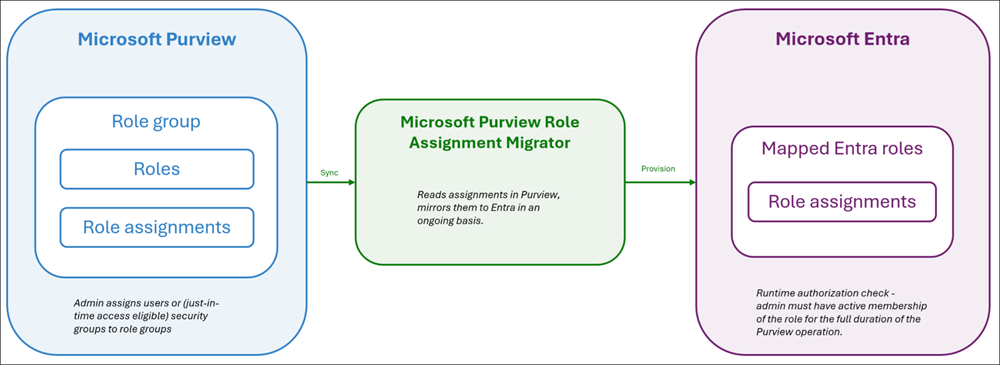
The Microsoft Purview Role Assignment Migrator is a Microsoft first-party enterprise application in Microsoft Entra ID that runs the background synchronization from Microsoft Purview role assignments to corresponding Entra roles. Microsoft 365 services use these Entra roles to verify that the administrator has the correct level of permissions before allowing long-running Microsoft Purview operations, such as content search and export, to proceed.
Role mapping
The following table shows which Purview roles map to each of the following Entra roles. These Entra roles only grant the ability to run Purview operations, and no other operations outside Purview are granted.
| Purview roles | Mapped Entra role | Description |
|---|---|---|
| Insider Risk Management Analysis Insider Risk Management Investigation Compliance Search Export Privacy Management Admin Privacy Management Analysis Privacy Management Investigation Privacy Management Permanent Contribution Privacy Management Temporary Contribution Privacy Management Viewer Data Security Investigation Reviewer |
Purview Workload Content Reader | Allows Microsoft Purview operations to read content from Microsoft 365 services (for example, read a file in SharePoint). |
| Hold Privacy Management Investigation Data Security Investigation Investigator |
Purview Workload Content Writer | Allows Microsoft Purview operations to read and write content to Microsoft 365 services (for example, store mail items in Exchange). |
| Search and Purge Data Security Investigation Admin Data Security Investigation Analyst |
Purview Workload Content Administrator | Allows Microsoft Purview operations to read, write, and delete content in Microsoft 365 services (for example, purge messages in Microsoft Teams). |
If an administrator holds multiple Purview roles that map to different Entra roles, they receive the highest-privilege Entra role. The precedence order is: Administrator > Writer > Reader.
Note
The Purview Role Assignment Migrator manages the Purview Workload Content Reader, Purview Workload Content Writer, and Purview Workload Content Administrator Entra roles, and only the listed Purview roles synchronize to Entra. Don't assign the Entra roles in the Entra portal. These roles don't appear in the Microsoft Purview portal like the ones that are shown on the settings page.
Synchronization audit logs
The Purview Role Assignment Migrator works in two modes:
- Initial bulk sync: When the Purview Role Assignment Migrator first activates for your tenant, it syncs all existing Purview role assignments to Microsoft Entra in a single pass. This process generates a burst of activity in your Microsoft Entra audit logs.
- Continuous sync: All subsequent changes to Purview role memberships trigger synchronization to Microsoft Entra.
Important
Keep the Purview Role Assignment Migrator enterprise application enabled in Microsoft Entra ID. The application ID is 7fe3d988-4f3b-4f33-83bd-1fb921a35ed2. Disabling this app stops synchronization. New Purview role assignments don't propagate to Microsoft Entra, and long-running Purview operations fail authorization checks at runtime.
The Purview Role Assignment Migrator synchronization activity appears in Microsoft Entra audit logs with the display name PurviewRoleAssignmentMigrator. The New Value field for each log entry shows the Microsoft Entra role that was assigned.
You see two distinct patterns of activity:
| Activity pattern | When it occurs | Volume |
|---|---|---|
| Bulk sync | Once, when the Purview Role Assignment Migrator first activates for your tenant | High — all existing Purview role assignments sync at once |
| Continuous sync | Ongoing, after each change to a Purview role membership | Low — proportional to the rate of Purview role changes in your tenant |
If you see a sudden spike of PurviewRoleAssignmentMigrator entries in your Microsoft Entra audit logs, this spike in audit log entries comes from the initial bulk sync and isn't a sign of unauthorized activity.
Important
Don't assign users to these Microsoft Entra roles directly in Microsoft Entra ID. The Purview Role Assignment Migrator manages these assignments exclusively from Purview and it overwrites any manual assignments in Microsoft Entra at the next synchronization.
Just-in-time access
By default, the Purview Role Assignment Migrator synchronizes the role assignments to the Microsoft Entra roles as active (permanent) assignments. Microsoft Entra Privileged Identity Management (PIM) for Groups allows eligible users to activate just-in-time membership to groups. When you add these Microsoft Entra security groups with eligible assignments to Purview roles, the Purview Role Assignment Migrator synchronizes that same security group membership into the corresponding Microsoft Entra roles. This process allows organizations that require role assignments to be just-in-time in Microsoft Entra to apply the same model for Microsoft Purview and enforce role activation.
Important
Size your just-in-time membership activation window on the security group to cover the full duration of your operations. If an activation expires while a long-running operation is still running, the operation might fail at its next runtime authorization check. For example, to identify how long your eDiscovery operations typically take, use Process Manager in eDiscovery and set activation durations accordingly.