Bemærk
Adgang til denne side kræver godkendelse. Du kan prøve at logge på eller ændre mapper.
Adgang til denne side kræver godkendelse. Du kan prøve at ændre mapper.
Surface Hub provides an on-screen display for volume, brightness, and input control. The Source button is a toggle key to switch between the volume, brightness, and input control menus.
To show the on-screen display
Press and hold the Source button for 4 seconds.
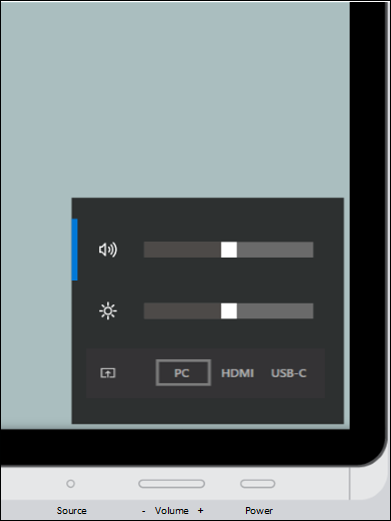
When the on-screen display is visible, use one or more buttons to reach desired settings.
To adjust volume
- Use the Volume up/down button to increase or decrease volume.
To adjust brightness
- Press the Source button again to switch to the brightness menu.
- Use the Volume up/down button to increase or decrease brightness.
To adjust input
- Press the Source button twice to switch to the Source menu.
- Use the Volume up/down button to switch between PC, HDMI, and USB-C inputs.