AI agent components
AI agents are built from a set of foundational components that work together to enable intelligent behavior.
Agent architecture
While all agents generally share the following components, how they are implemented and emphasized depends on the agent’s purpose and complexity.
- Foundation model (LLM): The large language model (LLM) provides the generative and reasoning capabilities. It enables natural language understanding, generation, and contextual awareness.
- Orchestrator: The orchestrator coordinates the agent’s behavior, deciding when to retrieve knowledge, invoke skills, or escalate to a human. It manages workflows, memory, and decision logic.
- Knowledge: This refers to the information an agent uses to understand its environment and make decisions. This includes the instructions defined for the agent and the grounding data it has access to, including structured data, unstructured content, documents, databases, and real-time inputs. Agents use this knowledge to provide contextually relevant responses and actions.
- Skills and tools: These are the actions, capabilities, and workflows the agent can use to take action such as sending messages, querying databases, or triggering automated workflows. These might include sending emails, retrieving data, updating records, or triggering an automated process. Skills are often tied to APIs, services, or automation tools that the agent can call upon to complete tasks.
- Autonomy: This is the logic that guides how an agent interprets information and chooses actions. It includes decision-making frameworks, rule-based logic, triggers for autonomous capabilities, and increasingly, machine learning models that allow agents to adapt and improve over time.
Reflection:
Think about a process or task you would like to automate. Which custom components (knowledge, skills, reasoning) would be most important to enable an agent to successfully handle that process?
LLMs vs. AI agents: What’s the difference?
Large language models (LLMs) are the core engine behind generative AI. They enable agents to understand and generate human-like language, summarize content, translate text, and more.
However, LLMs alone are not agents.
AI agents extend the power of LLMs by integrating additional components:
- Memory to retain context across interactions.
- Skills to take real-world actions.
- Reasoning and orchestration to manage complex workflows.
- Interfaces to interact with users and systems.
In short: LLMs generate intelligence. Agents apply that intelligence to achieve goals.
How AI agents work
Here’s how a typical AI agent operates:
- Input: A user asks a question or initiates a task.
- Understanding: The LLM interprets the input, determines intent, and extracts relevant information.
- Planning: The orchestrator, often with help from the LLM, decides what steps to take such as retrieving knowledge, calling a skill, or asking for clarification.
- Action: The agent performs the required actions using its skills or tools, guided by the plan.
- Response generation: The LLM generates a natural language response based on the results of the actions and the current context.
- Communication: The agent delivers the response to the user through the chosen interface.
- Learning: The agent stores relevant context or feedback to improve future interactions.
Example:
An employee asks an agent, “What is our company’s travel policy, and can you book a flight to Seattle for next week?”
- The agent retrieves the latest company travel policy from internal documentation or a knowledge base, using its understanding of organizational guidelines and employee roles.
- It then calls an external flight booking API to search for available flights to Seattle that comply with the company’s travel policy (e.g., preferred airlines, budget limits, approval requirements).
- The agent responds to the employee with a summary of the relevant travel policy, proposed flight options, and confirmation that the booking request has been initiated or completed all in natural language.
Autonomous agents
Autonomous agents operate with greater independence, often pursuing goals over multiple steps or sessions with minimal human intervention. A key element of autonomous agents is their ability to respond to triggers events or changes in data that prompt the agent to act without direct user input. Triggers can include scheduled times, data updates, external system events, or changes in user context.
Their workflow typically looks like this:
- Goal setting: The agent receives a high-level objective (from a user or system).
- Trigger monitoring: The agent continuously monitors for relevant triggers such as deadlines, data changes, or external events that may require action.
- Self-planning: Upon detecting a trigger or receiving a goal, the agent autonomously breaks down the objective into sub-tasks and creates a plan, often iteratively refining it.
- Iterative action: The agent executes actions, monitors results, and adapts its plan as needed potentially looping through planning and action multiple times. These actions may involve triggering workflows, combining the power of autonomous behavior with automated deterministic workflows.
- Self-evaluation: The agent assesses progress toward the goal, deciding whether to continue, adjust its approach, or declare completion.
- Reporting/communication: The agent summarizes outcomes or requests input only when necessary.
- Continuous learning: The agent updates its memory and strategies based on outcomes to improve future autonomy.
Autonomous agents emphasize self-directed planning, trigger-based execution, and minimal reliance on step-by-step user input, enabling them to handle more complex, multistep tasks.
Example:
A financial organization uses a tax correction agent built with Copilot Studio agent flows.
- The agent continuously monitors financial data for anomalies that may indicate the need for an audit.
- When an anomaly is detected, it autonomously triggers a structured audit workflow, collecting necessary documents and summarizing key findings.
- The agent then routes the audit results to the appropriate human reviewers for approval, ensuring compliance and transparency.
- Throughout the process, the agent adapts its actions based on new data or feedback, combining autonomous decision-making with deterministic workflows to maintain both flexibility and regulatory compliance.
This trigger-driven cycle allows agents to operate in dynamic environments, adapt to user needs, and deliver increasingly personalized and effective outcomes.
Building AI agents
Building AI agents can require a combination of foundational technologies, infrastructure, and development tools.
- Foundation models (LLMs): For natural language understanding, reasoning, and generation.
- Orchestration layer: To manage planning, decision-making, and coordination of actions.
- Skills and tools: A library of APIs, plugins, and services the agent can invoke to complete tasks.
- Memory and context store: To retain short- and long-term memory, enabling personalization and continuity.
- Data infrastructure: Secure, scalable access to structured and unstructured data sources.
- Security and governance: Identity management, access control, and compliance monitoring.
- Deployment environment: Cloud-native infrastructure (e.g., Azure Kubernetes Service, Azure Functions) to host and scale the agent.
However, the level of development required across these layers of the AI stack can vary significantly depending on the agent’s purpose and complexity. For retrieval and task-based agent scenarios, you may just need to add knowledge, skills, and instructions while leveraging existing infrastructure for the rest of the stack (for example, building an agent that extends Microsoft 365 Copilot). For more advanced and complex scenarios, you may fully customize your solution, including custom models, orchestration, logic, actions, security, and governance.
Microsoft AI agent solutions
Microsoft offers a range of tools and solutions to empower your AI transformation journey, whether you want to build a solution with a fully custom AI stack, or leverage existing components alongside your enterprise data, APIs, and business logic.
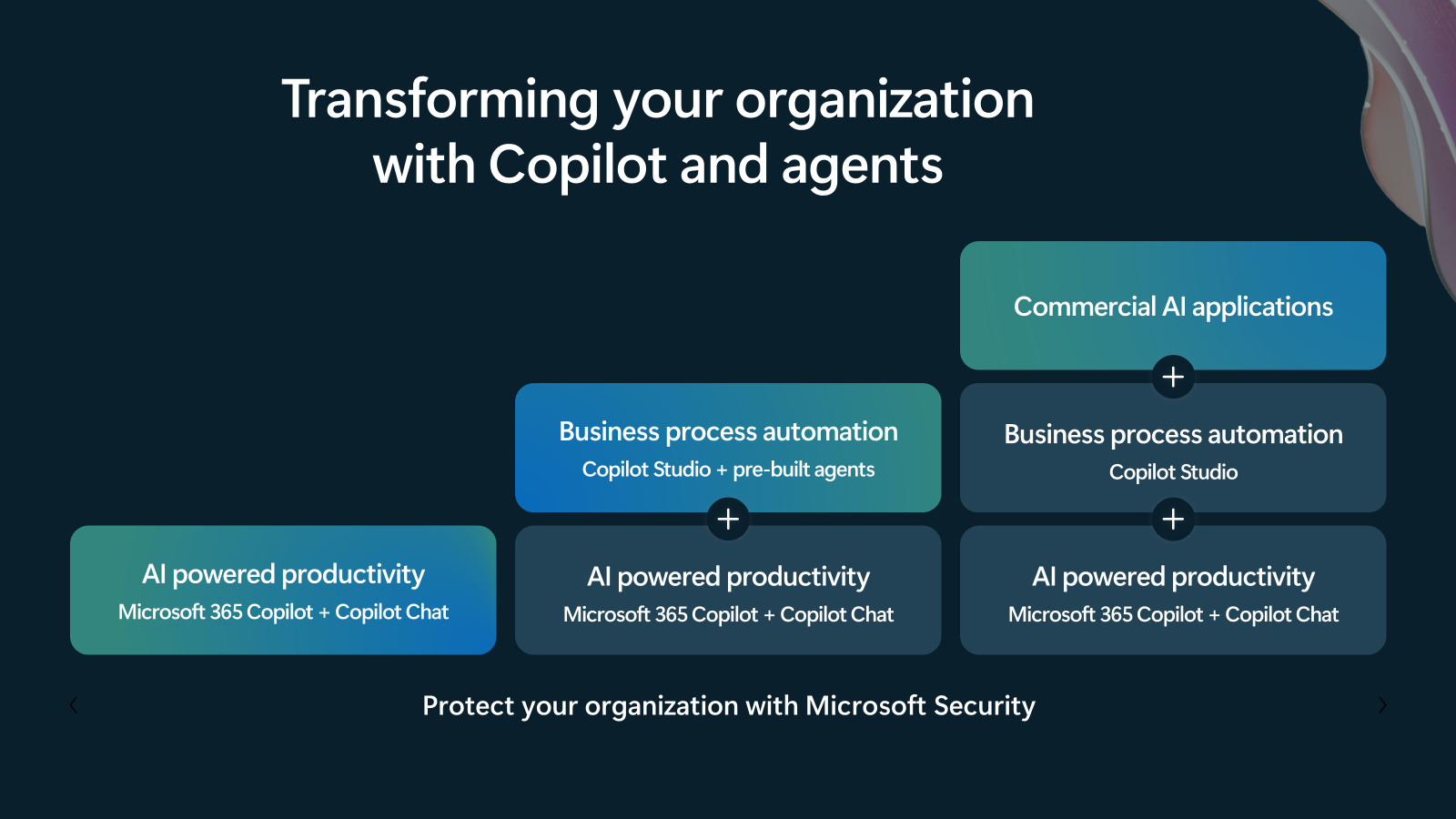
- Adopt: Microsoft 365 Copilot, Copilot Chat, and a range of first-party agents offer powerful capabilities to support AI-powered productivity right out of the box, provided with built-in security and governance controls.
- Extend: Microsoft 365 Copilot can be extended with agents that leverage Copilot's model, orchestrator, and user interface but are tailored to custom business logic, data, and systems for business process automation.
- Build: A range of Microsoft tools and services, including Copilot Studio, Microsoft 365 Agents Toolkit, Microsoft Foundry, and more, can be used to build custom agents and commercial generative AI applications for more advanced or complex scenarios.
Microsoft provides the best solutions for AI agents that can be used along this spectrum, including:
- Microsoft 365 Copilot and the lite version of Copilot Studio: Business users can develop AI agents using natural language in a no-code interface.
- Copilot Studio (full): Makers can use a low-code interface to build custom AI agents and extend Microsoft 365 Copilot.
- Visual Studio/GitHub/Microsoft Foundry: Developers can use these pro-code tools along with SDKs, frameworks, and services like Microsoft Agent Framework, Foundry Agent Service, Microsoft 365 Agents SDK, and Microsoft 365 Agents Toolkit to design, build, customize, publish, and manage enterprise-grade AI agent solutions.