Bemærk
Adgang til denne side kræver godkendelse. Du kan prøve at logge på eller ændre mapper.
Adgang til denne side kræver godkendelse. Du kan prøve at ændre mapper.
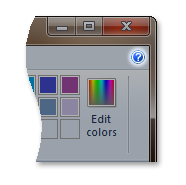
The Help Button is a control that the user can click to display the application help system.
Details
The following screen shot illustrates the Ribbon Help Button.
Help Button Properties
The Ribbon framework defines a collection of property keys for the Help Button control.
Typically, a Help Button property is updated in the ribbon UI by invalidating the Command associated with the control through a call to the IUIFramework::InvalidateUICommand method. The invalidation event is handled, and the property updates defined, by the IUICommandHandler::UpdateProperty callback method.
The IUICommandHandler::UpdateProperty callback method is not executed, and the application queried for an updated property value, until the property is required by the framework. For example, when a tab is activated and a control revealed in the ribbon UI, or when a tooltip is displayed.
Note
In some cases, a property can be retrieved through the IUIFramework::GetUICommandProperty method and set with the IUIFramework::SetUICommandProperty method.
The following table lists the property keys that are associated with the Help Button control.
| Property Key | Notes |
|---|---|
| UI_PKEY_Keytip | Can only be updated through invalidation. |
| UI_PKEY_Label | Can only be updated through invalidation. |
| UI_PKEY_TooltipDescription | Can only be updated through invalidation. |
| UI_PKEY_TooltipTitle | Can only be updated through invalidation. |
Related topics