BlockUIContainer.Child Eigenschaft
Definition
Wichtig
Einige Informationen beziehen sich auf Vorabversionen, die vor dem Release ggf. grundlegend überarbeitet werden. Microsoft übernimmt hinsichtlich der hier bereitgestellten Informationen keine Gewährleistungen, seien sie ausdrücklich oder konkludent.
Dient zum Abrufen oder Festlegen des UIElement gehosteten von der BlockUIContainer.
public:
 property System::Windows::UIElement ^ Child { System::Windows::UIElement ^ get(); void set(System::Windows::UIElement ^ value); };
public System.Windows.UIElement Child { get; set; }member this.Child : System.Windows.UIElement with get, setPublic Property Child As UIElementEigenschaftswert
Die UIElement von der BlockUIContainer.
Beispiele
Das folgende Beispiel zeigt, wie Sie die BlockUIContainer Elemente zum Hosten UIElement von Elementen innerhalb von Flussinhalten verwenden.
<FlowDocument ColumnWidth="400">
  <Section Background="GhostWhite">
    <Paragraph>
      A UIElement element may be embedded directly in flow content
      by enclosing it in a BlockUIContainer element.
    </Paragraph>
    <BlockUIContainer>
      <Button>Click me!</Button>
    </BlockUIContainer>
    <Paragraph>
      The BlockUIContainer element may host no more than one top-level
      UIElement.  However, other UIElements may be nested within the
      UIElement contained by an BlockUIContainer element.  For example,
      a StackPanel can be used to host multiple UIElement elements within
      a BlockUIContainer element.
    </Paragraph>
    <BlockUIContainer>
      <StackPanel>
        <Label Foreground="Blue">Choose a value:</Label>
        <ComboBox>
          <ComboBoxItem IsSelected="True">a</ComboBoxItem>
          <ComboBoxItem>b</ComboBoxItem>
          <ComboBoxItem>c</ComboBoxItem>
        </ComboBox>
        <Label Foreground ="Red">Choose a value:</Label>
        <StackPanel>
          <RadioButton>x</RadioButton>
          <RadioButton>y</RadioButton>
          <RadioButton>z</RadioButton>
        </StackPanel>
        <Label>Enter a value:</Label>
        <TextBox>
          A text editor embedded in flow content.
        </TextBox>
      </StackPanel>
    </BlockUIContainer>
  </Section>
</FlowDocument>
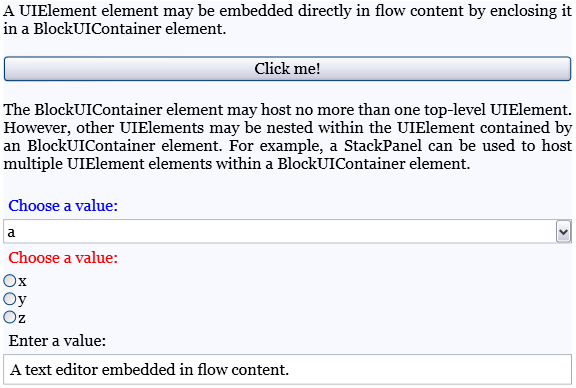
Die folgende Abbildung zeigt, wie dieses Beispiel gerendert wird.
Das folgende Beispiel zeigt, wie die Child Eigenschaft programmgesteuert verwendet wird.
Section secx = new Section();
Paragraph par1 = new Paragraph(new Run(" Text to precede the button... "));
Paragraph par2 = new Paragraph(new Run(" Text to follow the button... "));

// Create a new button to be hosted in the section.
Button buttonx = new Button();
buttonx.Content = "Click me!";

// Create a new BlockUIContainer, and assign the button
// as the UI container's child.
BlockUIContainer uiCont = new BlockUIContainer();
uiCont.Child = buttonx;

// Add the text runs and UI container to the paragraph, in order.
secx.Blocks.Add(par1);
secx.Blocks.Add(uiCont);
secx.Blocks.Add(par2);
Dim secx As New Section()
Dim par1 As New Paragraph(New Run(" Text to precede the button... "))
Dim par2 As New Paragraph(New Run(" Text to follow the button... "))

' Create a new button to be hosted in the section.
Dim buttonx2 As New Button()
buttonx2.Content = "Click me!"

' Create a new BlockUIContainer, and assign the button
' as the UI container's child.
Dim uiCont2 As New BlockUIContainer()
uiCont2.Child = buttonx2

' Add the text runs and UI container to the paragraph, in order.
secx.Blocks.Add(par1)
secx.Blocks.Add(uiCont2)
secx.Blocks.Add(par2)
Hinweise
Ein BlockUIContainer Kann nicht mehr als ein UIElement Kind direkt hosten. Das untergeordnete Element, das von einem BlockUIContainer hosten wird, kann jedoch untergeordnete Elemente selbst hosten.
In XAML entspricht der Umbruch eines UIElement Ins BlockUIContainer dem Festlegen des UIElement Werts der Child Eigenschaft.
