FlowDocumentReader.ZoomIncrement Eigenschaft
Definition
Wichtig
Einige Informationen beziehen sich auf Vorabversionen, die vor dem Release ggf. grundlegend überarbeitet werden. Microsoft übernimmt hinsichtlich der hier bereitgestellten Informationen keine Gewährleistungen, seien sie ausdrücklich oder konkludent.
Ruft den Zoomschritt ab oder legt ihn fest.
public:
 property double ZoomIncrement { double get(); void set(double value); };
public double ZoomIncrement { get; set; }member this.ZoomIncrement : double with get, setPublic Property ZoomIncrement As DoubleEigenschaftswert
Der aktuelle Zoomschritt, der als Prozentsatz interpretiert wird. Der Standardwert ist 10,0 (Zoomschritt von 10%).
Beispiele
Das folgende Beispiel zeigt, wie das ZoomIncrement Attribut festgelegt wird.
<FlowDocumentReader
  IsFindEnabled="True"
  IsPrintEnabled="True"
  MinZoom="50" MaxZoom="1000"
  Zoom="120" ZoomIncrement="5"
>
  <FlowDocument>
    <Paragraph>
      Flow content...
    </Paragraph>
  </FlowDocument>
</FlowDocumentReader>
Das folgende Beispiel zeigt, wie die ZoomIncrement-Eigenschaft programmgesteuert festgelegt wird.
FlowDocumentReader flowDocRdr = new FlowDocumentReader();

// Enable find...
flowDocRdr.IsFindEnabled = true;
// Enable printing...
flowDocRdr.IsPrintEnabled = true;
// Set zoom between 50% and 1000%.
flowDocRdr.MinZoom = 50;
flowDocRdr.MaxZoom = 1000;
// Set the zoom increment to 5%.
flowDocRdr.ZoomIncrement = 5;
// Set the initial zoom to 120%.
flowDocRdr.Zoom = 120;

FlowDocument flowDoc = new FlowDocument(new Paragraph(new Run("Flow content...")));
flowDocRdr.Document = flowDoc;
Dim flowDocRdr As New FlowDocumentReader()

' Enable find...
flowDocRdr.IsFindEnabled = True
' Enable printing...
flowDocRdr.IsPrintEnabled = True
' Set zoom between 50% and 1000%.
flowDocRdr.MinZoom = 50
flowDocRdr.MaxZoom = 1000
' Set the zoom increment to 5%.
flowDocRdr.ZoomIncrement = 5
' Set the initial zoom to 120%.
flowDocRdr.Zoom = 120

Dim flowDoc As New FlowDocument(New Paragraph(New Run("Flow content...")))
flowDocRdr.Document = flowDoc
Hinweise
Der Zoomschritt ist der Prozentsatz, um den die Zoom Ebene erhöht oder verringert wird, wenn die IncreaseZoom Befehle DecreaseZoom ausgeführt werden.
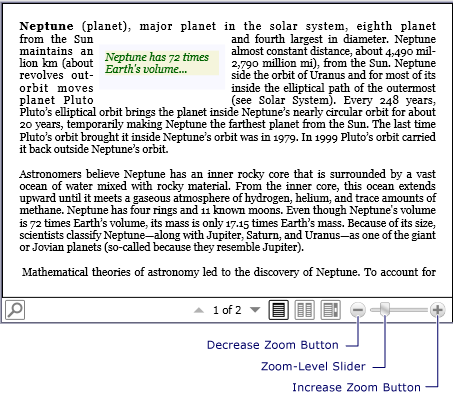
Die Standard-Benutzeroberfläche FlowDocumentReader (UI) enthält ein Zoomsteuerelement, das Schaltflächen zum Vergrößern oder Verkleinern des Zooms sowie einen Schieberegler zum Anpassen des Zoomfaktors bereitstellt. Die folgende Abbildung zeigt die Zoomsteuerelemente auf einer FlowDocumentReader Standard-Benutzeroberfläche.
Informationen zur Abhängigkeitseigenschaft
| Element | Wert |
|---|---|
| Bezeichnerfeld | ZoomIncrementProperty |
Auf Metadateneigenschaften festgelegt true |
Nichts |
