Hinweis
Für den Zugriff auf diese Seite ist eine Autorisierung erforderlich. Sie können versuchen, sich anzumelden oder das Verzeichnis zu wechseln.
Für den Zugriff auf diese Seite ist eine Autorisierung erforderlich. Sie können versuchen, das Verzeichnis zu wechseln.
Verwenden Sie dieses Muster, um die Arbeit rückgängig zu machen, wenn ein oder mehrere Schritte in einem letztendlich konsistenten Vorgang fehlschlagen. In der Cloud gehostete Anwendungen, die komplexe Geschäftsprozesse und Workflows implementieren, verwenden häufig Vorgänge, die dem eventuellen Konsistenzmodell folgen.
Kontext und Problem
Cloudanwendungen ändern häufig Daten, die auf verschiedene Datenquellen an verschiedenen geografischen Standorten verteilt sind. Um Konflikte zu vermeiden und die Leistung in einer verteilten Umgebung zu verbessern, sollten Anwendungen eine Eventual Consistency anstelle einer starken Transaktionskonsistenz implementieren. Im Modell der letztlichen Konsistenz besteht ein typischer Geschäftsvorgang aus einer Reihe von separaten Schritten. Während dieser Schritte kann die Gesamtansicht des Systemzustands inkonsistent sein. Das System sollte jedoch wieder konsistent werden, wenn alle Schritte abgeschlossen sind.
Die Behandlung von Schrittfehlern stellt im späteren Konsistenzmodell eine wichtige Herausforderung dar. Nach einem Fehler müssen Sie möglicherweise die Arbeit von abgeschlossenen Vorgangsschritten rückgängig machen. Sie können die Daten jedoch nicht immer zurücksetzen, da andere gleichzeitige Anwendungsinstanzen die Daten möglicherweise ändern. Selbst wenn gleichzeitige Instanzen die Daten nicht ändern, kann es komplexer sein, einen Schritt rückgängig zu machen, als den ursprünglichen Zustand wiederherzustellen. Möglicherweise müssen Sie geschäftsspezifische Regeln anwenden. Ein Beispiel finden Sie im Beispiel für die Reisewebsite.
Wenn ein Vorgang, der die spätere Konsistenz implementiert, über mehrere Datenspeicher erstreckt, müssen Sie auf jeden Datenspeicher zugreifen, um die Änderungen rückgängig zu machen. Um zu verhindern, dass das System inkonsistent bleibt, müssen Sie die Arbeit in jedem Datenspeicher zuverlässig rückgängig machen.
Ein Vorgang, der letztendliche Konsistenz implementiert, speichert seine betroffenen Daten nicht immer in einer Datenbank. Beispielsweise kann ein Vorgang in einer dienstorientierten Architekturumgebung (SOA) eine Aktion in einem Dienst aufrufen und den Zustand ändern, den der Dienst enthält. Um den Vorgang rückgängig zu machen, müssen Sie diese Zustandsänderung auch rückgängig machen, was dazu führen kann, den Dienst erneut aufzurufen, um die Auswirkungen der ersten Aktion rückgängig zu machen.
Lösung
Implementieren Sie eine Ausgleichstransaktion, mit der die Auswirkungen der abgeschlossenen Schritte im ursprünglichen Vorgang rückgängig werden. Möglicherweise denken Sie, dass Sie das System einfach in den ursprünglichen Zustand wiederherstellen können, aber dieser Ansatz kann Änderungen von anderen gleichzeitigen Anwendungsinstanzen überschreiben. Stattdessen muss die Ausgleichstransaktion intelligent parallel ablaufende Arbeiten berücksichtigen. Dieser Prozess ist in der Regel anwendungsspezifisch und hängt vom ursprünglichen Vorgang ab.
Sie können einen Workflow verwenden, um einen schließlich konsistenten Vorgang zu implementieren, der eine Entschädigung erfordert. Während der ursprüngliche Vorgang ausgeführt wird, zeichnet das System Informationen zu den einzelnen Schritten auf und wie Sie ihn rückgängig machen. Wenn der Vorgang fehlschlägt, läuft der Workflow durch die abgeschlossenen Schritte zurück und kehrt jeden Schritt um.
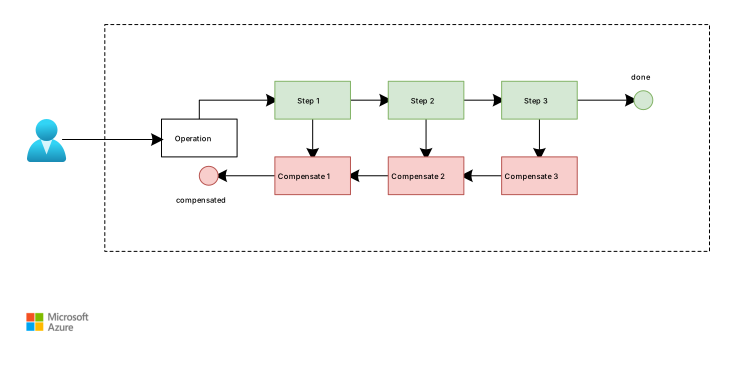
Während jeder Schritt eine separate Aktion ist, bilden sie gemeinsam einen letztendlich konsistenten Vorgang. Das System muss die Schritte und die entsprechenden Rückgängig-Vorgänge für jeden Schritt ausführen. Wenn der Kunde storniert, können diese Rückabwicklungsoperationen als Kompensationstransaktion ausgeführt werden.
Ein Einzelschrittfehler erfordert nicht immer, dass Sie ein Rollback des gesamten Systems mithilfe einer Ausgleichstransaktion ausführen. In einem Reisewebsiteszenario buchen Kunden beispielsweise Flüge F1, F2 und F3, aber es kann kein Zimmer im Hotel H1 reserviert werden. Es ist vorzuziehen, dem Kunden ein Zimmer in einem anderen Hotel anzubieten, als die Flüge zu stornieren. Der Kunde kann sich weiterhin für eine Stornierung entscheiden, wodurch die Ausgleichstransaktion ausgelöst wird, um die Flugbuchungen rückgängig zu machen. Der Kunde sollte diese Entscheidung jedoch treffen, nicht das System. Wenn Entscheidungen einen hohen Einfluss haben oder schwer zuverlässig zu automatisieren sind, schließen Sie einen Menschen in den Entscheidungsprozess ein.
Beachten Sie diese wichtigen Punkte:
Eine Ausgleichstransaktion muss die Arbeit möglicherweise nicht in der genauen umgekehrten Reihenfolge des ursprünglichen Vorgangs rückgängig machen.
Es könnte sein, dass Sie einige Schritte zum Rückgängigmachen parallel ausführen können.
Möglicherweise müssen Sie geschäftsspezifische Regeln anwenden. Wenn ein Kunde beispielsweise eine Flugreservierung storniert, hat er möglicherweise keinen Anspruch auf eine vollständige Rückerstattung.
Dieser Ansatz ähnelt dem Verteilten Transaktionsmuster von Saga.
Ausgleichstransaktionen sind schließlich konsistente Vorgänge und können fehlschlagen. Das System sollte den Fortschritt aufzeichnen, damit die Ausgleichstransaktion vom Fehlerpunkt fortgesetzt werden kann. Ein Schritt kann mehrmals ausgeführt werden, wenn ein Wiederholungsversuch ausgeführt wird. Entwerfen Sie daher jeden Schritt als idempotenten Befehl.
Manchmal ist ein manueller Eingriff die einzige Möglichkeit, aus einem fehlgeschlagenen Schritt wiederherzustellen. In diesen Situationen sollte das System eine Warnung auslösen, die detaillierte Informationen über den Grund für den Fehler enthält.
Probleme und Überlegungen
Berücksichtigen Sie die folgenden Punkte, wenn Sie sich für die Implementierung dieses Musters entscheiden:
Es mag nicht einfach sein, festzustellen, wann bei einem Schritt in einem Vorgang, der letztliche Konsistenz implementiert, ein Fehler aufgetreten ist. Ein Schritt schlägt möglicherweise nicht sofort fehl, sondern wird blockiert. Möglicherweise müssen Sie einen Timeoutmechanismus implementieren.
Es ist nicht einfach, die Kompensationslogik zu generalisieren. Eine Ausgleichstransaktion ist anwendungsspezifisch. Sie basiert darauf, dass die Anwendung über ausreichende Informationen verfügt, um die Auswirkungen jedes Schritts in einem fehlgeschlagenen Vorgang rückgängig zu machen.
Ausgleichstransaktionen funktionieren nicht immer. Definieren Sie die Schritte in einer Ausgleichstransaktion als idempotent-Befehle, damit Sie sie wiederholen können, wenn die Ausgleichstransaktion selbst fehlschlägt.
Die Infrastruktur, die die Schritte verarbeitet, muss die folgenden Kriterien erfüllen:
Sie ist sowohl im ursprünglichen Vorgang als auch in der Ausgleichstransaktion robust.
Sie verliert nicht die informationen, die erforderlich sind, um einen fehlschlagenden Schritt auszugleichen.
Es überwacht zuverlässig den Fortschritt der Kompensationslogik. Ausgleichstransaktionen werden nach dem ursprünglichen Vorgangscommit ausgeführt und andere Transaktionen können Zwischenzustände ändern. Stellen Sie daher sicher, dass Sie sowohl den ursprünglichen Vorgang als auch dessen Kompensation end-to-End korrelieren und überwachen können.
Eine kompensierende Transaktion gibt die Daten im System nicht unbedingt in dem Zustand zurück, in dem sich diese zu Beginn des ursprünglichen Vorgangs befanden. Stattdessen entschädigt die Transaktion die Arbeit, die der Vorgang erfolgreich abgeschlossen hat, bevor ein Fehler aufgetreten ist.
Die Ausgleichstransaktionsschritte umkehren den ursprünglichen Vorgang nicht immer in der genau entgegengesetzten Reihenfolge. Wenn z. B. ein Datenspeicher fehleranfälliger für Inkonsistenzen ist als ein anderer, machen Sie zunächst Änderungen an diesem Speicher rückgängig.
Einige Maßnahmen können Ihnen helfen, die Erfolgsraten zu verbessern. Sie können eine kurzfristige Sperre mit einem Timeout für jede Ressource platzieren, die zum Abschließen eines Vorgangs erforderlich ist. Sie können diese Ressourcen im Voraus erwerben und dann erst nach dem Erwerb aller Ressourcen Arbeiten ausführen. Schließen Sie alle Aktionen ab, bevor die Sperren ablaufen.
Wiederholungslogik, die mehr Fehler als vorübergehend behandelt, kann dazu beitragen, Fehler zu minimieren, die eine Kompensierungstransaktion auslösen. Wenn ein Schritt in einem Vorgang, der eventuellen Konsistenz implementiert, fehlschlägt, behandeln Sie ihn als vorübergehende Ausnahme, und wiederholen Sie den Schritt. Beenden Sie den Vorgang nur, und lösen Sie die Kompensation aus, wenn der Schritt wiederholt fehlschlägt oder Sie ihn nicht wiederherstellen können. Weitere Informationen zu Wiederholungsstrategien finden Sie unter Vorübergehende Fehlerbehandlung.
Wenn Sie eine Ausgleichstransaktion implementieren, stehen Ihnen viele Herausforderungen gegenüber, die der Implementierung der eventuellen Konsistenz ähneln. Weitere Informationen finden Sie unter Minimieren der Koordination.
Definieren Sie klare Punkte ohne Rückgabe - und unumkehrbare Schritte. In komplexen Workflows können Sie einige Vorgänge, z. B. externe Nebenwirkungen oder rechtsverbindliche Aktionen, nicht sicher oder sinnvoll rückgängig machen. Identifizieren Sie kompensierbare und irreversible Schritte. Entwerfen Sie den Workflow so, dass unumkehrbare Schritte erst auftreten, nachdem alle kritischen Überprüfungen erfolgreich ausgeführt wurden.
Wann Sie dieses Muster verwenden sollten
Verwenden Sie dieses Muster in folgenden Fällen:
Ein Geschäftsvorgang umfasst mehrere Schritte, Dienste oder Datenspeicher und muss rückgängig gemacht werden, wenn ein späterer Schritt fehlschlägt. Dieses Szenario tritt häufig in lang ausgeführten Workflows auf, die einem eventuellen Konsistenzmodell folgen und sich nicht auf Atomtransaktionen verlassen können.
Fehlerwiederherstellung erfordert häufig domänenspezifische Logik anstelle eines einfachen Datenrollbacks. Verwenden Sie Ausgleichsmaßnahmen, wenn das Rückgängigmachen von Arbeiten erfordert, dass Sie Geschäftsregeln anwenden, wie zum Beispiel Reservierungen stornieren oder teilweise Erstattungen gewähren.
Dieses Muster ist möglicherweise nicht geeignet, wenn:
Vorgänge können sicher wiederholt werden, und die meisten Fehler sind vorübergehend. Die Wiederholungslogik allein reicht häufig in diesen Fällen aus, und ausgleichende Transaktionen fügen unnötige Komplexität hinzu.
Das System kann temporäre Inkonsistenzen nicht tolerieren, oder eine Entschädigung kann einen gültigen Zustand nicht zuverlässig wiederherstellen. Verwenden Sie stattdessen starke Konsistenzmechanismen oder atome Transaktionen in allen Schritten.
Arbeitslastgestaltung
Bewerten Sie, wie Sie die Ausgleichstransaktion im Design einer Workload einsetzen, um die in den Säulen des Azure Well-Architected Framework behandelten Ziele und Prinzipien zu erfüllen. Die folgende Tabelle enthält Anleitungen dazu, wie dieses Muster die Ziele jeder Säule unterstützt.
| Säule | So unterstützt dieses Muster die Säulenziele |
|---|---|
| Zuverlässigkeitsentwurfsentscheidungen helfen Ihrer Arbeitsauslastung, ausfallsicher zu werden und sicherzustellen, dass sie nach auftreten eines Fehlers wieder in einen voll funktionsfähigen Zustand versetzt wird. | Kompensationsaktionen beheben Fehlfunktionen in kritischen Arbeitsauslastungspfaden, indem Prozesse wie direktes Zurücksetzen von Datenänderungen, Das Unterbrechen von Transaktionssperren oder sogar das systemeigene Systemverhalten verwendet werden, um den Effekt rückgängig zu machen. - RE:02 Kritische Abläufe - RE:09 Notfallwiederherstellung |
Wenn dieses Muster Kompromisse innerhalb einer Säule einführt, sollten Sie sie gegen die Ziele der anderen Säulen berücksichtigen.
Beispiel
Das folgende Diagramm zeigt eine praktische Azure Implementierung des Ausgleichstransaktionsmusters. Andere Implementierungen funktionieren möglicherweise auch für Ihre Workloadanforderungen. Ein Orchestrator, der in Azure Container Apps ausgeführt wird, koordiniert jeden Schritt eines lang ausgeführten Workflows, indem Befehle über Azure Service Bus gesendet werden. Da jeder Vorwärtsschritt erfolgreich verläuft, zeichnet der Orchestrator sowohl den Ausführungszustand als auch die entsprechende Ausgleichsaktion in Azure Cosmos DB auf, sodass der Workflow fortgesetzt, korreliert und überwacht werden kann.
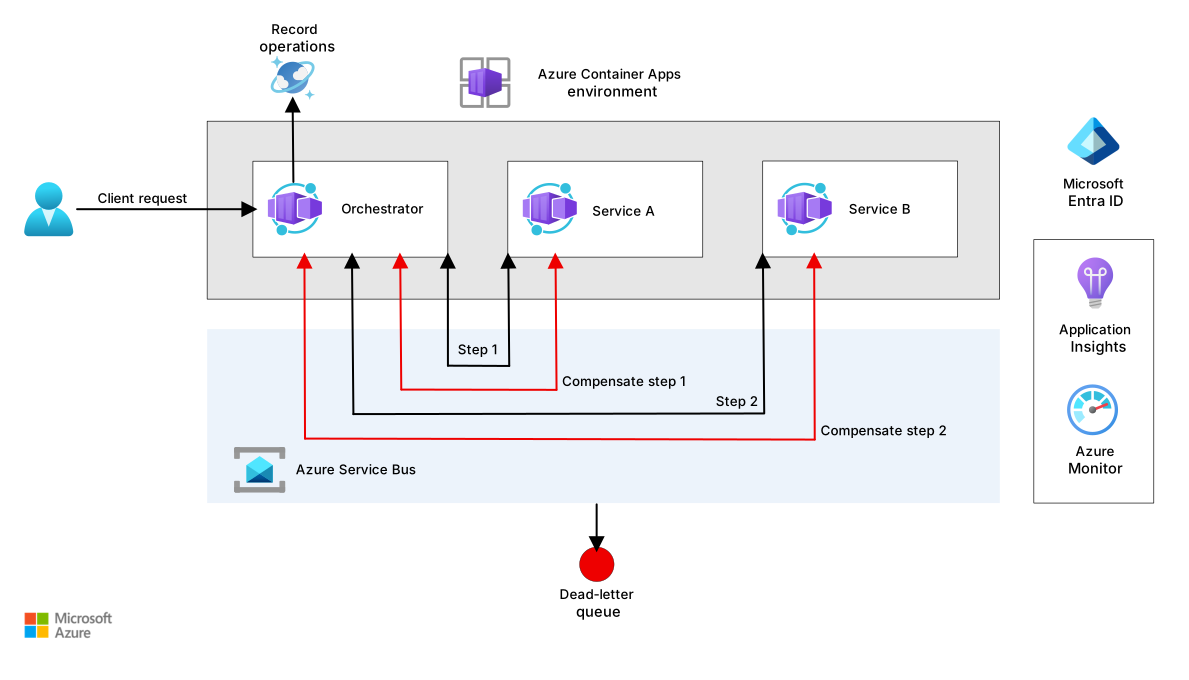
Dieses Modell verwendet wiederholungsversuche zuerst, um den Fortschritt vorwärts beizubehalten. Wenn ein Schritt fehlschlägt, wendet der Orchestrator wiederholungslogik für vorübergehende Fehler an und versucht, den ursprünglichen Vorgang fortzusetzen. Der Ausgleich wird nur aktiviert, wenn der Fortschritt unmöglich wird, z. B. wenn Wiederholungen ausgeschöpft sind oder der Fehler als nicht vorübergehend eingestuft wird.
Geschäftsspezifische Regeln können auch den Fortschritt vor sofortiger Entschädigung bevorzugen. Wenn ein Schritt fehlschlägt, kann der Orchestrator einen alternativen Pfad auswählen, z. B. einen gleichwertigen Dienst oder eine Fallbackoption ersetzen, anstatt den Workflow zurückzusetzen. Bei fällen mit hoher Wirkung oder mehrdeutigen Fällen können Sie den Workflow für die menschliche Überprüfung anhalten, bevor Sie entscheiden, ob Sie den Vorgang auf einem alternativen Weg fortsetzen oder eine Kompensation auslösen möchten. Dieser Ansatz behandelt die Entschädigung als letztes Mittel und lässt domänenspezifische Regeln die Wiederherstellungsentscheidungen leiten.
In einer typischen Sequenz sendet der Orchestrator Schrittmeldungen durch Service Bus (Schritte 1 und 2), empfängt erfolgreiche Ergebnisse und speichert Weiterleitungs- und Vergütungsmetadaten in Azure Cosmos DB.
Sie können Kompensation auf zwei Arten auslösen:
Wenn ein späterer Schritt in derselben Workload fehlschlägt und Sie zuvor erfolgreiche Schritte rückgängig machen müssen. Diese Kompensation kann sofort erfolgen, wenn ein Schritt einen Geschäftsfehler, wie z. B. einen Regelvalidierungsfehler, zurückgibt, oder nachdem alle technischen Wiederholungsversuche ausgeschöpft sind und die Nachricht in die Dead-Letter-Queue verschoben wird.
Wenn ein nachfolgender Client explizit anfordert, einen abgeschlossenen Vorgang abzubrechen.
In beiden Fällen liest der Orchestrator die gespeicherten Vergütungsdatensätze und sendet Kompensationsbefehle an den entsprechenden Dienst. Wenn ein Ausgleichsschritt vorübergehend fehlschlägt, können die Service Bus-Wiederholungen den Schritt abschließen, ohne den Vorfall zu eskalieren.
Wenn wiederholte Wiederholungen immer noch fehlschlagen, verschiebt Service Bus die Nachricht in eine Warteschlange für unzustellbare Nachrichten und behält Fehlerdetails bei. Der Orchestrator oder ein dedizierter Dead-Letter-Prozessor löst eine Warnung aus und sendet strukturierte Telemetrie, einschließlich Fehlerursache und Korrelations-IDs, an Azure Monitor und Log Analytics, wobei diese in Application Insights dargestellt werden können. Dieser Betriebspfad hilft Teams dabei, Fehler zu diagnostizieren, die Notwendigkeit eines manuellen Eingriffs zu ermitteln und die Rückverfolgbarkeit sowohl in den ursprünglichen als auch bei ausgleichenden Flüssen aufrechtzuerhalten.
Der Workflow kann die Entschädigung automatisch für klare, risikoarme Bedingungen starten oder für die menschliche Überprüfung anhalten, wenn die Situation mehrdeutig ist, hohe Auswirkungen hat oder eine manuelle Entscheidung erfordert.
Verwenden Sie verwaltete Identitäten und Microsoft Entra ID-basierte Autorisierung zwischen Komponenten, um geteilte Geheime Schlüssel zu vermeiden und den Zugriff mit den geringsten Rechten zu erzwingen. Wenn Sie ein vereinfachtes Referenzdiagramm erstellen, betrachten Sie diese Identitäts- und Berechtigungssteuerungen als grundlegende Implementierungsüberlegungen anstelle expliziter Prozessschritte. Konzentrieren Sie sich im Diagramm auf Orchestrierung, Wiederholungen, Kompensationen und die Fehlerbehandlung.
Verwandte Ressourcen
Überlegungen zu Daten für Microservices: Erfahren Sie, warum letztendliche Konsistenz und Teilfehler in verteilten Systemen inhärent sind. Das Muster "Ausgleichstransaktion" bietet einen konkreten Mechanismus zur Behandlung dieser Fehler, wenn Vorgänge mehrere Dienste umfassen.
Transaktionsausgangsmuster mit Azure Cosmos DB: Verwenden Sie dieses Muster, wenn ausgleichende Transaktionen zuverlässig Ereignisse oder Befehle veröffentlichen müssen. Dadurch wird sichergestellt, dass Zustandsänderungen und Nachrichten atomar aufgezeichnet werden, wodurch Der Nachrichtenverlust verhindert wird.
Design für Selbstheilung: Verwenden Sie Ausgleichstransaktionen als Teil eines Selbstheilungsansatzes für Ihre Anwendungen.
Scheduler Agent Supervisor-Muster: Verwenden Sie dieses Muster, um robuste Systeme zu implementieren, die Geschäftsvorgänge über verteilte Dienste und Ressourcen hinweg ausführen. Diese Systeme benötigen manchmal Ausgleichstransaktionen, um Die Arbeit rückgängig zu machen.
Wiederholungsmuster: Verwenden Sie dieses Muster, um vorübergehende Fehler zu behandeln und die Notwendigkeit von Ausgleichstransaktionen zu minimieren.
Saga verteiltes Transaktionsmuster: Verwenden Sie dieses Muster, um die Datenkonsistenz über Mikroservices hinweg in verteilten Transaktionen zu verwalten. Saga verwendet Ausgleichstransaktionen für die Fehlerwiederherstellung.
Pipes and Filters pattern: Verwenden Sie dieses Muster mit dem Kompensationstransaktionsmuster als Alternative zu verteilten Transaktionen, wenn Sie komplexe Aufgaben in wiederverwendbare Schritte dekompilieren.