Note
Access to this page requires authorization. You can try signing in or changing directories.
Access to this page requires authorization. You can try changing directories.
Important
As of October 2026, this content is archived and no longer maintained. Information on this page may not reflect the latest product plans, features, or guidance. For current roadmap information across Dynamics 365, Power Platform, Dataverse, Microsoft 365, and Copilot, visit the roadmap. Continue to use Microsoft Learn for authoritative product guidance and documentation.
| Enabled for | Public preview | General availability |
|---|---|---|
| Users, automatically |  Apr 7, 2025 |
Apr 22, 2025 |
Business value
Work optimally with the Business Central web client on modern devices that have large screens or large external monitors. This feature ensures that the application uses the screen efficiently, even when pages appear in different modes. You get the most productivity and efficiency in the web client.
Feature details
This feature optimizes screen space in the Business Central web client. It includes:
- Optimized default page size in narrow mode.
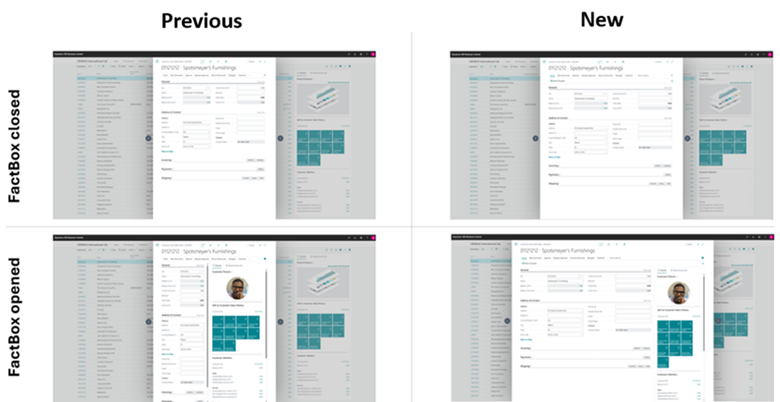
- Improved sizing and animation of the FactBox pane in narrow mode. The FactBox pane adds to the page width. When you expand or collapse the FactBox pane, the main content area width stays the same.
- Better proportions between field labels and values in narrow mode.
- An option to resize the FactBox pane and remember your choice for each page and mode. The Allow adjusting FactBox pane width feature provides this capability.
Geographic areas
Visit the Explore Feature Geography report for Microsoft Azure areas where this feature is planned or available.
Language availability
Visit the Explore Feature Language report for information on this feature's availability.
Tell us what you think
Help us improve Dynamics 365 Business Central by discussing ideas, providing suggestions, and giving feedback. Use the forum at https://aka.ms/bcideas.