Note
Access to this page requires authorization. You can try signing in or changing directories.
Access to this page requires authorization. You can try changing directories.
Important
As of October 2026, this content is archived and no longer maintained. Information on this page may not reflect the latest product plans, features, or guidance. For current roadmap information across Dynamics 365, Power Platform, Dataverse, Microsoft 365, and Copilot, visit the roadmap. Continue to use Microsoft Learn for authoritative product guidance and documentation.
| Enabled for | Public preview | General availability |
|---|---|---|
| Users, automatically | - |  Apr 1, 2026 |
Business value
Organizations often need vendors to default to “Purchase Invoice” when receiving electronic documents, but Business Central currently assigns “Purchase Order” to every new vendor. Allowing the e‑document type to be predefined on vendor templates ensures vendors are created with the correct default behavior from the start. This reduces manual corrections, improves accuracy in e‑document processing, and streamlines vendor onboarding.
Feature details
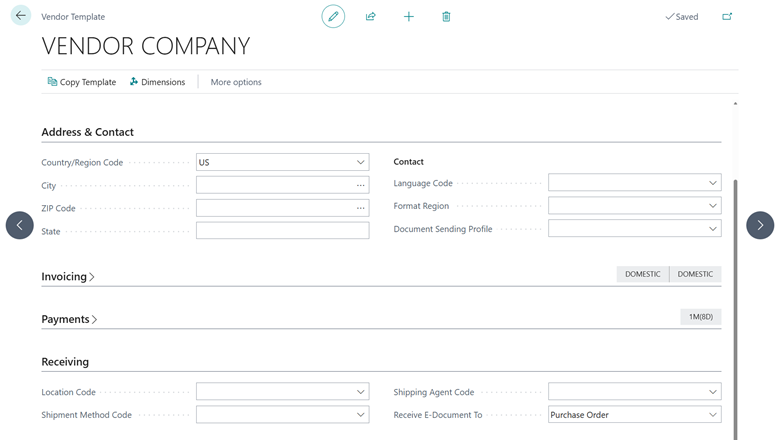
Business Central extends vendor templates to include the E‑Document Type field that's used in the E‑Documents module. Instead of always defaulting new vendors to Purchase Order, administrators can now specify whether a vendor should default to Purchase Order or Purchase Invoice based on their processes. When you create a vendor from a template, Business Central automatically applies the selected type, ensuring consistent setup and reducing errors in downstream e‑document handling. This enhancement improves efficiency, supports scalable vendor onboarding, and aligns vendor configuration with real‑world document workflows. To start using this feature, on the Vendor Template page, choose the Receive E-Document To option on the Receiving FastTab.
Geographic areas
Visit the Explore Feature Geography report for Microsoft Azure areas where this feature is planned or available.
Language availability
Visit the Explore Feature Language report for information on this feature's availability.
Tell us what you think
Help us improve Dynamics 365 Business Central by discussing ideas, providing suggestions, and giving feedback. Use the forum at https://aka.ms/bcideas.