Note
Access to this page requires authorization. You can try signing in or changing directories.
Access to this page requires authorization. You can try changing directories.
Important
Unity AI Gateway and service policies are in Beta. Account admins control access to these features from the account console Previews page. See Manage Azure Databricks previews.
AI governance is how you keep the AI your organization uses safe, compliant, and cost-controlled. On Azure Databricks, Unity AI Gateway is the control plane for AI: it routes every model and MCP request, enforces rate limits and cost controls, applies service policies, and records usage — across any model provider and any coding agent. Unity Catalog governs the assets behind it (models, MCP servers, and functions) with the same privileges and policies you already use for data, so you don't maintain a separate access model for AI.
This applies to external AI, not just Azure Databricks-hosted resources. You govern, in exactly the same way:
- External coding agents — Claude Code, Cursor, Codex, Gemini CLI, and others — by routing them through a Databricks model service.
- External MCP servers — registered as Unity Catalog MCP Services.
- External models — from any provider, such as OpenAI, Anthropic, and Google — accessed through Unity AI Gateway.
You govern everything from one place: who can access each AI asset, how its traffic is routed and cost-controlled through Unity AI Gateway, and how each request and response is allowed, denied, or sent for approval.
This guide is for workspace and account administrators setting up AI governance for the first time. By the end, your teams can use AI productively while Azure Databricks enforces your rules automatically. You'll set up how to:
- Control which AI services teams can use: grant and revoke access to models and MCP servers with the same Unity Catalog privileges and ABAC grant policies you use for tables and volumes.
- Route AI traffic and control cost: send model and MCP traffic through Unity AI Gateway, with rate limits and spend caps across any model provider.
- Apply service policies to requests and responses: attach service policies that allow, deny, or require approval for an interaction based on its content — block PII, deny out-of-policy content, or put a human in the loop — without changing application code.
- Monitor usage and cost: track who used what and what it cost in governed usage and inference tables.
For a hands-on first win, jump straight to a tutorial: govern a coding agent's GitHub access or moderate a model service's content.
Prerequisites
- A workspace that is enabled for Unity Catalog. See Get started with Unity Catalog.
- Account administrator access to enable previews, or an account administrator who can enable them for you.
Step 1: Enable the AI governance previews
Unity AI Gateway and service policies are in Beta. An account administrator must enable them from the Previews page in the account console before you can use them. See Manage Azure Databricks previews.
Unity Catalog asset governance is generally available and does not require a preview.
Step 2: Govern access to your AI assets in Unity Catalog
Unity Catalog manages AI assets as securable objects, so you grant and revoke access to them with the same privileges and ABAC grant policies you use for tables and volumes. Focus on the two primary AI assets:
- MCP Services: Govern access to MCP servers registered as Unity Catalog securables, with tool filtering and service policies. See MCP Services in Unity Catalog.
- Models: Govern access to registered ML models, including Azure Databricks-hosted foundation models. See Manage model lifecycle.
Unity Catalog also governs the functions that agents use as tools, with the same privileges. For tool use in agents, MCP Services provide the richest governance, including tool filtering and service policies.
Grant only the privileges each principal needs. Access to an AI asset determines what an agent acting on a user's behalf can reach.
Step 3: Route and control AI traffic with Unity AI Gateway
Unity AI Gateway is the agent control plane: it routes traffic to the model and MCP services your organization uses, enforces cost controls, and records usage — from one place, through the same Unity Catalog governance layer:
- Review how Unity AI Gateway works and how to get started. See Unity AI Gateway.
- Create model services for your LLMs, including Azure Databricks-hosted and external-provider models. See Discover foundation models.
- Point your coding agent — Claude Code, Cursor, Codex, Gemini CLI, and others — at a Azure Databricks model service, so its traffic is governed and costed through Unity AI Gateway. See Integrate with coding agents.
- Set rate limits and spend caps to protect capacity and control cost. See Configure rate limits for AI services using Unity AI Gateway.
- Govern access to MCP servers registered as Unity Catalog MCP Services, with grants, tool selection, and service policies. See Connect agents to third-party tools with MCP Services.
Step 4: Control request and response content with service policies
After you govern your assets and traffic, add controls on the content of individual requests and responses. Attach a service policy to a Model Service or MCP Service to allow, deny, or require approval for an interaction based on its content — for example, block PII or deny an out-of-policy tool call. See Service policies for AI securables and Create and attach a service policy.
Step 5: Monitor usage and cost
Confirm your governance is working and track activity over time:
- Track model and MCP usage — who called what, and when — in governed usage tables.
- Analyze cost across models, principals, and tags.
- Inspect full request and response payloads in inference tables.
How it works together
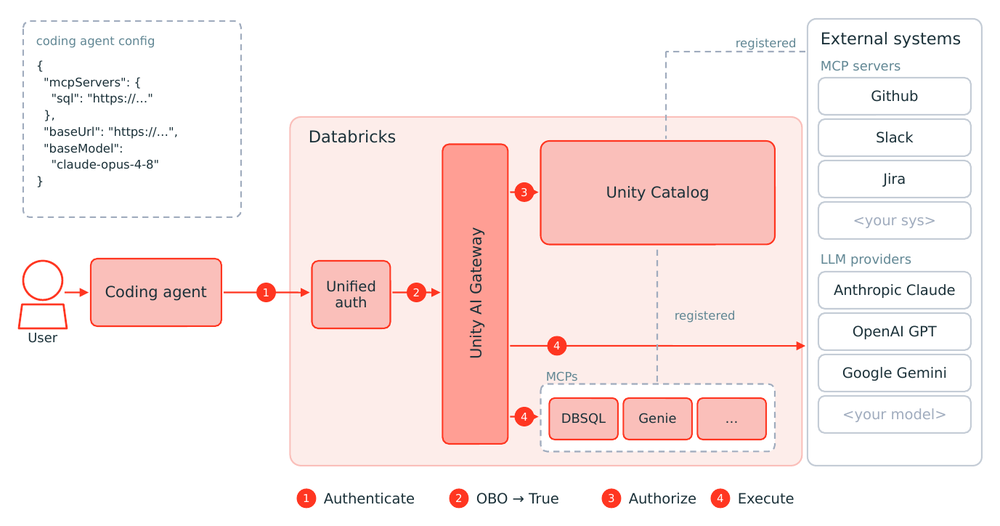
Unity Catalog is the foundation for AI governance on Azure Databricks: it governs your AI assets as securables, the same way it governs your data. Unity AI Gateway is the control plane for the traffic to those assets, and service policies govern the content of each request and response:
- Assets: every model, MCP server, function, and connection is a Unity Catalog securable, governed with the same privileges you use for data.
- Traffic: Unity AI Gateway routes every model service and MCP service request and enforces rate limits, usage, and cost.
- Behavior: service policies allow, deny, or require approval for individual requests and responses, based on their content.
So when an agent calls a tool or model, the request is authenticated, authorized against Unity Catalog, and routed through Unity AI Gateway before it reaches any external system:
Start with a tutorial
Put these capabilities into practice with a tutorial:
- Tutorial: Govern a coding agent's GitHub MCP access
- Tutorial: Moderate a model service's content with guardrails and service policies
Next steps
- Read the AI governance overview to understand how the layers relate.
- Learn how service policies control the content of requests and responses.
- Explore Unity AI Gateway for full model service and MCP service governance.