Microsoft 365 and Office | SharePoint | For business | Windows
A group of Microsoft Products and technologies used for sharing and managing content, knowledge, and applications.

This browser is no longer supported.
Upgrade to Microsoft Edge to take advantage of the latest features, security updates, and technical support.
' cx='32' cy='32' r='32' /%3E%3Ctext x='50%25' y='55%25' dominant-baseline='middle' text-anchor='middle' fill='%23FFF' %3ERS%3C/text%3E%3C/svg%3E)
I am trying to upload files to SharePoint by creating upload session and then uploading bytes in chunks on the upload url. After completion when I try to open the file in SharePoint, it doesn't open and shows error. I am able to download the file though, which appears to be corrupted and has some missing content
There is no error response in the api calls, everything gets completed with no issues but for some reason the uploaded file is getting corrupted no matter what I try. I am using Postman for making the api calls. Anybody has any idea about this?
Also, if I use the same api but do it one shot rather than chunks the file gets uploaded without any corruption.
A group of Microsoft Products and technologies used for sharing and managing content, knowledge, and applications.
An API that connects multiple Microsoft services, enabling data access and automation across platforms
' cx='32' cy='32' r='32' /%3E%3Ctext x='50%25' y='55%25' dominant-baseline='middle' text-anchor='middle' fill='%23FFF' %3EZY%3C/text%3E%3C/svg%3E)
Hello @Richa Singh , would you mind providing the URL you are using?

Hi @Richa Singh ,
Looks like you are uploading a very small file, uploading a very small chunks of data have errors while committing the file .
Best practices-createuploadsession Use resumable file transfers for files larger than 10 MiB (10,485,760 bytes).
For files smaller than 4MB, please make use of simple upload API, alternatively use upload session pass the entire content-ranges in single API call as the upload session can accept a maximum of 60MiB in API request.
Hope this helps.
If the answer is helpful, please click "Accept Answer" and kindly upvote it. If you have extra questions about this answer, please click "Comment".
Hi @SrinivasaRaoDarnaMSFT-7657 - I have tried with word files ranging from 2 MB to 15 MB, with some text and images in each but same issue for all.
Thanks for your reply, can you also check if able to split the content byte ranges into equal partitions of 320KiB.
Note: If your app splits a file into multiple byte ranges, the size of each byte range MUST be a multiple of 320 KiB (327,680 bytes). Using a fragment size that does not divide evenly by 320 KiB will result in errors committing some files.
Reference documentation: driveitem-createuploadsession
Hi @Richa Singh ,
I had a test to upload a .docx file with graph API, and the .docx file worked on my end. You could try to upload file using uploadurl like the below:
Body:

Header:
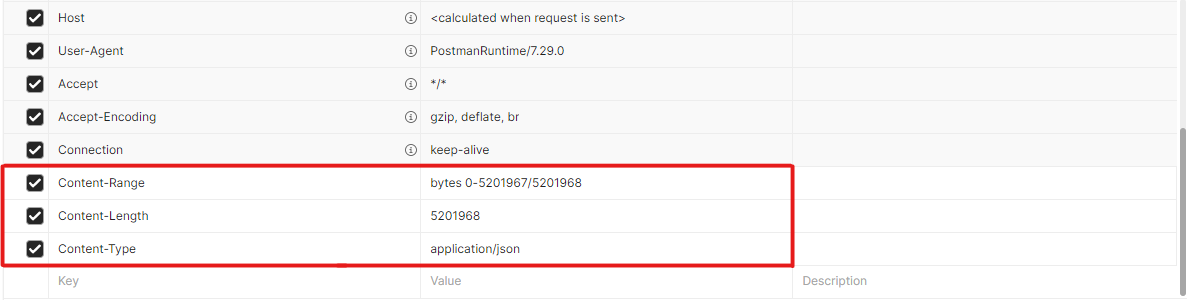
If the answer is helpful, please click "Accept Answer" and kindly upvote it. If you have extra questions about this answer, please click "Comment".
Note: Please follow the steps in our documentation to enable e-mail notifications if you want to receive the related email notification for this thread.
Hello @Richa Singh , does the answer above help you? would you mind providing an update on the status of your issue?
Hi @Zehui Yao_MSFT - It works when you do the upload in one shot but not when you do it in chunks.
Hello @Richa Singh , I am testing this issue. Do you mean you upload the whole file in chunks, and when each chunk completes, you get an error and the file is corrupted? Would you mind providing the error message you encountered?
Herllo @Richa Singh , would you mind providing an update on the status of this issue?
Hi @Zehui Yao_MSFT - Yes, I am uploading in chunks and don't get any error in response after or during load of file through api. The file gets loaded successfully but when you try to open the file, it doesn't open in SharePoint, it is corrupted. Even when I try to view it after downloading it, it has some missing content.
You can test this by creating docx file with some text and images in it, upload it in chunks then try to open it from SharePoint after completion of upload.
Hi @Zehui Yao_MSFT - Here you go-
URL for creating upload session -->
https://graph.microsoft.com/v1.0/users/450ca543-667a-4deb-86d7-f8e4f9471d2e/drive/root:/doc2.docx:/createUploadSession
Excuse me, @Richa Singh , I also wanted to confirm what type of file you uploaded?
Hi @Zehui Yao_MSFT - It was a docx file with some images and text in it