Note
Access to this page requires authorization. You can try signing in or changing directories.
Access to this page requires authorization. You can try changing directories.
Important
The information in this article only applies to OpenAI models operated by OpenAI (provided by OpenAI as a subprocessor). The information doesn’t apply to OpenAI models operated by Microsoft (Azure OpenAI).
Microsoft is expanding options for how OpenAI models can be delivered within Microsoft Online Services. In addition to OpenAI models that Microsoft operates (Azure OpenAI), Microsoft now provides OpenAI operated models through OpenAI as a subprocessor. This option gives your organization the foundation for more model flexibility, including quicker access to new AI model innovations, while maintaining enterprise-grade commitments and safeguards.
OpenAI was added to the Microsoft Online Services Subprocessors List on June 23, 2026. OpenAI as a subprocessor is available for use as of July 9, 2026. As a subprocessor, OpenAI operates with Microsoft oversight through contractual safeguards and appropriate technical and organizational measures. The Microsoft Product Terms and Microsoft Data Protection Addendum (DPA) apply to use of OpenAI models through Microsoft's enterprise Online Services, except as otherwise disclosed in the Exclusions section at the end of this article. Such use is also covered under our Enterprise Data Protection.
For more information about subprocessor data access, see Microsoft Data Access. To see a list of Microsoft subprocessors, see the Service Trust Portal.
OpenAI operated models serve the same GPT-based Copilot experiences your users already have. In Copilot Studio, creators must select the model during agent creation. Consistent with the experience for OpenAI models operated by Microsoft (Azure OpenAI) in Copilot experiences, users can select a GPT model.
Note
- OpenAI models delivered through OpenAI as a subprocessor in Copilot experiences are currently excluded from in-country processing commitments when applicable.
- Access to OpenAI operated models isn't currently available for use in government clouds (GCC, GCC High, DoD) or sovereign clouds.
- OpenAI operated models are included in the EU Data Boundary, except as otherwise noted in the EU Data Boundary documentation.
Manage OpenAI as a subprocessor in the Microsoft 365 admin center
Currently OpenAI operated models are disabled for all customers. You can choose to enable these models in the Microsoft 365 admin center at any time based on your organization’s preference. If you want to use GPT 5.6, you need to enable the use of OpenAI operated models.
Starting on July 24, 2026, OpenAI operated models will be enabled for all users for eligible commercial customers, unless you specifically disable the use of OpenAI operated models by selecting No users for the setting in the Microsoft 365 admin center.
Enable the use of OpenAI operated models
You can choose to enable OpenAI operated models so that they’re available for your organization. You must be a member of the AI Administrator or Global Administrator role to perform this task. For more information, see About administrator roles in the Microsoft 365 admin center.
To enable the use of OpenAI operated models:
- Go to the Microsoft 365 admin center and select Copilot > Settings > View all.
- Select AI providers operating as Microsoft subprocessors.
- On the AI providers operating as Microsoft subprocessors page, under Available subprocessors for your organization, select OpenAI.
- Under Choose which users can access OpenAI operated models, select All users, or specify users and groups, and then select Save.
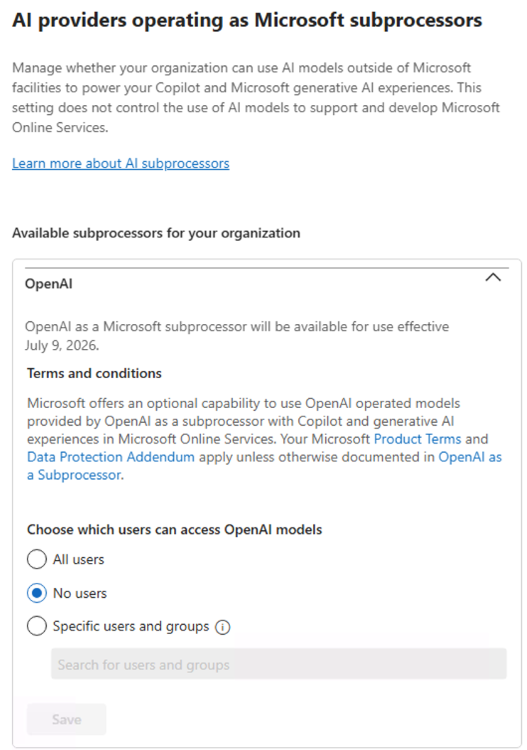
You can restrict user access to AI provider subprocessors by assigning permissions to specific users or Microsoft Entra ID security groups in the Microsoft 365 admin center. These assignments are applied at the provider level and enforced across Microsoft 365 Copilot and Copilot Studio experiences. When access is limited by user or group membership, only the assigned users can use Copilot features or agents that rely on that AI provider. Review existing user or group assignments and update policies or configurations as needed. For more information on user and security group access, see Assign AI provider access to users and groups. For more information on creating security groups, see Create, edit, or delete a security group in the Microsoft 365 admin center.
Some features or models are only available when OpenAI operated models are enabled. If you disable OpenAI as a subprocessor, certain features or models may no longer be accessible.
Disable the use of OpenAI operated models
You can disable the use of OpenAI operated models in the Microsoft 365 admin center. You must be a member of the AI Administrator or Global Administrator role to perform this task. For more information, see About administrator roles in the Microsoft 365 admin center.
To disable the use of OpenAI operated models:
- Go to the Microsoft 365 admin center and select Copilot > Settings > View all.
- Select AI providers operating as Microsoft subprocessors.
- On the AI providers operating as Microsoft subprocessors page, under Available subprocessors for your organization, select OpenAI.
- Under Choose which users can access OpenAI operated models, select No users, and then select Save.
After you disable OpenAI as a subprocessor, users won't have the option to use OpenAI operated AI models. You can choose to enable OpenAI operated models at a later date if desired.
Additional controls for Copilot Studio and Power Platform in the Power Platform admin center
After enabled in the Microsoft 365 admin center, additional admin controls are available in the Microsoft Power Platform admin center to allow OpenAI operated models to be used in Copilot Studio and Power Platform. For more information, see Allow external large language models (LLMs) for generative responses.
Exclusions
The following exclusions apply:
- OpenAI operated models available through Microsoft aren't FedRAMP High authorized. If your organization requires FedRAMP High prior to use, consult with your authorization official to determine whether use of OpenAI operated models is permitted within your environment.
- A Payment Card Industry (PCI) Data Security Standard (DSS) Attestation of Compliance (AOC) isn't available for OpenAI operated models.
- A Health Information Trust Alliance (HITRUST) Common Security Framework (CSF) Certification Letter isn't available for OpenAI operated models.
- A System and Organization Controls (SOC) 1 Type 2 report isn't available for OpenAI operated models.