Note
Access to this page requires authorization. You can try signing in or changing directories.
Access to this page requires authorization. You can try changing directories.
Processing unstructured documents (such as contracts and statements of work) or structured documents (such as invoices and insurance forms) is critical for intelligent document processing (IDP) workflows and retrieval-augmented generation (RAG) scenarios. Extracting data reliably at scale requires more than text extraction.
For high-quality automation, you often need to know what was extracted, where it came from, whether it matches your intent, and how reliable the extraction is.
Most enterprises face the following challenges when handling various documents at scale:
- Need to automate workflows, but only when the extraction meets an accuracy threshold that is required for the business application. You need to know how confident/accurate the analyzer is in its results.
- Need to validate the sources of extracted data for true reference. When seeing lower than expected confidence scores, validate the results quickly by reviewing the specific location in the document.
- Ideally, require ways to improve the quality of the analyzer results (by providing a few labeled examples) when it gets something wrong or encounters a new format with lower than expected confidence scores.
Azure Content Understanding in Foundry Tools provides critical features for post-processing your extracted output.
| Feature | Purpose | Value |
|---|---|---|
| Confidence scoring | Quantifies the analyzer's certainty in each prediction through confidence scores. | Enables STP (Straight Through Processing) |
| Grounding | Provides references/citations for every extracted output to the original document content | Ensures traceability, compliance, and user trust |
| Labeled samples | Provides corrected sample documents that show the analyzer relevant values, layouts, terminology, and domain conventions. Labeled training is available in the GA and preview APIs; optimized training and no runtime labeled data are preview capabilities. | Rapidly adapts to new formats or edge cases |
Note
In the 2025-11-01 GA and 2026-06-01-preview APIs, confidence scores and grounding are available for all document field types (extract, classify, and generate methods).
Learn more about these features below.
Confidence scoring: Automate with control
Every field can include a confidence score between 0 and 1 that indicates how certain the analyzer is about the result. Use this value to automate high-confidence results and route low-confidence results for human review.
Enable confidence scores for all fields (or specific fields) by using the estimateFieldSourceAndConfidence property. Learn more about configuring confidence scores for analyzers.
Why confidence scores matter
Confidence scores let you design workflows such as:
- Auto-approving extractions when confidence is above a defined threshold to intelligently automate document processing tasks.
- Optimizing resource allocation by reducing operational costs and using human-in-the-loop review for critical aspects.
- Rejecting or flagging extractions below a certain threshold for manual intervention, enhancing decision-making accuracy.
Example
You're processing scanned utility bills to extract billing address and amount due. For a document:
- Billing address: "1234 Market St., San Francisco, CA" → Confidence: 0.96
- Amount due: "$128.74" → Confidence: 0.52
In this case, your automation pipeline can post the billing address directly to your downstream application while routing the amount due to a human for verification. By using confidence scores, you reduce manual effort while maintaining accuracy.
Grounding: Trace every result to its source
Grounding ensures that every field, answer, or classification includes a reference to its original location in the document. This includes source information (page number and spatial coordinates) and spans (offset and length).
Why grounding matters
In enterprise workflows, accuracy isn't enough; you also need traceability. When a model extracts a customer name or a termination clause, you must be able to validate where that information came from. Grounding is critical for:
- Maintaining clear traceability and localization for extracted clauses, financial numbers, tables, and insurance IDs.
- Ensuring transparency with internal compliance checks.
- Supporting efficient human-in-the-loop validation by identifying the page, section, and content that provided the field value.
Example
You want to extract the termination clause from a contract. The model returns:
- Extracted text: "Either party may terminate this agreement with 60 days’ notice."
"spans": [
  {
    "offset": 343,
    "length": 102
  }
]
- Source: Page 3, coordinates
({x1},{y1},{x2},{y2},{x3},{y3},{x4},{y4})
Spans indicate the element's logical position using character offset and length. The source gives its visual position with page number and bounding box coordinates.
With this grounding data, your legal team can verify the extraction by jumping directly to the source paragraph in the PDF. This eliminates guesswork and builds trust in the application output.
Improve analyzer training with labeled examples
Both the 2025-11-01 GA API and the 2026-06-01-preview API support training custom document analyzers with labeled sample documents. Both versions use the same labeling workflow in Content Understanding Studio.
Important
Training supports document analyzers only, and it doesn't currently support fields that use the generate method.
If the context for all fields is clearly present in the test document, a zero-shot extraction call might be sufficient. Start by following the best practices for schema definitions. If you still see incorrect field values or confidence scores below your straight-through processing threshold, use labeled samples to improve the analyzer.
The labeled sample documents provide the domain context. By correcting field values in representative documents, you show the analyzer the relevant layouts, terminology, value patterns, and conventions for your scenario.
Labeled samples work to improve extraction quality:
- For datasets with minimal template variations, add a single labeled sample.
- For more complex variations, add a representative sample for each template or format.
- For documents that generate low confidence scores, incomplete extraction, or incorrect values.
- Evaluate extraction quality before and after training to confirm that the samples improve results.
To add a labeled sample, go to a document extraction result page in the Foundry portal and select the Label data tab. Upload a sample, and then select Auto label. Auto label runs the existing analyzer and prepopulates results that you can edit.
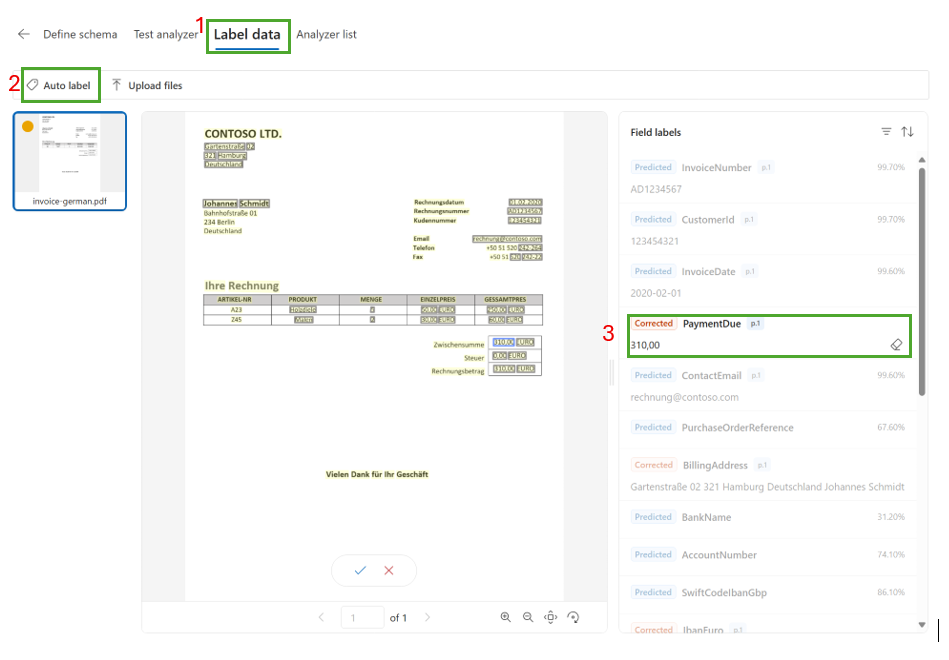
Edit any incorrect or missing field values. After you save the sample, corrected fields display the corrected tag.
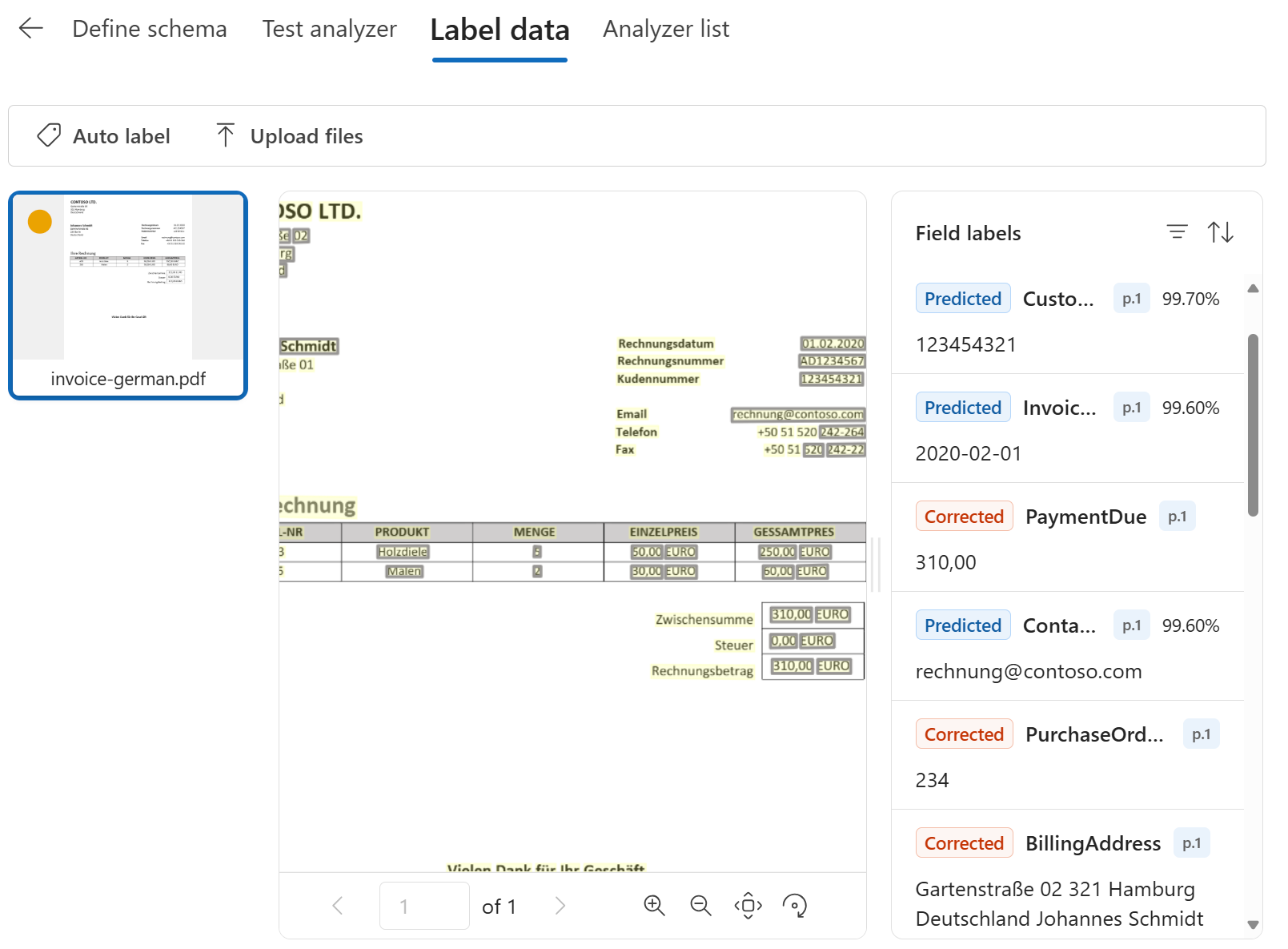
Note
You add labeled samples in Content Understanding Studio. After you add samples, rebuild the analyzer so the analyzer can use the samples.
For example, if invoices from a new vendor produce a low confidence score or incorrect Amount due value, add a representative invoice and correct its labeled values. The document itself provides the context about that vendor's layout and invoice conventions.
The analyzer then generalizes the pattern to extract the value from similar document templates.
Preview API improvements
Important
API version 2026-06-01-preview is in public preview. Previews are provided without a service-level agreement and aren't recommended for production workloads. For more information, see Supplemental Terms of Use for Microsoft Azure Previews and the Microsoft Products and Services Data Protection Addendum ("DPA").
The 2026-06-01-preview API uses the same labeled sample workflow but improves how training uses the documents. When you rebuild the analyzer, training distills the relevant patterns and domain context from the labeled samples into the built analyzer.
The preview training approach:
- Reduces token consumption when the analyzer runs compared with the GA training approach.
- Doesn't include or retain the labeled sample documents in the built analyzer.
- Doesn't require the built analyzer to access the labeled sample documents at analysis time.
The labeled sample documents remain in the storage account associated with your Content Understanding Studio project only for design purposes. For more information, see Data, privacy, and security for Content Understanding.
Limitations
Labeled samples don't correct text recognition problems. For example, if the letter l is recognized as the digit 1, labeling the value as the letter l doesn't improve extraction quality.
A complete workflow
When you build an intelligent document automation pipeline, these capabilities help you extract data reliably at scale. For example, if you process procurement contracts, you might extract:
- Vendor name
- Start and end dates
- Cancellation clause
To ensure quality and trust for enterprise-scale document understanding:
- Grounding gives your team full traceability to every field.
- Confidence scores help you automate, because human review is needed only when confidence is low.
- Labeled samples provide examples that help the analyzer adapt to domain context, new contract templates, or edge cases.