Share via

Active Directory Replication authentication

Paul Lapierre 21 Reputation points
2021-05-19T14:52:02.053+00:00

Our Network admin resigned, when I try to disable his admin account active directory replication fails.

I cannot find how to change what account AD replication is using.

Paul

Windows for business | Windows Server | User experience | Other

Answer accepted by question author

  1. Anonymous
    2021-05-21T07:41:48.647+00:00

    Hello @Paul Lapierre ,

    Thank you for your update.

    So as I understand, no matter the account is active or the account is inactive, the AD replication works fine, only when the account is inactive, PRTG flags "Active Directory Replication Errors" Message "The RPC server is unavailable", is it right?

    If so, I think AD replication is working.

    I suggest you can try to consult the engineer from PRTG, if they can provide some suggestions.

    Should you have any question or concern, please feel free to let us know.

    Best Regards,
    Daisy Zhou

    ============================================

    If the Answer is helpful, please click "Accept Answer" and upvote it.

    Was this answer helpful?

    0 comments No comments

5 additional answers

Sort by: Most helpful
  1. Anonymous
    2021-05-20T12:31:13.34+00:00

    Please provide the files I mentioned above.

    Was this answer helpful?

    0 comments No comments

  2. Paul Lapierre 21 Reputation points
    2021-05-20T10:12:56.76+00:00

    DaisyZhou-MSFT

    1. we have single forest and single domain environment.
    2. There are 2 DC
    3. To clarify a bit more, we us PRTG to monitor our environment. When I inactivate the old users Domain admin account, PRTG flags "Active Directory Replication Errors" Message "The RPC server is unavailable". Once you enable the account PRTG clears the error. With the account inactive I notice AD is still replicating new users account across the two DC, as will any changes to the sysvol folder we the user bat files are kept.
    4. The account in question is a member of the Domain administrator group.
    5. There are now errors in the logs when the account is inactive.

    I am wondering if this is a PRTG issue and not AD. RDP service is still running after the account is inactive, and seems AD Replication is still functioning.

    Was this answer helpful?

    0 comments No comments

  3. Anonymous
    2021-05-20T02:03:57.037+00:00

    Hello @Paul Lapierre ,

    Thank you for posting here.

    To better understand your question, please confirm the following information at your convenience.

    1.Is your AD forest single forest and single domain environment or single forest and multiple domains environment?

    2.If your AD forest is single forest and multiple domains environment. How many domains are there in your AD forest?

    For example:
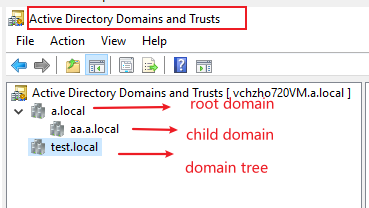
    98093-domain1.png

    3.How many DCs are there in each domain? Please run nltest /dclist:domain.com to check.

    4.Based on the description "when I try to disable his admin account active directory replication fails.", do you mean enable his admin account active directory replication works fine?

    5.Is your account a domain administrator account or a member of the domain administrator group?

    Please check AD replication status before disabling his admin account and after disabling his admin account, run the following commands on PDC to check.

    repadmin /syncall /AdeP C:\rep1.txt

    repadmin /showrepl C:\rep2.txt

    repadmin /replsum C:\rep3.txt

    repadmin /showrepl * /csv >c:\repsum.csv

    Tip: Please do not upload these log files, because private information may be involved. If you confirm that the command result has error information, please provide us with part of the error code and error information (if private information is involved, please obfuscate).

    Hope the information above is helpful.

    Should you have any question or concern, please feel free to let us know.

    Best Regards,
    Daisy Zhou

    ============================================

    If the Answer is helpful, please click "Accept Answer" and upvote it.

    Was this answer helpful?

    0 comments No comments

  4. Anonymous
    2021-05-19T14:58:53.607+00:00

    Do you have any more details? Please run;

    Dcdiag /v /c /d /e /s:%computername% >c:\dcdiag.log
    repadmin /showrepl >C:\repl.txt
    ipconfig /all > C:\dc1.txt
    ipconfig /all > C:\dc2.txt

    then put unzipped text files up on OneDrive and share a link.

    Was this answer helpful?

    0 comments No comments

Your answer

Answers can be marked as 'Accepted' by the question author and 'Recommended' by moderators, which helps users know the answer solved the author's problem.
