Azure Storage
Globally unique resources that provide access to data management services and serve as the parent namespace for the services.
This browser is no longer supported.
Upgrade to Microsoft Edge to take advantage of the latest features, security updates, and technical support.
' cx='32' cy='32' r='32' /%3E%3Ctext x='50%25' y='55%25' dominant-baseline='middle' text-anchor='middle' fill='%23FFF' %3ERD%3C/text%3E%3C/svg%3E)
Hello,
i have requirement for transferring more that 800 TB of data to azure ,
Azure data box is not available in my region also no express route in current design
import/export option will not restore it on Azure ANF
Requirement :
Globally unique resources that provide access to data management services and serve as the parent namespace for the services.
Also please share an update on availability of this feature in Asia pacific, if any :)
' cx='32' cy='32' r='32' /%3E%3Ctext x='50%25' y='55%25' dominant-baseline='middle' text-anchor='middle' fill='%23FFF' %3EDG%3C/text%3E%3C/svg%3E)
HI, Its should be something under road map. Nothing i can find officially about the feature availability. Sorry

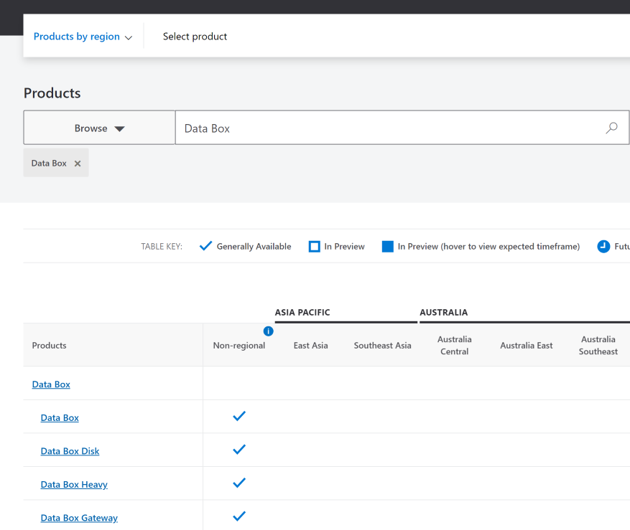
@Ragavendra dayakar As shared in the thread below, availability is unfortunately not clearly depicted on ACOM for non-regional services. We are available.
---------------------------------------------------------------------------------------------------------------------------------------------------------------------------
Please do not forget to "Accept the answer" and “up-vote” wherever the information provided helps you, this can be beneficial to other community members.
Hi Raghu - Unfortunately No. Azure Import/Export service does not support Azure NetApp Files currently.
Regards,
Dev
Hello @Devaraj G , correct no support for ANF , then we should restore it to blob or file share
@Ragavendra dayakar Welcome to Microsoft Q&A Forum, Thankyou for posting your query here!
Azure Import/Export service is used to securely import large amounts of data to Azure Blob storage and Azure Files by shipping disk drives to an Azure datacenter. This service can also be used to transfer data from Azure Blob storage to disk drives and ship to your on-premises sites. Data from one or more disk drives can be imported either to Azure Blob storage or Azure Files.
Supply your own disk drives and transfer data with the Azure Import/Export service. You can also use disk drives supplied by Microsoft.
If you want to transfer data using disk drives supplied by Microsoft, you can use Azure Data Box Disk to import data into Azure. Microsoft ships up to 5 encrypted solid-state disk drives (SSDs) with a 40 TB total capacity per order, to your datacenter through a regional carrier. You can quickly configure disk drives, copy data to disk drives over a USB 3.0 connection, and ship the disk drives back to Azure. For more information, go to Azure Data Box Disk overview.
For more information's, Prerequisites, supported regions and OS: https://learn.microsoft.com/en-us/azure/import-export/storage-import-export-service
Note: Can I purchase drives for import/export jobs from Microsoft?
No. You need to ship your own drives for import and export jobs.
How long can I view the status of completed jobs in the Azure portal?
You can view the status for completed jobs for up to 90 days. Completed jobs are deleted after 90 days.
What is the maximum Block Blob and Page Blob Size supported by Azure Import/Export?
Max Block Blob size is approximately 4.768TB or 5,000,000 MB.
Max Page Blob size is 8TB.
This article provides an overview of some of the common Azure data transfer solutions. The article also links out to recommended options depending on the network bandwidth in your environment and the size of the data you intend to transfer. Choose an Azure solution for data transfer:
This article provides an overview of the data transfer solutions when you have moderate to high network bandwidth in your environment and you are planning to transfer large datasets. The article also describes the recommended data transfer options and the respective key capability matrix for this scenario: https://learn.microsoft.com/en-us/azure/storage/common/storage-solution-large-dataset-moderate-high-network
Kindly let us know if you have any further queries. I’m happy to assist you further.
-------------------------------------------------------------------------------------------------------------------------------------------------
Please do not forget to "Accept the answer and “up-vote” wherever the information provided helps you, this can be beneficial to other community members.
Azure Data Box does not support Azure NetApp Files currently
Thanks for the information , But data box support is not present in my Region Asia pacific
https://azure.microsoft.com/en-us/global-infrastructure/services/?products=databox®ions=all
Databox is supported in Asia pacific. but for Azure netapp files databox is not supported.
its application data , its not file server, still considering some cleanup of unused data to reduce the size
how about Azure import/Export option so we can use our own disc and then ship to MS DC , but restore only to blob which we can decide
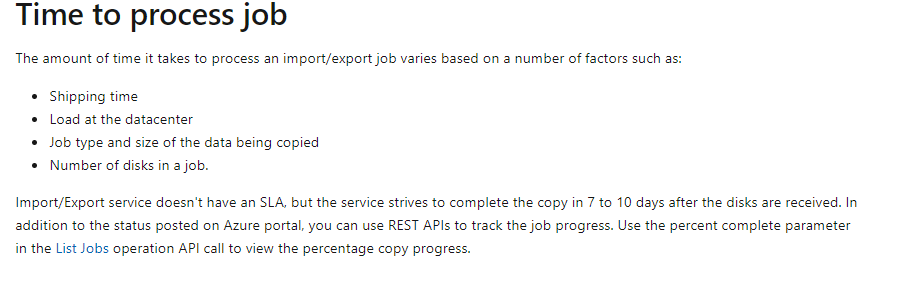
more info on how much time it takes to restore to blob
Hi @Ragavendra dayakar ,
what type of data it is (800TB) ? its more of file server data located in on-prem ?
You can only access the ANF volumes directly from azure VNet, from peered VNets in the same region, or from on-premises over a Virtual Network Gateway (ExpressRoute or VPN Gateway) as necessary. If EXPRESSROUTE is not an option, then only VPN gateway is the left option.
Azure Data Box does not support Azure NetApp Files currently .You can use any file-based copy tool to migrate data to the ANF service (robocopy / rsync or NetApp Cloud Sync)
Since the size of the data is huge and with other architecture limitations, you may have to consider very detailed phased migration approach with dedicated VPN gateway setup for data copy.