Hello @Namandeep Singh,
Based on what you described, it appears that Copilot in Power Automate is currently missing from your emailed platform environment. Copilot in Power Automate is only available in certain regions. Please ensure that the Power Platform environment you are using is located in one of the supported regions listed in the following Microsoft article: Regions overview for Power Automate - Power Automate | Microsoft Learn
- Preview region
- Regions with copilot GPUs (United States, Australia, United Kingdom, India)
- Europe and all other regions, including France and Canada
An admin of the environment or IT admin can confirm the region of your emailed platform environment by:
- Signing in to the Power Platform admin center
- Click on Manage and choose the Environments tab.
- Open your environment and confirm if the environment region is in the list above or not.
If your environment’s region is supported but the Copilot option is still not available, we recommend checking with your Global administrator to confirm whether the Copilot feature has been disabled at the tenant level. Additional details can be found in the following reference: Copilot in cloud flows FAQ - Power Automate | Microsoft Learn
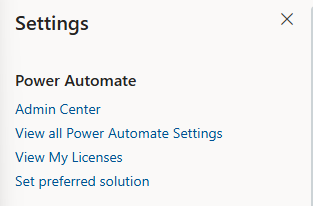
For this situation, please help me to check with your colleagues if they are experiencing the same issue with you. Please also note that an eligible license is required to use Copilot in Power Automate. This includes a standalone Power Automate license, a seeded Microsoft 365 license, or a Power Apps / Dynamics 365 license. To make sure which license is assigned to you, please access to Power Automate page, then click on the setting gear icon on the top right, you will have an option named "View My Licenses"
If you have verified the above and the issue still persists, please let me know. I am looking forward to hearing from you.
' cx='32' cy='32' r='32' /%3E%3Ctext x='50%25' y='55%25' dominant-baseline='middle' text-anchor='middle' fill='%23FFF' %3ENS%3C/text%3E%3C/svg%3E)

' cx='32' cy='32' r='32' /%3E%3Ctext x='50%25' y='55%25' dominant-baseline='middle' text-anchor='middle' fill='%23FFF' %3END%3C/text%3E%3C/svg%3E)
