Note
Access to this page requires authorization. You can try signing in or changing directories.
Access to this page requires authorization. You can try changing directories.
Azure Data Factory
Azure Databricks
Azure Kubernetes Service (AKS)
Azure SQL Database
Azure Storage
Solution ideas
This article describes a solution idea. Your cloud architect can use this guidance to help visualize the major components for a typical implementation of this architecture. Use this article as a starting point to design a well-architected solution that aligns with your workload's specific requirements.
This solution idea shows how you can use Azure to reengineer a z/OS mainframe batch application to deliver a secure, scalable, and highly available system in the cloud. Data and applications need to deliver and scale alongside business needs without infrastructural disruption. To minimize product or feature delivery times and reduce costs, finance, healthcare, insurance, and retail businesses can reengineer to the cloud.
Mainframe architecture
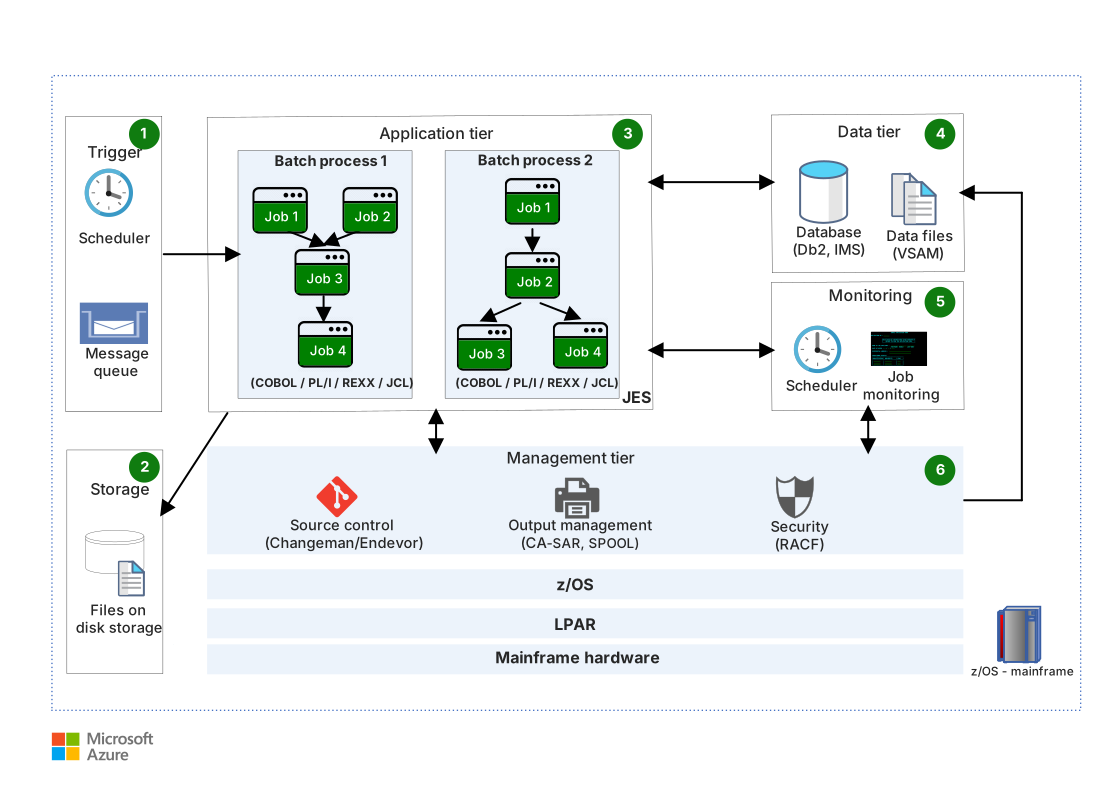
The following diagram shows the architecture of a typical batch application running on a z/OS mainframe.
Workflow
The following workflow corresponds to the previous diagram:
You can trigger mainframe batch processes at a scheduled time by using an operation, planning, and control (OPC) scheduler. Messages, like a message that announces a new file, can also trigger mainframe batch processes.
A mainframe direct-access storage device (DASD) stores input and output files, like flat files that the application requires. To trigger the batch process, create a file on the DASD.
The batch process is an execution of a set of jobs, like a job that internally runs a user or system program to perform a specific task. Batch processes typically run without user interaction. A job execution system (JES) runs batch jobs on the mainframe.
Programs in batch processes can read and write data from:
A file-based database, like Virtual Storage Access Method (VSAM).
A relational database, like Db2 or Informix.
A nonrelational database, like Information Management System (IMS).
A message queue.
Monitor job execution output by using an OPC scheduler or Tivoli Workload Scheduler (TWS). You can also use System Display and Search Facility in the JES to check the job execution status on the mainframe.
The management tier provides the following services:
Source control, like Endevor or ChangeMan.
Security, like Resource Access Control Facility (RACF). This security provides authentication for batch running, file access, and database access.
Output management that supports the storage and searching of job execution logs.
Azure architecture
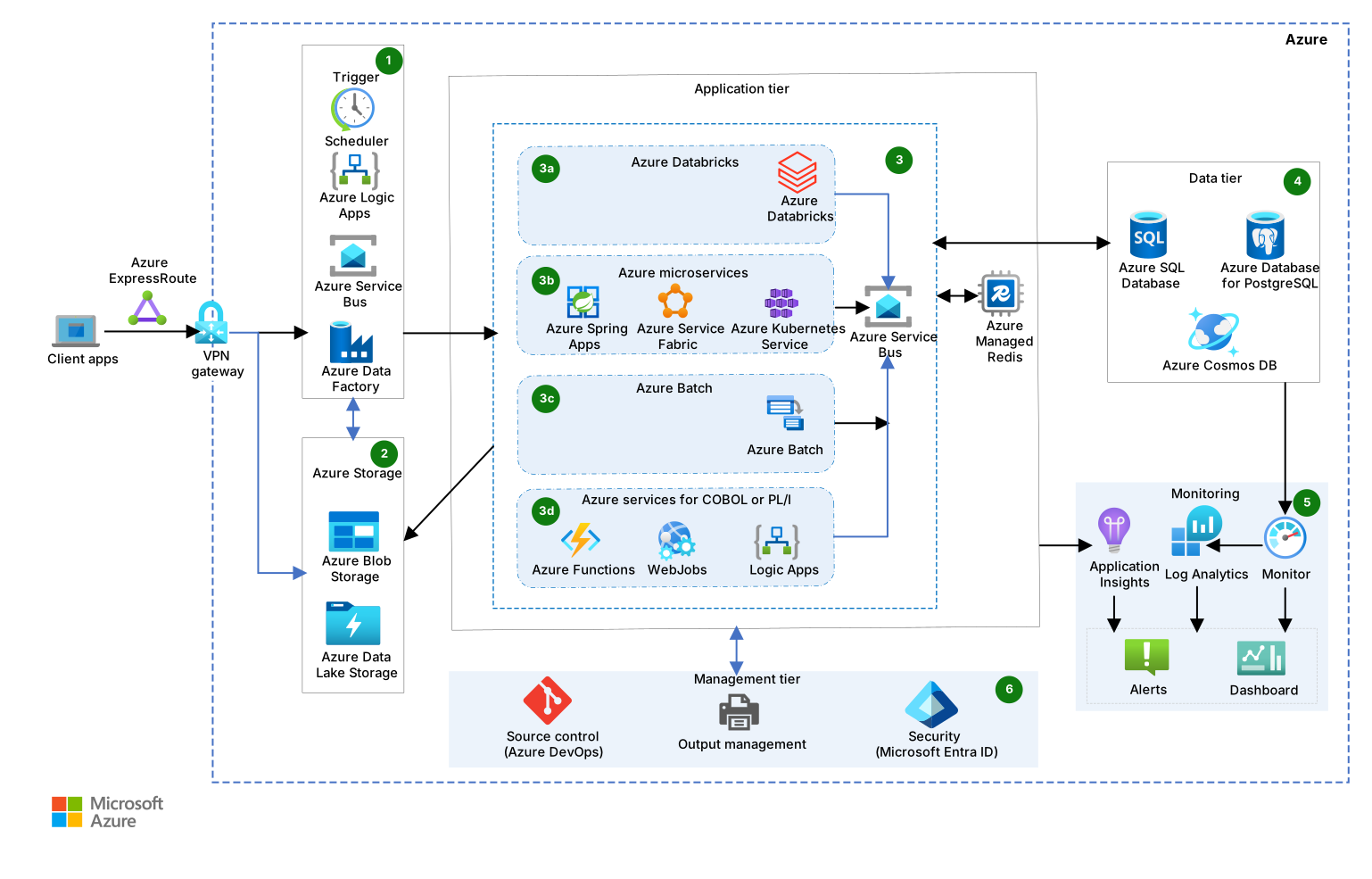
The following diagram shows how you can use Azure services to reengineer a similar application with added capabilities and flexibility.
Download a Visio file of this architecture.
Workflow
The following data flow corresponds to the previous diagram:
Use one of the following triggers to start the Azure batch process:
Use the Azure Databricks job scheduler or Azure Functions scheduler.
Create a recurring batch process task by using Azure Logic Apps.
Use a storage event, like file creation or deletion, in Azure Blob Storage or Azure Files.
Use a message-based trigger, like a new message in Azure Service Bus.
Create an Azure Data Factory trigger.
Store files that migrate from the mainframe by using Blob Storage or Azure Files. Batch processes that are reengineered on Azure can read and write data from this storage.
Azure supports mainframe batch workload implementation. Select specific services based on your business requirements. For example, consider the compute power required, total execution time, the ability to split mainframe batch process into smaller units, and cost sensitivity.
Azure Databricks is an Apache Spark-based analytics platform. You can write jobs in the R, Python, Java, Scala, and Spark SQL languages. Azure Databricks provides a compute environment that offers fast cluster start times, autotermination, and autoscaling. It has built-in integration with Azure Storage services like Blob Storage and Azure Data Lake Storage. It processes large amounts of data quickly and runs extract, transform, and load (ETL) workloads by using Azure Databricks.
Azure Kubernetes Service (AKS) offers an infrastructure for building service-based application architectures. AKS provides control over networking, scaling, and deployment strategies, so it's ideal for complex, large-scale microservices environments. For smaller applications, platform-managed solutions like Azure Container Apps are more cost effective. Container Apps eliminates platform management concerns and simplifies development so that you can focus on application building.
Important
Azure Spring Apps retires on March 31, 2028. We recommend Container Apps and AKS as the replacement services. For more information, see Azure Spring Apps retirement announcement.
You can reengineer your mainframe batch application by using .NET or Java. Batch provides the necessary infrastructure to run this application at scale. Batch creates and manages a pool of virtual machines (VMs), installs the applications, and then schedules jobs to run on the VMs. You don't need to install, manage, or scale cluster or job-scheduling software. Write applications in any Windows or Linux-supported programming language.
You can reengineer short-running COBOL or PL/I batch programs by using Azure services like Azure Functions, the WebJobs feature of Azure App Service, or Logic Apps.
Azure provides multiple data services for data storage and retrieval.
You can migrate mainframe relational databases, like Db2 and Informix, with minimal changes to Azure relational database services, like SQL Server on Azure Virtual Machines, Azure SQL Database, or Azure SQL Managed Instance. You can also use an open-source Relational Database Management System (RDBMS), like Azure Database for PostgreSQL. Choose an Azure database that meets your workload, cross-database query, two-phase commit, and other requirements.
You can migrate mainframe nonrelational databases like IMS, Integrated Data Management System (IDMS), and VSAM to Azure Cosmos DB. Azure Cosmos DB provides fast response times, instant autoscaling, and guaranteed speed at any scale. Azure Cosmos DB is a cost-effective option for unpredictable or sporadic workloads of any size or scale, and it doesn't require capacity planning or management.
Azure Managed Redis can accelerate reengineered applications.
Applications, the OS, and Azure resources can use agents that send logs and metrics to Azure Monitor Logs.
Application Insights monitors migrated applications, autodetects performance anomalies, and offers powerful analytics tools.
Log Analytics helps store, index, query, and derive analytics from log data.
To create alerts and dashboards, export to external services, or complete actions like VM scaling, use Log Analytics and Application Insights output.
This tier provides Azure services, like Azure DevOps and Microsoft Entra ID, for source control, security, and output management.
Components
This solution uses the following components.
Network and identity
Azure ExpressRoute is a connectivity service that extends your on-premises networks into the Microsoft cloud over a private connection from a connectivity provider. ExpressRoute establishes connections to Microsoft cloud services like Microsoft Azure and Microsoft 365. In this architecture, ExpressRoute provides secure, high-bandwidth connectivity between on-premises mainframe environments and Azure services.
Azure VPN Gateway is a virtual network gateway that sends encrypted traffic between an Azure virtual network and an on-premises location over the public internet. In this architecture, VPN Gateway provides an alternative connectivity option for Azure resource access when ExpressRoute isn't available.
Microsoft Entra ID is an identity and access management service that can sync with an on-premises directory. In this architecture, Microsoft Entra ID provides authentication and authorization services so that users and applications can access the reengineered batch system.
Application
Logic Apps is a cloud service that helps you create and run automated recurring tasks and processes on a schedule. Logic Apps calls services inside and outside Azure, like HTTP or HTTPS endpoints. You can use Logic Apps to post messages to Azure services like Service Bus or to upload files to a file share. In this architecture, Logic Apps provides workflow orchestration and scheduling capabilities to trigger and coordinate batch processes.
Service Bus is a cloud messaging service that you can use for messaging between a user interface and back-end services. Service Bus can decouple applications and services and increase reliability and use. In this architecture, Service Bus provides reliable messaging capabilities to trigger batch processes and coordinate reengineered system components.
Azure Databricks is an Apache Spark-based analytics platform and cloud-based data engineering tool that processes and transforms large amounts of data. You can then explore that data by using machine learning models. In this architecture, Azure Databricks provides high-performance compute capabilities, fast cluster start times, and autoscaling for large-scale batch workload processing.
AKS is a managed Kubernetes service that simplifies managed Kubernetes cluster deployment in Azure. Azure manages operational tasks for AKS. In this architecture, AKS orchestrates containers for reengineered batch applications in a scalable microservices architecture.
App Service is a web application, mobile back-end, and RESTful API platform. Use App Service to manage web hosting infrastructure during application design and deployment.
Container Apps is a serverless platform that reduces infrastructure and containerized application overhead. Container Apps manages server configuration, container orchestration, and deployment details, and its server resources secure your applications.
Azure Batch is a cloud service that runs general-purpose batch cloud computing for multiple scalable VMs. Batch supports ETL and AI use cases that involve multiple parallel, independent tasks. In this architecture, Batch provides scalable compute infrastructure for reengineered mainframe batch jobs across multiple VMs.
Azure Functions is a serverless compute service that runs small pieces of code. The Azure Functions cloud infrastructure provides updated servers that run applications at scale. In this architecture, Azure Functions provides serverless compute for short-running batch programs that are written in COBOL or PL/I.
The Web Apps feature of App Service provides a fully managed hosting environment to build, deploy, and scale web apps and APIs. To code reusable background business logic as web jobs, you can use WebJobs. In this architecture, WebJobs provides a background batch processing platform.
Azure Managed Redis is a fully managed in-memory caching service that scales and delivers highly optimized performance by using an in-memory data store like Redis. In this architecture, Azure Managed Redis provides high-speed caching to improve the performance of reengineered batch applications.
Storage
Azure storage provides multiple tiers of hot, cool, and archive data. Efficient use of these storage tiers can provide a price-to-performance advantage.
Azure Cosmos DB is a fully managed NoSQL database service that you can use to migrate nontabular data from mainframes. In this architecture, Azure Cosmos DB provides globally distributed NoSQL database services for the migration of mainframe nonrelational databases, like IMS, IDMS, and VSAM.
Azure Files is a fully managed file share service that provides simple, secure, and serverless enterprise-grade cloud file shares. You can use Azure Files as an add-on for managed SQL storage in reengineered mainframe solutions. In this architecture, Azure Files provides shared file storage that multiple batch processing nodes can access.
Azure Queue Storage is a cost-effective, durable message queueing service for large workloads. In this architecture, Queue Storage provides reliable message queuing for batch job execution and workflow management.
Azure SQL is a fully managed family of services for SQL Server. You can migrate and use relational data efficiently with other Azure services, like SQL Managed Instance or SQL Server on Virtual Machines. In this architecture, Azure SQL provides managed relational database services for migrated mainframe databases like Db2 and Informix.
Blob Storage is a scalable and secure object storage service for cloud-native workloads, archives, data lakes, high-performance computing, and machine learning. In this architecture, Blob Storage provides scalable object storage for batch input files, output data, and intermediate processing results.
Azure Table Storage is a NoSQL key-value store for rapid development by using large semi-structured datasets. In this architecture, Table Storage provides fast NoSQL storage for batch processing metadata and lookup data.
Monitoring
- Azure Monitor is a monitoring service that delivers a comprehensive solution for cloud and on-premises telemetry collection, analysis, and action. Azure Monitor includes Application Insights, Azure Monitor Logs, and Log Analytics features. In this architecture, Azure Monitor provides end-to-end monitoring and observability for reengineered batch applications, including performance metrics, logs, and alerts.
Management
Azure DevOps is a set of development tools that help you reengineer mainframe applications on Azure during each phase of software development and team collaboration. In this architecture, Azure DevOps provides comprehensive DevOps capabilities for source control, continuous integration/continuous deployment (CI/CD), and project management during mainframe reengineering. Azure DevOps provides the following services:
Azure Artifacts is a package management service that supports Maven, npm, Python, and NuGet package feeds from public or private sources. In this architecture, Azure Artifacts manages the required dependencies and libraries for reengineered mainframe applications.
Azure Boards is an agile project management tool that provides work item tracking, sprint planning, visualization, and reporting capabilities. In this architecture, Azure Boards tracks development tasks, user stories, and migration milestones.
Azure Pipelines is a CI/CD service that supports multiple languages, platforms, and cloud environments, including containers and Kubernetes. In this architecture, Azure Pipelines automates the build, test, and deployment processes for reengineered mainframe applications.
Azure Repos is a cloud-hosted Git repository service that provides unlimited private repositories with collaborative pull requests and advanced file management. In this architecture, Azure Repos provides version control for reengineered application code and configuration files.
Azure Test Plans is a test management service that provides manual testing, exploratory testing, and user-acceptance testing capabilities. In this architecture, Azure Test Plans checks the quality and functionality of reengineered mainframe applications by using comprehensive testing workflows.
Scenario details
Mainframes process large amounts of data. You can use batch processing to process high volumes of grouped transactions and then make bulk updates against the database. Mainframe batch processing requires minimal to no user interaction. For example, mainframe systems help banks and other financial institutions complete quarterly processing and reporting tasks, like quarterly stock reporting or pension statement production.
Potential use cases
This solution is ideal for the finance, insurance, healthcare, and retail industries. The architecture works best for:
- Resource-intensive mainframe batch applications.
- Batch applications that need high compute during a specific time, like at the end of the month, quarter, or year.
- Lightweight, repetitive mainframe batch processes that external systems might need to utilize.
Contributors
Microsoft maintains this article. The following contributors wrote this article.
Principal author:
- Ashish Khandelwal | Principal Engineering Architecture Manager
To see nonpublic LinkedIn profiles, sign in to LinkedIn.