Note
Access to this page requires authorization. You can try signing in or changing directories.
Access to this page requires authorization. You can try changing directories.
Azure Container Apps operates in the context of an environment, which runs its own virtual network. As you create an environment, a few key considerations inform the networking capabilities of your container apps: environment type, virtual network type, and accessibility level.
Environment selection
Container Apps has two environment types. They share many of the same networking characteristics, with some key differences.
| Environment type | Supported plan types | Description |
|---|---|---|
| Workload profiles (default) | Consumption, Dedicated | Supports user-defined routes (UDRs), egress through Azure NAT Gateway, and creating private endpoints in the container app environment. The minimum required subnet size is /27. |
| Consumption only (legacy) | Consumption | Doesn't support UDRs, egress through Azure NAT Gateway, peering through a remote gateway, or other custom egress. The minimum required subnet size is /23. |
For more information, see Environment types.
Virtual network type
By default, Container Apps is integrated with the Azure network, which is publicly accessible over the internet and can communicate only with internet-accessible endpoints. You also have the option to provide an existing virtual network as you create your environment instead. After you create an environment with either the default Azure network or an existing virtual network, you can't change the network type.
Use an existing virtual network when you need Azure networking features like:
- Network security groups.
- Azure Application Gateway integration.
- Azure Firewall integration.
- Control over outbound traffic from your container app.
- Access to resources behind private endpoints in your virtual network.
If you use an existing virtual network, you need to provide a subnet that's dedicated exclusively to the Container Apps environment that you deploy. This subnet isn't available to other services. For more information, see Virtual network configuration.
Accessibility level
You can configure whether your container app allows public ingress or ingress only from within your virtual network at the environment level.
| Accessibility level | Description |
|---|---|
| External | Your container app can accept public requests. External environments are deployed with a virtual IP on an external, public-facing IP address. |
| Internal | Internal environments have no public endpoints and are deployed with a virtual IP mapped to an internal IP address. The internal endpoint is an Azure internal load balancer. IP addresses are issued from the existing virtual network's list of private IP addresses. |
Public network access
The setting for public network access determines whether your Container Apps environment is accessible from the public internet. Whether you can change this setting after creating your environment depends on the environment's virtual IP configuration. The following table shows valid values for public network access, depending on your environment's virtual IP configuration.
| Virtual IP | Supported public network access | Description |
|---|---|---|
| External | Enabled, Disabled |
The Container Apps environment was created with an internet-accessible endpoint. The setting for public network access determines whether traffic is accepted through the public endpoint or only through private endpoints. You can change this setting after you create the environment. |
| Internal | Disabled |
The Container Apps environment was created without an internet-accessible endpoint. You can't change the setting for public network access to accept traffic from the internet. |
To create private endpoints in your Container Apps environment, you must set public network access to Disabled.
Azure networking policies are supported with the flag for public network access.
Ingress configuration
In the ingress section, you can configure the following settings:
Enable or disable ingress for your container app.
Accept traffic to your container app from anywhere or from only within the same Container Apps environment. In an internal environment, "anywhere" means anywhere in your virtual network, because the environment has no public endpoint. For more information, see How ingress visibility interacts with the environment type.
Define traffic-splitting rules between revisions of your application. For more information, see Traffic splitting.
For more information about networking scenarios, see Ingress in Azure Container Apps.
Inbound features
| Feature | Learn how to |
|---|---|
| Ingress Configure ingress |
Control the routing of external and internal traffic to your container app. |
| Premium ingress | Configure advanced ingress settings, such as workload profile support for ingress and idle timeout. |
| IP restrictions | Restrict inbound traffic to your container app by IP address. |
| Client certificate authentication | Configure client certificate authentication (also known as mutual TLS or mTLS) for your container app. |
| Traffic splitting Blue/Green deployment |
Split incoming traffic between active revisions of your container app. |
| Session affinity | Route all requests from a client to the same replica of your container app. |
| Cross-origin resource sharing (CORS) | Enable CORS for your container app, which allows requests made through the browser to a domain that doesn't match the page's origin. |
| Path-based routing | Use rules to route requests to different container apps in your environment, depending on the path of each request. |
| Virtual networks | Configure the virtual network for your Container Apps environment. |
| DNS | Configure DNS for your Container Apps environment's virtual network. |
| Private endpoint | Use a private endpoint to securely access your container app without exposing it to the public internet. |
| Integrate with Azure Front Door | Connect directly from Azure Front Door to a container app by using a private link instead of the public internet. |
Outbound features
| Feature | Learn how to |
|---|---|
| Using Azure Firewall | Use Azure Firewall to control outbound traffic from your container app. |
| Virtual networks | Configure the virtual network for your Container Apps environment. |
| Securing a existing virtual network with a network security group | Help secure your Container Apps environment's virtual network by using a network security group. |
| Azure NAT gateway integration | Use Azure NAT Gateway to simplify outbound internet connectivity in your virtual network in a workload profile environment. |
How-to articles
| Article | Learn how to |
|---|---|
| Provide a virtual network to an Azure Container Apps environment | Use a virtual network. |
| Protect Azure Container Apps with Web Application Firewall on Application Gateway | Configure Azure Web Application Firewall on Azure Application Gateway. |
| Control outbound traffic in Azure Container Apps with user-defined routes | Enable UDRs. |
| Use mTLS in Azure Container Apps | Build an mTLS application in Container Apps. |
| Use a private endpoint with an Azure Container Apps environment | Use a private endpoint to securely access your container app without exposing it to the public internet. |
| Create a private link to a container app with Azure Front Door | Connect directly from Azure Front Door to a container app by using a private link instead of the public internet. |
Environment security
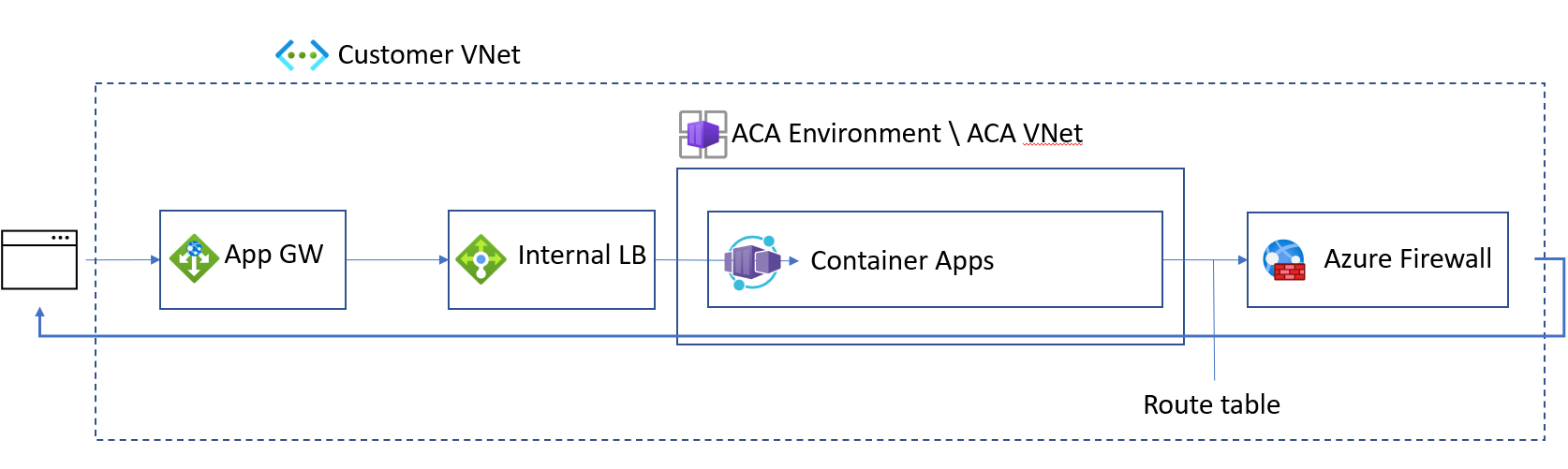
You can help secure your workload profile environment for ingress and egress networking traffic by taking the following actions:
Create your internal Container Apps environment in a workload profile environment. For steps, refer to Manage workload profiles with the Azure CLI.
Integrate Container Apps with Application Gateway.
Configure a UDR to route all traffic through Azure Firewall.
HTTP edge proxy behavior
Azure Container Apps uses an edge HTTP proxy that terminates TLS and routes requests to each application.
HTTP applications scale based on the number of HTTP requests and connections. Envoy routes internal traffic inside clusters.
Downstream connections support HTTP/1.1 and HTTP/2. Envoy automatically detects and upgrades connections if the client connection requires an upgrade.
You define upstream connections by setting the transport property on the ingress object.
Portal dependencies
For every app in Container Apps, there are two URLs.
The Container Apps runtime initially generates a fully qualified domain name (FQDN) that's used to access your app. To get the FQDN of your container app, go to your container app in the Azure portal. On the Overview pane, the FQDN is the Application Url value.
A second URL is also generated for you. This location grants access to the log-streaming service and the console. If necessary, add https://azurecontainerapps.dev/ to the allow list of your firewall or proxy.
Ports and IP addresses
The following ports are exposed for inbound connections:
| Protocol | Ports |
|---|---|
| HTTP/HTTPS | 80, 443 |
IP addresses have the following types:
| Type | Description |
|---|---|
| Public inbound IP | Used for application traffic in an external deployment, and for management traffic in both internal and external deployments. |
| Outbound public IP | Used as the "from" IP for outbound connections that leave the virtual network. These connections aren't routed down a VPN. Outbound IPs might change over time. Using Azure NAT Gateway or another proxy for outbound traffic from a Container Apps environment is supported only in a workload profile environment. |
| Internal load balancer IP | Exists only in an internal environment. |