Note
Access to this page requires authorization. You can try signing in or changing directories.
Access to this page requires authorization. You can try changing directories.
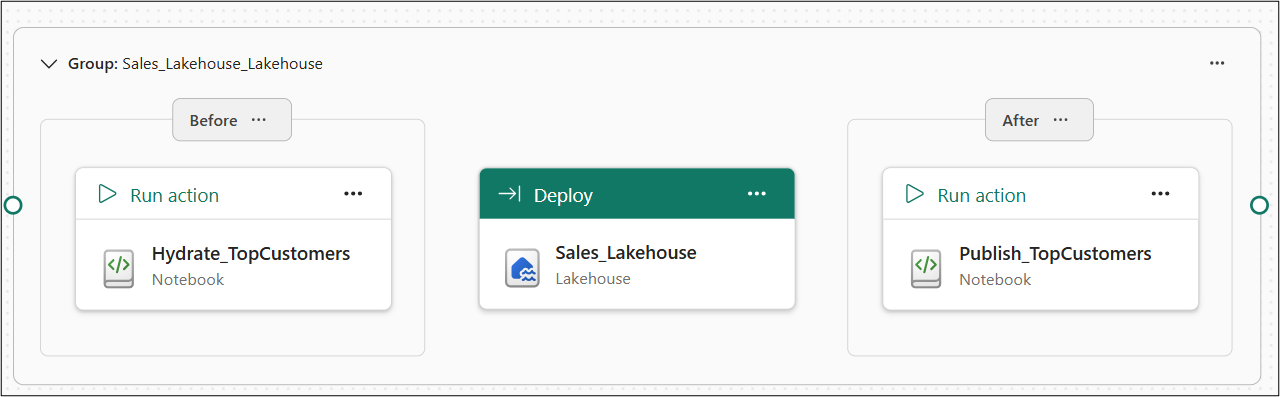
An action is a run of a workspace item that a deployment performs around the deployment of another item. Actions are how a deployment plan does work that deploying item metadata alone can't do, such as populating a lakehouse table before a warehouse view that reads it deploys.
An action belongs to a deployment group, and a group deploys exactly one item. The group's actions run around that item's deployment.
Important
This feature is in preview.
Pre-deploy and post-deploy actions
Each deployment group carries two sets of actions:
- Pre-deploy actions run before the group's item deploys.
- Post-deploy actions run after the group's item deploys.
A pre-deploy action can't run the same item that its own group deploys, because that item hasn't deployed yet when the action runs.
Item types you can run as an action
The following item types can run as deployment plan actions:
| Item type | Job type |
|---|---|
| Notebook | Execute |
| Data pipeline | Execute |
| Dataflow Gen2 | Execute |
| Copy job | Execute |
| User data function | Execute |
For the definition structure and job properties, see Deployment plan definition.
Each action runs the item. The item defines what the action does and which parameters it accepts, not the plan.
No other item type can run as an action. For item types that are under consideration but aren't supported, see Considerations and limitations.
Order actions within a deployment group
Chain actions to control the order they run in. When you chain one action to another, the deployment runs them in that sequence, so you can order an action that loads data before the action that validates it.

In the preceding image, the chain in the lakehouse group runs Refresh_Sales before Validate_Sales. The following warehouse group runs Notify before it deploys the warehouse.
The following rules apply:
- You can chain an action to other actions in the same deployment group. In the plan file, a chain is a dependency on another action's name.
- Action names must be unique within their deployment group, because a chain refers to an action by name.
- A chain can't loop back on itself. The system rejects a dependency cycle when you save the plan.
- Actions run one at a time. Actions that you don't chain to each other still don't run in parallel.
A deployment operation stops on the first failure, and the system doesn't roll back any changes. For more information, see If an operation fails.
Pass parameters to an action
An action can carry parameters, which the plan passes to the item that the action runs. Each parameter has a name and a value, and parameter names must be unique within an action.
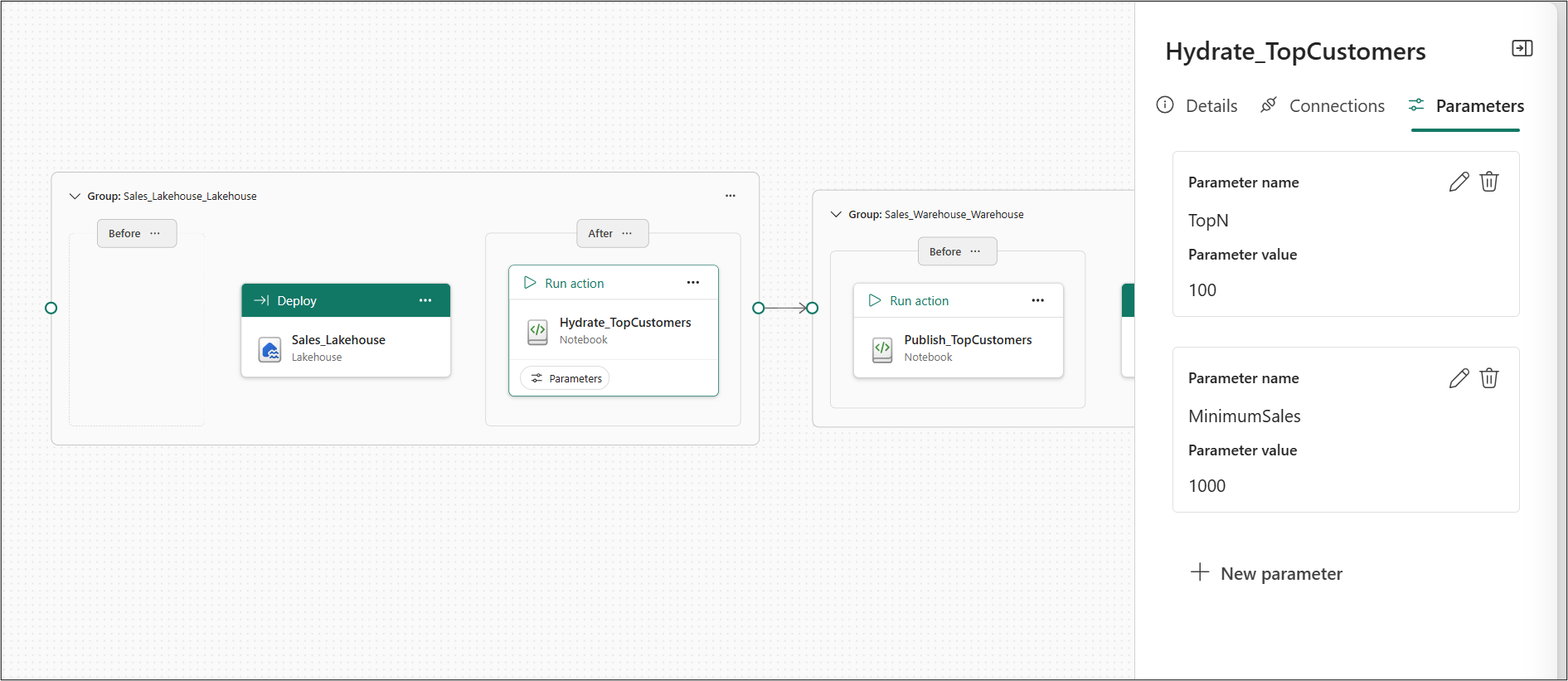
A parameter value is either a literal value or a reference to a variable in a Variable library. A variable reference lets a single plan supply different values per environment, instead of hard-coding a value that's correct in only one workspace.
A variable reference that doesn't resolve to a known variable type is rejected when the plan is saved.
Because the plan passes the values through to the item, supply the parameters that the item expects. For which parameters an item accepts, see that item type's documentation.
Considerations and limitations
General deployment plan limitations
- You can't use one plan to deploy into more than one workspace in a single run.
- You can attach only one deployment plan to a deployment operation.
Limitations for attaching a plan
- A plan attachment applies only to the current operation. You can't configure a plan as the default for future deployments or schedule the plan itself. If a deployment tool schedules an operation, the operation must attach the plan each time it runs.
- You can't attach a plan to a single-item import operation.
- The
fabric-cicdlibrary doesn't support deployment plans.
Limitations during a deployment
- You can't deploy independent deployment groups in parallel.
- A failed deployment isn't rolled back. Items that already deployed stay in the target workspace, and later items don't deploy.
Limitations for plan actions
- Only supported item and job type combinations can run as pre-deploy or post-deploy actions. See Item types you can run as an action.
- You can't use the same Dataflow Gen2 item in more than one action in a plan. Its refresh job can't run more than once at a time, so the canvas warns you when you add the second occurrence, and the second occurrence is blocked during the deployment.
- You can't return more than 512 KB from a user data function action. Larger output is truncated. The action still succeeds.
- You can't make an action wait for the services it feeds to catch up. An action completes when the action itself ends, so the next action can start before the data it produced is queryable.
- You can't use a deployment plan to change the active value set of a Variable Library during deployment. Variable references resolve against the value set that's already active in the target workspace. In a newly created target workspace, Default is active until you select and save another value set. For more information, see Variable library CI/CD.
Limitations for plan authoring
- You can't add more than one item to a deployment group.
- The canvas supports automatic layout only.
Deployment plan size limits
A plan that exceeds any of these limits is rejected when it's saved. The limits are enforced whenever a plan is saved, so they apply to the canvas, the REST API, a pull from Git, and external tools alike.
| Element | Limit |
|---|---|
| Plan size | 1 MB |
| Length of a group or step name | 60 characters |
| Groups in a plan | 1,000 |
| Dependencies on a group | 1,000 |
| Pre-deploy actions in a group | 20 |
| Post-deploy actions in a group | 20 |
| Dependencies on an action | 20 |
| Parameters on an action | 20 |