Note
Access to this page requires authorization. You can try signing in or changing directories.
Access to this page requires authorization. You can try changing directories.
Copilot Cowork uses the Customize page as the place where you manage everything that extends Cowork—the plugins you added and the skills you created—in one place.
Open the Customize page
Open the Customize page when you want to review or change the plugins and skills available to Cowork.
Open Cowork.
In the left navigation, select Customize. The page opens with two tabs: Plugins and Skills.
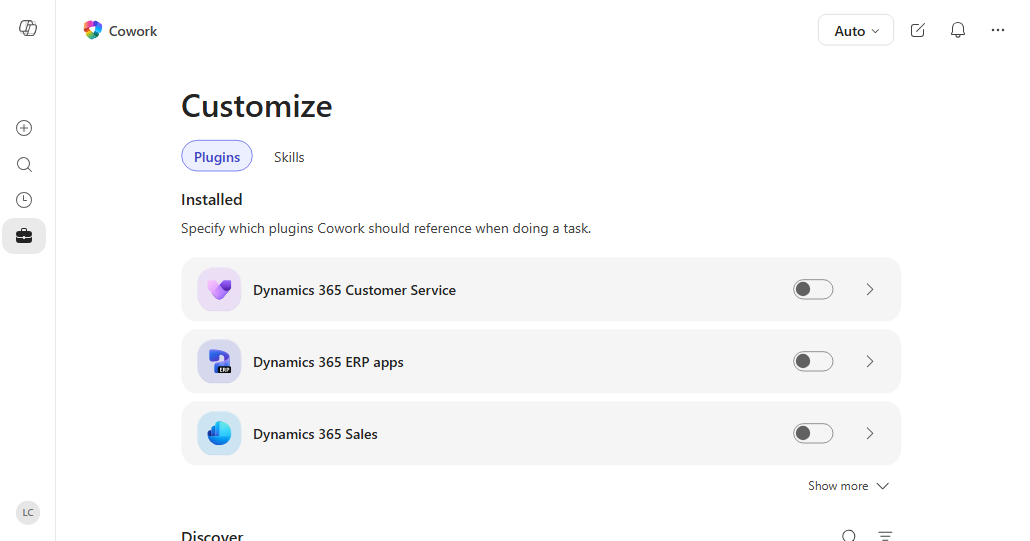
Manage your plugins
Use the Plugins tab to review plugins you added and find plugins that are available to you.
The Installed section shows plugins that you or your admin added. The Discover grid shows plugins available from the Marketplace and plugins you published. The page can also show plugins shared with you.
- Select a plugin card to open its detail page, where you can review the publisher, description, and included skills or connectors.
- Select Add on the detail page to add an available plugin.
- Select an installed plugin to open its detail page. From the detail page, you can turn the plugin on or off for the current conversation, see what data it connects to, and remove it.
- Use Discover to browse the Marketplace. If the Add split button is available at the top of the tab, you can create a new skill or upload a plugin package.
For step-by-step instructions, see Use plugins with Cowork.
Manage your skills
To manage the skills that Cowork can use in conversations, use the Skills tab.
The tab has two lists: Your skills for skills you created or added through plugins, and Built-in for the skills that ship with Cowork.
- Use the search box and source filters at the top of the tab to narrow the list.
- Select Add to create a new skill. Cowork starts a guided conversation that helps you write and save the skill.
- Select any skill to open its detail page. For skills you created, you can edit instructions, download the skill file, open it in OneDrive, or delete the skill. To test changes, start a new conversation.
For more on writing skills, see Use Cowork.
Tips
- Use the conversation Sources picker to choose the plugins and skills you need for a request.
- Turn off a plugin you're not using for a conversation to keep results focused.
- Test a new skill in a new conversation before using it in your main conversation.
- Add a skill description that explains when Cowork should use the skill. This description helps Cowork pick the right skill for each request.