Note
Access to this page requires authorization. You can try signing in or changing directories.
Access to this page requires authorization. You can try changing directories.
Work IQ is a workplace intelligence layer that delivers a semantic understanding of everything happening across your business. It understands work context, relationships, and patterns so agents can deliver faster, more accurate, and more secure responses than connector-only approaches.
Work IQ combines four integrated components: chat, context, tools, and workspaces. Together, these components ground agents in organizational information and business signals so responses are relevant to how work actually happens.
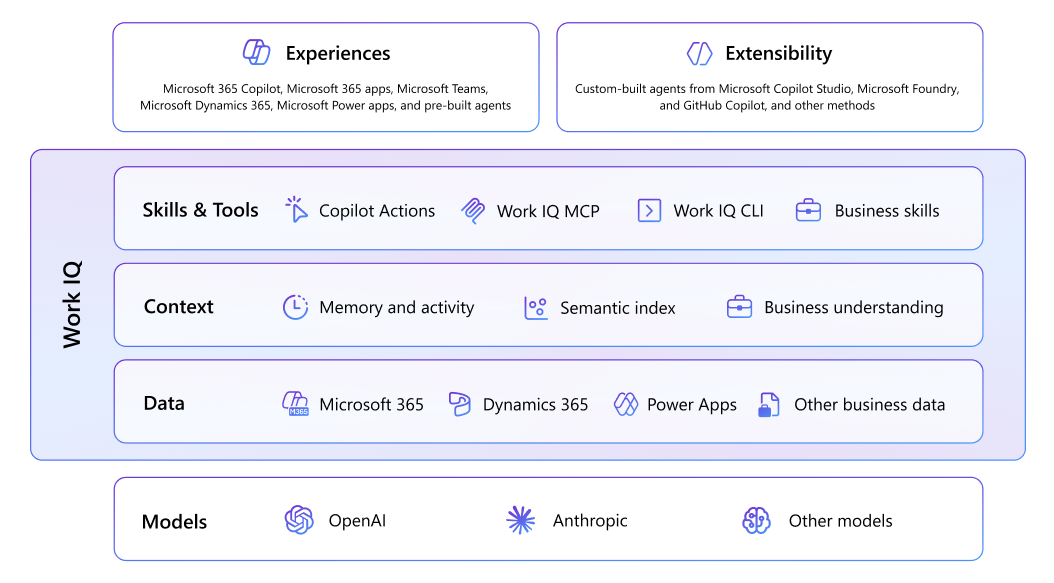
Work IQ is a secure platform that enables any agentic system to access and reason over an organization’s data, context, and tools. It continuously builds a rich, up-to-date semantic understanding across Microsoft 365, organizational systems, and external sources, with built-in governance that respects existing permissions and policies. Combining chat, context, tools, and workspaces, Work IQ supports high-volume, multistep interactions and scales to handle even the largest and most complex data estates. It works across frameworks and runtimes through standard protocols and provides the foundation for building agents, applications, and workflows that deliver faster, more intelligent, efficient outcomes.
When it comes to extensibility, you can both extend Work IQ with your business data and extend the agents you build with the intelligence of Work IQ. Furthermore, you can leverage Work IQ intelligence within your own development workflow with Work IQ API. This article explains the extensibility opportunities within each layer of Work IQ.
Data
The data layer provides secure access to structured and unstructured information from Microsoft 365, Dynamics 365, Power Apps, and connected business systems. This layer gives agents a foundational understanding of work across people, groups, content, and communication.
Microsoft 365 tenant data
Microsoft Graph data represents all the data from your Microsoft 365 tenant, including permission-based and information-protected content in SharePoint and OneDrive, including Word, Excel, PowerPoint, and other file types, as well as Outlook emails, and Teams meetings and chats. It also includes metadata and signals that describe collaboration, communication, and activity patterns over time.
Dynamics 365 and Power Apps business data
Work IQ also integrates Dynamics 365 and Power Apps data through Dataverse, which stores structured business datasets for those applications. This integration enables agents to reason across productivity data and systems-of-record data together, such as linking supplier issues discussed in a Teams call with downstream inventory and sales effects.
External business data from Copilot connectors
Copilot connectors extend the foundation of your tenant data by ingesting data from non-Microsoft systems and line-of-business applications, including prebuilt and custom connectors. As a result, Work IQ can reason over a broader business data estate within the tenant boundary.
Federated connectors (early access preview) offer an alternative way to bring your organization's data into Microsoft 365 that skips traditional indexing. Instead of crawling and syncing content into Microsoft Graph, federated connectors use Model Context Protocol (MCP) to read data in real time, making live or sensitive data sources discoverable without inclusion to the semantic index.
Context
The context layer expands beyond baseline grounding with continuously evolving insights that improve response speed and relevance. Work IQ helps agents understand how people and organizations work, including skill profiles, important projects, collaboration frequency, workflow criticality, and communication velocity.
Memory and activity signals
Copilot memory captures explicit user actions (including custom instructions and saved memories) and implicit signals from user activity patterns.
Semantic index
With semantic indexing, Work IQ maps your organization’s data into an advanced lexical and semantic index to power search relevance and accuracy, while ensuring organizational boundaries and permission structures within your tenant are respected. The semantic index is a superset of content within Microsoft Graph and ingested content from Copilot connectors.
Business understanding with Dataverse intelligence
Where Work IQ grounds agents in work productivity artifacts like files, meetings, and messages, Dataverse intelligence extends this foundation to structured business data, enabling agents to understand and act on your organization's systems of record.
Skills and tools
The skills and tools layer puts Work IQ intelligence into operation. Skills provide task-specific instructions that help agents complete specialized work with higher speed and precision. If skills describe what actions to take, tools execute those actions. Tools are the concrete integrations—MCP server tools, API plugins, and others services—that an agent calls to actually perform work.
Business skills
Business skills with Dataverse intelligence (preview) are natural-language instructions that encode your organization's processes, policies, and domain knowledge in a format agents can interpret and execute. Each skill defines how to complete a specific type of work — the steps, required inputs, and business rules that apply. At runtime, agents discover and apply relevant skills to complete tasks according to your organization's processes. When multiple agents share the same skill, they follow the same logic, ensuring consistent behavior across your organization.
Work IQ CLI
The Work IQ CLI (preview) exposes your Microsoft 365 data through the Model Context Protocol, allowing AI coding assistants in your development environment to access and reason over your workplace information. Running the CLI in MCP server mode means your AI assistant can automatically pull in relevant context as you work — for example, retrieving details from a meeting where a feature was discussed and using that context to inform code suggestions and jump-start the implementation.