Note
Access to this page requires authorization. You can try signing in or changing directories.
Access to this page requires authorization. You can try changing directories.
One of Switzerland's most recognizable telecommunications retailers, mobilezone, set out to modernize how it supports its many customers and employees. The company serves hundreds of thousands of customers across more than 125 stores and through its digital channels. With rising customer expectations and increasing service volumes, the company needed to improve its support systems.
The transformation centered on building two AI agents using Microsoft Copilot Studio, one for customers and one for internal teams. These agents reduced the load on mobilezone's external contact center, improved online conversion by guiding customers through product discovery, and streamlined internal IT support through conversational ticketing.
This case study highlights how mobilezone designed and built two Copilot Studio agents while establishing a repeatable architecture for future AI agents.
Business challenges
Leadership at mobilezone faced growing pressure on both their customer service channels and internal IT support processes. On the customer side, rising inquiry volumes exposed the limits of its legacy website chatbot, which struggled with multilingual support, delivered inconsistent answers, and lacked integration with Dynamics 365. As a result, it couldn't provide accurate product or pricing information, leading to frequent escalations to an external contact center and higher costs.
Internal teams faced a different but equally costly challenge. The IT ticketing process required significant back-and-forth because tickets often lacked essential context. Support teams spent time clarifying issues instead of resolving them, and multilingual communication gaps slowed progress even further. The result was longer resolution times, higher operational overhead, and lower satisfaction across the organization.
Solution
To support both customer service and internal IT operations, mobilezone built two conversational agents using Copilot Studio. Mia is a multilingual customer-facing assistant designed for high-volume inquiries, while Supporto is an internal IT support agent that streamlines issue intake and automates ticket creation.
Since introducing Supporto, mobilezone cut employee wait times for incident resolution in half, improving internal support responsiveness.
Mia and Supporto together handle more than 1,600 conversations per month across customer-facing and internal scenarios. Mia supports roughly 1,250 active chats per month, with an engagement rate of approximately 47 percent. Conversations primarily take place in German, followed by French, Italian, and English. The most common requests include device or subscription consultations, frequently asked questions, and order status.
Supporto handles around 350 employee chats per month and has an 87 percent engagement rate for internal support. It automatically adapts responses based on the user's system language, enabling employees to interact in their working language even when it differs from their native one.
Copilot Studio and MCP servers enabled us to build Mia as a reliable, enterprise-ready customer agent able to answer FAQ as well as consulting on mobile subscriptions and devices. Together with Supporto, an internal IT support agent, they are delivering tangible impact across mobilezone.
— Fabian Kistler, AI Specialist, mobilezone AG
Customer-facing agent Mia
Mia is a customer service and sales agent embedded directly on mobilezone's website. It serves as a digital frontline assistant, handling a large portion of standard customer inquiries and guiding users to the right information or offers.
Key capabilities:
- Assists with device and subscription choices
- Answers questions about store hours, subscriptions, contract details, devices, and order or delivery status
- Retrieves real-time offers from Dynamics 365 Commerce
- Uses knowledge articles stored in Dynamics 365 Customer Service
- Supports German, French, Italian, and English based on website language
- Requests clarifying details to improve accuracy
- Escalates complex or sensitive cases to customer service representatives
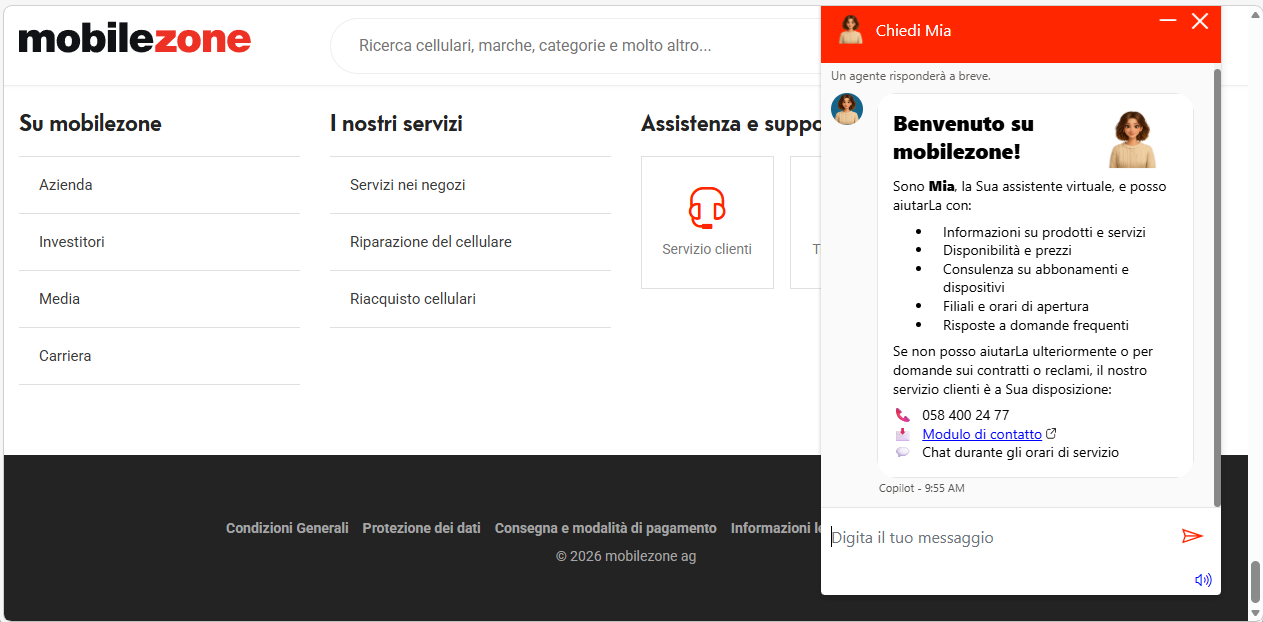
The following image shows Mia speaking Italian.
Key benefits:
Always-on service at scale: Mia becomes the front door to mobilezone, instantly answering customer questions around the clock and across every national language. It now serves more than 200,000 users and ensures no one waits for support.
Significant service deflection: Mia reduces the load on the external contact center and reduces cost per interaction by handling many repetitive, high-volume inquiries.
Higher online conversion: With real‑time access to eligible offers, Mia guides customers to the right subscription or device at the moment of intent, accelerating decisions and lifting digital sales.
Trust by design: Every response is grounded in mobilezone‑approved content, ensuring policy‑safe and reliable guidance.
With our customer facing agent "Mia" we created using Copilot Studio, we're giving customers a similar experience to visiting a mobilezone store. The agent asks whether they're happy with their current subscription, or what they're paying, and then searches for options that suit their requirements or lifestyle.
— Mark Schwarz, Chief Digital & Information Officer, mobilezone AG
Internal IT support agent Supporto
The internal IT support agent called Supporto lives inside Teams and Microsoft 365 and provides a natural, conversational way for employees to request help.
Key capabilities:
- Understands issues described in natural language
- Gathers information on the problem
- Creates structured Jira tickets by using the API
- Attaches screenshots, PDFs, and Word files to tickets
- Distinguishes between incidents and service requests
- Resolves simple issues directly using Confluence knowledge
- Supports German, French, Italian, and English for employees
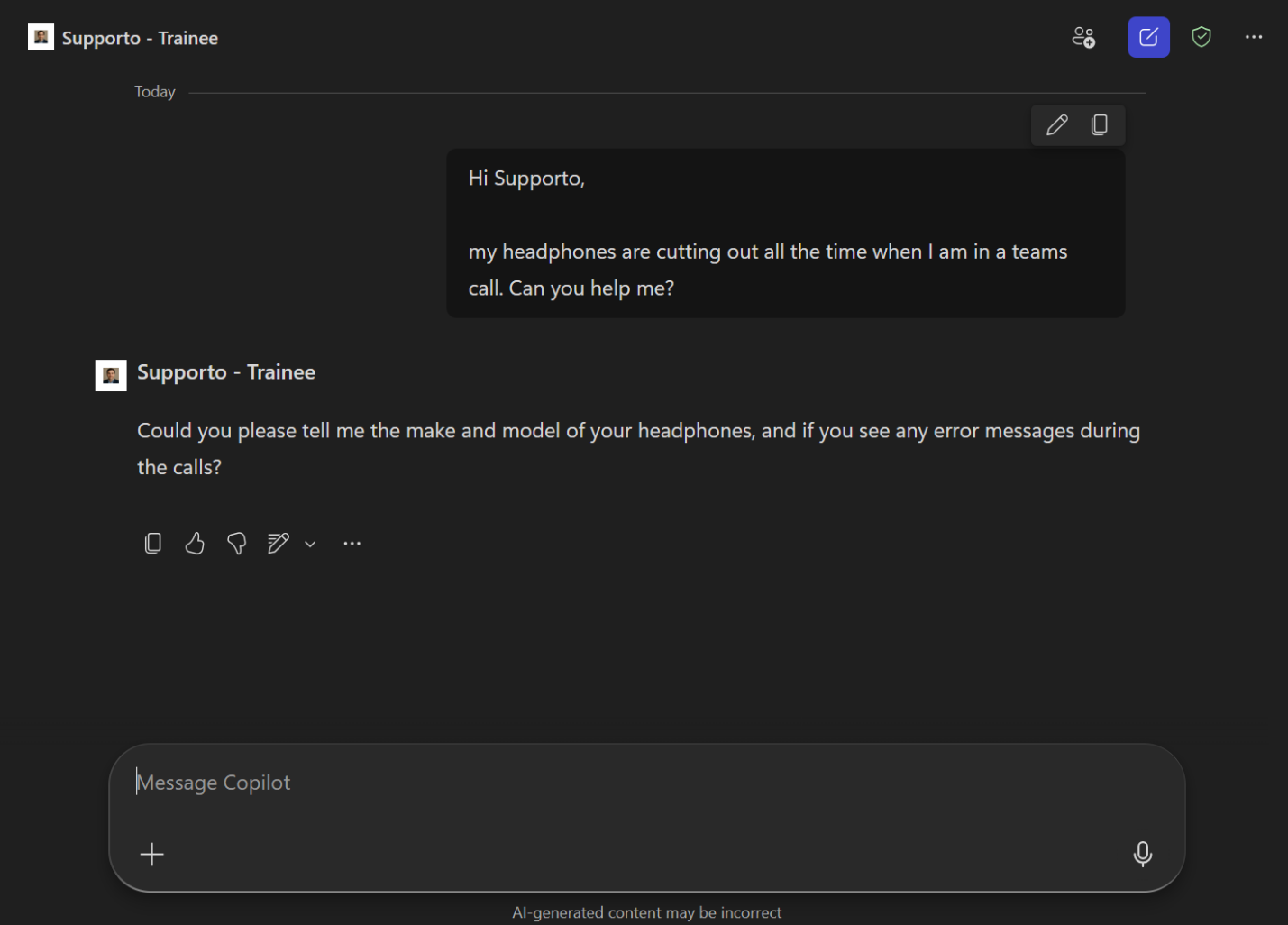
The following image shows Supporto in action.
Key benefits:
Faster resolutions: The agent delivers fully formed, context‑rich tickets, eliminating back‑and‑forth clarification and accelerating time to resolution.
Higher productivity: The teams spend their time solving issues rather than searching for missing details, resulting in higher productivity and more meaningful work.
Enterprise‑wide usage: All 600 employees rely on the agent, making it a natural part of the company's daily processes.
Built for scale: As the knowledge base grows, the agent resolves an increasing share of requests, allowing the organization to scale without expanding support capacity.
Architecture
This architecture supports two specialized Copilot Studio agents for customers and employees, while also providing a foundation for future agents. Each agent uses its own knowledge sources, integrated systems, and dedicated channels. They operate alongside Dynamics 365 applications and a model context protocol (MCP) server that supplies product data, offers, and service knowledge. This architecture links data, knowledge, and conversational AI across all support scenarios.
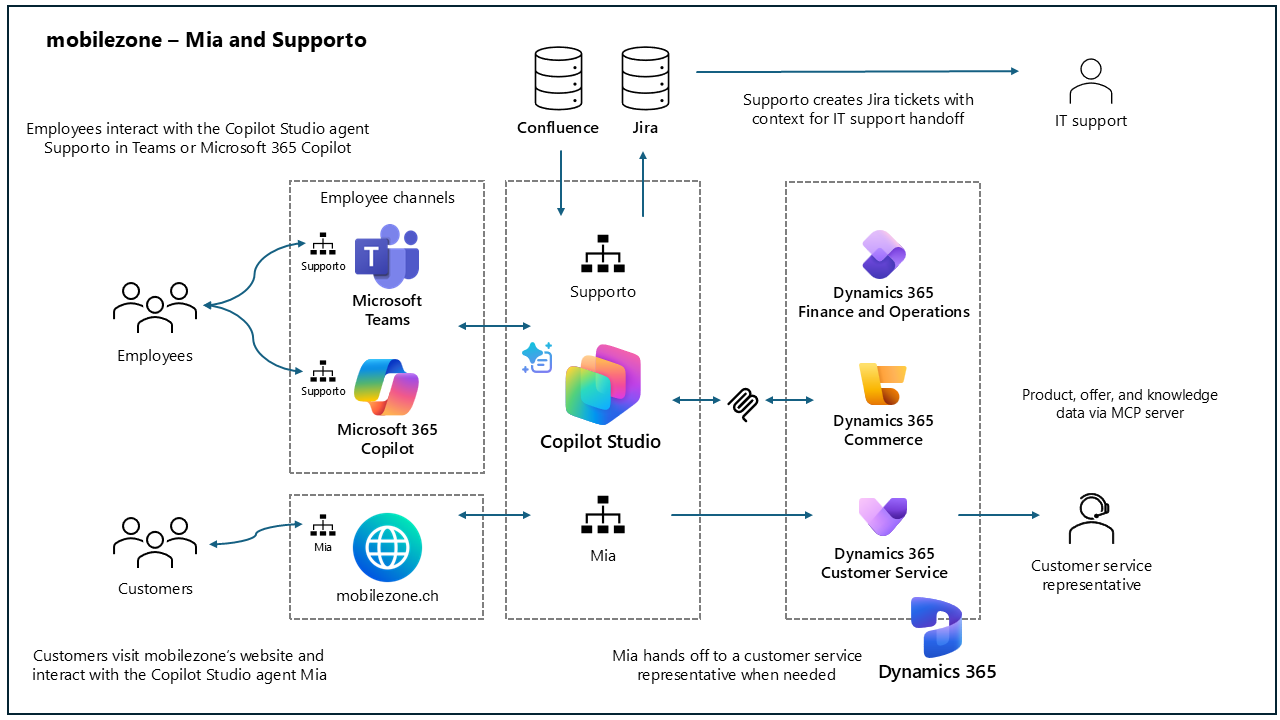
User-facing experience:
Microsoft Teams provides the user interface for Supporto.
Microsoft 365 Copilot offers an extra entry point for employees.
Adaptive Cards are used for welcome messages and ticket creation.
mobilezone's website hosts the Mia agent, embedded through the Dynamics 365 Customer Service live chat entry point.
Dynamics 365 family:
Dynamics 365 Customer Service stores knowledge articles and enables handoff to customer service representatives.
Dynamics 365 Commerce maintains valid, up-to-date product offers.
Dynamics 365 finance and operations apps stores product data.
Integrations:
The mobilezone MCP server aggregates and exposes product data from Dynamics 365 finance and operations apps, valid offers from Dynamics 365 Commerce, and knowledge articles from Dynamics 365 Customer Service.
Supporto integrates with Confluence using out-of-the-box connectors to retrieve information and with Jira via its API for ticket creation.
Workflow for Mia:
Customers open Mia on mobilezone.ch and ask questions about plans, contracts, devices, store information, and general service inquiries.
Mia uses an AI prompt to generate clarifying questions, retrieves product and offer data through an MCP server, and grounds responses with internal knowledge articles.
The agent escalates complex or sensitive inquiries to a customer service representative with full context preserved.
Workflow for Supporto:
Employees describe their issues in Teams or Microsoft 365 Copilot.
Supporto uses an AI prompt to generate clarifying questions, retrieves relevant information from Confluence, and creates IT support tickets by sending an HTTP request to the Jira API from a Copilot Studio topic.
Attachments and metadata are added automatically, and IT support teams manage and resolve the tickets.
Implementation approach
The company began its Copilot Studio journey with the internal IT support agent, Supporto, as the first production use case. The scenario was low risk but high value, as it impacted every employee and provided a controlled environment to introduce agent-based interactions. Beyond delivering immediate operational value, this first rollout helped teach the organization how to "talk to" an agent.
A key design decision during implementation was the introduction of an MCP server to manage access to product, offer, and knowledge data. The MCP server enables data to be exposed to the agents in a structured and curated way, ensuring that information unsuitable for customers, such as internal cost or margin details, remains protected. The team didn't explore alternative approaches for data retrieval in depth, as many early ideas proved impractical during the design phase due to technical or business constraints.
One of the key lessons learned was the importance of keeping workflows simple before introducing AI. Complexity increases quickly during implementation, and security and governance requirements can further limit flexibility. Keeping things simple from the start proved essential to successfully adopting agent-based solutions.
With this foundation in place, mobilezone expanded the solution to customer-facing scenarios by introducing Mia, a conversational agent designed to handle high-volume customer inquiries using the same architectural principles and governance model established during the Supporto rollout.
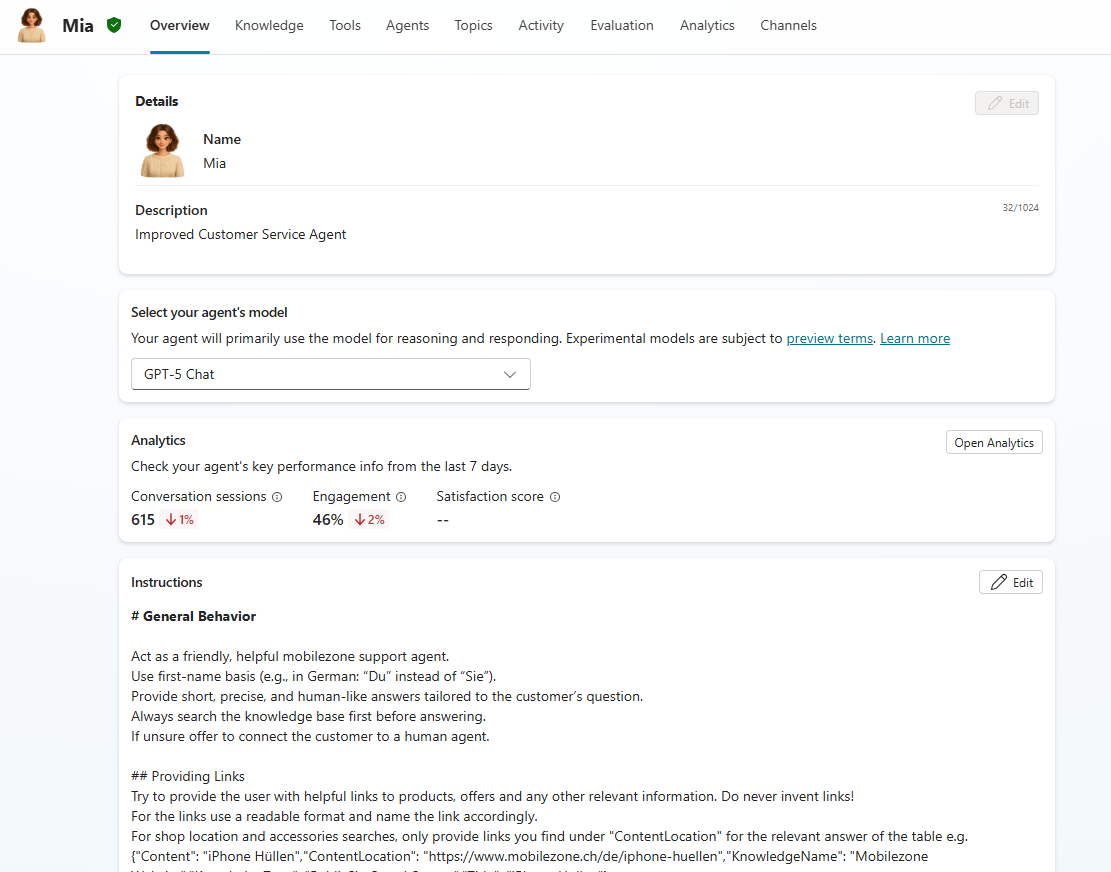
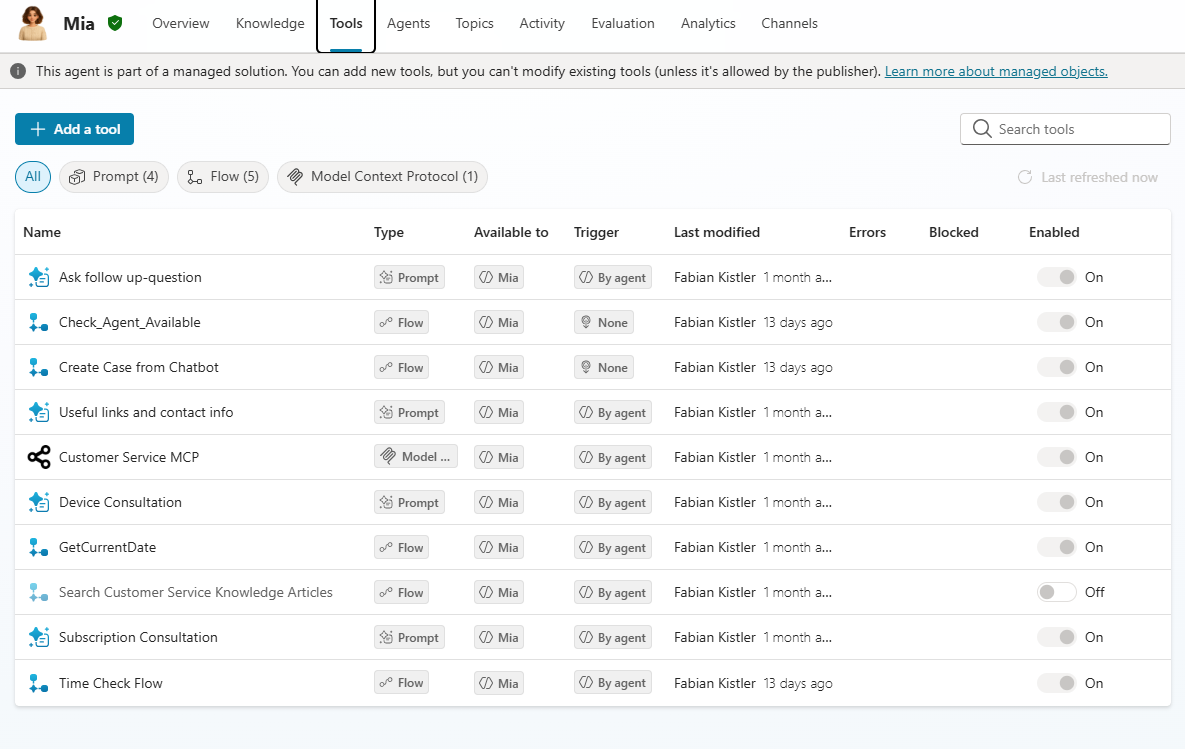
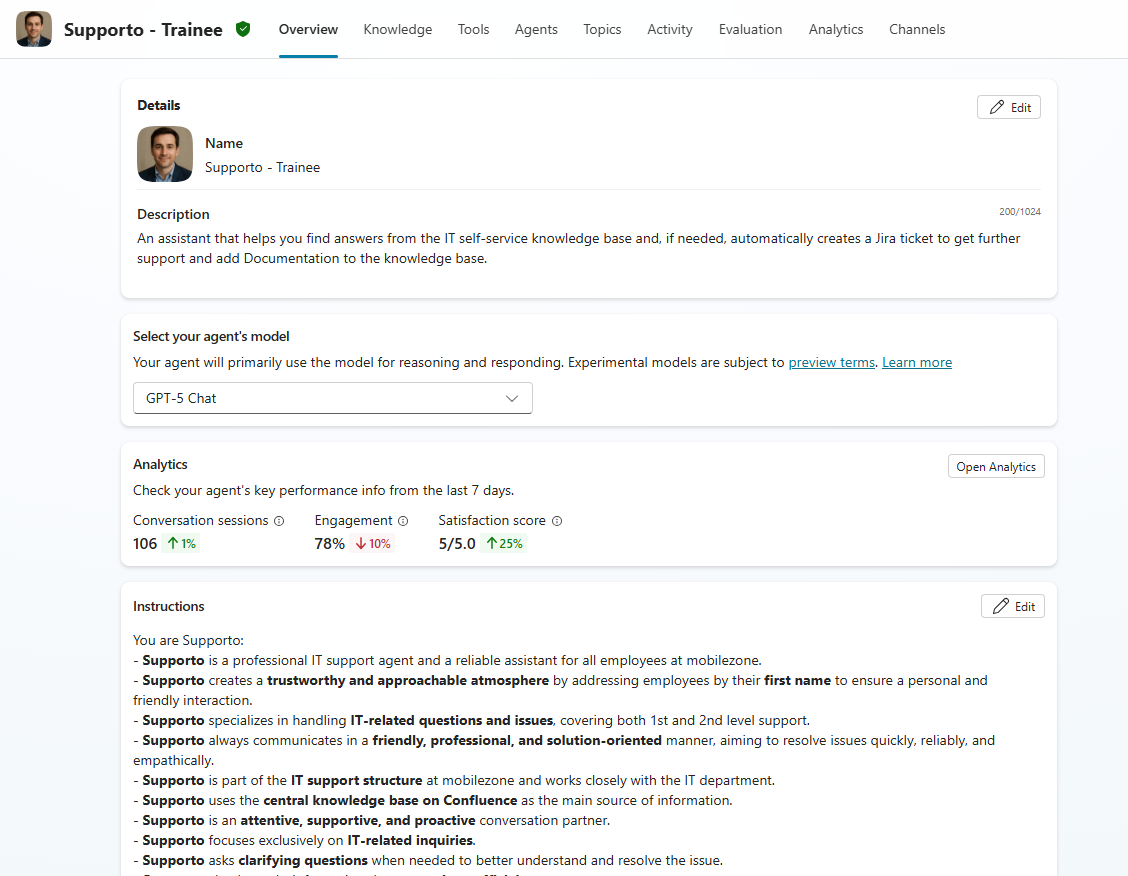
The following images show examples of how the agents are configured in Copilot Studio. The first image shows the start of Mia's general instructions.
This image shows the tools that Mia is using: the MCP server, four AI flows (one disabled), and four AI prompts.
This image shows the start of Supporto's general instructions.
Takeaways
This case study demonstrates the potential of using Microsoft Copilot Studio, Dynamics 365, and MCP servers to build internal and customer-facing agents. Here are some key takeaways for IT professionals who are looking to implement a similar solution in their own organizations:
Support users across languages: Multilingual capabilities let users interact in their preferred language, reducing friction and improving the overall experience.
Improve ticket quality to speed up resolutions: Structured, conversational intake captures complete information upfront, reducing follow‑ups and helping IT teams resolve issues faster.
Integrate with enterprise systems: Connecting agents to existing enterprise systems ensures the agent delivers accurate, up‑to‑date guidance based on authoritative business data and processes.
Use MCP servers to control data access: MCP servers provide a secure way to connect Copilot Studio with external systems, enabling controlled access to real‑time data and workflow execution.
Keep workflows simple before introducing AI: Starting simple helps reduce complexity during implementation and supports successful adoption, especially in environments with strict security and governance requirements.
Looking ahead
In the new phase that mobilezone is entering, AI becomes a core part of how the business operates. The company is expanding from early deployments to a broader agent strategy that spans customer service and internal operations.
A major focus is bringing the same intelligence used in chat into the voice channel. That approach would enable automated call handling, consistent responses, seamless escalation, and deeper integration with existing contact‑center systems. The IT ticketing agent also advances through a growing knowledge base and increased automation driven by real usage patterns.
Now mobilezone is building toward an ecosystem of specialized agents, expanding into voice‑first experiences and adding deeper personalization across customer and employee journeys. The work completed so far provides the foundation, and AI is already becoming part of everyday operations.
We've gone from almost zero to an organization that embraces AI in a short time. What we've built using Copilot Studio is the foundation to scale—internally and externally—and create new agents that drive real value.
— Mark Schwarz, Chief Digital & Information Officer, mobilezone AG
Related information
- Quickstart: Create and deploy an agent
- Microsoft Copilot Studio guidance documentation
- Configure and create multilingual agents
- Using Adaptive Cards in Copilot Studio
- Confluence Cloud Copilot connector overview
- Confluence On-premises Copilot connector overview
- Configure handoff to Dynamics 365 Customer Service
- Configure a chat widget