Note
Access to this page requires authorization. You can try signing in or changing directories.
Access to this page requires authorization. You can try changing directories.
Azure DevOps Server | Azure DevOps Server 2022 | Azure DevOps Server 2020
You can manage your search extension and indexing status, which include the following actions:
Prerequisites
| Category | Requirements |
|---|---|
| Permissions | Member of the Project Collection Administrators group. |
| Tasks | Complete Install and configure Search. |
Manage indexing
Search gets managed by running PowerShell and SQL scripts. All of these scripts are available to download from the Code-Search GitHub repository. You can download all scripts into a local folder on the server. This server runs the database for Azure DevOps Server using the Download ZIP option.
The PowerShell scripts require the SQL script files, so ensure the SqlScripts folder and its contents are present, along with the PowerShell scripts.
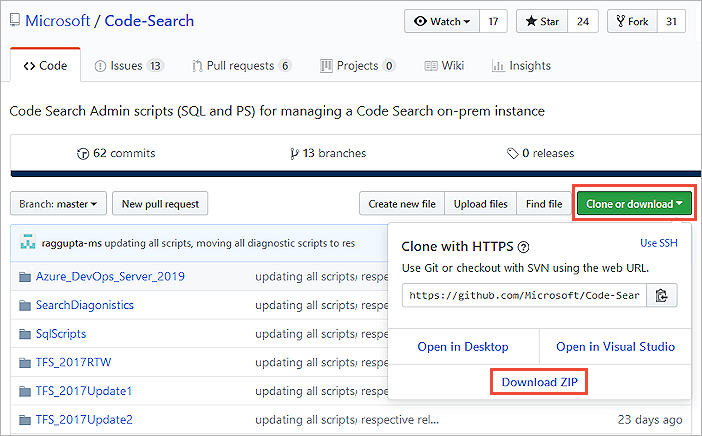
Check indexing status
To check the indexing status after Search is configured, or after the extension is installed for a collection, do the following steps.
If you encounter any issues, get support on the Developer Community.
Pause indexing
To pause all indexing, execute: PauseSearchIndexing.ps1, which is useful if you see spikes in CPU utilization after configuring Search. You're prompted to enter the following information.
- The SQL server instance name where the Azure DevOps Server configuration database is
- The name of the Azure DevOps Server configuration database
Resume indexing
If you paused indexing, execute: ResumeIndexing.ps1 to start again. You're prompted to enter the following information.
- The SQL server instance name where the Azure DevOps Server configuration database is
- The name of the Azure DevOps Server configuration database
Reindex a repository or collection
To reindex a Git or TFVC repository, execute the appropriate
version of the script, Re-IndexingRepository.ps1, for your Azure DevOps Server version.
You're prompted to enter the following information.
- The SQL server instance name where the Azure DevOps Server configuration database is
- The name of the Azure DevOps Server collection database
- The name of the Azure DevOps Server configuration database
- The type of reindexing to execute, either
Git\_RepositoryorTFVC\_Repository - The name of the collection
- The name of the repository to reindex
To reindex a collection, execute the script: TriggerCollectionIndexing.ps1.
You're prompted to enter the following information.
- The SQL server instance name where the Azure DevOps Server configuration database is
- The name of the Azure DevOps Server collection database
- The name of the Azure DevOps Server configuration database
- The name of the collection
- The entities to reindex, either
All,Code,WorkItem, orWiki
Search limitations
If you do a disaster recovery (DR) operation and move your server back to an earlier snapshot of your SQL database, reindex all your collections.